
Important Safeguards
When using electrical appliances, basic safety precautions should always be followed to reduce the risk of fire, electric shock, and/or injury to persons, including the following:
- Read all instructions before using this appliance.
- Do not touch hot surfaces. Use handles or knobs.
- To protect against electrical shock, do not immerse cord, plugs, or heating base in water or other liquid.
- Close supervision is necessary when any appliance is used by or near children.
- Unplug from outlet when not in use and before cleaning. Allow to cool before putting on or taking off parts.
- Do not operate any appliance with a damaged cord or plug, or after the appliance malfunctions or has been damaged in any manner.
- The use of accessory attachments not recommended by the appliance manufacturer may cause injuries.
- Do not use outdoors.
- Do not let cord hang over edge of table or counter, or touch hot surfaces.
- Do not place on or near a hot gas or electric burner, or in a heated oven.
- Extreme caution must be used when moving an appliance containing hot oil or other hot liquids.
- Always attach plug to appliance first, then plug cord into the wall outlet. To disconnect, turn any control to 'OFF', then remove plug from wall outlet.
- Do not use appliance for other than intended use.
Product Overview
The Toastmaster 4-Quart Digital Slow Cooker is designed for convenient and efficient slow cooking. It features a durable heating base, a removable stoneware insert, a glass lid, and a digital control panel.

Image Description: A front-facing view of the Toastmaster 4-Quart Digital Slow Cooker in graphite color. The slow cooker features a stainless steel exterior, a black digital control panel with blue display, black handles, and a clear glass lid with a black knob. The Toastmaster logo is visible on the front.
Components:
- Heating Base: The main unit containing the heating element and control panel.
- Stoneware Insert: Removable ceramic pot where food is cooked.
- Glass Lid: Transparent lid to cover the stoneware insert during cooking.
- Locking Lid Mechanism: Integrated latches on the lid for secure transport.
- Control Panel: Digital interface for setting temperature and time.

Image Description: A diagram highlighting key features of the slow cooker. It points out the integrated lid latch, dishwasher-safe stoneware insert, digital interface, and automatic keep warm mode. The control panel is labeled as 'Slim Profile Controls'.
Setup
- Unpacking: Carefully remove all packaging materials, including any labels or stickers. Retain the packaging for future storage or transport.
- Initial Cleaning: Before first use, wash the stoneware insert and glass lid in warm, soapy water. Rinse thoroughly and dry. Wipe the exterior of the heating base with a damp cloth. Do not immerse the heating base in water.
- Placement: Place the slow cooker on a flat, stable, heat-resistant surface, away from walls or cabinets to allow for proper ventilation. Ensure the power cord is not dangling where it can be pulled or tripped over.
- Assembly: Place the clean stoneware insert into the heating base. Position the glass lid on top of the stoneware insert.
Operating Instructions
Control Panel Functions:

Image Description: A close-up view of the digital control panel. It shows the display, 'LOW', 'HIGH', and 'WARM' indicators, and buttons for 'TEMP', 'TIME', and 'STOP'. An orange circle highlights the 'Automatic Keep Warm Function'.
- Display: Shows the remaining cooking time.
- TEMP Button: Press to cycle through temperature settings: LOW, HIGH.
- TIME Button: Press to adjust the cooking time.
- STOP Button: Press to end the cooking cycle or cancel settings.
- LOW Indicator: Illuminates when the slow cooker is set to LOW temperature.
- HIGH Indicator: Illuminates when the slow cooker is set to HIGH temperature.
- WARM Indicator: Illuminates when the slow cooker is in Keep Warm mode.
Cooking Procedure:
- Prepare Food: Place ingredients into the stoneware insert.
- Set Temperature: Plug the slow cooker into a 120V AC electrical outlet. The display will show '00:00'. Press the TEMP button to select either LOW or HIGH. The corresponding indicator light will illuminate.
- Set Time: Press the TIME button. The display will flash. Use the TIME button to adjust the cooking duration in 30-minute increments, from 30 minutes up to 10 hours. Hold the button to increase the time faster.
- Start Cooking: After setting the time, the display will stop flashing and the countdown will begin automatically.
- Keep Warm Function: Once the set cooking time expires, the slow cooker will automatically switch to the WARM setting for up to 6 hours. The WARM indicator light will illuminate. After 6 hours, the unit will turn off.
- Stop Cooking: To manually stop the cooking cycle at any time, press the STOP button.

Image Description: An image showing the slow cooker base with the stoneware insert removed, placed behind it. Text indicates adjustable cooking times for Low, Medium (not explicitly on this model's panel but implied by time adjustment), High, and up to 10 hours.
Using the Locking Lid:
The integrated lid latch allows for secure transport of the slow cooker. To engage the locking mechanism, ensure the lid is properly seated on the stoneware insert. Slide the latches on both sides of the lid upwards until they securely connect to the handles of the heating base. To unlock, slide the latches downwards.
Maintenance and Cleaning
Proper cleaning and maintenance will ensure the longevity and optimal performance of your slow cooker.
- Always Unplug: Before cleaning, always unplug the slow cooker from the electrical outlet and allow it to cool completely.
- Stoneware Insert and Glass Lid: The stoneware insert and glass lid are dishwasher safe. Alternatively, they can be washed by hand in warm, soapy water. Avoid abrasive cleaners or scouring pads that may scratch surfaces.
- Heating Base: Wipe the exterior of the heating base with a soft, damp cloth. Do not use abrasive cleaners. Never immerse the heating base in water or any other liquid.
- Storage: Ensure all parts are clean and dry before storing. Store the slow cooker with the lid inverted on the stoneware insert, then place the stoneware insert into the heating base.
Troubleshooting
| Problem | Possible Cause | Solution |
|---|---|---|
| Slow cooker does not turn on. | Not plugged in; power outlet not functioning; unit malfunction. | Ensure unit is securely plugged into a working outlet. Check household circuit breaker. If problem persists, contact customer support. |
| Food cooks too slowly or not at all. | Lid not properly sealed; incorrect temperature setting; too much liquid. | Ensure lid is seated correctly. Verify temperature setting (LOW/HIGH). Reduce liquid if recipe allows. Avoid frequently lifting the lid. |
| Food cooks too quickly. | Incorrect temperature setting; recipe requires lower heat. | Ensure temperature is set to LOW for longer cooking times. Adjust recipe or cooking time as needed. |
| Digital display is blank or unresponsive. | Power interruption; unit malfunction. | Unplug the unit for a few minutes, then plug it back in. If the issue persists, contact customer support. |
Specifications
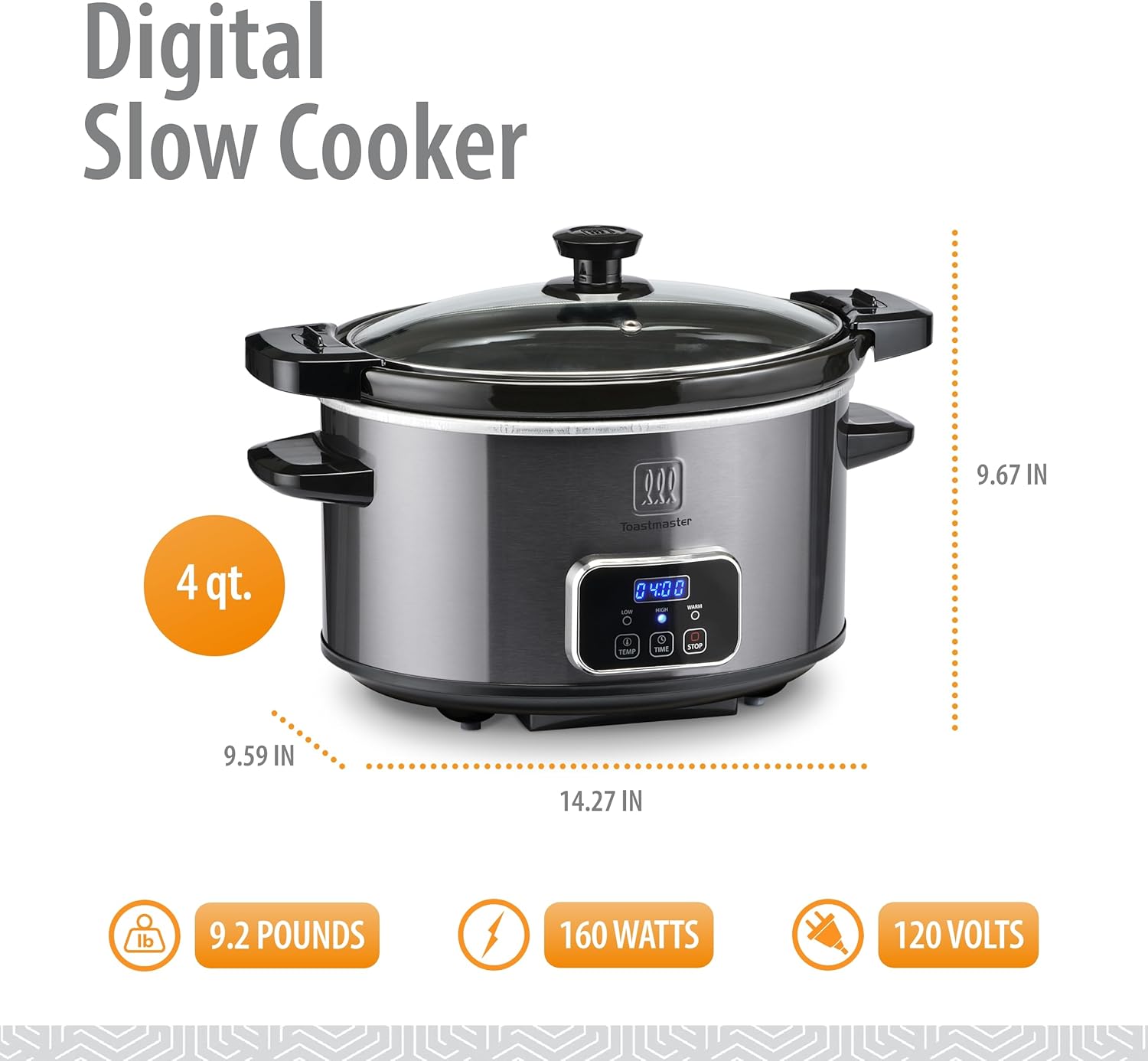
Image Description: A diagram showing the dimensions of the slow cooker (9.59"D x 14.27"W x 9.67"H) and key specifications: 9.2 Pounds, 160 Watts, 120 Volts.
- Brand: Toastmaster
- Model Number: 655772021663
- Capacity: 4 Quarts
- Color: Graphite
- Material: Glass (lid), Stoneware (insert), Stainless Steel (exterior)
- Product Dimensions: 9.59"D x 14.27"W x 9.67"H
- Item Weight: 9.2 Pounds
- Wattage: 160 watts
- Voltage: 120 Volts
- Control Type: Digital (Touch)
- Dishwasher Safe: Stoneware insert and glass lid only.
Warranty and Support
For warranty information or technical support, please refer to the warranty card included with your product or visit the official Toastmaster website. Do not attempt to repair the appliance yourself. Unauthorized repairs may void the warranty.