
Introduction
Welcome to the Apitor Robot B STEM Kit instruction manual. This kit provides an engaging and educational experience for children aged 6-12, allowing them to build and operate 8 different motorized models. The set includes 240 building pieces, an electric motor, and a convenient storage organizer to keep all components tidy. This manual will guide you through the assembly process, operation, maintenance, and troubleshooting of your Apitor Robot B STEM Kit.
Product Overview
The Apitor Robot B STEM Kit is designed to foster creativity and an understanding of basic engineering principles. It features a versatile set of building blocks that can be configured into various models, powered by an electric motor for dynamic movement.
Components
- Building Blocks: 240 pieces for constructing multiple models.
- Electric Motor: Powers the models, enabling movement.
- Storage Organizer: A large tote with a removable tray, designed for efficient organization of all parts.
- Instruction Manuals: Detailed step-by-step picture instructions for initial models.
- Apitor Kit App: Access to additional building instructions and models.
Storage Organizer Details
The included storage organizer measures 14.6"L x 11.9"W x 6"H. It features 14 removable partition trays, allowing for flexible organization of smaller components and accommodating larger pieces.

Image: The Apitor Robot B STEM Kit storage organizer, showing the large tote and removable partitioned tray with dimensions.
Electric Motor Functionality
The electric motor brings your creations to life, allowing for various movements such as wheel rotation, shoveling, and forward/backward motion. This component requires 2 AA batteries (not included).
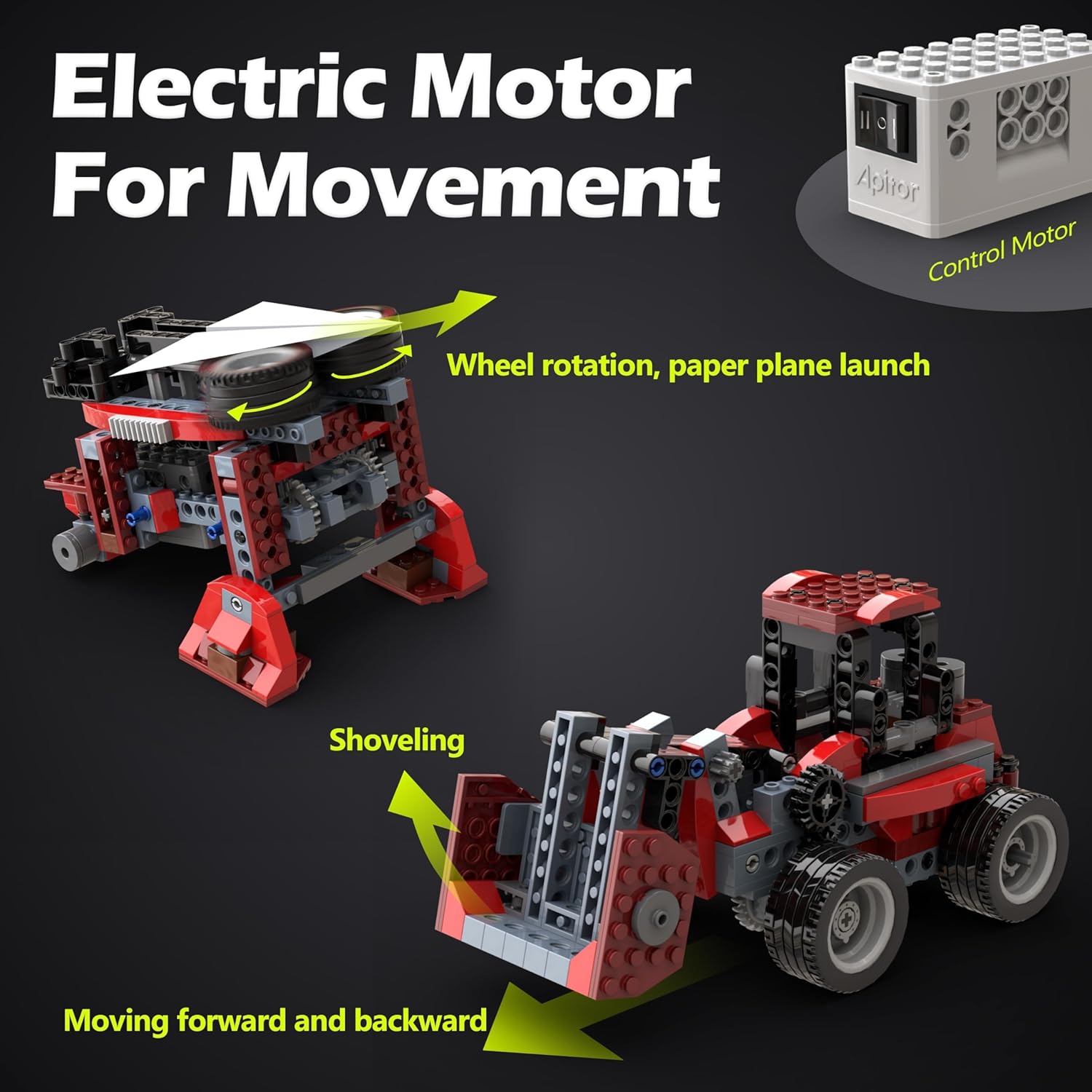
Image: Illustration of the electric motor and two robot models demonstrating wheel rotation and shoveling actions.
Building Instructions
The kit comes with detailed paper instructions. For more models and an interactive building experience, download the official Apitor Kit app.

Image: A child following both paper and app-based instructions to build a robot model.
Setup
Follow these steps to prepare your Apitor Robot B STEM Kit for building:
- Unpack Components: Carefully remove all building blocks, the electric motor, and the storage organizer from the packaging.
- Organize Parts: Use the provided storage organizer and its removable trays to sort the building blocks by type, size, or color. This will simplify the building process.
- Install Batteries: The electric motor requires 2 AA batteries. Open the battery compartment on the motor unit, insert the batteries according to the polarity indicators (+/-), and securely close the compartment. Batteries are not included.
- Review Instructions: Familiarize yourself with the included step-by-step picture instructions or download the Apitor Kit app for digital guidance.
Operating Instructions
Once your model is assembled, follow these steps to operate it:
- Power On: Locate the power switch on the electric motor unit and switch it to the 'ON' position.
- Control Movement: Depending on the model built, the motor will activate specific functions. For example, in a monster truck model, the motor will drive the wheels for forward and backward movement.
- Experiment: Explore the different movements and functions of your assembled model. The kit encourages experimentation and creative play.
- Power Off: When finished playing, switch the electric motor to the 'OFF' position to conserve battery life.
Educational Benefits by Age Group

Image: Visual representation of learning benefits for different age groups (6-7, 8-9, 10+ years old) including assembly, organizational skills, and creating new models.
Maintenance
Proper care ensures the longevity of your Apitor Robot B STEM Kit:
- Cleaning: Wipe building blocks and the motor unit with a soft, slightly damp cloth. Do not submerge the electric motor in water.
- Storage: Always store all components in the provided storage organizer after use to prevent loss and damage. Keep the kit in a cool, dry place away from direct sunlight.
- Battery Care: Remove batteries from the electric motor if the kit will not be used for an extended period to prevent leakage. Replace old batteries with new ones when performance diminishes.
- Inspection: Periodically check all parts for wear or damage. Replace any broken pieces if necessary (contact support for replacement parts, if available).
Troubleshooting
If you encounter issues with your Apitor Robot B STEM Kit, refer to the following common problems and solutions:
| Problem | Possible Cause | Solution |
|---|---|---|
| Motor not working | Batteries are dead or incorrectly installed. | Check battery polarity (+/-). Replace with fresh AA batteries. |
| Model does not move smoothly | Parts are not assembled correctly or are too tight. | Review the building instructions carefully. Ensure all connections are secure but not overly tight, allowing for free movement of gears and wheels. |
| Missing pieces | Pieces may have been misplaced during unpacking or play. | Thoroughly check the packaging and play area. Ensure all pieces are stored in the organizer after each use. |
| App instructions not loading | Internet connection issue or app requires update. | Ensure your device has a stable internet connection. Check your device's app store for any available updates for the Apitor Kit app. |
Specifications
- Product Dimensions: 17.52 x 12.99 x 6.73 inches
- Item Weight: 4.99 pounds
- Item Model Number: Robot B
- Manufacturer Recommended Age: 6 - 12 years
- Materials: High-quality ABS plastic
- Power Source: 2 AA batteries (for electric motor, not included)
Warranty Information
Specific warranty details for the Apitor Robot B STEM Kit are not provided in the product information. Please refer to the product packaging or the official Apitor website for any applicable warranty terms and conditions.
Support
For further assistance, technical support, or inquiries regarding replacement parts, please visit the official Apitor website or contact their customer service directly. Contact information is typically available on the product packaging or the brand's official online presence.
Video: An official product video demonstrating features and functionality of the Apitor Robot B STEM Kit.
