
1. Product Overview
The ODK L Shaped Desk is a versatile and functional furniture piece designed for home office, gaming, or general workspace use. It features a reversible L-shape configuration, allowing it to be set up for left or right-hand orientation to best suit your space. Key features include integrated power outlets, LED lighting, ample storage with file drawers, and a monitor stand.
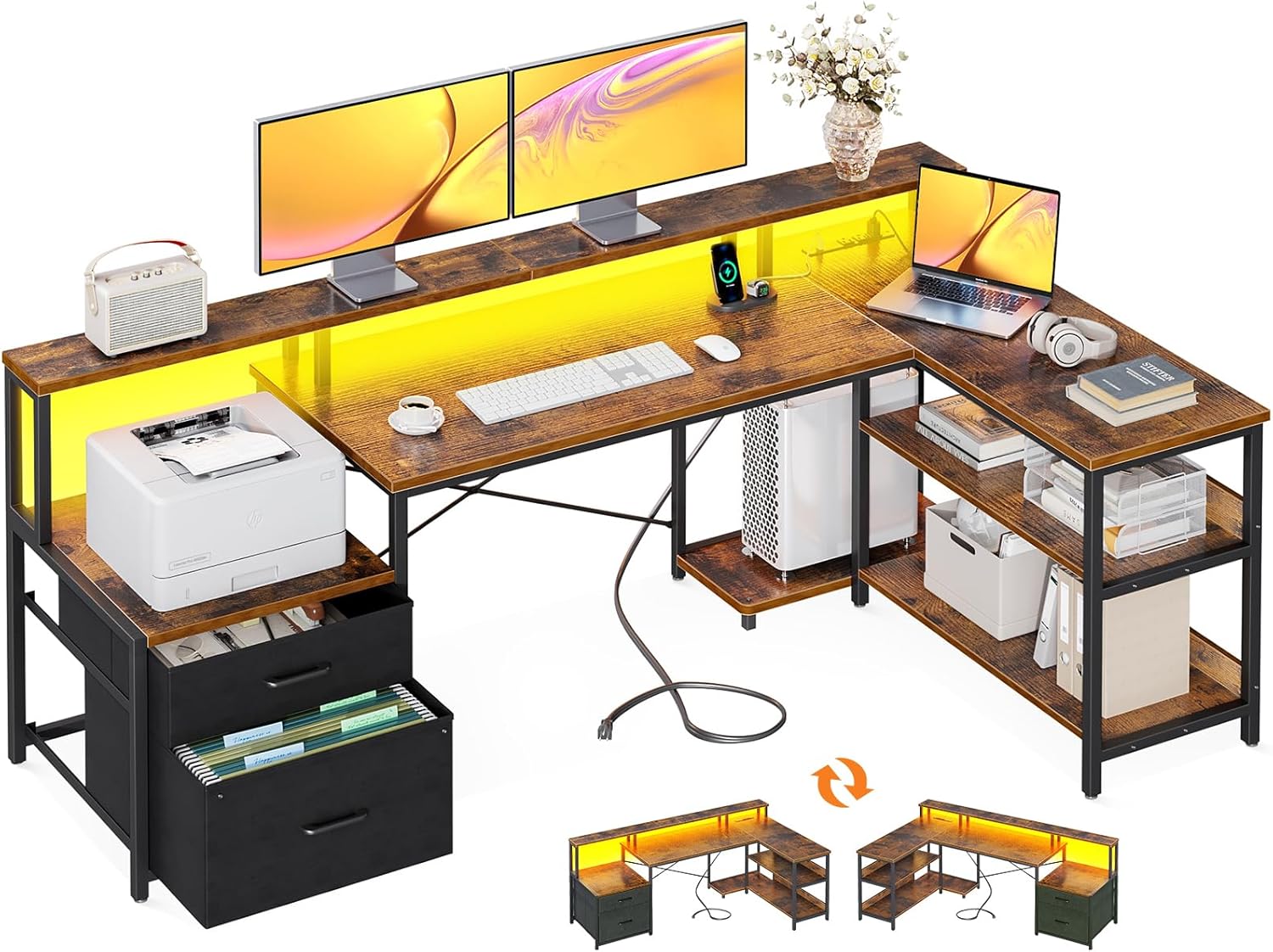
Figure 1: ODK L Shaped Desk, showcasing its L-shape design, integrated monitor shelf, and storage solutions including a file cabinet and open shelving.
Key Features:
- Reversible L-Shape Design: Adaptable to left or right corner configurations.
- Ample Storage: Includes two file drawers, a printer cabinet, two-tier under-desk bookshelf, and a computer tower stand.
- Integrated Power Outlet: Features 3 standard AC outlets and 2 USB ports for convenient device charging.
- Cool LED Lighting: Offers 7 colors, 13 modes, 8 adjustable brightness levels, and 9 flicker frequencies with a memory function.
- Ergonomic Monitor Stand: Designed to promote better posture and provide additional storage space.
- Sturdy Construction: Built with a durable metal frame and high-quality MDF board for long-lasting use.
2. Setup and Assembly
Assembly of the ODK L Shaped Desk requires careful attention to the provided instructions. All necessary tools, including an Allen wrench and Phillips screwdriver, are typically included. It is recommended to have two people for assembly, though it can be completed by one person.
2.1 Unpacking and Preparation
- Carefully unpack all components and verify against the parts list in your assembly guide.
- Lay out all parts on a clean, soft surface (e.g., a blanket or carpet) to prevent scratches.
- Identify all hardware and sort them for easy access. Extra hardware is often provided.
2.2 Assembly Steps
Follow the step-by-step visual instructions provided in the included assembly manual. Pay close attention to the orientation of parts, especially when attaching the main desktop and the L-shaped extension, as the desk is reversible.

Figure 2: Detailed dimensions of the ODK L Shaped Desk, illustrating the layout and size of each section, including the main desktop, L-extension, and storage units.
- Begin by assembling the main desk frame, ensuring all screws are finger-tight before final tightening.
- Attach the desktop panels. Note the pre-drilled holes for accurate alignment.
- Assemble the storage units, including the file drawers and shelves. The fabric drawers are designed for ease of assembly and weight reduction.
- Install the monitor stand and the recessed power strip according to the instructions. Ensure the power cord is routed safely.
- Affix the LED light strip. The strip typically comes with 3M adhesive tape and wire holders for neat installation.
- Once all components are assembled, fully tighten all screws for stability.
Tip: The reversible design means you can choose to install the L-shaped extension on either the left or right side during assembly. Refer to the specific diagrams for your desired configuration.
3. Operating Instructions
3.1 Using the Power Outlet
The desk is equipped with a recessed power strip for convenient access to power. It includes 3 standard AC outlets and 2 USB ports.

Figure 3: The integrated power strip, providing easy access to charging for laptops, phones, and other electronic devices directly from the desk surface.
- Plug the desk's main power cord into a wall outlet.
- Connect your devices (laptops, phones, gaming consoles) to the available AC outlets or USB ports.
- Ensure devices are compatible with the power strip's specifications (125V/12A for AC, 5V/2A for USB).
3.2 Operating the LED Lights
The integrated LED strip offers customizable lighting options to enhance your workspace or gaming setup.

Figure 4: The desk illuminated by its RGB LED strip, demonstrating its use in a gaming environment and highlighting the customizable lighting effects.
- The LED lights are controlled via a remote attached to the power plug.
- Color Selection: Choose from 7 distinct colors.
- Mode Selection: Select from 13 different lighting modes (e.g., static, fade, flash).
- Brightness Adjustment: Adjust the light intensity using 8 levels of brightness.
- Flicker Frequency: Modify the speed of dynamic modes with 9 flicker frequencies.
- Memory Function: The lights will recall the last used setting when powered on again.
3.3 Utilizing Storage Features
The desk provides extensive storage options to keep your workspace organized.

Figure 5: The large file drawer and integrated storage shelves, designed to accommodate documents, office supplies, and a printer, promoting an organized workspace.
- File Drawers: Use the two fabric file drawers for organizing documents. The bottom drawer is designed to hold hanging files (Legal/A4 size).
- Printer Cabinet: A dedicated space is provided for a printer, ensuring it is easily accessible yet neatly stored.
- Under-Desk Shelves: The two-tier shelves offer open storage for books, binders, and other office essentials.
- CPU Stand: A designated stand keeps your computer tower off the floor, protecting it from dust and improving airflow.
3.4 Monitor Stand Usage
The long monitor stand is designed to elevate your screens to an ergonomic viewing height, reducing neck and back strain.
- Place your monitors directly on the elevated shelf. The wide surface can accommodate multiple screens.
- Utilize the space underneath the monitor stand for additional storage of smaller items or to keep your desktop clear.
4. Maintenance
Regular maintenance will help preserve the appearance and functionality of your ODK L Shaped Desk.
- Cleaning: Wipe surfaces with a soft, damp cloth. Avoid harsh chemicals or abrasive cleaners that could damage the finish. For the vintage wood finish, a dry cloth is often sufficient for light dusting.
- Stability Check: Periodically check all screws and connections to ensure they remain tight. Re-tighten if any wobbling or looseness is detected.
- LED Strip: Ensure the LED strip and its connections remain dry and free from dust. If the adhesive weakens, re-secure with appropriate tape or clips.
- Power Outlet: Keep the power outlets clean and free of debris. Do not spill liquids into the outlets.
- Weight Capacity: Do not exceed the recommended maximum weight of 50 pounds on the desktop or shelves to prevent damage.
5. Troubleshooting
This section addresses common issues you might encounter with your ODK L Shaped Desk.
| Problem | Possible Cause | Solution |
|---|---|---|
| Desk wobbles or is unstable. | Loose screws; uneven floor; incorrect assembly. | Ensure all screws are fully tightened. Adjust the adjustable foot pads on the desk legs to level the desk on uneven surfaces. Review assembly instructions to confirm correct part orientation. |
| LED lights do not turn on or function incorrectly. | Power connection issue; remote control battery low; LED strip damage. | Check if the power plug for the LED strip is securely connected to the power outlet. Ensure the desk's main power cord is plugged into a working wall outlet. Verify the remote control battery. Inspect the LED strip for any visible damage. |
| Power outlets or USB ports are not working. | Desk's main power cord unplugged; circuit breaker tripped; faulty device. | Confirm the desk's main power cord is securely plugged into a functional wall outlet. Check your home's circuit breaker. Test with a different device to rule out a faulty device. |
| File drawers are difficult to open/close. | Overloaded drawer; fabric misaligned; obstruction. | Reduce the weight in the drawer. Ensure the fabric drawer is properly seated within its frame and not catching on any edges. Check for any obstructions inside or around the drawer. |
6. Specifications
| Attribute | Detail |
|---|---|
| Brand | ODK |
| Model Number | B02021001004USAN0419ASDQ1GA |
| Product Dimensions (D x W x H) | 67.9" x 39.4" x 35" |
| Color | Vintage |
| Style | Office / Gaming |
| Base Material | Metal |
| Top Material Type | Engineered Wood |
| Item Weight | 60 Pounds |
| Special Feature | Reversible, Power Outlet, LED Strip, Monitor Shelf |
| Number of Drawers | 2 (File Drawers) |
| Number of Shelves | 2 |
| Maximum Weight Recommendation | 50 Pounds |
| Required Assembly | Yes |
7. Warranty and Support
7.1 Warranty Information
Specific warranty details for the ODK L Shaped Desk are provided by the manufacturer, ODK. Please refer to the documentation included with your purchase or contact ODK customer service directly for comprehensive warranty terms and conditions.
7.2 Customer Support
For any questions, concerns, or assistance with your ODK L Shaped Desk, please contact ODK customer support. Contact information can typically be found on the ODK official website or within the packaging materials.
When contacting support, please have your model number (B02021001004USAN0419ASDQ1GA) and purchase date readily available to expedite assistance.