
1. Introduction
Thank you for choosing the Volcan Foldable Portable Solar Panel 60W (Model Sol 60). This manual provides essential information for the safe and efficient use of your solar panel. Please read these instructions carefully before operating the product and retain them for future reference.
This solar panel is designed to provide portable power for compatible devices and power stations, utilizing high-efficiency monocrystalline solar cells for optimal energy conversion.
2. Product Features
Key Features:
- High-Efficiency Monocrystalline Solar Cells: Achieves a conversion efficiency of up to 22%, maximizing power generation from sunlight.
- Optimal Power Output: Provides a maximum power of 60 Watts and a maximum voltage of 19.8 Volts.
- Foldable and Portable Design: Compact dimensions when folded (13.8"L x 9.1"W x 2.2"H) and lightweight (4.7 lbs) for easy transport and storage.
- Multiple Charging Ports: Equipped with USB, Type-C, and DC output ports for versatile device compatibility.

Figure 1: High-efficiency monocrystalline solar cells with up to 22% conversion rate.
Design & Construction:
- Durable Material: Constructed from monocrystalline silicon for longevity and performance.
- Weather Resistant: Features an IP65 rating, providing protection against dust and water splashes, making it suitable for outdoor use.

Figure 2: Durable and weather-resistant design with IP65 rating.

Figure 3: Folded dimensions (13.8"L x 9.1"W x 2.2"H) and unfolded dimensions (33.8"L x 28.1"W).
3. Package Contents
Upon unpacking, please ensure all the following items are included:
- Volcan Foldable Portable Solar Panel 60W (Model Sol 60)
- DC Connection Cable
- Carabiners (for hanging/mounting)
- Instruction Manual
4. Setup
Follow these steps to set up your Volcan solar panel:
- Unfold the Solar Panel: Carefully unfold the solar panel completely to expose all solar cells.
- Position for Sunlight: Place the unfolded solar panel in a location with direct, unobstructed sunlight. For optimal performance, angle the panel directly towards the sun.
- Connect to Power Station: Locate the DC power input port on your compatible power station or solar generator. Connect the provided DC connection cable from the solar panel's control box to the power station's input.
- Secure the Panel (Optional): Use the integrated loops and provided carabiners to secure the solar panel to an RV, tent, or other stable structure, ensuring it remains angled towards the sun.

Figure 4: Basic setup for connecting the solar panel to a power station.

Figure 5: Solar panel deployed and charging a power station.
5. Operating Instructions
Optimal Placement:
For maximum power generation, ensure the solar panel is positioned to receive direct sunlight throughout the day. Adjust its angle periodically to follow the sun's path. Any shading on the panel, even partial, can significantly reduce its output.
Connecting Devices:
Once the solar panel is connected to a power station, you can connect your electronic devices to the power station's output ports (AC, USB, etc.) for charging. The solar panel will continuously feed power to the power station, which then distributes it to your devices.

Figure 6: Charging multiple devices via a power station connected to the solar panel.
Volcan Energon Portable Power Station Overview:
Video 1: An overview of the Volcan Energon Portable Power Station, which can be charged by this solar panel. This video demonstrates the power station's features and capabilities.
6. Maintenance
- Cleaning: Regularly wipe the solar panel surface with a soft, damp cloth to remove dust, dirt, or debris that may accumulate and reduce efficiency. Avoid using harsh chemicals or abrasive materials.
- Storage: When not in use, fold the solar panel and store it in a cool, dry place away from direct sunlight and extreme temperatures.
- Inspection: Periodically check the cables and connectors for any signs of wear, damage, or corrosion. Ensure connections are secure before each use.
7. Troubleshooting
- Low Power Output:
- Ensure the panel is in direct sunlight and not shaded by trees, buildings, or other objects.
- Adjust the panel's angle to face the sun directly.
- Clean the surface of the solar cells to remove any dirt or dust.
- No Charging:
- Verify that all cables are securely connected between the solar panel and the power station.
- Check the power station's input status to confirm it is receiving power.
- Inspect cables and connectors for any visible damage.
8. Specifications
| Feature | Specification |
|---|---|
| Brand | Volcan |
| Model Number | Sol 60 |
| Material | Monocrystalline Silicon |
| Maximum Power | 60 Watts |
| Maximum Voltage | 19.8 Volts |
| Efficiency | High Efficiency (up to 22%) |
| Product Dimensions (Folded) | 13.8"L x 9.1"W x 2.2"H |
| Product Dimensions (Unfolded) | 33.8"L x 28.1"W |
| Item Weight | 4.7 Pounds |
| Waterproof Rating | IP65 |
| Output Ports | USB, Type-C, DC |
9. Warranty and Support
Volcan is committed to providing high-quality products and excellent customer service. Your Volcan Foldable Portable Solar Panel 60W comes with the following:
- Warranty Service: A 24-month warranty from the date of purchase.
- Returns and Refunds: Available within the specified return period. Please refer to your purchase platform's return policy for details.
- Customer Support: 24/7 hour customer support is available to assist you with any questions or issues.
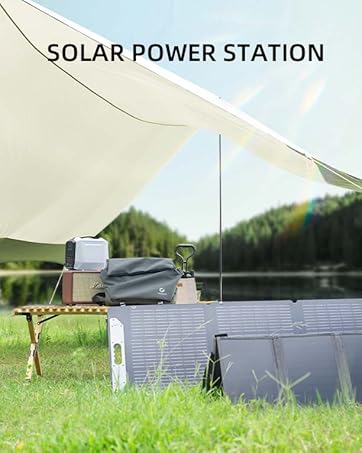
Figure 7: Volcan's commitment to after-sales service and customer satisfaction.