Important Safety Information
Read all instructions carefully before using the microwave oven. Keep this manual for future reference. Failure to follow these safety instructions may result in electric shock, fire, or injury.
- Do not attempt to operate this oven with the door open as this can result in harmful exposure to microwave energy.
- Do not place any object between the oven front face and the door, or allow soil or cleaner residue to accumulate on sealing surfaces.
- Do not operate the oven if it is damaged. It is particularly important that the oven door closes properly and that there is no damage to the: (1) door (bent), (2) hinges and latches (broken or loosened), (3) door seals and sealing surfaces.
- The oven should not be adjusted or repaired by anyone except properly qualified service personnel.
- Always use microwave-safe cookware.
- Do not heat sealed containers, as they may explode.
- Supervise children closely when the microwave is in use.
- Do not use the microwave for purposes other than heating food.
Setup and Installation
Unpacking
Carefully remove all packaging materials from the microwave oven and its accessories. Ensure all components are present: microwave unit, glass turntable, and turntable ring assembly. Inspect the oven for any damage during shipping. Do not operate if damaged.
Placement
Place the microwave oven on a flat, stable surface that can support its weight. Ensure there is adequate ventilation around the unit. Maintain a minimum of 4 inches (10 cm) of space around the sides, top, and rear of the oven for proper airflow. Do not block ventilation openings.
Keep the microwave away from heat sources, strong magnetic fields, and areas with high humidity.
Turntable Assembly
- Place the turntable ring assembly in the center of the microwave oven cavity.
- Carefully place the glass turntable onto the turntable ring, ensuring it sits securely in the center support.

Image: Front view of the Beautiful 1.1 Cu ft 1000 Watt Sensor Microwave Oven. The microwave is white with a gold handle and control panel accents. The display shows "2:22".
Operating Instructions
Control Panel Overview
The microwave features a touch-activated display and control panel. Key functions include:
- Display: Shows time, cooking settings, and status.
- Sensor Cook: Automatically adjusts cooking time for various foods.
- Sensor Reheat: Automatically reheats food to an optimal temperature.
- Auto Cook: Pre-programmed settings for common foods.
- Power Level: Adjusts microwave power output.
- Time Cook: Manually set cooking time.
- Unlock: Used for child safety lock.
- +/- Buttons: Adjust time or quantity.
- Start/+30 Sec: Starts cooking or adds 30 seconds to cooking time.
- Stop/Cancel: Stops cooking or clears settings.

Image: Angled view of the microwave, highlighting the control panel with its touch-activated buttons and digital display. The interior of the microwave is visible through the door.
Basic Cooking
- Place food in a microwave-safe container on the glass turntable.
- Close the microwave door securely.
- Press the "Time Cook" button.
- Use the "+" and "-" buttons to set the desired cooking time.
- Press "Power Level" if you wish to adjust the power (default is 100%). Use "+" and "-" to select a power level from 1 to 10.
- Press "Start/+30 Sec" to begin cooking.
Sensor Cook and Reheat
The Sensor Cook and Sensor Reheat functions automatically detect when your food is ready, eliminating guesswork.
- Sensor Cook: Press the "Sensor Cook" button, then select the food type (e.g., Potato, Rice, Oatmeal). The microwave will automatically determine the cooking time.
- Sensor Reheat: Press the "Sensor Reheat" button. The microwave will automatically reheat your food.

Image: A detailed view of the microwave's control panel, highlighting the 9 preset cooking options: Potato, Rice, Oatmeal, Frozen Dinner, Frozen Vegetable, Fish, Soup, Pizza, and Pasta. These options simplify cooking by automatically setting heat and time.
Child Safety Lock
ATTENTION: This microwave oven features a Child Safety Lock in compliance with federal regulations, requiring two distinct actions to open the door during or after operation.
To Open Microwave During or After Use:
- Press the Unlock button or pad.
- Pull the door handle.
To Deactivate the Child Safety Lock:
- Press the Unlock pad for 3 seconds. The display will indicate "Loc".
- Press the - pad.
- Press the + pad. The display will show "ULoc".
To re-activate the child safety lock, repeat the above steps.
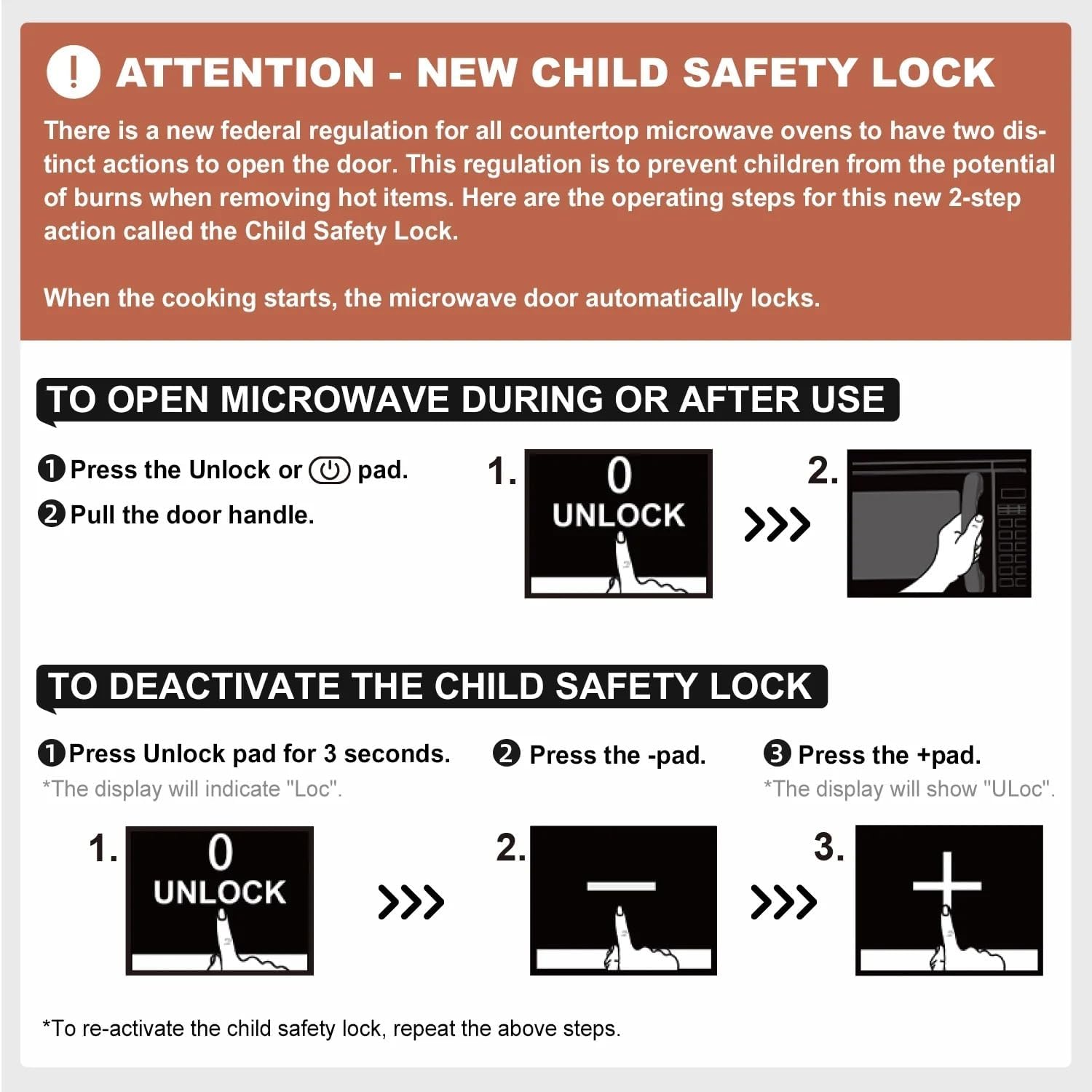
Image: A visual guide explaining how to open the microwave door with the Child Safety Lock active and how to deactivate or reactivate the lock using the control panel buttons.
Maintenance and Cleaning
Regular cleaning helps maintain the performance and appearance of your microwave oven.
- Interior: Wipe the interior cavity with a damp cloth after each use to prevent food splatters from drying. For stubborn stains, use a mild microwave-safe cleaner. Do not use abrasive cleaners or scouring pads.
- Exterior: Clean the exterior surfaces with a soft, damp cloth. Avoid harsh chemicals that may damage the finish.
- Door Seals: Regularly clean the door seals and sealing surfaces to ensure proper door closure and prevent microwave energy leakage.
- Glass Turntable: The glass turntable and turntable ring can be removed and washed in warm, soapy water or in the dishwasher. Ensure they are completely dry before placing them back in the oven.
- Odor Removal: To remove odors, place a bowl of water with lemon slices or white vinegar inside the microwave and heat for 5-10 minutes.
Troubleshooting
Before contacting customer support, try these solutions for common issues:
| Problem | Possible Cause | Solution |
|---|---|---|
| Oven does not start | Door not closed properly; Power cord unplugged; Fuse blown or circuit breaker tripped. | Ensure door is firmly closed. Check power cord connection. Reset circuit breaker or replace fuse. |
| Food not heating | Incorrect cooking time/power level; Microwave-safe cookware not used. | Adjust cooking time and power level. Use only microwave-safe dishes. |
| Turntable not rotating | Turntable not properly seated; Debris under turntable. | Ensure turntable and ring are correctly positioned. Clean any debris from under the turntable. |
| Unusual noises | Food container touching oven walls; Turntable not seated correctly. | Ensure dishes do not touch the oven walls. Re-seat the turntable. |
| Display shows "Loc" | Child Safety Lock is active. | Follow instructions in the "Child Safety Lock" section to deactivate. |
Specifications
- Model Number: BTFCMS811BEST10
- Capacity: 1.1 Cubic Feet
- Wattage: 1000 Watts
- Voltage: 120 Volts (AC)
- Item Weight: Approximately 25 Pounds
- Product Dimensions: 17 x 12.2 x 21.2 inches (W x H x D)
- Installation Type: Countertop
- Control Type: Touch
- Special Features: Sensor Cook, Sensor Reheat, Turntable, Child Safety Lock
- Material: Glass, Metal
Warranty and Support
For warranty information or technical support, please refer to the documentation provided at the time of purchase or contact the manufacturer directly. Keep your proof of purchase for warranty claims.
This product may be eligible for extended protection plans. Please consult your retailer for details on available protection plan options.


