
1. Introduction
This manual provides essential instructions for the safe and efficient operation and maintenance of your Dolphin Proteus DX5i Robotic Pool Cleaner. Please read this manual thoroughly before using the product and retain it for future reference.
2. Safety Information
Always follow basic safety precautions to reduce the risk of fire, electric shock, and injury. This appliance is not intended for use by persons with reduced physical, sensory or mental capabilities, or lack of experience and knowledge, unless they have been given supervision or instruction concerning use of the appliance by a person responsible for their safety.
- Ensure the power supply is disconnected before any maintenance or cleaning.
- Do not operate the cleaner if the cable is damaged.
- Keep children away from the pool area during cleaner operation.
- Only use the original power supply unit provided with the cleaner.
3. Package Contents
Verify that all components are present in the package:
- Dolphin Proteus DX5i Robotic Pool Cleaner
- Power Supply Unit
- Universal Caddy for transport and storage
- User Manual (this document)
4. Setup
4.1 Caddy Assembly
The Universal Caddy is designed for convenient transport and storage of your Dolphin Proteus DX5i. Assemble the caddy according to the included instructions. Ensure the cable holder is properly attached to keep the robot cable organized and tangle-free.

Image: The Dolphin Proteus DX5i robotic pool cleaner positioned next to its universal caddy, ready for assembly or storage.

Image: The universal caddy with the Dolphin robotic cleaner attached, showcasing the organized, tangle-free cable management system.
4.2 Initial Placement in Pool
Carefully place the Dolphin Proteus DX5i into the pool. Allow it to sink to the bottom. Ensure the floating cable is sufficiently extended to cover the entire pool area without being overly taut or tangled.
4.3 Wi-Fi Connection and App Setup
The Proteus DX5i features Wi-Fi connectivity for remote control and scheduling via the MyDolphin Plus mobile app. Download the MyDolphin Plus app from your device's app store. Follow the in-app instructions to connect your robotic cleaner to your home Wi-Fi network. This allows you to schedule cleanings and control the unit from anywhere.

Image: A smartphone displaying the MyDolphin Plus mobile app interface, illustrating features like weekly timer, cycle selector, cleaning mode, and manual drive options.
5. Operating Instructions
5.1 Starting a Cleaning Cycle
Once the cleaner is in the pool and connected to power, you can initiate a cleaning cycle either manually via the power supply unit or through the MyDolphin Plus app. The app provides advanced options for scheduling and selecting specific cleaning modes.
5.2 Wall Climbing and Waterline Scrubbing
The Dolphin Proteus DX5i is designed with advanced wall-scrubbing capabilities, ensuring thorough cleaning of both the pool floor and walls. Its powerful suction and active brushing mechanism enable effective waterline scrubbing, removing debris and algae buildup.
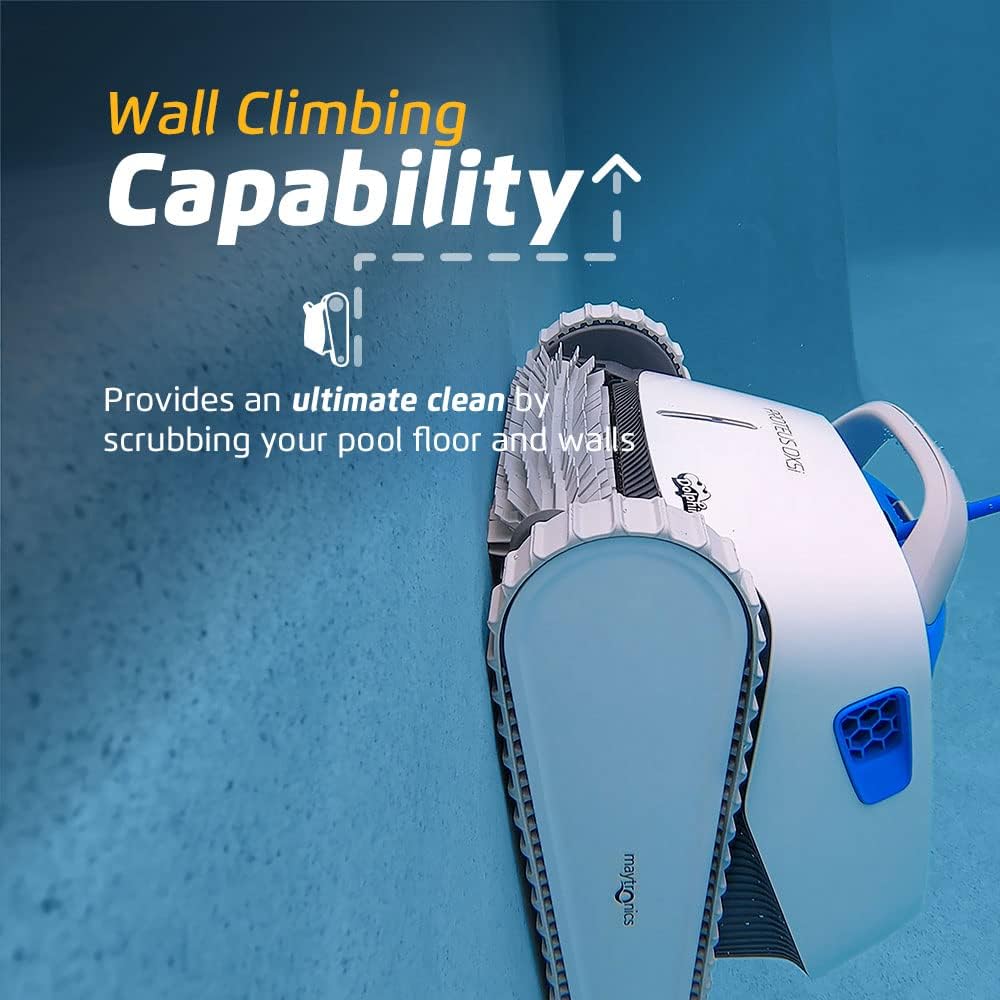
Image: The Dolphin Proteus DX5i robotic pool cleaner actively climbing a pool wall, demonstrating its wall-scrubbing capability.

Image: The Dolphin Proteus DX5i robotic pool cleaner performing waterline scrubbing, showing powerful suction and cleaning action at the pool's edge.

Image: The Dolphin Proteus DX5i robotic pool cleaner on the pool floor, highlighting its efficient and durable active scrubbing brush for deep cleaning.
5.3 Retrieving the Cleaner
At the end of a cleaning cycle, or when you wish to remove the cleaner, gently pull the floating cable to bring the unit to the edge of the pool. Use the ergonomic handle to lift the cleaner out of the water. Allow excess water to drain before placing it on the caddy.
6. Maintenance
6.1 Filter Care
Regular cleaning of the filter basket is crucial for maintaining optimal cleaning performance. The Proteus DX5i features an easy-access top-load filter basket. To clean:
- Open the top cover of the cleaner.
- Pull out the filter basket.
- Rinse the filter basket thoroughly with a garden hose to remove all debris.
- Reinsert the clean filter basket and close the cover.

Image: A person demonstrating the easy-access top-load filter system of the Dolphin Proteus DX5i, showing the filter basket being removed for cleaning.

Image: An exploded view diagram of the Dolphin Proteus DX5i, labeling key components such as the easy-access top-load filter, ergonomic handle, lightweight design, and active brushing mechanism.
6.2 General Care
After each use, rinse the cleaner with fresh water to remove any pool chemicals. Store the cleaner and power supply in a cool, dry, and shaded area when not in use. Avoid direct sunlight exposure.
7. Troubleshooting
If your Dolphin Proteus DX5i encounters an issue, refer to the following common solutions:
| Problem | Possible Cause | Solution |
|---|---|---|
| Cleaner not moving or operating | Power supply disconnected; tangled cable; clogged impeller | Check power connection; untangle cable; inspect and clear impeller |
| Poor cleaning performance | Clogged filter basket; worn brushes | Clean filter basket thoroughly; replace brushes if necessary |
| Cleaner not climbing walls | Clogged filter; air in cleaner; improper water chemistry | Clean filter; shake cleaner to release air; check pool water balance |
| App connectivity issues | Weak Wi-Fi signal; app not updated | Ensure strong Wi-Fi signal near power supply; update MyDolphin Plus app |
If the problem persists after attempting these solutions, please contact Dolphin customer support.
8. Specifications
| Feature | Detail |
|---|---|
| Brand | Dolphin |
| Model Name | Proteus DX5i with Caddy |
| Model Number | 99996212-LSWIF-Caddy |
| Power Source | AC |
| Item Weight | 2 Pounds |
| Control Method | App |
| Hose Length | 60 Feet |
| UPC | 810071221606 |
| Manufacturer | Maytronics |
9. Warranty and Support
9.1 Warranty Information
The Dolphin Proteus DX5i Robotic Pool Cleaner comes with a Limited Warranty. Please refer to the warranty card included with your product or visit the official Dolphin website for detailed terms and conditions regarding coverage and duration.
9.2 Customer Support
For technical assistance, troubleshooting beyond this manual, or warranty claims, please contact Dolphin customer support. Contact information can typically be found on the official Dolphin website or on your product packaging.
10. Product Overview Video
Video: An overview of the Dolphin Proteus DX5i robotic pool cleaner, demonstrating its features and operation. This video is provided by The Pool Spot.


