
1. Introduction
This manual provides detailed instructions for the safe operation, maintenance, and troubleshooting of your Goolsky WLtoys 284010 RC Drift Car. Please read this manual thoroughly before using the product to ensure proper function and longevity.
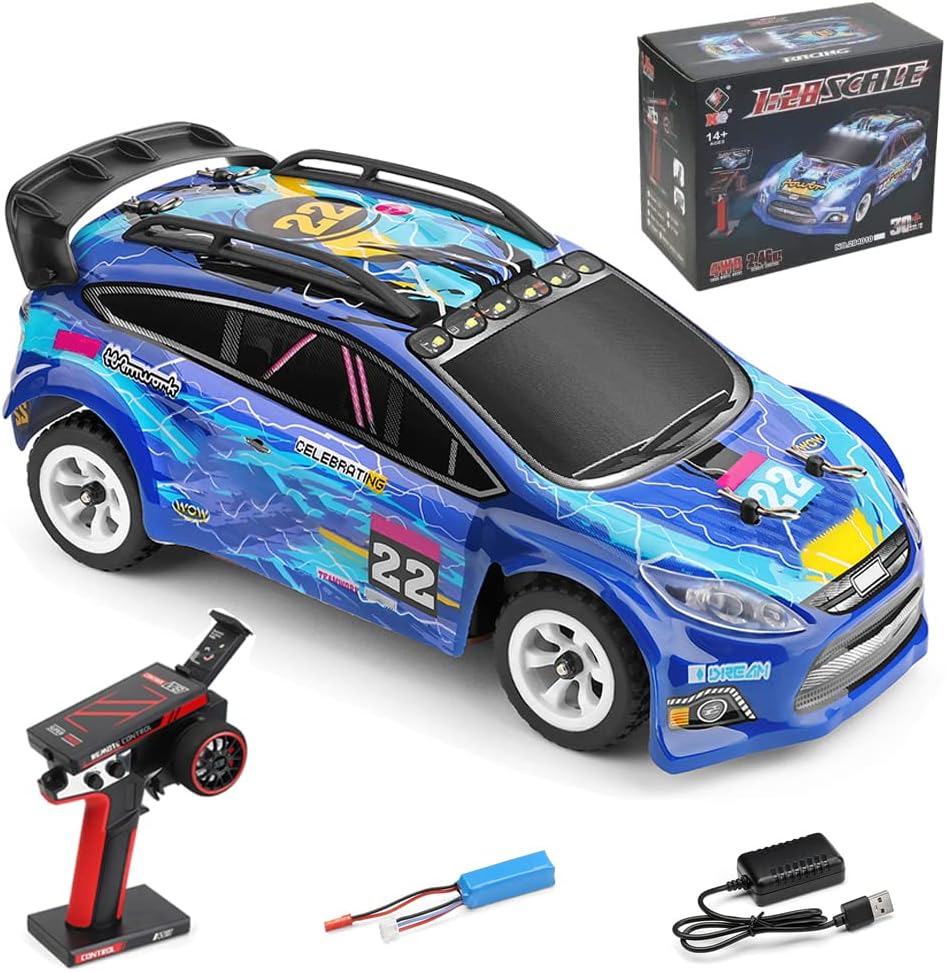
Image 1.1: The Goolsky WLtoys 284010 RC Drift Car and its accessories.
2. What's in the Box
Verify that all items are present in the package:
- 1 x Remote Control Car (WLtoys 284010)
- 1 x Remote Controller
- 1 x Car Battery (7.4V Li-Po 400mAh)
- 1 x Charging Cable
3. Safety Precautions
WARNING: Failure to follow these safety instructions may result in injury or damage to the product.
- Always operate the RC car in open areas, away from people, pets, and obstacles.
- Do not operate near water or in wet conditions to prevent electrical damage.
- Keep fingers, hair, and loose clothing away from moving parts (wheels, motor).
- Adult supervision is recommended for younger users.
- Do not touch the motor immediately after use, as it may be hot.
- Use only the provided charging cable and battery. Improper charging can lead to fire or explosion.
- Store the car and battery in a cool, dry place when not in use.
4. Setup
4.1. Charging the Car Battery
- Connect the charging cable to a USB power source (e.g., computer USB port, USB wall adapter).
- Connect the car battery (7.4V Li-Po 400mAh) to the charging cable.
- The charging indicator light will show the charging status (refer to charger instructions for specific light patterns).
- Charging time is approximately 30 minutes. Do not overcharge the battery.

Image 4.1: The 7.4V Li-Po 400mAh battery and charging cable.
4.2. Installing Batteries in the Remote Control Car
- Carefully remove the car body shell.
- Connect the fully charged 7.4V Li-Po battery to the car's power connector.
- Secure the battery in its compartment and reattach the car body shell.

Image 4.2: View of the car's internal chassis and battery placement area.
4.3. Installing Batteries in the Remote Controller
- Open the battery compartment on the back of the remote controller.
- Insert 4 x AAA batteries (not included), ensuring correct polarity.
- Close the battery compartment.

Image 4.3: The remote controller showing battery compartment location.
4.4. Binding the Remote Controller
- Ensure both the car and the remote controller are powered off.
- First, turn on the remote controller. The power LED will flash.
- Next, turn on the RC car.
- The remote controller's power LED will become solid, indicating a successful connection.
5. Operating Instructions
The Goolsky WLtoys 284010 features a 2.4GHz ratio control system, allowing multiple cars to operate simultaneously without interference, and offers a control distance of over 100 meters.
5.1. Remote Controller Functions
- Trigger: Pull the trigger to move the car forward. Push the trigger to move backward or brake.
- Steering Wheel: Turn the steering wheel left or right to control the car's direction.
- Steering Regulation (Trim): Adjust this dial to fine-tune the steering if the car does not drive straight.
- Speed Control: The remote controller allows for speed adjustment, making it suitable for various skill levels and environments.

Image 5.1: Remote controller layout and functions.
5.2. Driving Tips
- Start with lower speeds to familiarize yourself with the controls.
- Practice steering and throttle control in an open area.
- The car features 4WD and independent suspension, allowing for smooth cornering and stable posture on various terrains like track, gravel, mountains, and road.
- To drift, apply throttle while turning sharply. Experiment with different speeds and steering angles.

Image 5.2: The car's independent suspension handles diverse terrains.
5.3. LED Lights
The car is equipped with LED searchlights and headlights for enhanced visibility and an engaging driving experience, especially in low-light conditions.

Image 5.3: The RC car's LED lighting system.
5.4. Integrated Mobile Phone Holder
The remote control includes a built-in mobile phone holder. This allows for mounting a smartphone to achieve real-time control vision if an external camera system is integrated (camera not included).
6. Maintenance
6.1. Cleaning
- After each use, gently wipe the car body and chassis with a soft, dry cloth to remove dirt and dust.
- Avoid using water or chemical cleaners, as they can damage electronic components.
- Remove any debris from the wheels and suspension components.
6.2. Storage
- Always turn off the car and remote controller before storing.
- Remove batteries from the remote controller if storing for extended periods.
- Store the car and accessories in a cool, dry place, away from direct sunlight and extreme temperatures.
6.3. Battery Care
- Do not leave batteries charging unattended.
- If the battery becomes hot during charging, discontinue charging immediately.
- Do not puncture or damage the battery.
- Dispose of old batteries according to local regulations.
7. Troubleshooting
| Problem | Possible Cause | Solution |
|---|---|---|
| Car does not respond to remote. | Low battery in car or remote; Not properly bound; Car/remote not powered on. | Charge car battery; Replace remote batteries; Re-bind the remote and car; Ensure both are powered on. |
| Car drives slowly or inconsistently. | Low car battery; Obstruction in wheels/gears. | Charge car battery; Check for and remove obstructions. |
| Car pulls to one side. | Steering trim needs adjustment. | Adjust the steering regulation (trim) dial on the remote controller. |
| Short control range. | Interference; Low remote battery. | Move to an area with less interference; Replace remote batteries. |
8. Specifications
| Feature | Detail |
|---|---|
| Model Number | 284010 |
| Scale | 1:28 |
| Drive System | 4WD (Four-Wheel Drive) |
| Max Speed | Up to 30 KM/H |
| Control Frequency | 2.4GHz |
| Control Distance | Approximately 100m |
| Motor | 130 Brushed Motor |
| Car Battery | 7.4V Li-Po 400mAh |
| Charging Time | Approx. 30 minutes |
| Use Time | Approx. 20 minutes |
| Remote Controller Batteries | 4 x AAA (not included) |
| Chassis Material | Metal |
| Car Shell Material | High-quality PVC |
| Package Dimensions | 9.84 x 7.87 x 5.75 inches |
| Item Weight | 2 pounds |

Image 8.1: Detailed product information and dimensions.
9. Product Video
Watch the official product video to see the Goolsky WLtoys 284010 RC Drift Car in action, demonstrating its features and performance.
Video 9.1: Official demonstration of the WLtoys 284010 RC Car's capabilities.
10. Warranty and Support
For any issues or questions regarding your Goolsky WLtoys 284010 RC Drift Car, please contact Goolsky customer support. Refer to your purchase documentation for specific warranty details and contact information.
Goolsky is committed to providing quality products and customer satisfaction.