
1. Introduction
This manual provides detailed instructions for the installation, operation, and maintenance of your Eonon UA12S-PLUS Android 13 Universal Double DIN Car Stereo. This advanced car stereo system integrates a 10.1-inch QLED touchscreen, Wireless Apple CarPlay, Android Auto, built-in HDMI, Digital Signal Processor (DSP), Octa Core processor with 6GB RAM and 64GB ROM, and 4G LTE connectivity to enhance your in-car entertainment and navigation experience.
2. Product Overview
The Eonon UA12S-PLUS is designed to offer a comprehensive and intuitive user experience. It runs on Android 13, providing access to a wide range of applications and features. The QLED display ensures vibrant colors and clear visuals, while the powerful Octa Core processor guarantees smooth performance.

Figure 2.1: Eonon UA12S-PLUS Car Stereo highlighting key specifications like Android 13, Octa Core, 6GB RAM, 64GB ROM, DSP, and QLED display.
Key Features:
- Operating System: Android 13
- Processor: Octa Core with Qualcomm Snapdragon 655 AI
- Memory: 6GB RAM + 64GB ROM
- Display: 10.1-inch QLED Touchscreen (1280x720 resolution, 178° viewing angles, 1080P video playback)
- Connectivity: Wireless Apple CarPlay, Android Auto, Bluetooth, HDMI, 4G LTE
- Audio: Built-in DSP (Digital Signal Processor), 4x48W Wattage, 4.1 Speaker surround sound channel configuration
- Additional Features: 1-second boot time, USB/MicroSD support, Steering Wheel Control (analog SWC signal only), Split Screen functionality, Brightness Mode (Day, Night & Auto), 720P AHD Rear View Camera Input.
3. Setup & Installation
Proper installation is crucial for optimal performance. It is recommended to have this unit installed by a professional technician.
3.1. Package Contents

Figure 3.1: Included accessories for the UA12S-PLUS unit.
3.2. Compatibility and Mounting
The UA12S-PLUS is a universal double DIN unit. If your factory car radio is a standard 2-DIN size (178*100mm), you can directly install this unit. If your original radio is NOT standard 2-DIN size (178*100mm), you may need to purchase an extra 2-DIN KIT for installation.
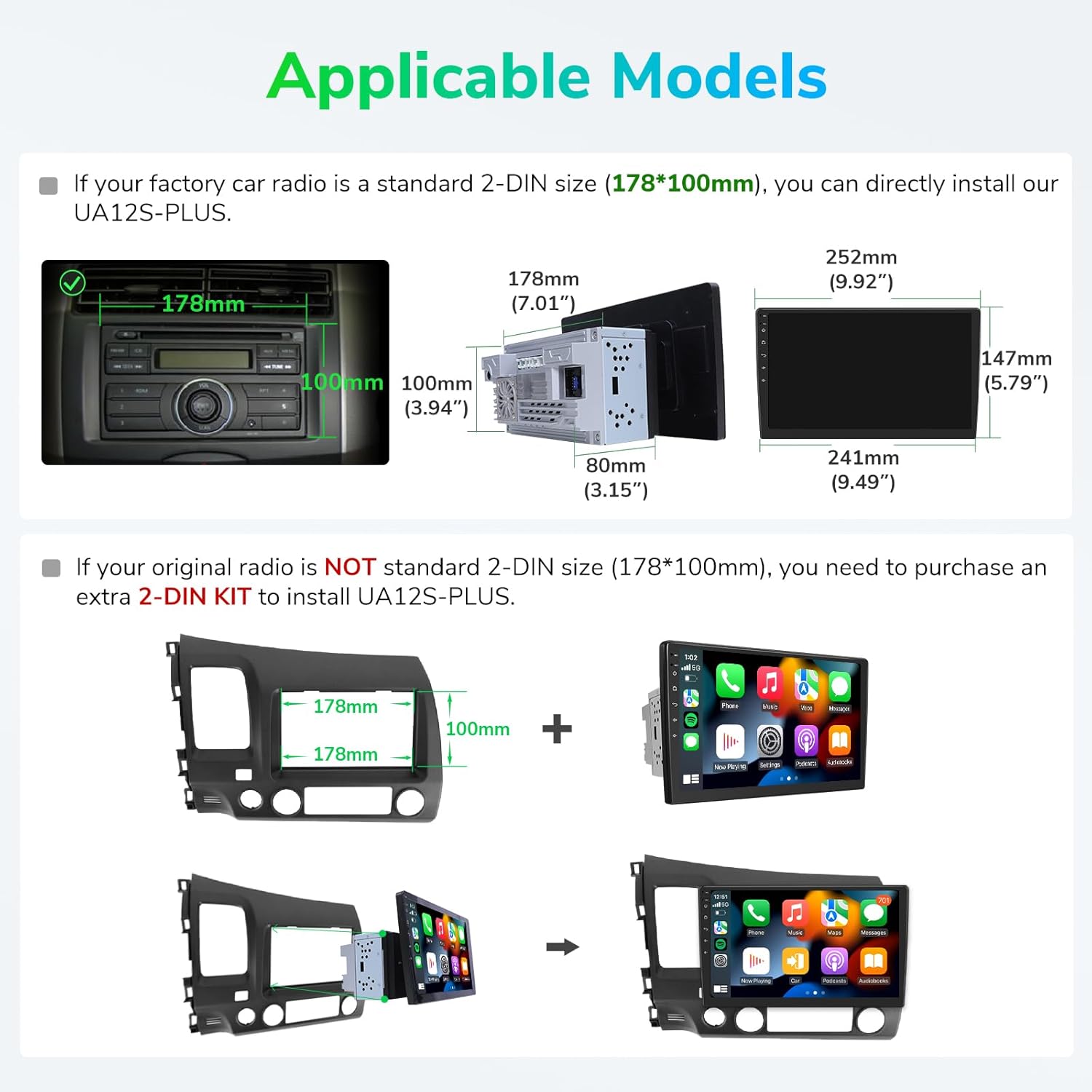
Figure 3.2: Standard 2-DIN size for direct installation.

Figure 3.3: Installation with an extra 2-DIN kit and ISO connector information.
3.3. Wiring Diagram
Refer to the detailed wiring diagram provided in the user manual and below for all connections. Ensure all wires are correctly connected to prevent damage to the unit or your vehicle.

Figure 3.4: Comprehensive wiring diagram for the UA12S-PLUS.
4. Operating Instructions
The UA12S-PLUS features an intuitive user interface designed for ease of use while driving.
4.1. User Interface and Navigation
The Android 13 operating system provides a customizable home screen with quick access to essential functions like navigation, radio, music, and settings. The redesigned pull-down menu offers easy access to common controls such as volume, brightness, and connectivity options.
Video 4.1: Demonstrates the new user interface, split-screen functionality, vertical volume control, all-in-one media player, fixed bottom shortcut bar, easy settings, day/night mode, and redesigned pull-down menu.
4.2. Smart Voice Control
Utilize smart voice control through Wireless Apple CarPlay or Android Auto to manage music, navigation, and calls hands-free, ensuring a safer driving experience.

Figure 4.2: Smart Voice Control for hands-free operation.

Figure 4.3: Examples of voice commands for Apple CarPlay and Android Auto.
4.3. Split Screen Functionality
The split-screen feature allows you to run two applications simultaneously, such as navigation and music, for enhanced multitasking.

Figure 4.4: Split screen displaying navigation and media player.
5. Connectivity
The UA12S-PLUS offers multiple connectivity options to keep you connected and entertained.
5.1. Wireless Apple CarPlay & Android Auto
Seamlessly integrate your smartphone for navigation, music, calls, and more, either wirelessly or via USB connection.
5.2. Bluetooth
Connect your phone for hands-free calling and audio streaming.
5.3. 4G LTE & Wi-Fi
Stay connected with built-in 4G LTE support and Wi-Fi for internet access and app downloads.

Figure 5.1: Access to various apps and Wi-Fi connectivity.
6. Optional Accessories
Enhance your driving experience with compatible Eonon accessories.
6.1. Rear View Camera (A0125)
Connect an optional AHD reversing camera (A0125) for improved safety and parking assistance.

Figure 6.1: Rear View Camera (A0125) support and connection.
6.2. Bluetooth OBD2 Scanner (V0056)
Monitor real-time vehicle information by connecting an optional Bluetooth OBD2 scanner (V0056).

Figure 6.2: Bluetooth OBD2 Scanner (V0056) support.
6.3. Dash Camera (R0020)
Record your journeys with an optional Dash Camera (R0020). Note: R0020 requires an SD card (not included).

Figure 6.3: Dash Camera (R0020) support.
7. Specifications
| Feature | Specification |
|---|---|
| Brand | Eonon |
| Model | UA12S-PLUS |
| Operating System | Android 13 |
| Processor | Octa Core, Qualcomm Snapdragon 655 AI |
| RAM | 6GB |
| ROM | 64GB |
| Screen Size | 10.1 Inches |
| Display Type | QLED |
| Resolution | 1280x720 |
| Audio Output Mode | Stereo |
| Speaker Surround Sound Channel Configuration | 4.1 |
| Wattage | 48 watts |
| Tuner Technology | AM, FM |
| Connector Type | Bluetooth, HDMI, USB |
| Human Interface Input | Touchscreen |
| Video Encoding | H.264, H.265/HEVC, VP9, AV1 |
| Parcel Dimensions | 31.19 x 22.4 x 19.51 cm; 2.74 kg |
8. Maintenance
To ensure the longevity and optimal performance of your Eonon UA12S-PLUS car stereo, follow these maintenance guidelines:
- Screen Cleaning: Use a soft, lint-free cloth slightly dampened with water or a screen cleaner specifically designed for electronic displays. Avoid harsh chemicals or abrasive materials.
- Software Updates: Regularly check for and install software updates via the Updater app to enhance system stability, optimize speed, and resolve any bugs. Ensure the unit has at least 10% battery or is in a charging state during updates. Do not remove the battery or power during the upgrade process.
- Temperature Control: Avoid exposing the unit to extreme temperatures. Prolonged exposure to direct sunlight or very cold conditions can affect performance and lifespan.
- Cable Connections: Periodically check all cable connections to ensure they are secure and free from damage. Loose connections can lead to intermittent issues.
- Dust and Debris: Keep the unit free from dust and debris, especially around ventilation areas, to prevent overheating.
9. Troubleshooting
If you encounter any issues with your Eonon UA12S-PLUS, refer to the following common troubleshooting steps:
- Unit Not Powering On: Check all power connections, including the main power cable and fuse. Ensure the vehicle's ignition is on.
- Touchscreen Unresponsive: Perform a factory reset (refer to settings menu). If the issue persists, ensure the screen is clean and free from obstructions.
- No Audio Output: Verify speaker connections and audio output settings. Check the volume level and ensure the unit is not muted.
- CarPlay/Android Auto Connection Issues: Ensure your phone's Bluetooth and Wi-Fi are enabled. Try restarting both your phone and the car stereo. For wired connections, check the USB cable.
- GPS Signal Loss: Ensure the GPS antenna is correctly installed and has a clear line of sight to the sky.
- Software Glitches: Perform a system restart. If the problem continues, check for available software updates.
For more detailed troubleshooting or persistent issues, please contact Eonon customer support.
10. Warranty & Support
Eonon products typically come with a manufacturer's warranty. Please refer to the warranty card included in your package or visit the official Eonon website for detailed warranty terms and conditions. For technical support, product inquiries, or service requests, please contact Eonon customer service through their official channels.


