
Introduction
Thank you for choosing the AONIMI 10000mAh Portable Power Bank. This ultra-slim and compact external battery pack is designed to provide reliable backup power for your mobile devices on the go. With dual USB outputs and a versatile USB-C input, it offers convenient and efficient charging for a wide range of smartphones, tablets, and other USB-powered devices.
Please read this manual carefully before using the product to ensure safe and optimal performance. Keep this manual for future reference.

Image: The AONIMI 10000mAh Portable Power Bank in black and purple, highlighting its compact design.
Package Contents
Please check the package for the following items:
- 10000mAh Portable Charger Power Bank Battery Pack x 2
- Micro USB Charging Cable x 2
- User Manual x 1
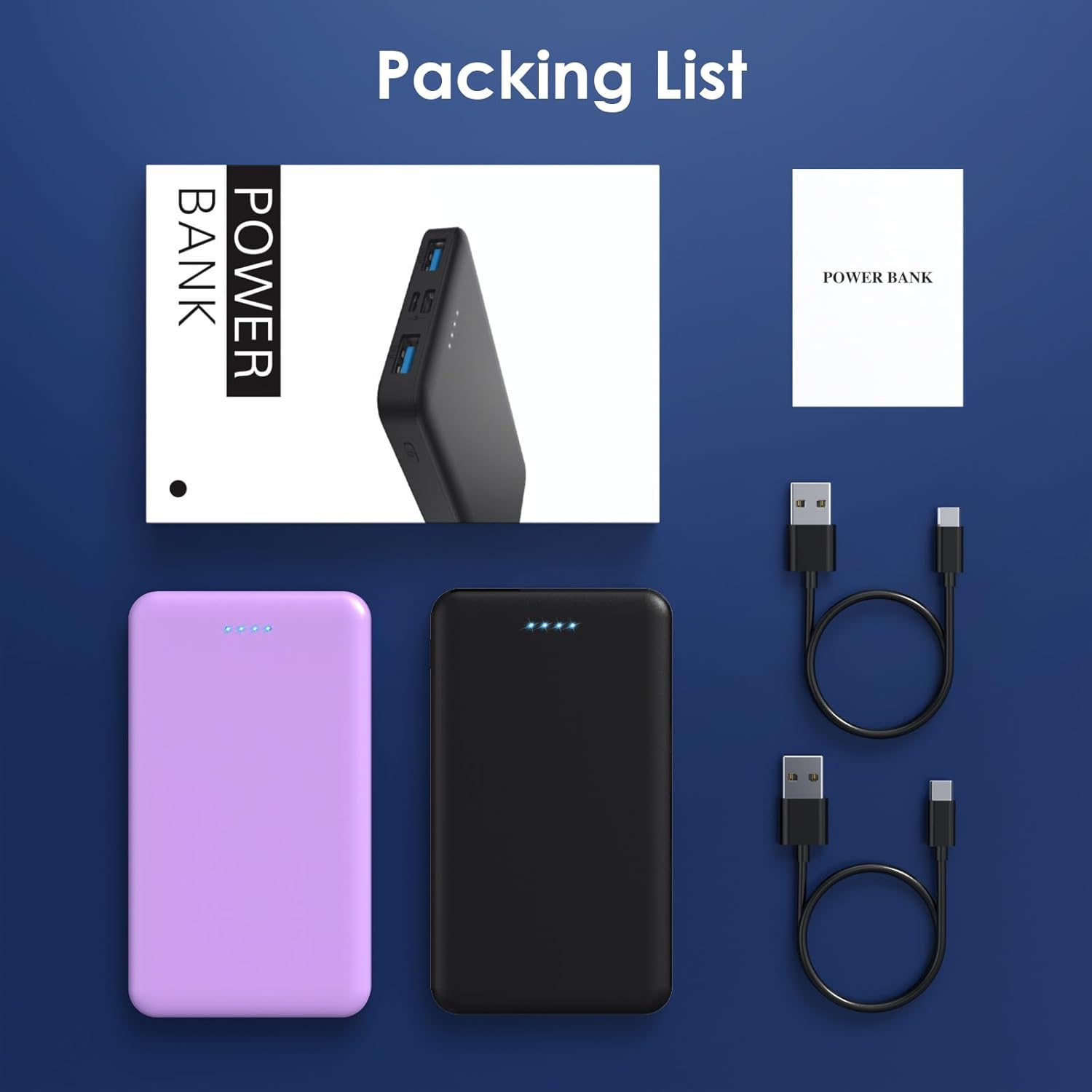
Image: All items included in the product package.
Product Features
- Compact & Ultra Slim Design: High-quality Li-polymer electric core for portability and durability.
- Dual USB Output & USB C Input: Charge two devices simultaneously with 5V/2.1A output. The power bank itself can be recharged via Micro USB or USB-C input.
- Universal Compatibility: Works with a wide range of smartphones, tablets, and smaller USB-charged devices.
- 4 LED Indicators: Clearly shows the remaining power level (25%~50%~75%~100%).
- Certified Safety: Built-in smart protection system ensures complete protection against overcharge, over-voltage, over-current, short circuit, and over-discharge.
Specifications
| Attribute | Detail |
|---|---|
| Capacity | 10000mAh / 37Wh (Each Power Bank) |
| Dimension | 5.9 x 2.9 x 0.6 inches (Each) |
| Dual USB Output | 5V / 2.1A |
| Micro USB Input | 5V / 2.1A |
| USB-C Input | 5V / 2.1A (Not for charging smartphones) |
| Item Weight | 14 ounces |
| Model Number | HX60S9 |

Image: Detailed view of the power bank's dimensions and port layout.
Setup: Charging Your Power Bank
Before using your AONIMI Portable Power Bank for the first time, it is recommended to fully charge it.
- Connect the Charging Cable: Use the included Micro USB cable or a USB-C cable (not included for charging smartphones) to connect the power bank's input port (Micro USB or USB-C) to a USB wall charger (5V/2.1A recommended) or a computer's USB port.
- Monitor Charging: The 4 LED indicators on the power bank will light up sequentially to show the charging progress. When all four LEDs are solid, the power bank is fully charged.
- Charging Time: A full charge typically takes 6-8 hours with a 5V/2.1A adapter.
Note: The USB-C port on the power bank is for input (recharging the power bank) only and cannot be used to charge smartphones or other devices.
Operating Your Power Bank
Charging Your Devices
- Connect Your Device: Use your device's original USB charging cable to connect it to one of the two USB output ports on the power bank.
- Start Charging: The power bank will automatically begin charging your device. The LED indicators will illuminate to show the remaining battery level of the power bank.
- Charge Multiple Devices: You can charge two devices simultaneously using both USB output ports.
- Stop Charging: Disconnect your device from the power bank once charging is complete. The power bank will automatically turn off after a short period of inactivity. You can also press the power button to turn it off manually.

Image: Demonstrates the dual USB output capability, charging two devices at once.

Image: Illustrates the power bank's use in a social setting, charging multiple devices.
LED Power Indicators
The AONIMI power bank features four LED lights that indicate the remaining battery capacity:
- 1 LED lit: 0-25% capacity remaining
- 2 LEDs lit: 26-50% capacity remaining
- 3 LEDs lit: 51-75% capacity remaining
- 4 LEDs lit: 76-100% capacity remaining (Full charge)
Press the power button briefly to check the current battery level.
Image: Visual representation of the LED indicator meanings.
Compatibility
The AONIMI Portable Power Bank is widely compatible with most USB-powered devices, including but not limited to:
- iPhones: iPhone 14, 13, 13 Pro, 13 Pro Max, 13 mini, 12, 12 Pro, 12 Pro Max, 12 mini, 11, 11 Pro, XS, XS Max, XR, X, 8 Plus, 7 Plus, 6s, 6, SE, etc.
- Samsung Galaxy: S20, S20+, S10, S10+, S9, S8, etc.
- Other Smartphones: Google Pixel, LG, and other Android phones.
- Tablets: iPads, Android tablets.
- Small Devices: Air-pods, Bluetooth headphones, fitness trackers, smart watches, portable speakers, and other USB-charged electronic devices.
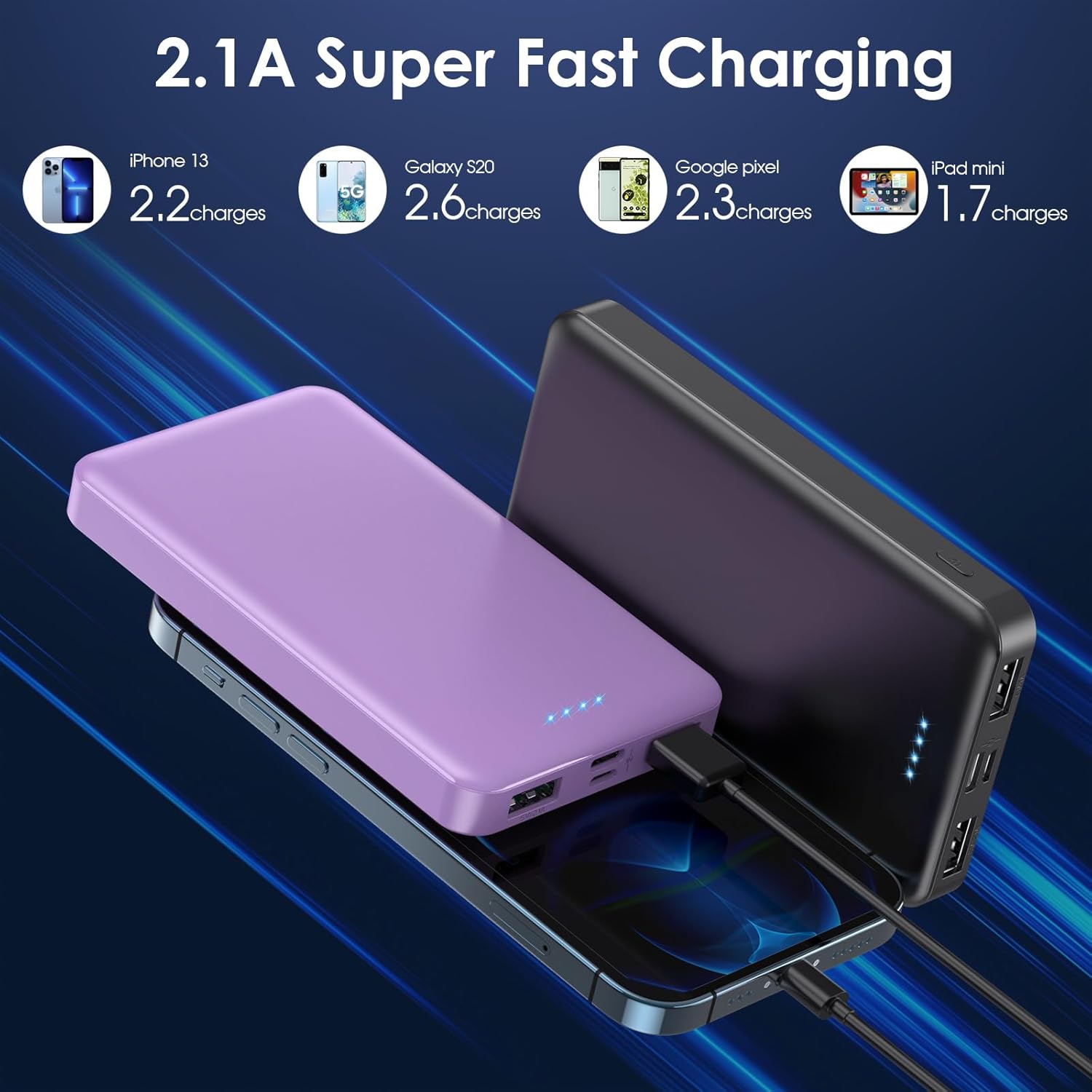
Image: Illustrates the approximate number of charges for different compatible devices.
Safety Precautions
Your safety is our priority. The AONIMI power bank is equipped with a smart protection system. To ensure safe operation and prolong the lifespan of your device, please observe the following:
- Do not expose the power bank to extreme temperatures (hot or cold), direct sunlight, or high humidity.
- Do not disassemble, modify, or attempt to repair the power bank yourself.
- Avoid dropping, hitting, or subjecting the power bank to strong impacts.
- Keep the power bank away from water and other liquids.
- Do not use the power bank if it is damaged, swollen, or leaking.
- Use only certified charging cables and adapters.
- Keep out of reach of children.
- Dispose of the power bank responsibly according to local regulations.

Image: Overview of the multi-protection safety system.
Maintenance
- Clean the power bank with a soft, dry cloth. Do not use harsh chemicals or abrasive materials.
- Store the power bank in a cool, dry place when not in use.
- If storing for an extended period, charge the power bank to about 50% capacity every 3 months to maintain battery health.
Troubleshooting
| Problem | Possible Cause | Solution |
|---|---|---|
| Power bank not charging |
|
|
| Device not charging from power bank |
|
|
| Slow charging |
|
|
Warranty and Support
AONIMI provides a 24-month warranty policy for this product, covering manufacturing defects from the date of purchase.
If you encounter any issues or have questions regarding your AONIMI Portable Power Bank, please do not hesitate to contact our customer support team. We offer 24 hours friendly customer service and easy-to-reach support.
For assistance, please refer to the contact information provided on the product packaging or the official AONIMI website.