
Product Overview
This ChongXiao Universal Brushless Controller is designed for electric bicycles and scooters, offering versatile control over motor speed and direction. It features a brushless sine wave design for stable operation and extended service life. This controller is compatible with a wide range of voltages and power outputs, making it a flexible solution for various electric vehicle applications.
- Suitable for electric bicycle scooters, controlling rotational speed and direction.
- Brushless design for stability and longer service life.
- Compatible with various brands and models of electric bicycle scooters.
- Advanced technology ensures performance, durability, safety, and stability.
- Complete functions and simple wiring; unused functions do not require connection.
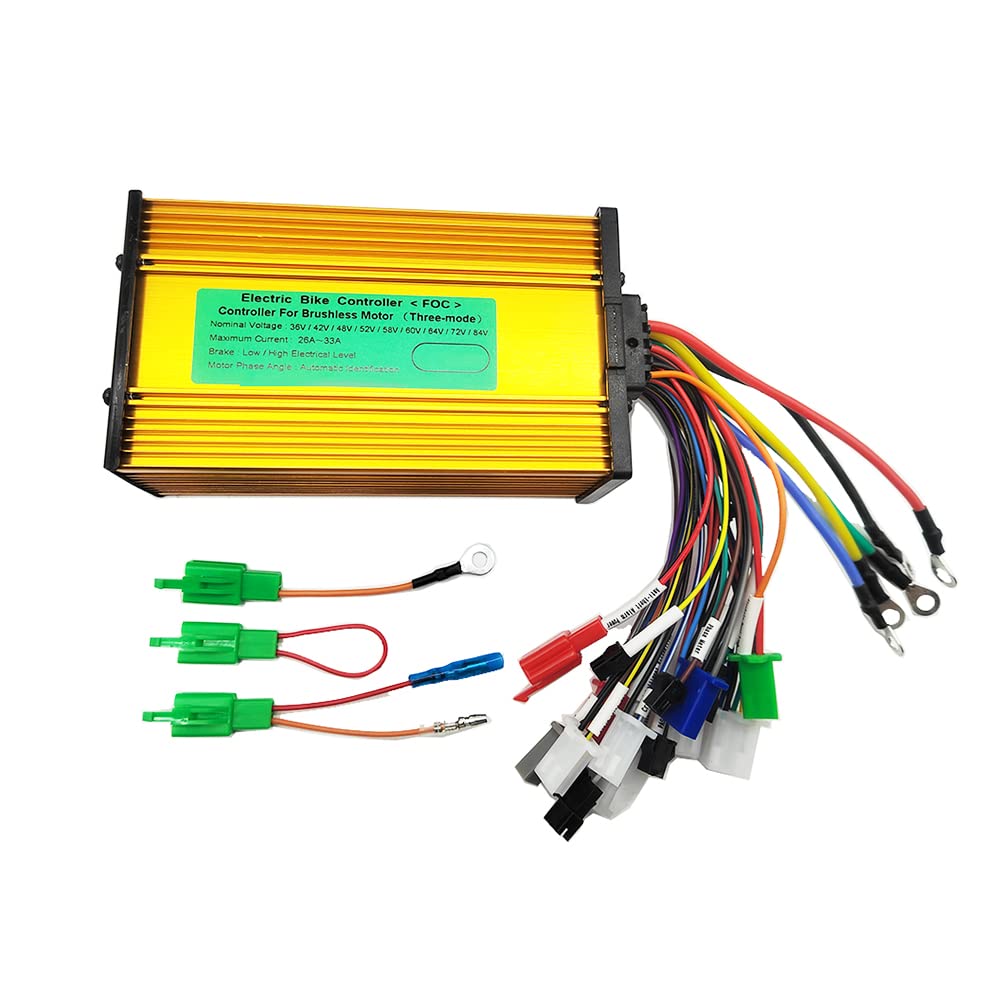
This image displays the ChongXiao Universal Brushless Controller, highlighting its golden aluminum casing and the product label. The label indicates its compatibility with 36V/42V/48V/52V/58V/60V/64V/72V/84V systems, a maximum current of 26A-33A, and support for low/high electrical level brakes and automatic identification of motor phase angle.
Installation and Wiring
Follow these steps for proper installation and wiring of the controller. Refer to the wiring diagram for visual guidance.

This diagram illustrates the various wires and connectors of the ChongXiao Universal Brushless Controller, each labeled with a number corresponding to its function. Key connections include battery, motor phase lines, throttle, hall sensors, and self-learning lines.
Wiring Procedure
- Connect the motor phase lines: Connect the three thick wires from the controller to the corresponding motor phase lines (color to color).
- Connect the battery lines: Connect the red wire from the controller to the battery positive (+) and the black wire to the battery negative (-).
- Connect the throttle and electric door lock: Connect the controller's throttle line (color to color) to your throttle. If your throttle does not have an electric door lock, the controller's electric door lock wires can be shorted to provide power.
- Connect the Hall sensor lines: If your motor has Hall sensors, connect the controller's Hall lines to them. If the motor operates without Hall wires, this step can be skipped.
- Intelligent Recognition (Self-Learning): Dock the two self-learning lines together. The wheel will either move forward or reverse.
- If the wheel moves forward, separate the self-learning lines.
- If the wheel moves in reverse, separate the self-learning lines, then dock them again. If the wheel now moves forward, separate the self-learning lines.
- Connect other functions: Connect other optional functions as needed, such as brakes, PAS, cruise, display, or anti-theft systems. Functions not in use do not require connection.
Wire Identification
- 1. High Level Brake: For connecting high-level brake signals.
- 2. Low Level Brake: For connecting low-level brake signals.
- 3. PAS (Pedal Assist System): For connecting pedal assist sensors.
- 4. Cruise: For activating cruise control functionality.
- 5. Intelligent Recognition (Self-Learning Line): Used for motor phase identification.
- 6. Reverse Gear: For reverse functionality.
- 7. Multiple Data Meter: For connecting to a multi-function display.
- 8. Three Speed Gear: For selecting different speed modes.
- 9. Anti-Theft Alarm Signal: For connecting to an anti-theft alarm system.
- 10. Anti-Theft Alarm Power: Power supply for the anti-theft alarm.
- 11. Speed Controller Handle (Throttle): For connecting the throttle.
- 12. Hall Meter: For connecting to a Hall sensor-based speed display.
- 13. Hall: For connecting the motor's Hall sensors.
- 14. Special for Differential Motor: Specific connection for differential motors.
- 15. Phase Meter: For connecting to a phase-based speed display.
- 16. Electric Door Lock: For ignition or power lock.
- 17. Phase Line: Thick wires connecting to motor phases.
- 18. Battery: Power input from the battery.
Operation
Once the controller is correctly wired and powered, the electric scooter or e-bike can be operated using the connected throttle and other accessories.
Key Functions
- Throttle Control: Use the speed controller handle (throttle) to regulate motor speed.
- Braking: The controller supports both high-level and low-level brake signals to safely stop the motor.
- Pedal Assist (PAS): If a PAS sensor is connected, the motor will provide assistance when pedaling.
- Cruise Control: Activate the cruise function for maintaining a constant speed.
- Speed Modes: Utilize the three-speed gear function to switch between different performance levels.
- Reverse: If connected, the reverse gear allows for backward movement.
- Display Integration: Connect a compatible data meter or display to monitor speed, battery level, and other parameters.
Maintenance
To ensure the longevity and optimal performance of your brushless controller, consider the following maintenance guidelines:
- Keep Dry: Protect the controller from water and excessive moisture. While the casing offers some protection, it is not fully waterproof.
- Cleanliness: Periodically clean the exterior of the controller to prevent dust and dirt buildup, which can affect heat dissipation.
- Cable Inspection: Regularly check all wiring connections for signs of wear, corrosion, or loose connections. Secure any loose wires.
- Heat Management: Ensure the controller has adequate airflow to dissipate heat, especially during prolonged use or high-power operation. Avoid covering it with insulating materials.
- Avoid Overloading: Operate the controller within its specified voltage and current limits to prevent damage.
Troubleshooting
If you encounter issues with your controller, refer to these common troubleshooting steps:
- No Power:
- Check battery connections (positive and negative).
- Verify the electric door lock connection or ensure it is shorted if not used with a throttle that has one.
- Ensure the battery is charged.
- Motor Not Running/Incorrect Direction:
- Re-perform the intelligent recognition (self-learning) procedure.
- Check motor phase line connections (color to color).
- Verify Hall sensor connections if your motor uses them.
- Intermittent Operation:
- Inspect all wire connections for looseness or damage.
- Check for signs of overheating on the controller.
- Brakes Not Working:
- Verify high-level and low-level brake wire connections.
- Ensure brake levers are functioning correctly.
- Display Not Working:
- Check the connection to the multiple data meter or display.
- Ensure the display itself is powered and functional.
If problems persist after following these steps, consult a qualified technician.
Technical Specifications

This image provides the physical dimensions of the controller, showing its length as 177mm, width as 85mm, and height as 45mm, which is useful for installation planning.
| Feature | Detail |
|---|---|
| Nominal Voltage | 36V/42V/48V/52V/60V/72V/84V (Universal) |
| Current | 26A-33A |
| Transistor Count | 12 |
| Phase Angle | 60°/120° (Automatic Identification) |
| Rated Power | 500W-1000W |
| Item Package Dimensions | 7.76 x 4.76 x 2.05 inches |
| Package Weight | 0.6 Kilograms |
| Material | Aluminum |
| Model Name | 36V-84V 26-33A brushless controller |
| Included Components | Controller |
| Date First Available | April 18, 2023 |
Warranty Information
This product does not come with a manufacturer's warranty. Please refer to the retailer's return policy for any issues or contact the seller directly for support regarding product defects or discrepancies upon arrival.
Customer Support
For further assistance or inquiries regarding your ChongXiao Universal Brushless Controller, please contact your product retailer or the manufacturer, ChongXiao. You may also find helpful resources and community forums online for electric scooter and e-bike components, which can provide additional support and troubleshooting tips.