
Jesebang YT18-GR
Jesebang Wireless Earbuds YT18-GR User Manual
Model: YT18-GR
Product Overview
The Jesebang Wireless Earbuds (Model YT18-GR) are Bluetooth 5.3 stereo earphones designed for a high-quality audio experience. They feature 13mm graphene speakers, triple-layer composite diaphragms for powerful bass, stunning treble, and clear mids. The built-in microphones utilize Environmental Noise Cancellation (ENC) for clear communication during calls. These earbuds offer an extended playtime of up to 40 hours with the charging case, an LED display for battery status, and an IP7 waterproof rating, making them suitable for sports and active lifestyles. They are designed for comfort with earhooks and support one-step auto pairing for ease of use.

Figure 1: Jesebang Wireless Earbuds YT18-GR in their charging case, showcasing the green color and LED display.

Figure 2: Detailed internal structure of the earbud, illustrating the 13mm graphene drivers and composite diaphragms responsible for high-quality stereo sound.
Package Contents
Please verify that all items are present in the package:
- Jesebang Wireless Earbuds (Left and Right)
- Charging Case
- USB-C Charging Cable
- User Manual (this document)

Figure 3: The retail packaging for the Jesebang YT18 True Wireless Earbuds.
Setup
1. Initial Charging
Before first use, fully charge the earbuds and the charging case. Connect the provided USB-C cable to the charging case and a power source. The digital LED display on the case will show the charging progress from 1 to 100. When placing the earbuds into the case, they will begin charging automatically, and their individual battery levels will be displayed.

Figure 4: The charging case and earbuds displaying their respective power levels via LED indicators.
2. Pairing with Your Device
The earbuds utilize Bluetooth 5.3 technology for a stable and fast connection.
- Remove both earbuds from the charging case. They will automatically power on and pair with each other.
- On your device (smartphone, tablet, etc.), activate Bluetooth.
- Search for "YT18" in the list of available Bluetooth devices and select it to connect.
- Once connected, you will hear an audible confirmation, and the earbuds will be ready for use.

Figure 5: Visual guide for the one-step auto pairing process, showing the earbuds and a phone's Bluetooth settings.
3. Comfort Fit and Waterproofing
The earbuds are designed with earhooks to ensure a secure and comfortable fit, especially during physical activities. They are also IP7 waterproof, protecting them from sweat and rain during intense workouts.

Figure 6: The earbuds are designed for active use, featuring IP7 waterproof and sweat resistance.
Operating Instructions
Touch Controls
The Jesebang Wireless Earbuds feature intuitive touch control sensors on each earbud. The following table outlines the common functions:
| Action | Function |
|---|---|
| Single Tap (L/R) | Play/Pause music, Answer/End call |
| Double Tap (L) | Previous Song |
| Double Tap (R) | Next Song |
| Triple Tap (L) | Volume Down |
| Triple Tap (R) | Volume Up |
| Long Press (2s) (L/R) | Reject Call / Activate Voice Assistant |
| Long Press (5s) (L/R) | Power On/Off |
Stereo and Mono Mode
The earbuds can be used together for a stereo audio experience or independently in mono mode. To use a single earbud, simply remove one from the charging case; it will automatically connect to your device if previously paired. This is useful for calls or when you need to be aware of your surroundings.
Call Noise Cancellation (ENC)
Each earbud is equipped with a built-in microphone that utilizes Environmental Noise Cancellation (ENC) technology. This feature helps to reduce background noise during calls, ensuring clear and realistic sound for both you and the person you are speaking with.
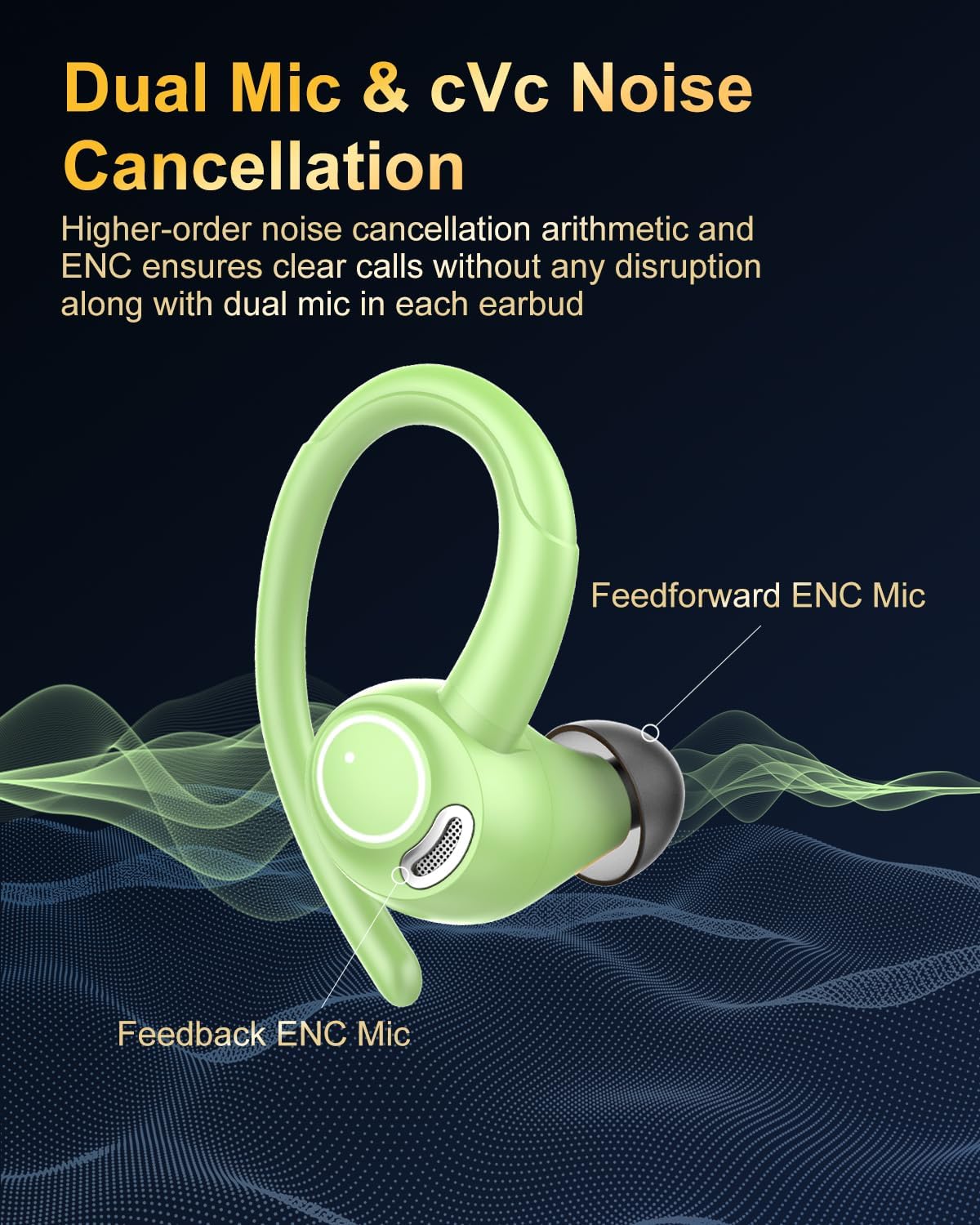
Figure 7: Illustration of the dual microphone system for enhanced call noise cancellation.
Maintenance
Proper maintenance ensures the longevity and optimal performance of your earbuds.
- Cleaning: Regularly clean both the charging contacts on the earbuds and the charging pins within the charging case. Use a dry, soft cloth or cotton swab. Ensure to remove any sweat or dirt buildup to prevent charging failures.
- Water Exposure: While the earbuds are IP7 waterproof, they are not designed for prolonged submersion. Avoid exposing them to saltwater or chemicals. Dry them thoroughly after exposure to sweat or rain before placing them back in the charging case.
- Storage: Store the earbuds and charging case in a cool, dry place away from direct sunlight and extreme temperatures.
Troubleshooting
If you encounter issues with your Jesebang Wireless Earbuds, please refer to the following common solutions:
- Earbuds not pairing with each other:
Ensure both earbuds are fully charged. Place them back into the charging case, close the lid for a few seconds, then open it and remove them simultaneously. They should automatically pair.
- Earbuds not connecting to device:
Check if Bluetooth is enabled on your device. Forget "YT18" from your device's Bluetooth list and attempt to pair again following the "Pairing with Your Device" steps.
- No sound from one earbud:
Ensure both earbuds are charged. Try placing both back in the case, closing the lid, and then removing them. If the issue persists, a full discharge and recharge might help. For specific reset procedures, consult the manufacturer's official support channels.
- Charging issues:
Clean the charging contacts on the earbuds and the charging pins in the case. Ensure the USB-C cable is securely connected and the power source is functional.
Specifications
| Feature | Detail |
|---|---|
| Model Name | YT18-GR |
| Connectivity Technology | Wireless (Bluetooth 5.3) |
| Bluetooth Range | Up to 15 meters |
| Audio Driver Size | 13mm Graphene Drivers |
| Impedance | 32 Ohm |
| Frequency Range | 2.4GHz |
| Wireless Transmit Power | 6-8 dbm |
| Playtime (Earbuds) | Up to 8 hours (single charge) |
| Total Playtime (with Charging Case) | Up to 40 hours |
| Charging Time (Headset) | Approx. 1.5 hours |
| Charging Time (Charging Case) | Approx. 3.5 hours |
| Battery Capacity (Headset) | 40mAh (each) |
| Battery Capacity (Charging Case) | 400mAh |
| Input/Output | 4.75V/5.25V/500mA |
| Water Resistance Level | IP7 Waterproof |
| Control Method | Touch Control |
| Product Dimensions | 2.87 x 1.73 x 4.02 inches |
| Item Weight | 4.6 ounces |

Figure 8: Detailed product parameters as listed on the packaging.
Warranty and Support
For warranty information and technical support, please contact the manufacturer directly.
- Manufacturer: Shenzhen medu Acoustic Technology Co., Ltd
- Address: China, Guangdong, Dongguan Fenggang town, Golden Phoenix Avenue, Fenghe Industrial Park, 5th floor, building D
- Contact Person: Jingfan Wen
- Phone: +86 236 8209 8166
For European and UK inquiries, please use the following representative contacts:
- UK Representative: EVATOST CONSULTING LTD
- Address: Suite 11, First Floor, Moy Road Business Centre, Taffs Well, Cardiff, Wales, CF15 7QR
- Email: contact@evatmaster.com
- EC Representative: eVatmaster Consulting GmbH
- Address: Bettinastr. 30, 60325 Frankfurt am Main, Germany
- Email: contact@evatmaster.com

Figure 9: Contact details for UK and EC representatives as printed on the product packaging.
Ask a question about this manual
Ask about setup, troubleshooting, compatibility, parts, safety, or missing instructions. Manuals+ will review the question and use this page’s manual context to help answer it.