
Simfer B9109DERM
Simfer Built-In Electric Oven User Manual
Model: B9109DERM
1. Product Overview
The Simfer Built-In Electric Oven (Model: B9109DERM) is a 90 cm appliance designed for seamless integration into your kitchen cabinetry. It offers 10 versatile cooking functions, a generous 104-liter capacity, and is equipped with dual turbo fans for efficient heat distribution. Key features include a digital touch timer, a triple-layer glass door for enhanced insulation and safety, and an easy-clean interior.

Figure 1.1: Front view of the Simfer Built-In Electric Oven, showcasing the stainless steel finish, control knobs, and digital display.
2. Safety Information
Please read all safety instructions carefully before using the oven. Failure to follow these instructions may result in electric shock, fire, or personal injury.
- Electrical Safety: Ensure the oven is connected to a properly grounded electrical outlet with the correct voltage (220-240V) and frequency (50/60Hz). The maximum power consumption is 3600 watts. Do not use extension cords.
- Hot Surfaces: The oven interior, door, and surrounding surfaces become very hot during operation. Always use oven mitts or gloves when handling hot items or surfaces.
- Child Safety: This oven is equipped with a child safety lock on the operating keys. Always activate the child lock when the oven is not in use, especially if children are present. Do not allow children to play with or near the oven.
- Ventilation: Ensure adequate ventilation around the built-in oven as per installation guidelines to prevent overheating.
- Cleaning: Always disconnect the oven from the power supply before cleaning. Allow the oven to cool completely before cleaning any surfaces.
- Flammable Materials: Do not store flammable materials in or near the oven.
3. Installation and Setup
This oven is designed for built-in installation. Professional installation is recommended to ensure proper fit and electrical connection.
3.1. Pre-Installation Checks
- Verify that the electrical supply meets the oven's requirements (220-240V, 50/60Hz, 3600W).
- Ensure the cabinet opening dimensions are appropriate for the oven.
3.2. Dimensions
Accurate measurements are crucial for proper installation.
- External Product Dimensions: Approximately 56.5 cm (Depth) x 87 cm (Width) x 59.5 cm (Height).
- Internal Oven Dimensions: Approximately 44 cm (Depth) x 87 cm (Width) x 58 cm (Height).
- Item Weight: 43 Kilograms.

Figure 3.1: Detailed technical diagram illustrating the oven's dimensions and the required cabinet opening for built-in installation.
3.3. First Use
Before first use, wipe the interior of the oven with a damp cloth. Heat the empty oven at maximum temperature for approximately 30 minutes to burn off any manufacturing residues. A slight odor may be present during this process; ensure the kitchen is well-ventilated.
4. Operating Instructions
The Simfer oven features a user-friendly control panel with rotary knobs and a digital touch timer.
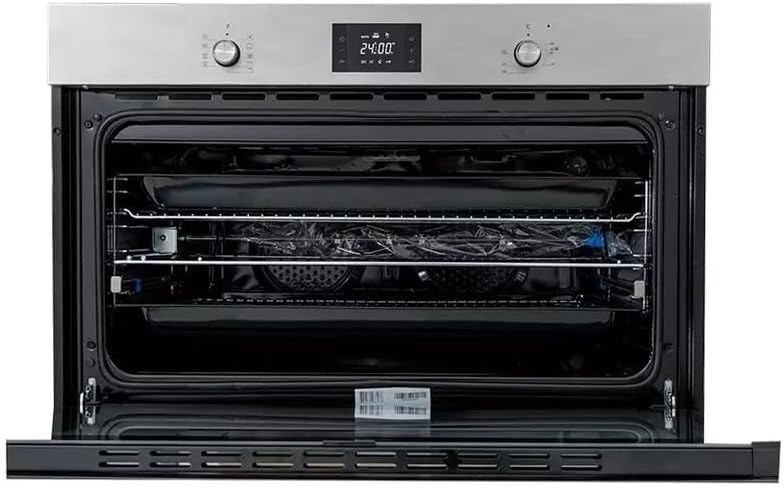
Figure 4.1: Interior view of the oven, highlighting the spacious 104-liter capacity and adjustable chrome racks.
4.1. Control Panel
The control panel consists of:
- Function Selector Knob: Used to select one of the 10 cooking functions.
- Temperature Selector Knob: Used to set the desired cooking temperature.
- Digital Touch Timer: Displays time, allows setting cooking duration, and activates child lock.
4.2. Cooking Functions
The oven offers 10 functions, including:
- Conventional Heating (Upper and Lower Elements)
- Fan-Assisted Cooking (Upper and Lower Elements with Fan)
- Turbo Fan Function (for even heat distribution)
- Grill Function (Internal Grill)
- Rotisserie (Chicken Grill)
- Defrost Function
- Bottom Heating
- Top Heating
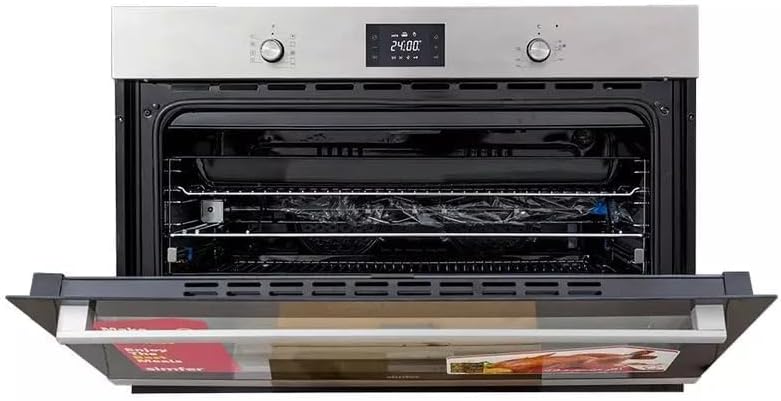
Figure 4.2: The oven interior with the rotisserie accessory, ideal for roasting poultry.
4.3. Setting the Oven
- Place food in the oven on the appropriate rack or tray.
- Turn the Function Selector Knob to choose the desired cooking mode.
- Turn the Temperature Selector Knob to set the required temperature.
- Use the Digital Touch Timer to set the cooking duration if needed. The oven will automatically turn off when the set time expires.
- To activate the child safety lock, refer to the specific instructions in the digital timer section of the full manual.
5. Maintenance and Cleaning
Regular cleaning and maintenance will ensure the longevity and optimal performance of your oven.
5.1. Interior Cleaning
The oven features an easy-clean interior. For general cleaning:
- Allow the oven to cool completely before cleaning.
- Wipe the interior surfaces with a soft cloth and mild detergent.
- For stubborn stains, use a non-abrasive oven cleaner specifically designed for electric ovens. Follow the cleaner's instructions carefully.
- The chrome rack and cooking tray can be removed for easier cleaning in a sink.
5.2. Exterior Cleaning
Clean the stainless steel exterior with a soft cloth and a non-abrasive stainless steel cleaner. Avoid using harsh chemicals or abrasive pads that could scratch the surface.
5.3. Glass Door Cleaning
The triple-layer glass door can be cleaned with a glass cleaner. For thorough cleaning between the glass panes, consult the full manual for instructions on how to safely remove and re-install the inner glass panels.
6. Troubleshooting
Before contacting customer support, please refer to the following common issues and their potential solutions:
| Problem | Possible Cause | Solution |
|---|---|---|
| Oven does not heat up. | No power supply; Oven not set correctly; Child lock activated. | Check power connection and circuit breaker; Ensure function and temperature are set; Deactivate child lock. |
| Uneven cooking. | Food placed incorrectly; Fan not operating. | Ensure food is centered and not overcrowding; Check if fan function is selected and operating. |
| Digital display not working. | Power interruption; Faulty display. | Reset power by turning off and on at the circuit breaker; If issue persists, contact service. |
| Oven light not working. | Bulb needs replacement. | Replace the oven light bulb (refer to full manual for bulb type and replacement instructions). |
7. Specifications
| Feature | Specification |
|---|---|
| Brand | Simfer |
| Model Number | B9109DERM |
| Type | Built-In Electric Oven |
| Size | 90 cm |
| Capacity | 104 Liters |
| Number of Functions | 10 |
| Fans | 2 Turbo Fans |
| Control Type | Rotary Knobs, Digital Touch Timer |
| Door Type | Triple Layer Reflective Glass |
| Material | Stainless Steel |
| Color | Silver |
| Voltage | 220-240 Volts |
| Frequency | 50/60 Hz |
| Wattage | 3600 Watts |
| Item Weight | 43 Kilograms |
| Manufactured In | Turkey |
8. Warranty and Support
Your Simfer Built-In Electric Oven (Model: B9109DERM) comes with a three-year manufacturer's warranty from the date of purchase. This warranty covers defects in materials and workmanship under normal use.
8.1. Warranty Claims
To make a warranty claim, please retain your proof of purchase (receipt or invoice). Contact the authorized Simfer service center or the retailer from whom you purchased the product. They will guide you through the necessary steps for repair or replacement.
8.2. Customer Support
For technical assistance, spare parts, or service inquiries beyond the warranty period, please contact your local authorized Simfer service provider. Always provide the model number (B9109DERM) and serial number (if applicable) when seeking support.
Related documentsB9109DERM


Ask a question about this manual
Ask about setup, troubleshooting, compatibility, parts, safety, or missing instructions. Manuals+ will review the question and use this page’s manual context to help answer it.