
1. Introduction
This manual provides detailed instructions for the proper installation, operation, and maintenance of your Dioche 4mm C Mount Lens. This 10MP lens features low distortion, manual focus, and an adjustable aperture, designed for industrial camera applications. Please read this manual thoroughly before use to ensure optimal performance and longevity of the product.
2. Product Features
- Detailed Image Quality: Utilizes advanced glass composites and anti-reflective coatings for high-contrast, detailed images.
- Wide Application: Designed with low distortion and high compatibility, suitable for most security camera systems.
- Simple Installation: Easy to install and disassemble without interfering with other accessories.
- 10MP Resolution: Supports high-resolution cameras up to 10 megapixels, with a 4mm focal length and F1.8-16 aperture.
- Premium Material: Constructed from durable aluminum alloy, offering anti-corrosion, wear-resistant, and sturdy performance in various environments.
3. Package Contents
Please verify that all items listed below are included in your package. If any items are missing or damaged, contact customer support immediately.
- 1 x Dioche 4mm C Mount Lens
- 1 x C-Mount Adapter Ring

Figure 3.1: The Dioche 4mm C Mount Lens shown with its front and rear caps, and the C-mount adapter ring.
4. Setup Instructions
Follow these steps to properly install the Dioche 4mm C Mount Lens onto your industrial camera.
- Prepare the Camera: Ensure your industrial camera is powered off and disconnected from any power source. Remove any existing lens or body cap from the camera's C-mount.
- Attach the Adapter (if necessary): If your camera requires a C-mount adapter, screw the provided adapter ring onto the camera body first. Ensure it is securely tightened.
- Mount the Lens: Carefully align the threads of the Dioche 4mm C Mount Lens with the C-mount on your camera (or adapter). Gently screw the lens clockwise until it is firmly attached. Avoid overtightening.
- Remove Lens Caps: Remove the front and rear lens caps. Store them in a safe place to protect the lens when not in use.

Figure 4.1: The Dioche 4mm C Mount Lens shown installed on an industrial camera, ready for operation.
5. Operating Instructions
The Dioche 4mm C Mount Lens features manual focus and adjustable aperture. Proper adjustment is crucial for achieving clear and well-exposed images.
5.1. Adjusting Focus
- Power On Camera: Power on your industrial camera and access its live view or monitoring interface.
- Rotate Focus Ring: Locate the focus ring on the lens (often marked with "NEAR" and "FAR" or infinity symbol). Gently rotate this ring to adjust the focus until the image appears sharp on your monitor.
- Fine-Tune: For critical focus, zoom in on a specific area of interest in your camera's live view and make small adjustments to the focus ring.
5.2. Adjusting Aperture
The aperture controls the amount of light entering the lens and affects the depth of field.
- Locate Aperture Ring: Find the aperture ring on the lens, typically marked with F-numbers (e.g., F1.8, F2.8, F4, F8, F16).
- Rotate for Desired Brightness/Depth of Field:
- Rotating towards smaller F-numbers (e.g., F1.8) opens the aperture, allowing more light in and creating a shallower depth of field (more background blur).
- Rotating towards larger F-numbers (e.g., F16) closes the aperture, allowing less light in and creating a deeper depth of field (more of the scene in focus).
- Monitor Image: Observe the image on your camera's monitor to achieve the desired brightness and depth of field for your application.
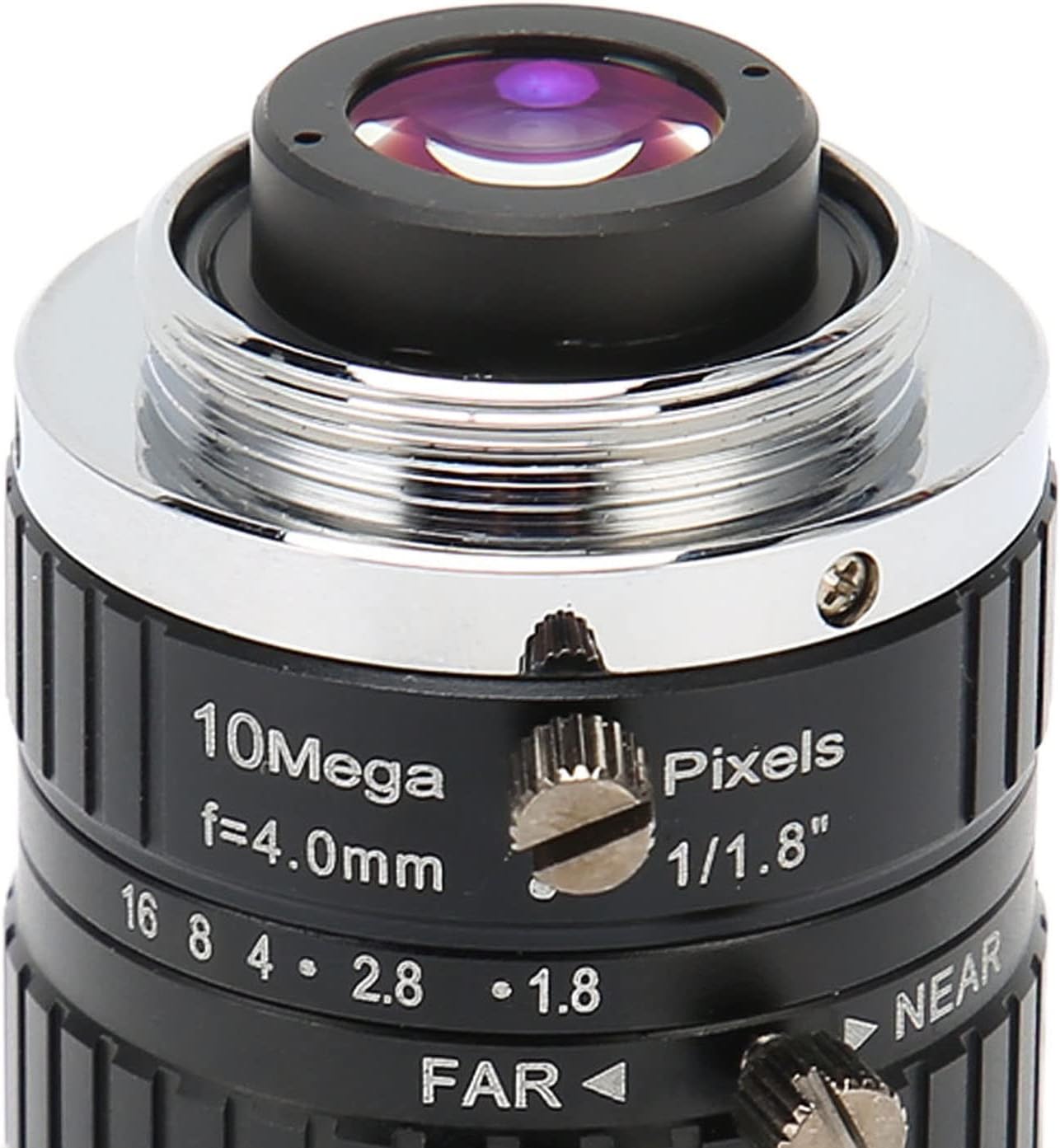
Figure 5.1: Detailed view of the lens, highlighting the manual focus and aperture adjustment rings.
Video 5.1: An overview demonstrating the physical features and adjustments of the Dioche C Mount Lens, including focus and aperture rings.
6. Maintenance
Proper maintenance ensures the longevity and optimal performance of your lens.
- Cleaning the Lens: Use a soft, lint-free microfiber cloth specifically designed for optics to clean the lens elements. For stubborn smudges, use a small amount of lens cleaning solution applied to the cloth, not directly to the lens.
- Dust Removal: Use a blower brush to remove dust particles from the lens surface before wiping. Avoid using compressed air, which can damage coatings.
- Storage: When not in use, always attach the front and rear lens caps to protect the lens elements. Store the lens in a dry, cool place, away from direct sunlight and extreme temperatures.
- Avoid Impact: Handle the lens with care to prevent drops or impacts, which can damage the optical elements or mechanical components.
7. Troubleshooting
If you encounter issues with your Dioche 4mm C Mount Lens, refer to the following common problems and solutions.
| Problem | Possible Cause | Solution |
|---|---|---|
| Image is blurry or out of focus. | Incorrect focus adjustment. | Adjust the manual focus ring until the image is sharp. Ensure the camera's back focus is correctly set if applicable. |
| Image is too dark or too bright. | Incorrect aperture setting. | Adjust the manual aperture ring to allow more or less light. Check camera exposure settings. |
| Dust or spots visible on the image. | Dust on lens elements or camera sensor. | Clean the lens elements using a blower brush and microfiber cloth. If spots persist, clean the camera sensor according to your camera's manual. |
| Lens cannot be mounted securely. | Incorrect mount type or damaged threads. | Ensure your camera has a C-mount or the correct adapter is used. Inspect lens and camera threads for damage. |
8. Specifications
Detailed technical specifications for the Dioche 4mm C Mount Lens.
- Item Type: C Mount Lens
- Material: Aluminum alloy
- Focal Length: 4mm
- Image Format: 1/1.8in
- Resolution: 10MP
- Aperture Range (D/f'): F1.8-16
- Mount Type: C Mount
- Field Angle (HxV) (1/1.8in): 103.2° x 76.8°
- Field Angle (HxV) (1/2in): 91.3° x 68.05°
- Field Angle (HxV) (1/3in): 68.05° x 51.4°
- Back Focal Length (BFL): 17.53mm
- Minimum Object Distance (M.O.D.): 0.1m
- Dimensions: Approx. 39x38mm / 1.54x1.5in
- Lens Structure: Aluminum Alloy + 12G
- Focus Type: Manual Focus
- Operating Temperature: -20℃ to +80℃

Figure 8.1: Diagram illustrating the approximate dimensions of the Dioche 4mm C Mount Lens.
9. Warranty and Support
Dioche products are manufactured to high quality standards. While specific warranty details are not provided in this manual, please retain your proof of purchase. For any product inquiries, technical support, or warranty claims, please contact your retailer or the manufacturer directly through their official channels.
You can visit the Dioche store for more information: Dioche Official Store