
Introduction
This manual provides instructions for the Allimity RMT-B122A replacement remote control. This remote is designed to be compatible with Sony BDP-S2100 and BDP-S790 Blu-ray players. It functions as a direct replacement for the original remote without requiring any programming or setup, allowing for immediate use upon battery installation.
Setup
To begin using your Allimity RMT-B122A replacement remote control, follow these simple steps for battery installation:
- Open the Battery Compartment: Locate the battery compartment cover on the back of the remote control. Slide the cover downwards or press the latch to open it.
- Insert Batteries: Insert two (2) AAA alkaline batteries into the compartment. Ensure that the positive (+) and negative (-) terminals of the batteries align correctly with the markings inside the compartment. Incorrect insertion can prevent the remote from functioning.
- Close the Battery Compartment: Slide the battery compartment cover back into place until it clicks securely.
The remote control is now ready for use. No additional programming is required.
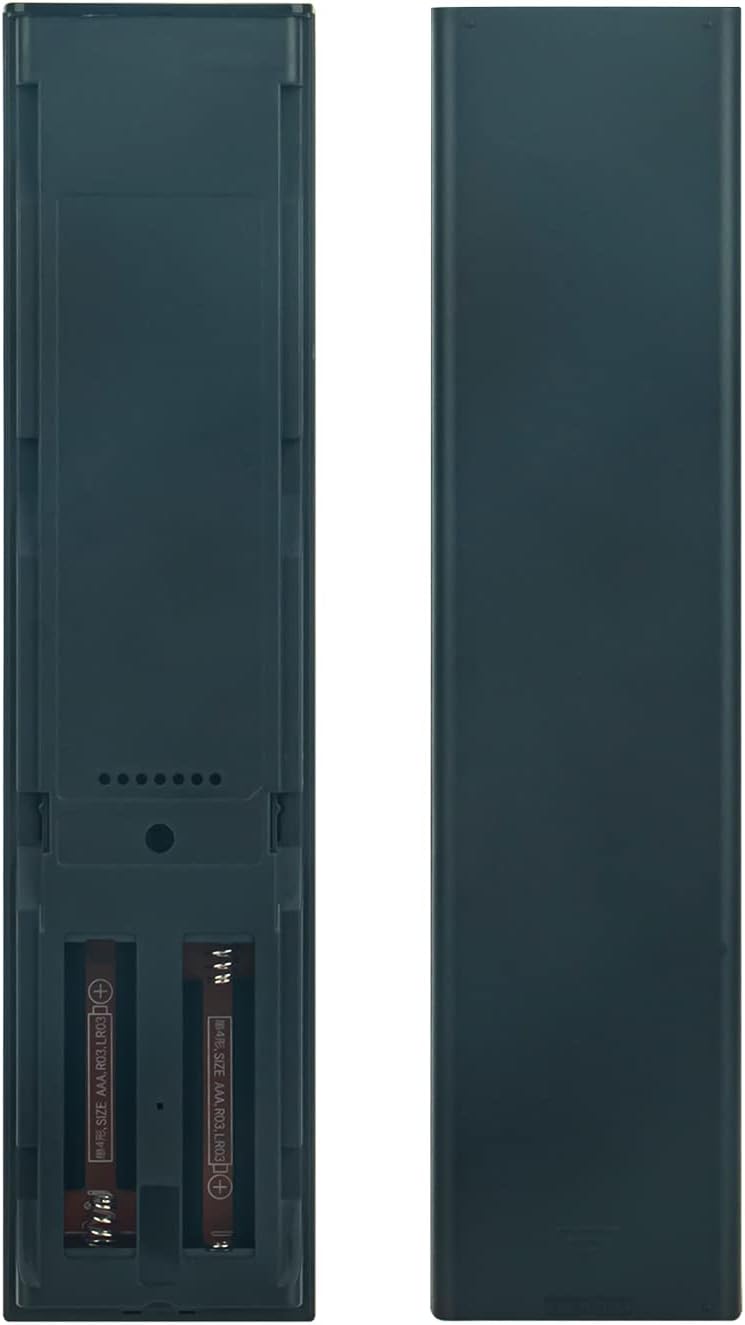
Image: Back of the remote control with the battery compartment open, illustrating where to insert the two AAA batteries.
Operating Instructions
The Allimity RMT-B122A remote control operates using infrared (IR) technology. Ensure a clear line of sight between the remote control and your Sony Blu-ray player for optimal performance. Point the remote directly at the Blu-ray player when pressing buttons.

Image: Front view of the Allimity RMT-B122A remote control, displaying its layout and various function buttons.
Key Functions:
- Power Button: Located at the top right, typically green, to turn the Blu-ray player on or off.
- Numeric Keypad (0-9): For direct input of track numbers or other numerical selections.
- Navigation Pad (Up, Down, Left, Right, Enter/Home): Used to navigate menus and confirm selections. The 'HOME' button typically returns to the main menu.
- Playback Controls (Play, Pause, Stop, Fast Forward, Rewind, Skip): Standard buttons for media playback control.
- Volume Controls (VOL +/-): Adjusts the audio output volume.
- Display/Input/Subtitle: Buttons for specific functions related to display settings, input selection, and subtitle options.
- Color Buttons (Yellow, Blue, Red, Green): Often used for specific functions within menus or interactive content.
- Netflix Button: Direct access to the Netflix application.
Refer to your Sony Blu-ray player's user manual for specific functions of each button as they relate to your device's features.
Maintenance
Proper care and maintenance will extend the life of your remote control:
- Cleaning: Use a soft, dry cloth to clean the remote control. Do not use liquid cleaners, sprays, or abrasive materials, as these can damage the remote's surface or internal components.
- Avoid Moisture: Keep the remote control away from water, humidity, and other liquids. Exposure to moisture can cause internal damage.
- Temperature: Do not expose the remote control to extreme temperatures (hot or cold) or direct sunlight for extended periods.
- Battery Replacement: Replace batteries promptly when the remote's performance diminishes. If the remote will not be used for an extended period, remove the batteries to prevent leakage and potential damage.
- Avoid Drops: Protect the remote from drops and impacts, which can damage its internal circuitry or external casing.
Troubleshooting
If you experience issues with your remote control, try the following troubleshooting steps:
- Remote Not Responding:
- Check if the batteries are inserted correctly with the correct polarity (+/-).
- Replace the batteries with fresh AAA alkaline batteries.
- Ensure there are no obstructions between the remote control and the Blu-ray player.
- Make sure you are pointing the remote directly at the Blu-ray player's IR sensor.
- Limited Range:
- Ensure batteries are fresh. Weak batteries can reduce the remote's effective range.
- Remove any objects that might be blocking the signal path.
- Specific Buttons Not Working:
- This remote is a replacement and should function identically to the original. If a specific button does not work, ensure it is a function supported by your Blu-ray player model.
- Re-check battery installation or replace batteries.
If problems persist after trying these steps, contact the seller for further assistance.
Specifications
| Brand | ALLIMITY |
| Model Number | RMT-B122A |
| Compatible Devices | Sony BDP-S2100, Sony BDP-S790 Blu-ray Players |
| Connectivity Technology | Infrared (IR) |
| Max Number of Supported Devices | 1 |
| Button Quantity | 49 |
| Maximum Range | 33 Feet (approx. 10 meters) |
| Number of Batteries Required | 2 |
| Battery Type | AAA Alkaline |
| Item Weight | 99 Grams |
Warranty and Support
Specific warranty information for the Allimity RMT-B122A replacement remote control is not provided in the product details. For any warranty claims, technical support, or further assistance, please contact the original seller or manufacturer directly through your purchase platform.
