
Fotopro CSTRXG12ZPCFBK
Fotopro Carbon Fiber Horizontal Tripod User Manual
Model: CSTRXG12ZPCFBK
Brand: Fotopro
Introduction
This manual provides detailed instructions for the setup, operation, and maintenance of your Fotopro Carbon Fiber Horizontal Tripod. Designed for versatility and stability, this 2-in-1 tripod and monopod system is ideal for various photography and videography needs, including macro, overhead, and panoramic shots. Please read this manual thoroughly before using the product to ensure proper and safe operation.
Product Features
- 360° Horizontal Carbon Fiber Tripod: Features a horizontal adjustment knob to convert the tripod to horizontal center column mode. The 17.28-inch (43.9 cm) horizontal center shaft can rotate 360° and supports up and down movement, suitable for product, food, desk, macro, tilt, pan, panorama, and time-lapse photography.
- Stable and Durable Construction: Made with 25mm large diameter carbon fiber tubes, offering a maximum load capacity of 22 lbs (10 kg). CNC precision machining and metal components in key areas like the center column swivel sleeve ensure stability and durability.
- Ideal Travel Tripod: Compact and foldable, with a folded height of 17.32 inches (44 cm) and a weight of only 3 lbs (1.36 kg), making it easy to transport. Its 4-section carbon fiber legs adjust from 4.6 inches (11.6 cm) to 63 inches (160 cm) for versatile shooting heights.
- 2-in-1 Professional Tripod & Monopod: Includes a detachable leg that can be combined with the head to form a monopod. The monopod adjusts from 19.5 inches (49.5 cm) to 52 inches (132 cm) and weighs 1.23 lbs (0.45 kg), suitable for flexible shooting, quick snapshots, hiking, or as a selfie stick.
- Thoughtful Detail Design: The center shaft can be inverted for low-angle shots. A hook at the bottom of the center shaft allows for hanging additional weight (e.g., a backpack) to enhance stability in windy conditions. Dual expansion holes enable connection of accessories like microphones or fill lights. Removable footbeds with built-in spikes provide stability on various terrains including sand, snow, and rocky beaches.
Parts Identification
Familiarize yourself with the key components of your Fotopro X-go HR Pro Tripod:
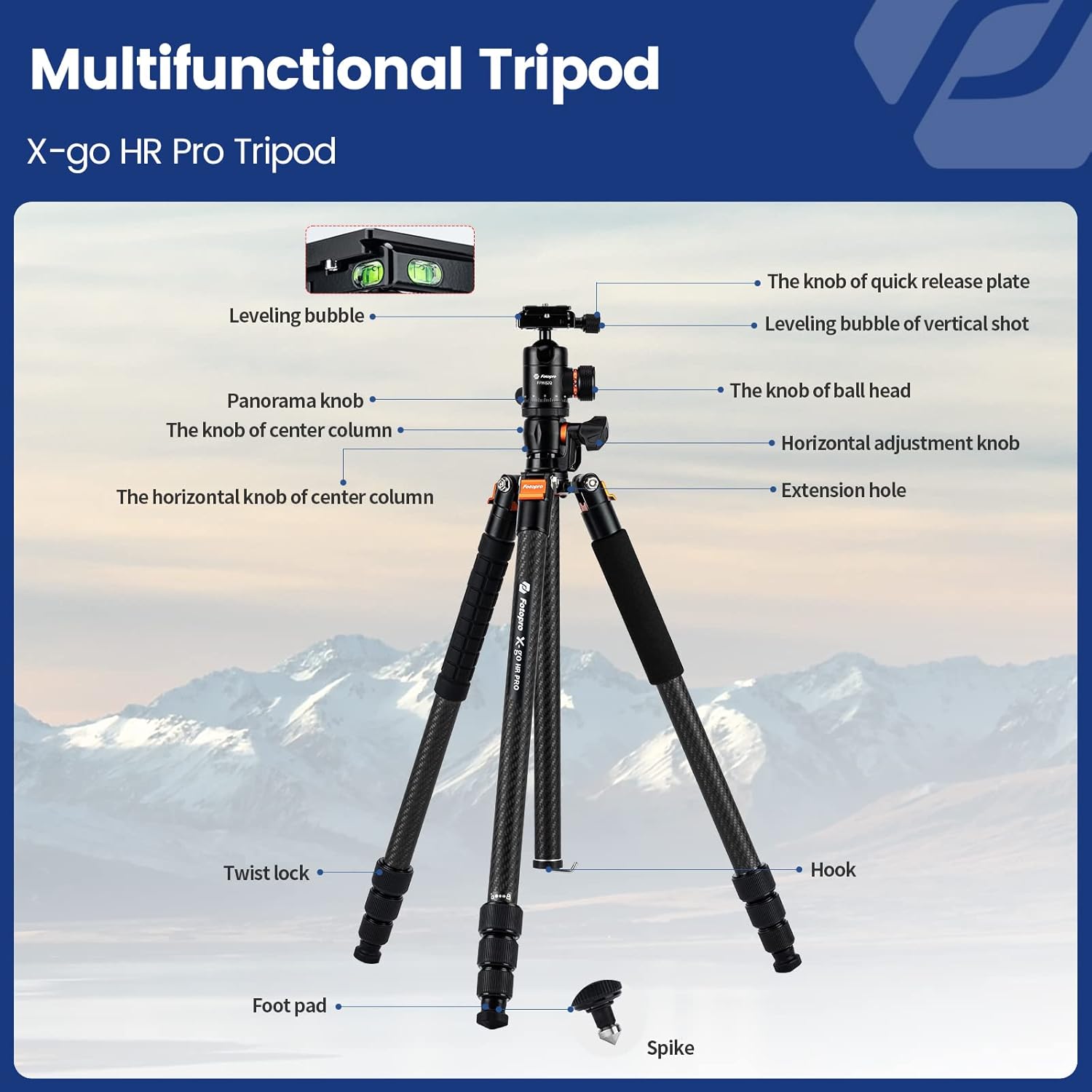
This image displays the Fotopro X-go HR Pro Tripod with various parts labeled for easy identification. Key components include the quick release plate knob, leveling bubbles (for both vertical and horizontal shots), panorama knob, center column knob, horizontal adjustment knob, extension hole, twist locks, hook, foot pad, and spike.
- Knob of Quick Release Plate: Secures the camera to the ball head.
- Leveling Bubble (Vertical Shot): Assists in achieving a level setup for standard vertical shots.
- Panorama Knob: Controls the 360-degree rotation of the ball head for panoramic photography.
- Knob of Center Column: Locks and unlocks the vertical movement of the center column.
- Horizontal Knob of Center Column: Engages and disengages the horizontal movement of the center column.
- Extension Hole: Allows attachment of additional accessories.
- Twist Lock: Used to extend and secure the tripod legs.
- Hook: Located at the bottom of the center column, used to hang weight for added stability.
- Foot Pad: Standard rubber feet for general use.
- Spike: Interchangeable with foot pads for enhanced grip on soft or uneven terrain.
Setup & Assembly
Standard Tripod Setup
- Unfold the tripod legs by releasing the leg angle locks.
- Extend each leg section to the desired height by twisting the leg locks counter-clockwise to loosen, extending the section, and then twisting clockwise to tighten.
- Ensure all leg locks are securely tightened before mounting equipment.
- Adjust the center column height by loosening the center column knob, raising or lowering the column, and then tightening the knob.
- Attach your camera to the quick release plate, then secure the plate to the ball head.

This image demonstrates the Fotopro tripod extended to its maximum height of 62.6 inches (1590mm), showing its adjustable range from a compact 17.32 inches (440mm) when folded.
Horizontal Column Mode
- Loosen the horizontal knob of the center column.
- Pull the center column upwards and then pivot it horizontally until it is parallel to the ground.
- Tighten the horizontal knob to secure the column in place.
- The horizontal column can be rotated 360 degrees and adjusted vertically while in horizontal mode.

This image illustrates the tripod's 360° horizontal rotation feature, allowing the center column to pivot from vertical to horizontal, enabling versatile shooting angles for panoramic and macro photography.

This image highlights the horizontal rotation feature, showing the transverse axis extended to its full length of 17.28 inches (439mm), providing ample reach for various shooting angles.
This video demonstrates the setup and versatility of the Fotopro Carbon Fiber Horizontal Tripod, showcasing its ability to switch between vertical and horizontal modes, and its use in various photography scenarios like overhead and macro shots.
Monopod Conversion
- Identify the tripod leg with the foam grip. This leg is detachable.
- Unscrew this leg from the tripod body.
- Remove the ball head from the main tripod body.
- Screw the ball head onto the top of the detached leg.
- The monopod is now ready for use. Its adjustable range is from 19.5 inches (49.5 cm) to 52 inches (132 cm).

This diagram illustrates the 2-in-1 functionality of the Fotopro tripod, detailing how to detach a leg and the center column to form a monopod, and how the center column can be inverted for low-angle shots.
Operating Instructions
Adjusting the Ball Head
- Ball Head Lock Knob: Loosen this knob to adjust the angle of your camera. Tighten to secure the camera in position.
- Panorama Knob: Loosen this knob to rotate the camera horizontally for panoramic shots without changing the tripod's leg position.
- Quick Release Plate: Ensure your camera is securely attached to the quick release plate before mounting it onto the ball head. Use the quick release plate knob to firmly attach or detach the plate.

This close-up image showcases the panoramic ball head, indicating a maximum load capacity of 22.04 lbs (10KG) and featuring three leveling bubbles for precise alignment in various orientations.
Using Spikes for Stability
For increased stability on soft ground, sand, snow, or rocky terrain, you can replace the rubber foot pads with the built-in spikes. Simply unscrew the rubber foot pads and extend the spikes as needed.

This image shows the Fotopro Carbon Fiber Horizontal Tripod in its standard configuration, with an inset demonstrating the monopod conversion and the spike feet for enhanced grip on uneven surfaces.
Versatile Shooting Scenarios
The Fotopro tripod is designed to support a wide range of photographic applications:
- Product Photography: Utilize the horizontal column for overhead shots of products on a table or floor.
- Macro Photography: Position the camera close to the ground or use the inverted center column for extreme low-angle macro shots.
- Long Exposure: The stable carbon fiber construction minimizes vibration, crucial for sharp long exposure images.
- Travel Photography: Its lightweight and compact design makes it an excellent companion for on-the-go shooting.

This collage illustrates various applications of the Fotopro tripod, including product photography, overhead shots, long exposure photography, and macro shooting, highlighting its versatility.
Maintenance
- Cleaning: After each use, especially in dusty, sandy, or wet environments, wipe down the tripod legs and joints with a clean, damp cloth. Avoid using harsh chemicals.
- Lubrication: Periodically check the leg locks and moving parts. If they become stiff, apply a small amount of silicone-based lubricant. Do not over-lubricate.
- Storage: Store the tripod in a dry, cool place, preferably in its carrying bag, to protect it from dust and moisture.
- Inspection: Regularly inspect all screws, knobs, and leg locks to ensure they are tight and functioning correctly.
Troubleshooting
| Problem | Possible Cause | Solution |
|---|---|---|
| Tripod is unstable or wobbly. | Leg locks not fully tightened; uneven ground; excessive load; center column extended too high. | Ensure all leg locks are securely tightened. Adjust leg angles for stability on uneven surfaces. Do not exceed maximum load capacity (22 lbs / 10 kg). Lower the center column if possible. Use the hook to add weight. |
| Leg sections are difficult to extend or retract. | Dirt or debris inside leg sections; lack of lubrication. | Clean leg sections thoroughly. Apply a small amount of silicone-based lubricant to the moving parts. |
| Ball head does not hold camera securely. | Ball head lock knob not tightened sufficiently; quick release plate not properly seated or tightened. | Ensure the ball head lock knob is fully tightened. Verify the quick release plate is correctly inserted and its knob is securely fastened. Do not exceed the ball head's load capacity. |
| Horizontal column does not move smoothly or lock properly. | Horizontal knob not fully loosened/tightened; internal debris. | Ensure the horizontal knob is completely loosened before adjusting and fully tightened to lock. Clean the mechanism if debris is suspected. |
Specifications
| Feature | Detail |
|---|---|
| Model Name | CSTRXG12ZPCFBK |
| Material | Carbon Fiber |
| Maximum Height | 63 Inches (160 cm) |
| Folded Height | 17.32 Inches (44 cm) |
| Item Weight | 3 lbs (1.36 kg) |
| Weight Limit (Max Load) | 22 lbs (10 kg) |
| Horizontal Center Shaft Length | 17.28 Inches (43.9 cm) |
| Monopod Adjustable Range | 19.5 - 52 Inches (49.5 - 132 cm) |
| Tripod Head Type | Ball Head |
| Leg Sections | 4 |
| Special Features | Adjustable, Rotatable, 2-in-1 Tripod/Monopod, Inverted Center Shaft, Spiked Feet |
Warranty and Support
Fotopro products are manufactured to high quality standards. For warranty information, technical support, or service inquiries, please refer to the official Fotopro website or contact their customer service directly. Keep your purchase receipt as proof of purchase for any warranty claims.
For further assistance, you may visit the Fotopro Official Store on Amazon.
Related documentsCSTRXG12ZPCFBK

Ask a question about this manual
Ask about setup, troubleshooting, compatibility, parts, safety, or missing instructions. Manuals+ will review the question and use this page’s manual context to help answer it.