
1. Introduction
Thank you for choosing the WESTTREE X26A 20000mAh Rechargeable Camping Fan with LED Lantern. This device is designed to provide portable cooling and illumination for various indoor and outdoor activities. Please read this manual thoroughly before use to ensure proper operation and to maximize the product's lifespan.
2. Safety Instructions
- Do not immerse the fan in water or other liquids.
- Keep the fan away from open flames, heat sources, and direct sunlight to prevent battery damage.
- Do not disassemble, repair, or modify the product. Contact customer support if service is required.
- Ensure children and pets do not play with the fan.
- Use only the provided Type-C charging cable or a certified equivalent.
- Avoid placing fingers or foreign objects into the fan blades while operating.
- Store the fan in a cool, dry place when not in use for extended periods.
3. Package Contents
Please check the package for the following items:
- WESTTREE X26A Camping Fan with LED Lantern
- USB Type-C Charging Cable
- User Manual
4. Product Features
- Double Blade Design: Provides powerful airflow.
- 270° Adjustable Head: Allows for precise airflow direction.
- 20000mAh Rechargeable Battery: Offers extended operating time.
- USB Type-C Input: For convenient and fast charging.
- USB Output Port: Functions as a power bank for charging other devices.
- Integrated LED Lantern: Features 3 brightness settings and 2 color temperatures (warm and white light).
- Quiet Operation: Operates at a low noise level (below 28dB).
- 4 Fan Speeds: Adjustable via a stepless speed regulation dial.
- Portable Design: Includes a sturdy handle and hanging hook for versatile placement.
- Power Indicator Display: Shows remaining battery level and timer settings.
5. Setup
- Unpacking: Carefully remove the fan and all accessories from the packaging.
- Initial Charge: Before first use, fully charge the fan. Connect the Type-C charging cable to the fan's input port and the other end to a 5V/3A USB power adapter (not included). The power indicator lights will show charging progress.
- Positioning: Place the fan on a stable, flat surface or use the integrated hook to hang it. Adjust the fan head to the desired angle (up to 270 degrees).

Image: The WESTTREE X26A fan with its LED lights on, demonstrating its ability to charge a smartphone via its USB output port. This image highlights the fan's multi-functional design, serving as both a cooling device and a portable power source.
6. Operating Instructions
6.1 Fan Operation
- Power On/Off: Rotate the fan speed dial clockwise to turn on the fan. Continue rotating to increase speed. Rotate counter-clockwise to decrease speed and turn off.
- Speed Adjustment: The fan features stepless speed regulation. Turn the dial to precisely adjust the airflow from low to high.

Image: The WESTTREE X26A fan positioned on a bedside table, providing quiet airflow to a person sleeping. This illustrates the fan's low noise level, making it suitable for use in quiet environments like bedrooms or tents.
6.2 LED Lantern Operation
- Turning On/Off: Locate the light button on the control panel. Press once to turn on the light.
- Brightness Adjustment: Press the light button repeatedly to cycle through 3 brightness settings (Low, Mid, High).
- Color Temperature: The lantern offers two color temperatures: warm and white light. Refer to the control panel for specific controls to switch between these modes.

Image: A visual representation of the WESTTREE X26A fan's LED lantern functionality, showing three distinct brightness levels (Low, Mid, High) and two color temperature options (warm and white light) illuminating a tent interior.
6.3 Timer Setting
- The fan includes a timer function. Press the timer button to set the fan to automatically turn off after a specified duration (e.g., 2H, 4H, 6H, 8H). The active timer setting will be indicated on the power display.
7. Charging the Fan
The WESTTREE X26A fan is equipped with a 20000mAh rechargeable battery. To charge:
- Connect the provided USB Type-C cable to the fan's input port.
- Connect the other end of the cable to a compatible USB power source (e.g., wall adapter, power bank, computer USB port). For optimal charging speed, a 5V/3A adapter is recommended.
- The power indicator display will show the charging status (25%, 50%, 75%, 100%). A full charge typically takes approximately 6 hours with a 5V/3A input.
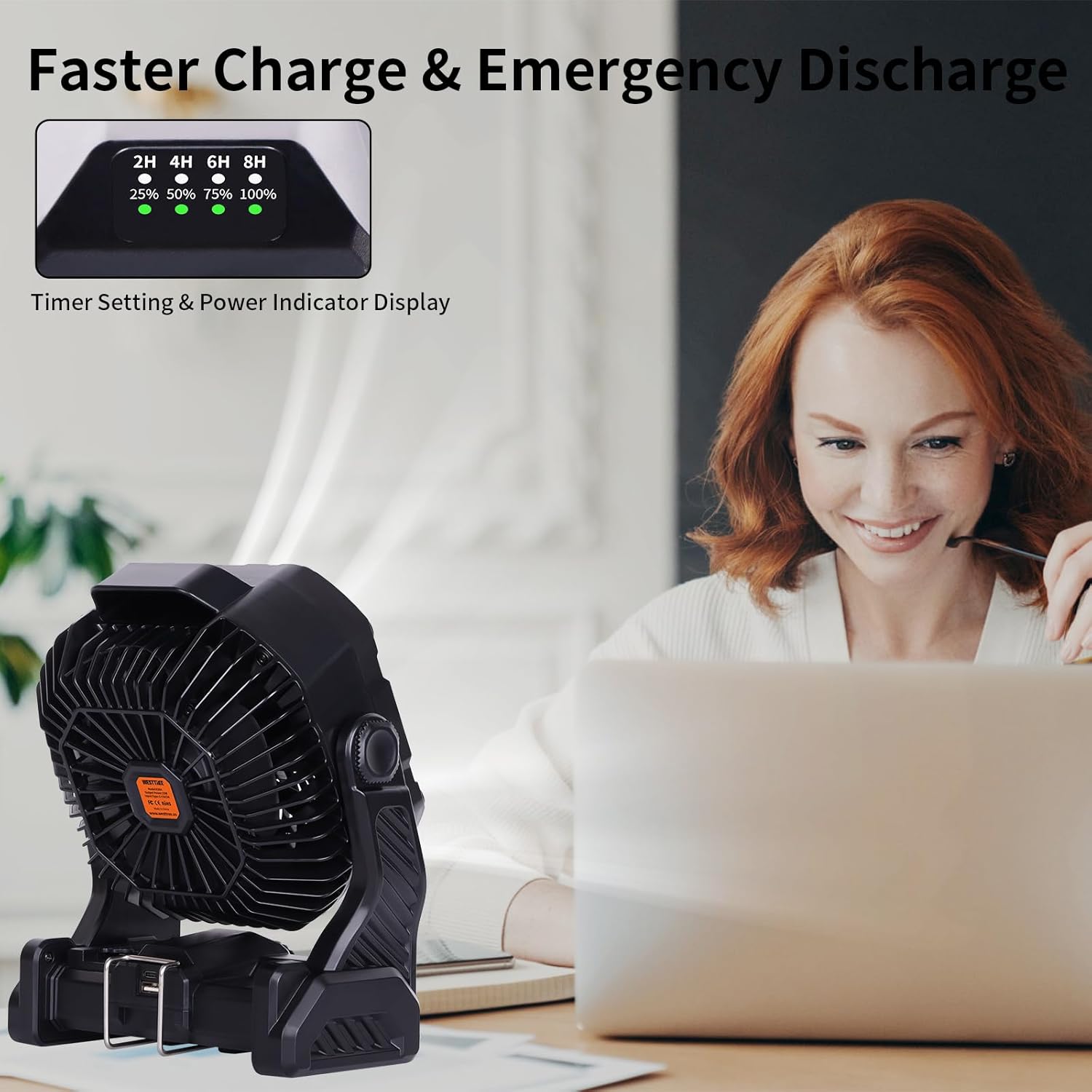
Image: The WESTTREE X26A fan on a desk, displaying its power indicator with charging percentages and timer settings. A smartphone is shown connected to the fan, illustrating its capability to charge external devices.
8. Using as a Power Bank
The fan can also serve as a portable power bank to charge other USB-powered devices:
- Locate the USB output port on the fan.
- Connect your device's charging cable to the fan's USB output port.
- The fan will begin charging your device. Monitor your device's charging status.

Image: A detailed view of the WESTTREE X26A fan's control panel, highlighting the power display and the USB output port being used to charge a smartphone. This demonstrates the fan's dual function as a portable charger.
9. Maintenance
- Cleaning: Ensure the fan is turned off and unplugged before cleaning. Use a soft, dry cloth to wipe the exterior. For stubborn dirt, a slightly damp cloth can be used, followed by a dry cloth. Do not use abrasive cleaners or solvents.
- Storage: When not in use for extended periods, store the fan in a cool, dry place, away from direct sunlight and extreme temperatures. It is recommended to charge the battery to about 50-70% before storage to prolong battery life.
10. Troubleshooting
| Problem | Possible Cause | Solution |
|---|---|---|
| Fan does not turn on | Battery is depleted Power dial not turned sufficiently | Charge the fan fully Ensure the power dial is rotated clockwise past the 'off' position |
| LED lantern does not turn on | Battery is depleted Light button not pressed | Charge the fan fully Press the light button to activate |
| Fan does not charge | Charging cable faulty Power adapter insufficient Charging port damaged | Try a different USB Type-C cable Use a 5V/3A power adapter Contact customer support |
| Device not charging from USB output | Fan battery low Device cable faulty USB output port damaged | Charge the fan fully Try a different charging cable for your device Contact customer support |
11. Specifications
| Feature | Detail |
|---|---|
| Brand | WESTTREE |
| Model Name | X26A |
| Battery Capacity | 20000mAh |
| Power Source | Battery Powered |
| Charging Input | USB Type-C (5V) |
| USB Output | Yes (for charging other devices) |
| Fan Speeds | 4 (Stepless regulation) |
| Noise Level | 26 dB |
| LED Lantern | 3 Brightness Settings, 2 Color Temperatures (Warm/White) |
| Adjustable Head | 270° |
| Product Dimensions | 2"D x 2"W x 2"H (Approximate) |
| Item Weight | 3.23 pounds |
| Indoor/Outdoor Usage | Outdoor |

Image: A diagram illustrating the dimensions of the WESTTREE X26A fan (10.8"H x 8.5"W x 4.7"D) and a close-up view of its integrated hanging hook, emphasizing its portability and versatile placement options.
12. Warranty and Support
For warranty information or technical support, please contact WESTTREE customer service through the retailer where the product was purchased or visit the official WESTTREE website. Please have your model number (X26A) and purchase details ready when contacting support.