
1. Introduction
The EASYGUARD ECS002PP-BM-FM1 is a plug-and-play remote starter system designed for select BMW vehicles equipped with a factory OEM push-start button. This system allows users to remotely start and stop their vehicle using the existing factory key fob, providing convenience for pre-warming or pre-cooling the vehicle.
2. Compatibility
This remote starter system is compatible with the following BMW models and years, provided the vehicle has a factory OEM push-start button:

Table showing compatible BMW models and years for the ECS002PP-BM-FM1 remote starter, including Series, Platform, and Jumper Setting.
| Year | Plate | Series | Platform | Jumper Setting |
|---|---|---|---|---|
| 2010-2018 | F20/F21 | 1 | FEM | No.1, 2 take off |
| 2011-2018 | F30/F31/F34/F35/F80 | 3/M3/3GT | FEM | No.1, 2 take off |
| 2013-2018 | F22/F23/F87 | 2/M2 | FEM | No.1, 2 take off |
| 2013-2018 | F32/F33/F36/F82/F83 | 4/4GT/M4 | FEM | No.1, 2 take off |
All listed vehicles must be equipped with a factory OEM push-start button.
3. Package Contents
The EASYGUARD ECS002PP-BM-FM1 kit includes the following components:

Image displaying the various components included in the EASYGUARD ECS002PP-BM-FM1 remote starter kit, including the control module, bypass module, wiring harnesses, and battery boards.
- Control Module
- Bypass Module
- Bypass Wire
- Battery Board (Choose one of two provided)
- Plug Play Wire Harness
4. Important Notes and Safety Information

Key considerations for the EASYGUARD remote starter installation and operation.
- This system is designed for plug-and-play installation.
- No programming of car keys is required.
- The system utilizes your factory OEM key/remote for remote start/stop functions.
- Your vehicle must have a factory OEM Push Start Button.
- A bypass module is included in the kit.
- You must have two working factory keys for installation: one will be placed in the bypass module, and the other will be used for daily operation.
Safety Information
Keep the entire kit and its components away from children.
5. Installation
Installation of this system requires careful attention to detail. If you lack experience with car alarm or electrical installations, it is highly recommended to seek assistance from a trained professional installer.
5.1. Bypass Module Installation
The bypass module is crucial for the system to function correctly, as it interacts with the vehicle's chip immobilizer. The bypass module is included in the kit and does not need to be purchased separately.

Step-by-step visual guide for installing the bypass module, focusing on the key sensing area and battery board placement within the factory key.
- Locate the key sensing area in your vehicle.
- Carefully open one of your factory key fobs.
- Slightly raise the contact spring within the key fob to ensure good contact with the battery board.
- Insert one of the provided battery boards into the key fob.
- Connect the ribbon cable from the bypass module to the battery board.
- Secure the key with adhesive tape, wrapping it several times, and ensure the key button side faces up.
- Place the assembled key fob with the bypass module near the key sensing area in your vehicle.
5.2. Wiring Diagram for FEM Vehicles
A detailed English wiring diagram is available. Please contact us to review it if needed. The diagram below illustrates the connections for FEM vehicles.

Detailed wiring diagram for FEM vehicles, illustrating connections for the remote starter system to various pins and modules.
Note: This wiring diagram is complex. Professional installation is strongly recommended to avoid damage to your vehicle's electrical system.
6. Operation
Once installed, the EASYGUARD ECS002PP-BM-FM1 system allows you to remotely control your vehicle using your factory key fob.
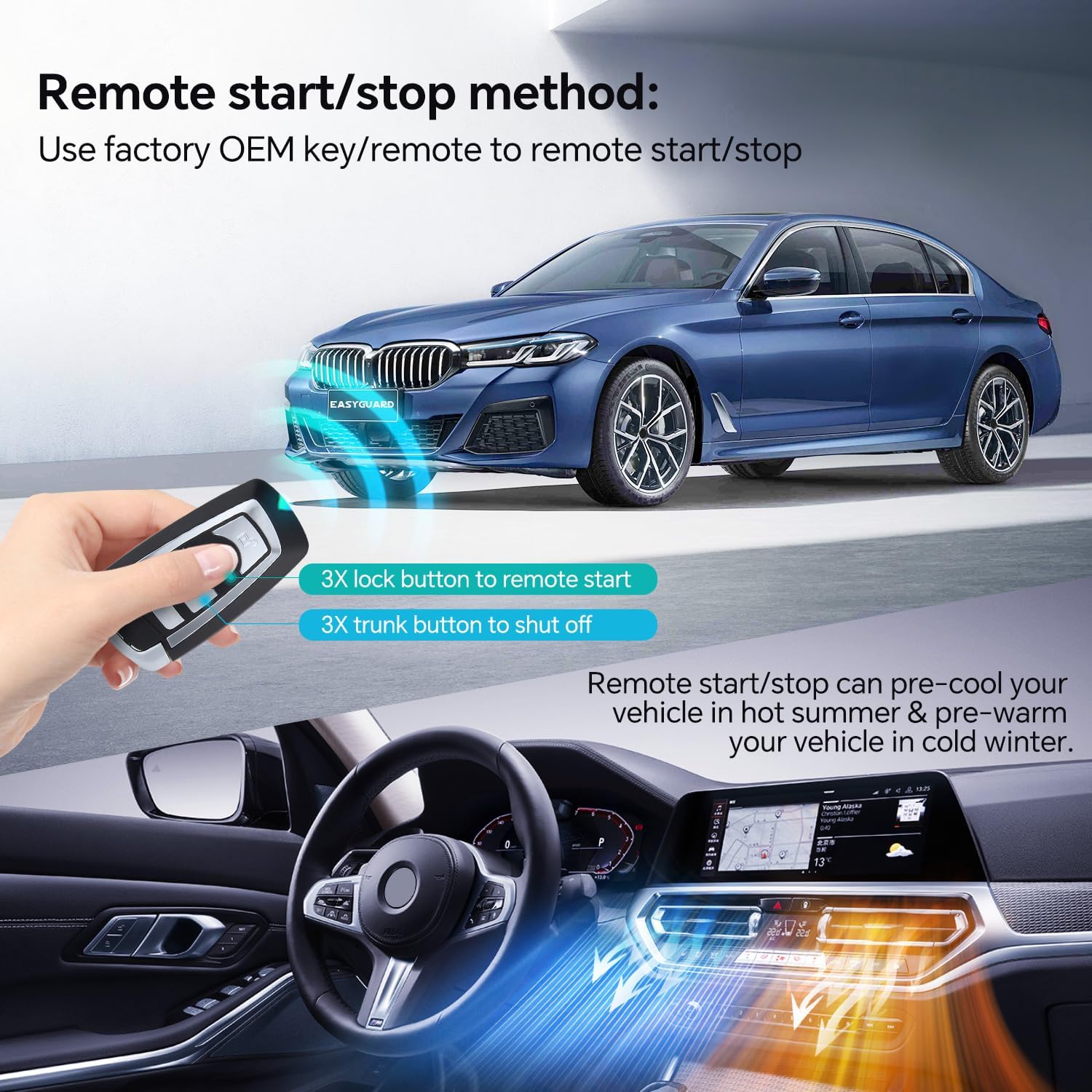
Illustration of using the factory key fob to remote start and stop the vehicle, highlighting the 3x lock and 3x trunk button presses.
6.1. Remote Start
To remotely start your vehicle:
- Press the Lock button on your factory key fob three (3) times consecutively.
- The vehicle's engine will start, and the climate control system will activate based on its last setting.
6.2. Remote Stop
To remotely shut off your vehicle:
- Press the Trunk button on your factory key fob three (3) times consecutively.
- The vehicle's engine will shut off.
6.3. Security Feature
For safety and security, the engine will automatically shut off if a door is opened after a remote start. This is a normal function of the system.
7. Troubleshooting
If you encounter issues with your EASYGUARD remote starter, please review the following common problems and solutions:
- System Not Functioning Properly:
Ensure all wiring connections are secure and correctly installed according to the diagram. Verify that both factory key fobs are working correctly and that one is properly placed within the bypass module as per installation instructions. - Engine Shuts Off After Remote Start When Door is Opened:
This is a built-in security feature and is normal operation. It prevents unauthorized driving of the vehicle after a remote start. - Limited Remote Range:
The remote start system operates using the range of your existing factory key fob. Obstacles, weather conditions, and battery strength of your key fob can affect the effective range. - Battery Drain Concerns:
Ensure that all modules are correctly installed and that the vehicle's computer and monitor completely shut down after the remote stop function is used. Incorrect installation or persistent activity from vehicle systems can lead to battery drain. Consult a professional installer to verify the installation.
For further assistance, please contact EASYGUARD customer support.
8. Specifications
- Item Model Number: ECS002PP-BM-FM1
- Item Weight: 2.86 pounds (1.3 kg)
- Product Dimensions: 7.09 x 5.91 x 2.36 inches (18 x 15 x 6 cm)
- Manufacturer: ieasyguard.com
9. Warranty and Support
For warranty information and technical support, please refer to the documentation provided with your purchase or visit the official EASYGUARD website. It is recommended to retain your proof of purchase for warranty claims.