
AGM M7
AGM M7 4G Rugged Phone User Manual
Model: M7 | Brand: AGM
1. Introduction
This user manual provides comprehensive instructions for the safe and efficient operation of your AGM M7 4G Rugged Phone. Please read this manual thoroughly before using the device and keep it for future reference.
The AGM M7 is designed for durability and ease of use, featuring a rugged build, large buttons, and a powerful speaker, making it suitable for various environments and users.
2. Package Contents
Please check the contents of your package. If any items are missing or damaged, contact your retailer.
- AGM M7 4G Rugged Phone
- USB Type-C Charging Cable
- Power Adapter (may vary by region)
- User Manual (this document)
- SIM Ejector Tool (if applicable)
3. Device Overview
Familiarize yourself with the main components of your AGM M7 phone.

Figure 3.1: Front view of the AGM M7 phone, highlighting its large buttons and screen interface.
- Display: 2.4-inch touchscreen.
- Physical Keypad: Large, tactile buttons for dialing and navigation.
- Speaker: Powerful 3.5W 35mm speaker on the back.
- Side Key: Customizable function button.
- Cameras: Front (0.3M) and Rear (2M) cameras.
- LED Torch: Integrated flashlight.
- USB Type-C Port: For charging and data transfer.
4. Setup
4.1 Installing SIM Cards and Battery
The AGM M7 supports dual SIM cards. Follow these steps to install your SIM cards and the battery:
- Carefully remove the back cover of the phone.
- Insert your SIM card(s) into the designated slots. Ensure the gold contacts are facing down and the notched corner is correctly aligned.
- Insert the 2500mAh Lithium-Ion battery into its compartment, aligning the contacts.
- Replace the back cover, ensuring it is securely latched to maintain water and dust resistance.
4.2 Initial Charging
Before first use, fully charge the phone. Use the provided USB Type-C cable and power adapter.

Figure 4.1: USB Type-C charging port and optional charging dock for the AGM M7.
- Connect the USB Type-C cable to the phone's charging port.
- Connect the other end of the cable to the power adapter, then plug the adapter into a wall outlet.
- The battery indicator on the screen will show charging status.
- A full charge typically takes a few hours.
Note: A charging dock is supported but needs to be purchased separately.
5. Basic Operation
5.1 Power On/Off
- To Power On: Press and hold the Power/End Call button until the screen lights up.
- To Power Off: Press and hold the Power/End Call button, then select "Power Off" from the options on the screen.
5.2 Making Calls
- From the home screen, use the keypad to dial the desired phone number.
- Press the Green Call button to initiate the call.
- To end a call, press the Red End Call button.
5.3 Sending Messages
- Navigate to the "Messages" application from the main menu.
- Select "New Message" or "Create Message".
- Enter the recipient's number or select from contacts.
- Type your message using the keypad.
- Press the Send option.
5.4 Navigation and Interface
The AGM M7 features a 2.4-inch touchscreen and a physical keypad for navigation.

Figure 5.1: The AGM M7's large buttons and clear icons for easy navigation.
- Use the directional keys on the keypad to navigate through menus and options.
- Press the central "OK" button to select an item.
- The touchscreen can also be used for direct interaction with on-screen elements.
- The phone supports big fonts and icons for improved readability.
6. Advanced Features
6.1 Smart Operation System and Applications
The AGM M7 runs a smart operation system that supports popular applications.

Figure 6.1: Supported applications on the AGM M7's smart operating system.
Pre-installed applications include Facebook, WhatsApp, TikTok, Skype, and Zello. These can be accessed from the main menu.
Note: The AGM M7 does NOT support Google Play Store.
6.2 Customizable Side Key
The function of the side key on the AGM M7 is customizable to suit your needs.

Figure 6.2: Customizable functions of the side key.
You can configure it to:
- Access Push-to-Talk (PTT) features (e.g., Zello).
- Quickly launch the camera.
- Control audio playback.
- Activate the LED torch (flashlight).
6.3 Camera Functionality
The phone is equipped with a 0.3M front camera and a 2M rear camera for capturing photos and videos.
6.4 LED Torch
The integrated LED torch provides illumination in dark environments. It can be activated via the customizable side key or through the phone's menu.
7. Durability Features
The AGM M7 is built to withstand harsh conditions, certified with IP68, IP69K, and MIL-STD-810H ratings.

Figure 7.1: Durability features of the AGM M7, including drop, water, temperature, and dust resistance.
- IP68 Rating: Protected against dust ingress and can withstand immersion in water up to 1.5 meters for 30 minutes.
- IP69K Rating: Protected against close-range high-pressure, high-temperature spray downs.
- MIL-STD-810H Certified: Meets military standards for durability against drops (up to 2 meters), extreme temperatures (-20°C to 60°C), and other environmental stresses.
- Dust Protection: Blocks 99% of dust particles.
Always ensure the USB port cover and back cover are securely closed to maintain water and dust resistance.
8. Battery Management
The AGM M7 is equipped with a long-lasting 2500mAh Lithium-Ion battery.

Figure 8.1: The 2500mAh battery provides extended usage.
- Talk Time: Up to 15 hours.
- Standby Time: Up to 13 days (300 hours).
- Charging: Use the provided USB Type-C cable and adapter for optimal charging.
To maximize battery life, consider reducing screen brightness, disabling unused features like Wi-Fi or Bluetooth when not needed, and closing background applications.
9. Audio Features
The AGM M7 features a powerful rear speaker for clear and loud audio.
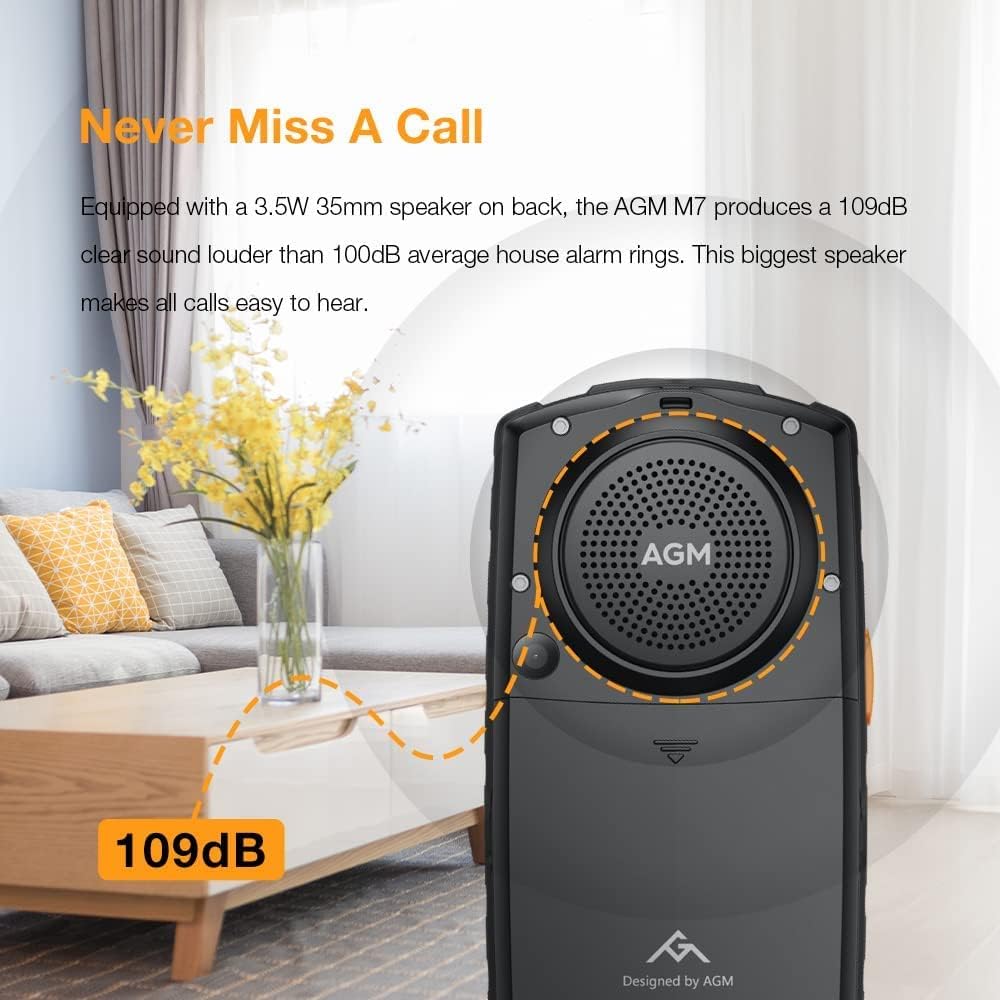
Figure 9.1: The AGM M7's powerful 109dB speaker.
- Speaker Output: Equipped with a 3.5W 35mm speaker.
- Loudness: Produces 109dB sound, significantly louder than typical phone rings, ensuring you never miss a call.
10. Connectivity
The AGM M7 supports various connectivity options for communication and data transfer.
- Network: 4G LTE-FDD, 3G WCDMA, 2G GSM.
- Wireless: Wi-Fi, Bluetooth.
- Wired: USB Type-C for charging and data.
- SIM: Dual SIM card slots.
11. Network Compatibility
The AGM M7 is designed to work with specific network bands. Please verify compatibility with your carrier before use.

Figure 11.1: Network compatibility details for the AGM M7.
Recommended Carrier:
- GSM T-Mobile Phone
Supported Bands:
- 2G GSM: B2/3/5/8
- 3G WCDMA: B1/2/4/5/8
- 4G LTE-FDD: B2/4/5/7/28AB
Not Compatible With:
- Straight Talk
- Cricket
- Any contract SIM card
- CDMA carriers (e.g., Verizon, Sprint, Boost Mobile)
Please check with your local bands before purchase. Contact customer support for any compatibility questions.
12. Maintenance and Care
To ensure the longevity and optimal performance of your AGM M7, follow these maintenance guidelines:
- Cleaning: Use a soft, damp cloth to clean the phone's surface. Avoid harsh chemicals or abrasive materials.
- Port Covers: Always ensure the USB Type-C port cover and back cover are securely sealed to maintain water and dust resistance.
- Temperature: Avoid exposing the phone to extreme temperatures outside its operating range (-20°C to 60°C).
- Storage: Store the phone in a cool, dry place when not in use for extended periods.
- Battery: Do not attempt to replace the battery yourself. Contact authorized service personnel if battery issues arise.
13. Troubleshooting
This section addresses common issues you might encounter with your AGM M7 phone.
| Problem | Possible Cause | Solution |
|---|---|---|
| Phone does not power on. | Low battery; Battery not properly installed. | Charge the phone for at least 30 minutes. Ensure battery is correctly inserted. |
| Cannot make or receive calls. | No SIM card; SIM card not activated; Out of network coverage; Incorrect network settings. | Ensure SIM card is inserted and activated. Check network signal strength. Verify network compatibility (Section 11). |
| Poor audio quality from speaker. | Speaker obstructed; Volume too low. | Ensure speaker grille is clear of debris. Increase volume using the volume buttons. |
| Phone is slow or unresponsive. | Too many applications running; Low storage. | Close unused applications. Clear cache or uninstall unnecessary apps to free up storage. Restart the phone. |
| Battery drains quickly. | High screen brightness; Background apps; Weak signal. | Reduce screen brightness. Close background apps. Move to an area with better network coverage. |
If the issue persists after trying these solutions, please contact customer support.
14. Specifications
| Feature | Detail |
|---|---|
| Model | AGM M7 |
| Display | 2.4-inch Touchscreen |
| RAM | 1GB |
| ROM | 8GB |
| Battery | 2500mAh Lithium-Ion |
| Rear Camera | 2M |
| Front Camera | 0.3M |
| Speaker | 3.5W 35mm, 109dB output |
| Water Resistance | IP68, IP69K |
| Drop Protection | MIL-STD-810H (up to 2m) |
| Dust Protection | 99% Blockage |
| Operating Temperature | -20°C to 60°C |
| SIM Card Slots | Dual SIM |
| Connectivity | 4G LTE-FDD, 3G WCDMA, 2G GSM, Wi-Fi, USB Type-C |
| Dimensions | 5.79 x 3.15 x 2.05 inches (Package) |
| Item Weight | 10.2 ounces |
15. Warranty and Support
AGM provides a limited warranty for the M7 4G Rugged Phone. Please refer to the warranty card included in your package for specific terms and conditions.
For technical support, troubleshooting assistance, or warranty claims, please contact AGM customer service through the following channels:
- Website: Visit the official AGM website for support resources and contact information.
- Email: Refer to your warranty card or product packaging for the support email address.
- Phone: Check the AGM website for regional support phone numbers.
When contacting support, please have your product model (AGM M7) and purchase information ready.
16. Product Video
Watch the official product video for a visual overview of the AGM M7's features and durability.
Video 16.1: "AGM M7 Best Rugged Phone" - This video showcases the phone's ruggedness, powerful speaker, large keypad, long standby time, LED flashlight, and smart features like TikTok and gaming, as well as charging dock support.
Related documentsM7


Ask a question about this manual
Ask about setup, troubleshooting, compatibility, parts, safety, or missing instructions. Manuals+ will review the question and use this page’s manual context to help answer it.