
1. Introduction
Thank you for choosing the Lixada GPS Remote Control Bait Boat. This manual provides essential information for the safe and efficient operation, setup, and maintenance of your bait boat. Please read this manual thoroughly before first use and retain it for future reference.
The Lixada Bait Boat is designed for fishing enthusiasts, featuring advanced functionalities such as GPS positioning, automatic return, cruise control, and a dual-motor system for reliable performance. It supports a bait load of up to 2kg and offers a control range of 500 meters.
2. Safety Information
- Always operate the bait boat in open water, away from swimmers, other boats, and obstacles.
- Do not operate the boat in strong winds or extreme weather conditions.
- Ensure all hatches and covers are securely closed before placing the boat in water to prevent water ingress.
- Keep hands and loose clothing away from propellers when the boat is powered on.
- Do not attempt to retrieve the boat by swimming if it becomes stuck or loses power far from shore.
- Supervise children when they are operating or near the bait boat.
- Use only the specified batteries and charging equipment.
3. Package Contents
Verify that all items are present in the package:
- 1 x Fishing Bait Boat
- 1 x Remote Control
- 1 x USB Cable
- 1 x Boat Battery (5200 mAh or 12000 mAh, depending on model)
- 2 x Remote Control Sticks
- 1 x Screw
- 2 x Propellers
- 1 x User Manual
4. Product Overview
4.1 Bait Boat Components
The bait boat features a streamlined hull, three independent bait tanks, and front/rear navigation lights. The dual motor system is equipped with anti-winding protective covers and upgraded three-blade propellers for enhanced performance.

Image: Illustration of the dual motor system, highlighting the anti-winding protective cover and the three-blade propeller for improved efficiency.

Image: Close-up view of the three independent bait tanks, designed for controlled bait release.
4.2 Remote Control
The remote control allows for precise navigation, bait release, and activation of advanced features like GPS positioning and cruise control. It features a display for GPS information and battery status.
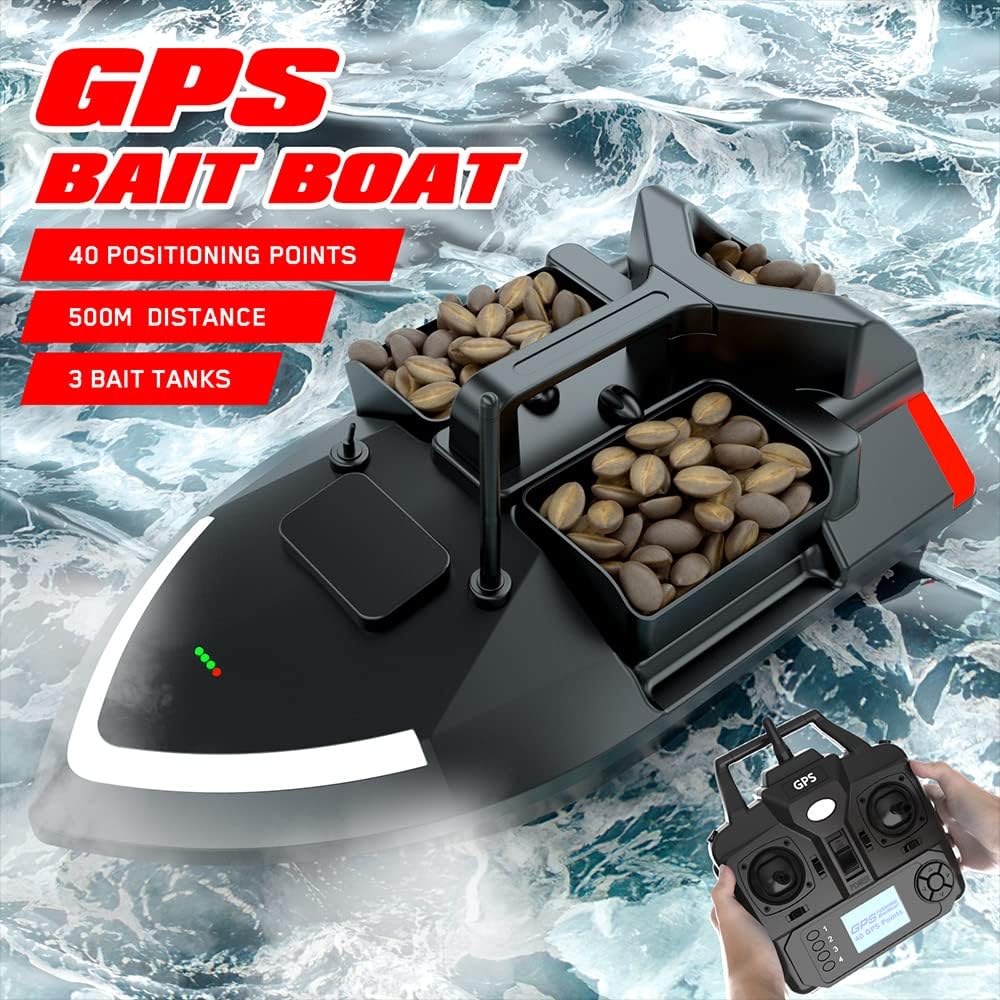
Image: The Lixada GPS Bait Boat in water with the remote control, illustrating its operational context.
5. Setup
5.1 Charging the Boat Battery
- Locate the charging port on the bait boat.
- Connect the provided USB cable to the boat's charging port and a suitable USB power adapter (not included).
- The charging indicator light will show the charging status. A full charge typically takes 6 hours.
- Disconnect the charger once fully charged.
5.2 Installing Remote Control Batteries
- Open the battery compartment on the back of the remote control.
- Insert 4 x AA batteries (not included), ensuring correct polarity.
- Close the battery compartment securely.
5.3 Attaching Propellers
If the propellers are not pre-installed, carefully attach them to the motor shafts, ensuring they are secure. Use the provided screw if necessary.
5.4 Initial Pairing
Typically, the boat and remote control are pre-paired. If pairing is required, power on both the boat and the remote control. Follow the instructions in the remote control's specific manual section for pairing if automatic connection does not occur.
6. Operating Instructions
6.1 Powering On/Off
- To power on the boat, press and hold the power button until the indicator lights illuminate.
- To power on the remote control, slide the power switch to the 'ON' position.
- To power off, reverse the steps.
6.2 Basic Navigation
Use the joysticks on the remote control to steer the boat:
- Left Joystick: Controls forward/backward movement.
- Right Joystick: Controls left/right turning.
6.3 Bait Tank Operation
The boat features three independent bait tanks. Load your bait into the tanks. Use the corresponding buttons on the remote control to open and release bait from each tank individually at your desired location.
6.4 Automatic Return Function
The boat is equipped with an automatic return feature. If the boat's battery is low, the remote control signal is lost, or the boat exceeds the 500-meter control range, it will automatically return to its starting point.

Image: Visual representation of the low battery alarm and the automatic return mechanism when the boat exceeds 500 meters or loses signal.
6.5 Cruise Control
Activate the cruise control system with a single click on the remote. This feature allows the boat to maintain a straight line at a constant speed, conserving effort and freeing your hands.
6.6 Fixed-Point Cruising (GPS Functionality)
Utilizing the Beidou/GPS dual satellite positioning system, you can set up to 40 positioning points. From the starting point, the boat can be programmed for automatic cruising to these designated destinations.
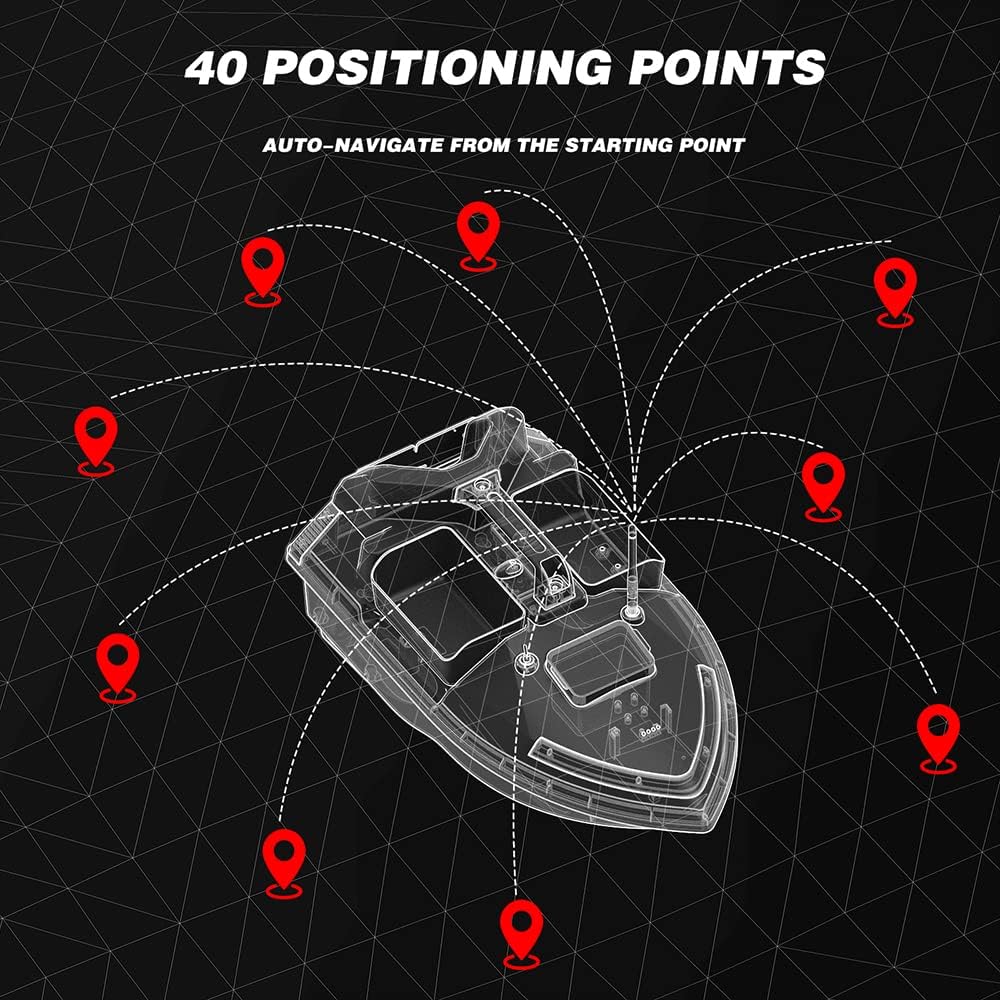
Image: Graphic illustrating the capability to set up to 40 GPS positioning points for automated navigation routes.
6.7 Automatic Route Correction
An integrated automatic balancing system helps correct yaw and ensures the boat travels straight, even in windy conditions, waves, or under load.
6.8 Night Flashing Light
The boat is equipped with night flashing lights for visibility during low-light conditions. Activate these lights via the remote control for safe night operation.
6.9 Hook and Line Attachment
The rear container features an anti-detachment design, allowing you to attach a hook and line for precise release, preventing tangles.

Image: Illustration of the slotted back bucket hook design, demonstrating how a fish hook can be placed in the rear bin to improve fishing efficiency.
7. Maintenance
7.1 Cleaning the Boat
- After each use, rinse the boat with fresh water to remove any salt, dirt, or debris.
- Wipe the boat dry with a soft cloth.
- Ensure no water enters the electronic compartments.
7.2 Battery Care
- Charge the boat battery fully before long-term storage.
- Store batteries in a cool, dry place.
- Remove AA batteries from the remote control if not used for an extended period.
7.3 Propeller Inspection
- Regularly inspect propellers for any damage or entanglement with fishing lines or debris.
- Clean propellers as needed to ensure optimal performance.
7.4 Storage
Store the bait boat in a dry, shaded area, away from direct sunlight and extreme temperatures.
8. Troubleshooting
| Problem | Possible Cause | Solution |
|---|---|---|
| Boat does not power on. | Low boat battery. | Charge the boat battery fully. |
| Remote control does not power on. | Low or incorrectly installed AA batteries. | Replace AA batteries, ensuring correct polarity. |
| Boat does not respond to remote. | Out of range; signal interference; pairing issue. | Bring boat closer; avoid interference sources; re-pair if necessary. |
| Boat moves erratically or slowly. | Propellers entangled; low boat battery. | Check and clear propellers; charge boat battery. |
| GPS functions are inaccurate. | Poor satellite signal; environmental interference. | Operate in open areas with clear sky view; wait for better signal acquisition. |
9. Specifications

Image: Detailed product information including dimensions, materials, battery capacity, control distance, and positioning points.
- Model: BLW5728332647526QM
- Material: ABS Plastic & Electronic Parts
- Max Load Capacity: 2 kg
- Boat Battery Capacity: 5200 mAh / 12000 mAh (optional)
- Remote Control Battery: 4 x AA batteries (not included)
- Charging Time: Approximately 6 hours
- Working Time: 2 hours (5200 mAh) / 4 hours (12000 mAh)
- Max Speed: 10 km/h
- Remote Control Range: 500 meters
- Frequency: 2.4 GHz
- Positioning Points: 40
- Boat Dimensions: 490 x 264 x 281 mm (19.3 x 10.4 x 11.1 inches)
- Package Dimensions: 535 x 320 x 260 mm (21.1 x 12.6 x 10.2 inches)
- Package Weight: 3.5 kg
10. Warranty and Support
For warranty information and technical support, please refer to the documentation provided at the time of purchase or contact your retailer. Keep your purchase receipt as proof of purchase.


