
1. Introduction
This manual provides instructions for the installation, use, and maintenance of your Asvine #6 Gold Plated Fountain Pen Replacement Nibs. This set includes one Extra Fine (EF), one Fine (F), and one Medium (M) nib, each with a black section. These nibs are designed for specific Asvine fountain pen models.
Compatibility: These replacement nibs are compatible with Asvine fountain pen models V169, P20, P30, and V126 Series. They are not compatible with the Asvine P36 model.
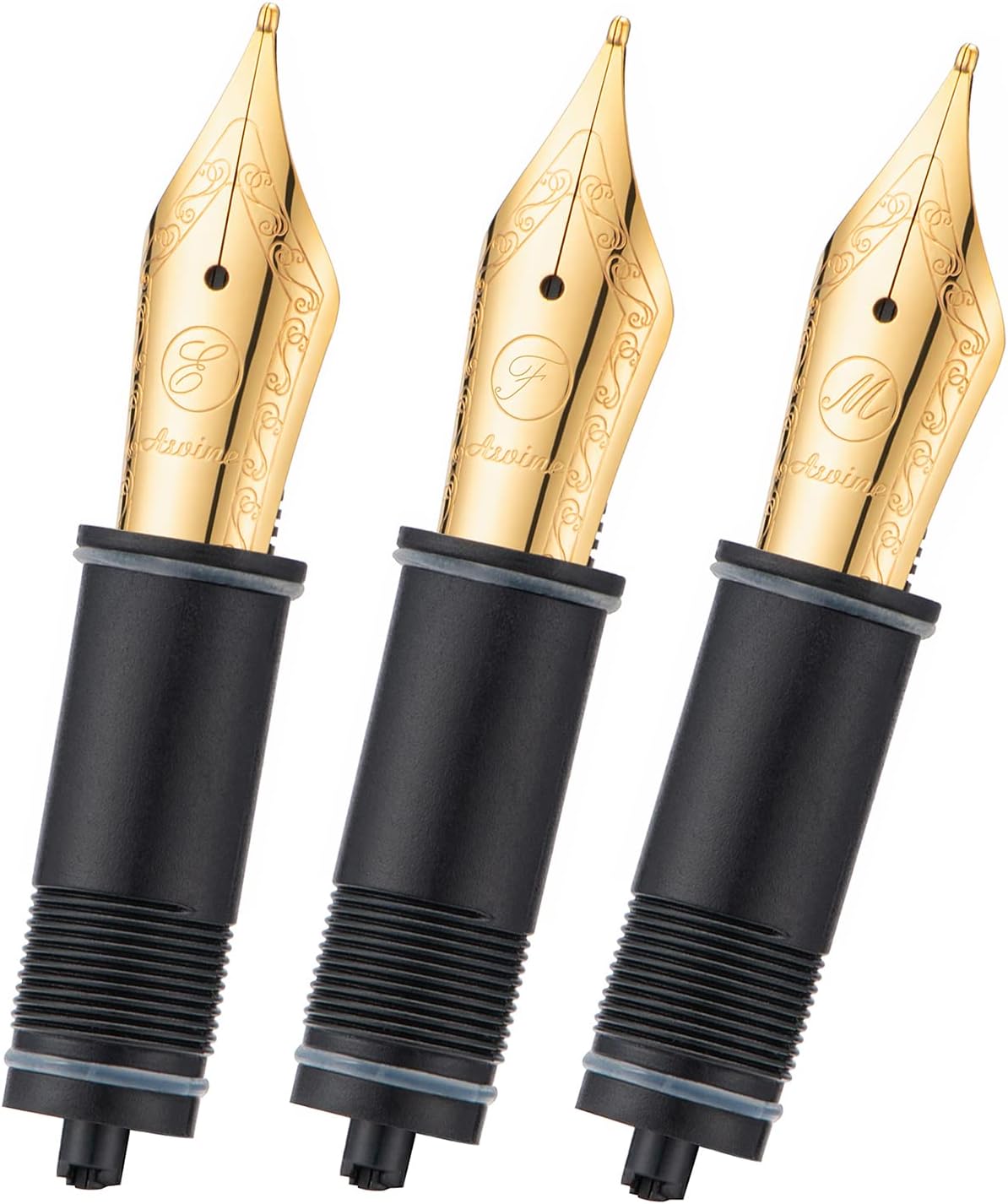
Image 1: Three Asvine gold-plated fountain pen replacement nibs, featuring Extra Fine, Fine, and Medium points, each attached to a black feed and housing.
2. Setup: Nib Replacement
Replacing the nib on your compatible Asvine fountain pen is a straightforward process. Follow these steps carefully to ensure proper installation and function.
- Prepare the Pen: Before attempting to remove the old nib, ensure that the pen's ink cartridge or converter is removed. This prevents ink spills and allows for easier manipulation of the nib unit.
- Remove the Old Nib: Gently twist the existing nib unit (nib and feed section) counter-clockwise to unscrew it from the pen barrel. Apply steady, firm pressure.
- Insert the New Nib: Take one of the new Asvine replacement nibs. Align the threads of the new nib unit with the threads inside the pen barrel.
- Secure the New Nib: Carefully twist the new nib unit clockwise until it is securely fastened. Do not overtighten.
- Reinstall Ink Supply: Once the new nib is in place, reinsert your ink cartridge or converter. If using a converter, fill it with your desired fountain pen ink.

Image 2: A close-up view of three Asvine gold-plated fountain pen nibs (EF, F, M) with black sections, arranged on a light-colored surface next to a book.
3. Operating Your Fountain Pen with New Nib
After replacing the nib, allow a few moments for the ink to flow down to the new nib. You may need to gently tap the pen or lightly press the nib to a piece of paper to encourage ink flow. When writing, hold the pen at a comfortable angle, typically between 45 and 55 degrees, to ensure smooth ink delivery and prevent scratching the paper.
Different nib sizes (EF, F, M) offer varying line widths:
- Extra Fine (EF): Produces a very thin line, suitable for detailed writing or small script.
- Fine (F): Produces a thin line, ideal for general writing and note-taking.
- Medium (M): Produces a broader line, suitable for signatures, journaling, or when a more expressive line is desired.
4. Maintenance
Proper maintenance extends the life and performance of your fountain pen nibs. Regular cleaning is recommended, especially when changing ink colors or if the pen will not be used for an extended period.
- Routine Cleaning: Unscrew the nib unit from the pen barrel. Rinse the nib and feed under cool, running water until the water runs clear.
- Deep Cleaning: For stubborn ink residue, soak the nib unit in a cup of cool water for several hours or overnight. You may use a mild, pen-safe cleaning solution if necessary.
- Drying: Allow the nib unit to air dry completely on a paper towel before reassembling or storing.
- Storage: Store unused nibs in a dry, safe place to prevent damage.

Image 3: The underside view of three Asvine gold-plated fountain pen nibs, highlighting the black feed components and the intricate design of the nibs.
5. Troubleshooting
| Issue | Possible Cause | Solution |
|---|---|---|
| Difficulty removing/installing nib section | Overtightening, ink residue, or manufacturing tolerance. | Ensure cartridge/converter is removed. Apply gentle, steady twisting force. If stuck, contact Asvine customer support for assistance. |
| No ink flow or inconsistent flow | Dried ink in feed, air bubble, or improper nib seating. | Clean the nib unit thoroughly. Ensure the ink cartridge/converter is properly installed and full. Gently tap the pen or prime the feed. |
| Scratchy writing experience | Nib misalignment or damage. | Inspect the nib tines for misalignment. If misaligned, gentle adjustment may be possible by an experienced user, or contact support. If damaged, replacement may be necessary. |
6. Specifications
| Feature | Detail |
|---|---|
| Brand | Asvine |
| Item Model Number | JIXG362G |
| Nib Sizes Included | Extra Fine (EF), Fine (F), Medium (M) |
| Nib Material | Gold Plated |
| Section Color | Black |
| Compatibility | Asvine V169, P20, P30, V126 Series Fountain Pens |
| Incompatibility | Asvine P36 Fountain Pen |
| Package Dimensions | 6.65 x 3.19 x 0.39 inches |
| Item Weight | 0.634 ounces |
7. Support and Warranty
For any issues encountered during the installation or use of your Asvine replacement nibs, or if you are unable to remove a stuck nib section, please contact Asvine customer support. The manufacturer is committed to providing replacement parts or assistance as needed.
Please refer to your original product purchase documentation for specific warranty details. General support inquiries can be directed to the Asvine official channels.