
1. Introduction
Thank you for choosing the Miady Silent 5000mAh USB Table Fan. This compact and powerful fan is designed to provide optimal cooling and comfort in various settings, including your office, home, or while traveling. With its long-lasting rechargeable battery, adjustable speeds, and automatic oscillation, it offers a versatile and efficient cooling solution.
Please read this manual carefully before using the product to ensure proper operation and to maximize its lifespan. Keep this manual for future reference.
2. Safety Instructions
- Do not immerse the fan in water or any other liquid.
- Keep the fan away from open flames, heat sources, and direct sunlight.
- Do not insert fingers or any objects into the fan grille when it is operating.
- Ensure the fan is placed on a stable, flat surface to prevent it from falling.
- This appliance is not intended for use by persons (including children) with reduced physical, sensory or mental capabilities, or lack of experience and knowledge, unless they have been given supervision or instruction concerning use of the appliance by a person responsible for their safety.
- Only use the provided USB-C cable for charging.
- Do not attempt to disassemble or repair the fan yourself. Contact customer support for assistance.
- Unplug the fan when not in use for extended periods or before cleaning.
3. Package Contents
Please check the package contents upon opening to ensure all items are present:
- 1 x Miady Silent 5000mAh USB Table Fan
- 1 x USB-C Charging Cable
- 1 x User Manual (this document)
4. Product Overview
Familiarize yourself with the components of your Miady Table Fan:

Figure 4.1: Front view of the Miady Table Fan and included USB-C cable.

Figure 4.2: Internal components of the fan, showing the motor, fan blades, and protective grille.
- Fan Grille: Protective cover for the fan blades.
- Fan Blades: Generate airflow.
- Control Button: Used for power, speed adjustment, and oscillation control.
- LED Indicators: Display battery level and speed setting.
- Base: Provides stability and houses the battery and control circuitry.
- USB-C Charging Port: For connecting the charging cable.
5. Setup
Setting up your Miady Table Fan is quick and easy:
- Unpack: Carefully remove the fan and all accessories from the packaging.
- Placement: Place the fan on a stable, flat, and dry surface. Ensure there is adequate space around the fan for optimal airflow and oscillation.
- Initial Charge: For first-time use, it is recommended to fully charge the fan. Connect the USB-C cable to the fan's charging port and the other end to a 5V DC 0.6A USB power adapter (not included) or a compatible USB port. The LED indicators will show charging status.
6. Operating Instructions
6.1 Power On/Off and Speed Adjustment
The fan features three adjustable speeds. Use the single control button on the base to manage power and speed.
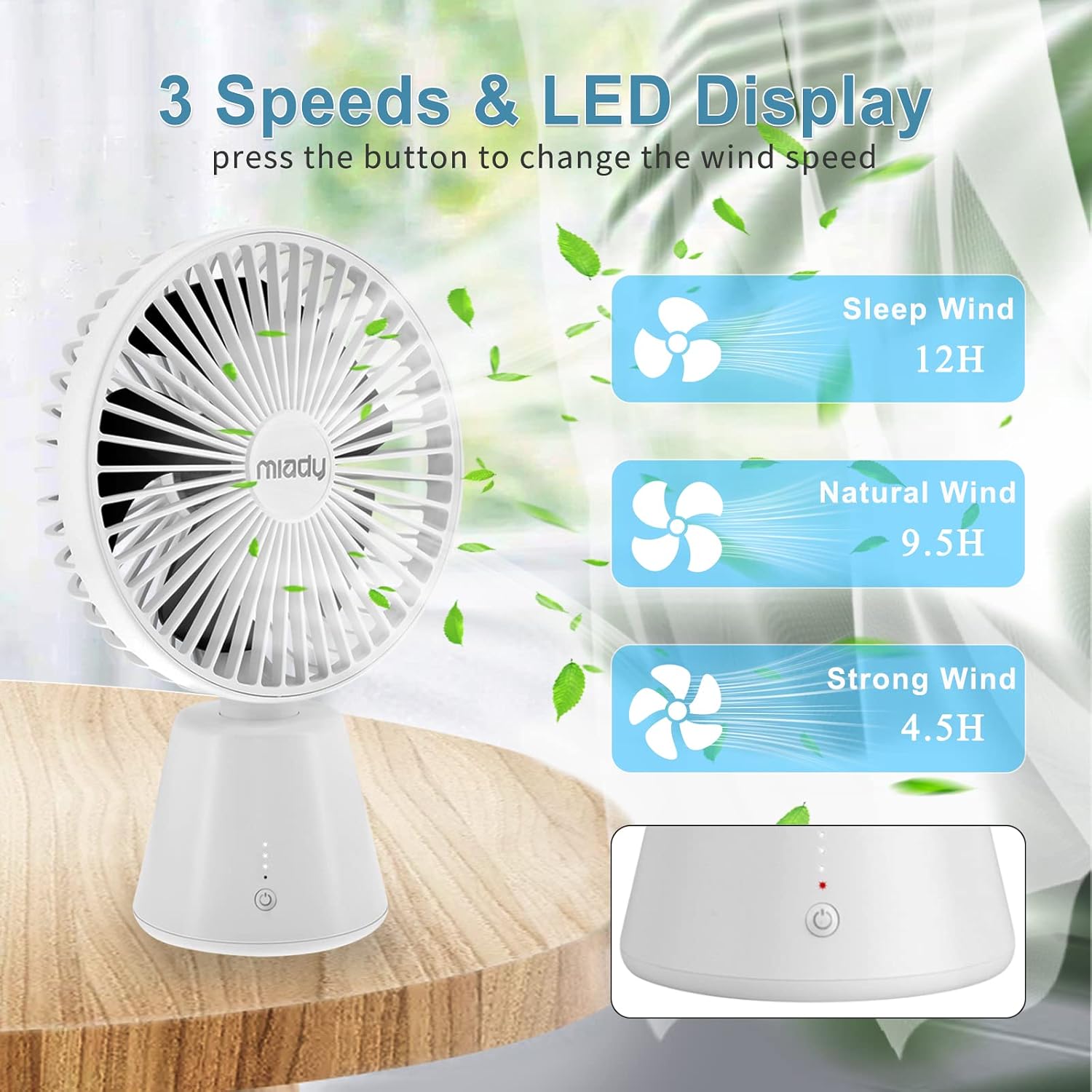
Figure 6.1: Illustration of the three speed settings and their approximate battery life.
- To Power On: Briefly press the control button once. The fan will start at Speed 1 (Sleep Wind).
- To Adjust Speed: Briefly press the control button repeatedly to cycle through the speeds: Speed 1 (Sleep Wind) → Speed 2 (Natural Wind) → Speed 3 (Strong Wind).
- To Power Off: After Speed 3, press the button one more time to turn the fan off.
6.2 Oscillation Function
The fan offers a 135° automatic oscillation feature to distribute air more widely.

Figure 6.2: The fan's 135° automatic oscillation feature.
- To Activate Oscillation: Double-click the control button while the fan is running. The fan head will begin to oscillate automatically within a 135° range.
- To Deactivate Oscillation: Double-click the control button again. The fan will stop oscillating and remain in its current direction.
6.3 Wired/Wireless Operation
The Miady fan can operate both wirelessly using its built-in battery or while connected to a power source via its USB-C port.

Figure 6.3: The fan supports both wireless (battery-powered) and wired operation.
- Wireless Mode: Powered by the internal 5000mAh high-capacity battery, providing 4.5 to 12 hours of working time depending on the speed setting.
- Wired Mode: Connect the fan to a charger, power bank, or laptop via the USB-C port for continuous operation or while charging.
7. Charging
The fan is equipped with a 5000mAh rechargeable Lithium-ion battery.
- Charging Time: A full charge takes approximately 5 hours when using a 5V DC 0.6A USB-C cable.
- Battery Life: Provides 4.5 to 12 hours of continuous use on a full charge, depending on the selected speed.
- Charging Indicator: The LED indicators on the base will show the charging status. Refer to the product's specific LED behavior for details (e.g., blinking while charging, solid when full).
- Power Source: Can be charged via any standard USB port (e.g., computer, wall adapter, power bank).
8. Maintenance
Proper maintenance ensures the longevity and optimal performance of your fan.
- Cleaning: Use a soft, dry cloth to wipe the exterior of the fan. Do not use abrasive cleaners, solvents, or immerse the fan in water. Ensure the fan is turned off and unplugged before cleaning.
- Storage: When not in use for extended periods, store the fan in a cool, dry place, away from direct sunlight and extreme temperatures.
- Dust Removal: Periodically use a soft brush or compressed air to gently remove dust from the fan grille and blades to maintain efficient airflow.
9. Troubleshooting
If you encounter any issues with your Miady Table Fan, please refer to the following common problems and solutions:
| Problem | Possible Cause | Solution |
|---|---|---|
| Fan does not turn on. | Battery is depleted. | Charge the fan fully using the USB-C cable. |
| Power button not pressed correctly. | Ensure you press the power button firmly. | |
| Oscillation not working. | Oscillation function not activated. | Double-click the control button to activate oscillation. |
| Short battery life. | Fan used on highest speed setting. | Higher speeds consume more power. Use lower speeds for extended battery life. |
| Battery not fully charged. | Ensure the fan is fully charged before use (approx. 5 hours). | |
| Unusual noise during operation. | Dust or debris on fan blades. | Turn off and unplug the fan. Gently clean the fan blades and grille. |
| Fan not on a stable surface. | Place the fan on a flat, stable surface. |
If the problem persists after trying these solutions, please contact Miady customer support.
10. Specifications
| Feature | Specification |
|---|---|
| Brand | Miady |
| Model Number | DF01 |
| Color | White |
| Dimensions (L x W x H) | 25.5 x 9.6 x 17.1 cm (10 x 3.8 x 6.7 inches) |
| Weight | 590 grams (1.3 lbs) |
| Power | 4 Watts |
| Voltage | 5 Volts |
| Material | Copper (motor) |
| Number of Speeds | 3 |
| Battery Type | Lithium-ion |
| Battery Capacity | 5000 mAh |
| Charging Port | USB-C |
| Oscillation Range | 135° Automatic |
| Special Features | Portable, Quiet Operation |
11. Warranty and Support
Miady provides a 12-month warranty service for this product from the date of purchase. This warranty covers manufacturing defects and issues arising from normal use.
For any questions, technical support, or warranty claims, please contact Miady customer service. Our friendly customer service team is ready to assist you.
Contact Information:
Please refer to the contact details provided on the product packaging or the official Miady website for the most up-to-date support information.