
1. Introduction
This manual provides essential information for the safe and efficient installation, operation, and maintenance of the Porcheson MS700 MS210A PLC Control System. This system is designed to replace the PS860AM control system in injection molding machines, offering advanced programmable logic control capabilities. Please read this manual thoroughly before attempting any installation or operation to ensure proper functionality and to prevent damage or injury.
The Porcheson MS700 MS210A system is a full set PLC solution engineered for precision control in industrial environments. Adherence to the guidelines presented herein is crucial for optimal performance and longevity of the equipment.
2. Safety Information
Important Safety Instructions: Always observe the following safety precautions to reduce the risk of electric shock, fire, or injury.
- Installation and maintenance should only be performed by qualified and authorized personnel.
- Ensure that all power to the injection molding machine and the control system is disconnected before performing any installation, wiring, or maintenance tasks.
- Use appropriate personal protective equipment (PPE) such as safety glasses and insulated gloves.
- Verify all wiring connections are correct and secure according to the provided wiring diagrams to prevent electrical hazards and system malfunction.
- Do not operate the system in environments exceeding its specified temperature, humidity, or vibration limits.
- Never attempt to modify the internal components of the control system. Refer all servicing to qualified technicians.
Warning Symbols: Pay close attention to symbols indicating potential hazards throughout this manual.
- DANGER: Indicates an imminently hazardous situation which, if not avoided, will result in death or serious injury.
- WARNING: Indicates a potentially hazardous situation which, if not avoided, could result in death or serious injury.
- CAUTION: Indicates a potentially hazardous situation which, if not avoided, may result in minor or moderate injury, or property damage.
3. Product Overview
The Porcheson MS700 MS210A PLC Control System is a robust and integrated solution for managing the complex operations of injection molding machines. It comprises a central processing unit (MS700) and an input/output module (MS210A), along with necessary communication interfaces and power supply units.
This system is designed for high reliability and precision, enabling efficient control over various machine parameters such as temperature, pressure, injection speed, and clamping force. Its modular design facilitates integration and maintenance.
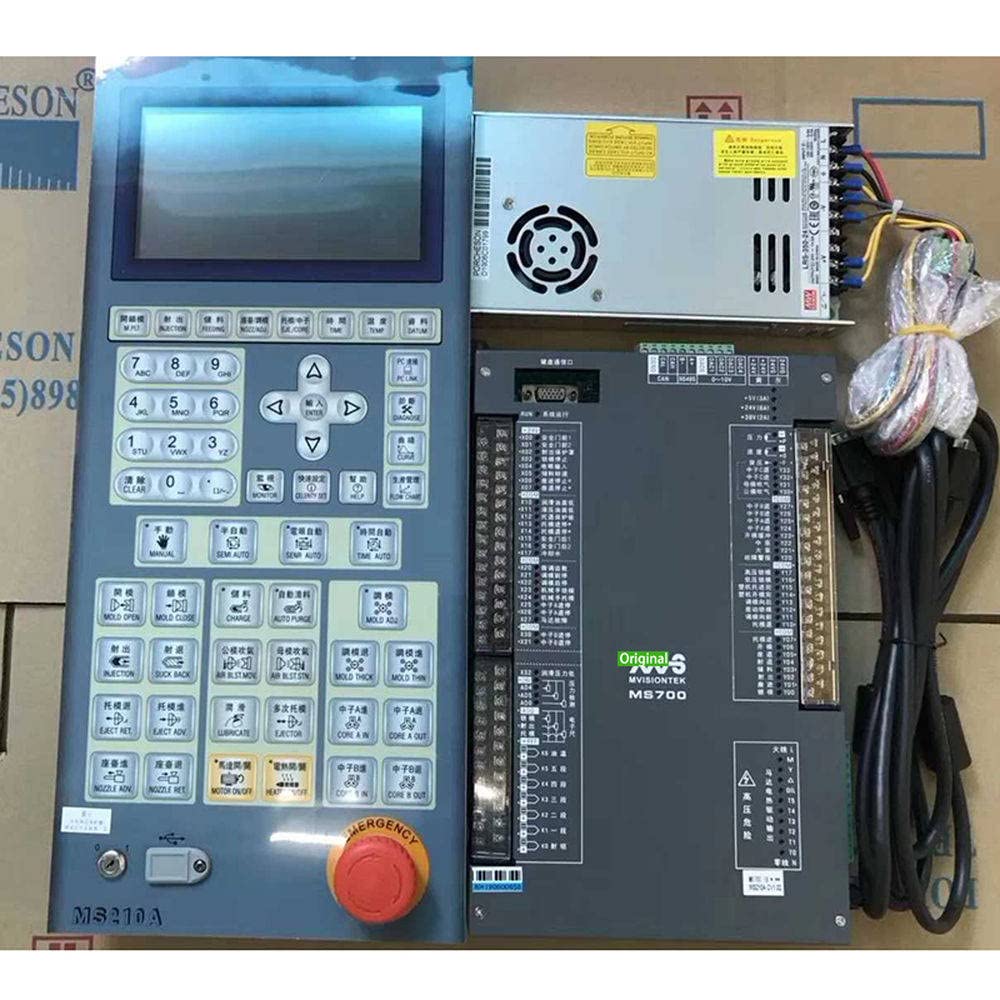
This image displays the main components of the Porcheson MS700 MS210A PLC Control System, including the central processing unit and associated modules, designed for integration into injection molding machinery.
4. Setup
4.1. Pre-installation Checks
- Unpack the system carefully and inspect all components for any signs of shipping damage. Report any damage immediately.
- Verify that all components listed in the packing list are present.
- Ensure the installation environment meets the specified operating conditions (temperature, humidity, ventilation).
- Confirm that the power supply voltage and frequency match the system requirements.
4.2. Mounting Instructions
The MS700 MS210A system is typically mounted within an electrical control cabinet. Use appropriate mounting hardware to secure the modules to a DIN rail or mounting plate. Ensure sufficient clearance for ventilation and cable routing.
- Mount the MS700 CPU module first, followed by the MS210A I/O module, ensuring proper alignment and secure fastening.
- Maintain adequate spacing between modules and other heat-generating components.
4.3. Wiring
All wiring must comply with local and national electrical codes. Refer to the detailed wiring diagrams provided with your specific machine integration documentation. General wiring steps include:
- Power Supply Wiring: Connect the main power supply to the designated terminals on the MS700 module. Ensure proper grounding.
- Input/Output Wiring: Connect machine sensors, actuators, and control devices to the appropriate terminals on the MS210A I/O module. Label all wires clearly.
- Communication Wiring: Connect any required communication cables (e.g., Ethernet, RS-485) to the respective ports on the MS700 module for integration with HMI or other control systems.
4.4. Initial Power-Up
After all wiring is complete and verified, apply power to the system. Observe the status indicators on the MS700 and MS210A modules. The system should initiate a self-test sequence. Refer to the LED indicator section for status interpretations.
5. Operating
5.1. Basic Operation Principles
The Porcheson MS700 MS210A operates based on a programmed logic sequence. The PLC continuously monitors input signals from sensors, executes the programmed logic, and controls output devices (actuators) accordingly. The system typically interfaces with a Human-Machine Interface (HMI) for operator interaction.
5.2. Interface Navigation
Access to system parameters, operational modes, and diagnostic information is typically done through the connected HMI. Consult the HMI's specific user manual for detailed navigation instructions. Common functions include:
- Main Screen: Displays real-time machine status and key process values.
- Parameter Settings: Allows adjustment of injection profiles, temperatures, pressures, and cycle times.
- Alarm/Event Log: Provides a history of system warnings and errors.
- Manual Control: Enables individual control of machine axes or functions for setup and troubleshooting.
5.3. Programming Basics
Programming of the MS700 PLC is performed using specialized software on a connected computer. This process involves creating ladder logic diagrams or other programming languages to define the machine's operational sequence. Only trained personnel with knowledge of PLC programming should attempt to modify the control program.
6. Maintenance
Regular maintenance ensures the longevity and reliable operation of the Porcheson MS700 MS210A PLC Control System.
6.1. Routine Inspection
- Periodically inspect all wiring connections for tightness and signs of corrosion or damage.
- Check for any loose mounting hardware.
- Examine the modules for dust accumulation, especially around ventilation openings.
- Monitor LED indicators for any abnormal status.
6.2. Cleaning Procedures
Ensure power is disconnected before cleaning. Use a soft, dry, lint-free cloth to wipe down the exterior of the modules. For dust accumulation in ventilation areas, use compressed air. Do not use liquid cleaners or solvents.
6.3. Firmware Updates
From time to time, firmware updates may be released to improve performance or add new features. Consult the manufacturer's website or technical support for information on available updates and the correct procedure for installation. Always back up the current configuration before performing a firmware update.
6.4. Component Replacement
In case of a component failure, only replace modules with genuine Porcheson spare parts. Refer to the system's service manual for detailed replacement procedures. Ensure power is off and proper ESD (Electrostatic Discharge) precautions are taken when handling electronic components.
7. Troubleshooting
This section provides guidance for resolving common issues. For problems not listed here, or if solutions do not resolve the issue, contact technical support.
| Problem | Possible Cause | Solution |
|---|---|---|
| System does not power on. | No power supply; incorrect wiring; faulty power supply unit. | Check main power switch and circuit breaker. Verify power supply wiring. Test power supply unit. |
| Input/Output (I/O) not responding. | Incorrect I/O wiring; faulty sensor/actuator; module failure; program error. | Verify I/O wiring. Test sensor/actuator functionality. Check module status LEDs. Review PLC program logic. |
| Communication error with HMI/PC. | Loose communication cable; incorrect communication settings; network issue. | Check communication cable connections. Verify IP addresses and port settings. Consult network administrator. |
| System fault indicator (LED) is active. | Internal system error; program error; hardware malfunction. | Consult the system's diagnostic log via HMI or programming software. Power cycle the system. If persistent, contact support. |
8. Specifications
The following are general specifications for the Porcheson MS700 MS210A PLC Control System. Specific values may vary based on configuration. Refer to the product datasheet for precise details.
- Model: MS700 (CPU), MS210A (I/O Module)
- Input Voltage: Typically 24V DC (refer to specific model for AC options)
- Operating Temperature: 0°C to 55°C (32°F to 131°F)
- Storage Temperature: -20°C to 70°C (-4°F to 158°F)
- Humidity: 5% to 95% non-condensing
- Protection Class: IP20 (when installed in an appropriate enclosure)
- Communication Interfaces: Ethernet, RS-485, USB (configuration dependent)
- Mounting: DIN Rail or Panel Mount
9. Warranty and Support
Warranty: The Porcheson MS700 MS210A PLC Control System comes with a standard manufacturer's warranty against defects in materials and workmanship. The warranty period and terms are specified in the purchase agreement. Please retain your proof of purchase for warranty claims. The warranty does not cover damage caused by improper installation, misuse, unauthorized modifications, or operation outside of specified environmental conditions.
Technical Support: For technical assistance, troubleshooting beyond the scope of this manual, or warranty inquiries, please contact your authorized distributor or the manufacturer's technical support team. Have your product model number and serial number ready when contacting support.
Contact Information:
- Website: www.porcheson.com (Example, replace with actual)
- Email: support@porcheson.com (Example, replace with actual)
- Phone: +1-XXX-XXX-XXXX (Example, replace with actual)