
1. Product Overview
The TOMLOV DM602 Pro is a versatile 10.1-inch HDMI digital microscope designed for detailed observation and analysis. It features a robust boom arm stand, a powerful 144-LED ring light, and a triple-lens system to accommodate various applications, from electronics repair and coin examination to biological slide observation. The large IPS screen provides clear and vibrant images, and its connectivity options allow for easy sharing and documentation.
2. What's in the Box
- 1x Upgraded DM602 Pro 10.1 inch HDMI Digital Microscope
- 1x 13" Pro Boom Stand with Metal Base
- 1x Ring Light with 144 Leds
- 1x Lens A
- 1x Lens L
- 1x Lens D
- 1x Bottom Light
- 10x Prepared slides
3. Setup Guide
3.1 Assembling the Boom Arm Stand
Carefully unpack all components. Insert the vertical pole into the metal base and secure it. Attach the horizontal arm to the vertical pole using the provided clamps and screws. Ensure all connections are tight for stability.

Figure 3.1: Assembled TOMLOV DM602 Pro Digital Microscope with Boom Arm Stand.
3.2 Attaching the Microscope Unit
Mount the microscope unit (with the 10.1-inch LCD screen) onto the horizontal arm of the stand. Secure it firmly using the adjustment knobs. The unit should be able to slide along the arm and rotate for optimal viewing angles.
Video 3.1: Demonstrates the installation process of the TOMLOV DM602 Pro 10.1 Inch HDMI Microscope onto its stand.
3.3 Connecting Power
Connect the provided power adapter to the microscope unit and plug it into a power outlet. Ensure all cables are neatly arranged to avoid interference with the microscope's movement.
4. Operating Instructions
4.1 Power On/Off and Basic Controls
Press the power button on the microscope unit to turn it on. Use the buttons on the unit or the remote control to navigate menus, adjust settings, and capture images or videos. The remote control allows for stable operation without disturbing the sample.
4.2 Focusing and Magnification
Adjust the height of the microscope unit along the boom arm stand to get a rough focus. Use the focusing knob on the microscope body for fine-tuning the image clarity. The DM602 Pro offers a wide magnification range, from 2x to 2000x, depending on the lens used and digital zoom settings.
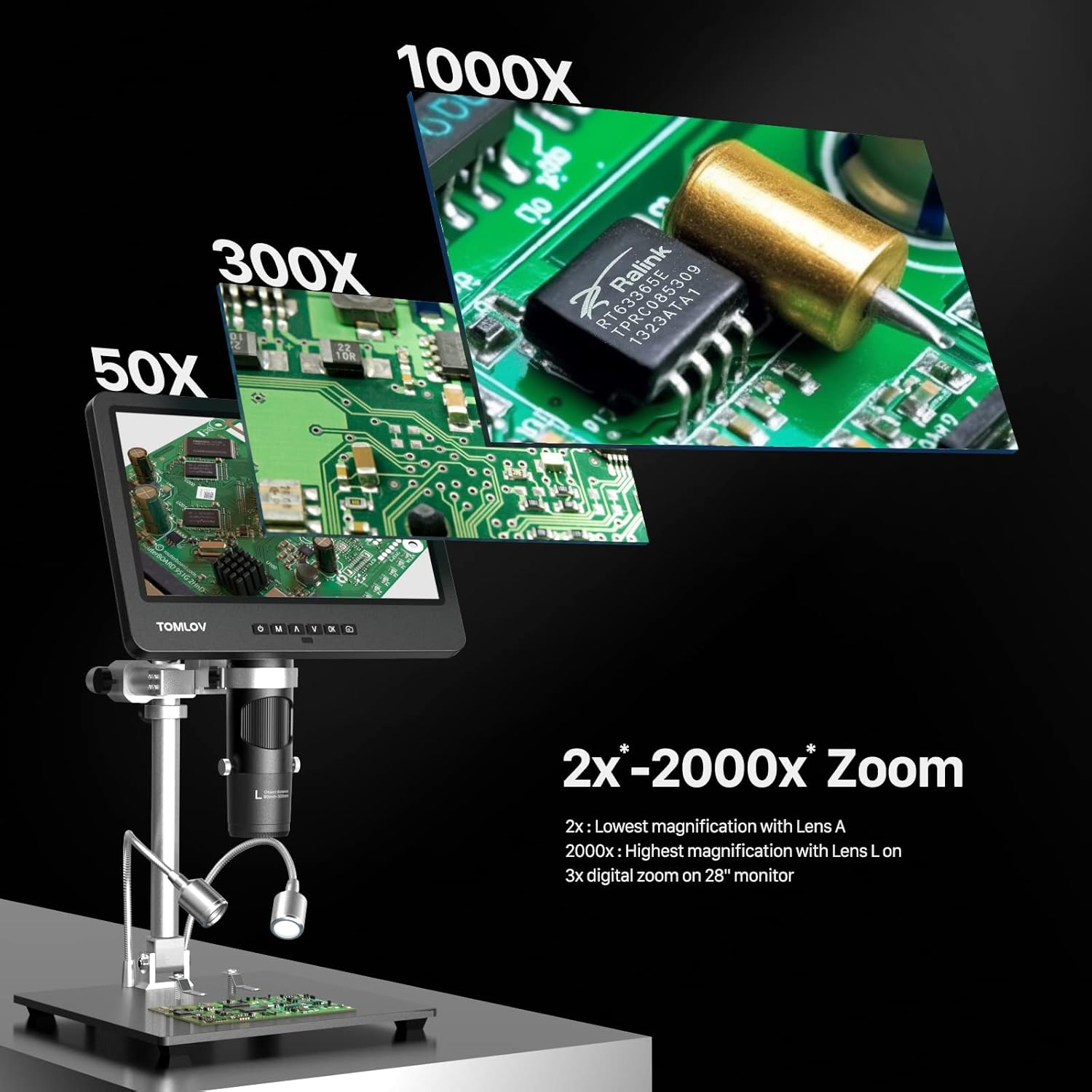
Figure 4.1: The microscope offers a wide zoom range for various levels of detail.
5. Interchangeable Lenses
The DM602 Pro comes with three interchangeable lenses, each optimized for different applications and working distances.

Figure 5.1: The three distinct lenses provide versatility for different observation needs.
5.1 Lens L (60x-200x) for Soldering
This lens provides powerful magnification with ample working space, ideal for soldering and electronics repair. Its working distance is approximately 90mm-240mm.

Figure 5.2: Lens L is designed for detailed soldering tasks, offering sufficient working distance.
Video 5.1: Instructions on how to effectively use Lens L for soldering applications with the microscope.
5.2 Lens A (2x-700x) for Coin Observation
The A lens is suitable for observing entire coins or larger objects, providing clear magnification from 2x to 700x. Its working distance is approximately 12mm-275mm.

Figure 5.3: Lens A is ideal for viewing coins, capturing both overall and detailed aspects.
Video 5.2: Demonstrates the proper use of Lens A for examining coins with the microscope.
5.3 Lens D (1000x-2000x) for Biological Slides
This high-magnification lens is designed for observing biological specimens on slides. It offers a maximum magnification of 2000x with a very short working distance of approximately 4mm-5mm.

Figure 5.4: Lens D is specifically for high-magnification viewing of biological slides.
Video 5.3: Guide on how to use Lens D for observing slides with the TOMLOV DM602 Pro Microscope.
5.4 Changing Lenses
To change a lens, carefully unscrew the two screws holding the current lens in place and remove it. Install the desired new lens and fasten the two screws securely. Ensure the lens is properly seated before use.

Figure 5.5: Step-by-step guide for safely changing the objective lenses.
6. Lighting Options
The DM602 Pro offers multiple lighting solutions to ensure optimal illumination for various samples and to minimize glare.
6.1 144-LED Ring Light
The microscope features a powerful 144-LED ring light that provides bright, even, and shadow-free illumination. It includes stepless dimming control to adjust brightness from 10% to 100%.

Figure 6.1: The 144-LED ring light provides superior illumination compared to standard 8-LED lights.

Figure 6.2: Adjust the brightness of the ring light from 10% to 100% using the stepless dimmer.
6.2 Side Lights
Two adjustable side lights are included, which can be positioned to reduce glare on reflective surfaces or to highlight specific features of your sample. These are particularly useful when the ring light might cause unwanted reflections.
6.3 Bottom Light for Slides
For transparent biological slides, a dedicated bottom light is provided. This illuminates the sample from underneath, allowing for clear observation of translucent specimens.

Figure 6.3: The bottom light is essential for viewing transparent samples on prepared slides.
7. Connectivity and Recording
7.1 HDMI and USB Output
The DM602 Pro features both HDMI and USB outputs. Connect to an external monitor or TV via HDMI for larger group viewing, or to a Windows/Mac computer via USB for real-time viewing, image capture, and video recording on your PC.
7.2 Photo and Video Recording
Capture high-resolution images and record videos directly to the included 64GB Micro SD card with a single button press. This allows for easy documentation and sharing of your observations.

Figure 7.1: The microscope supports photo and video recording to a 64GB Micro SD card.
8. Product Specifications
| Model Name | DM602 Pro |
| Screen Size | 10.1 inch IPS |
| Maximum Magnification | 2000x |
| Lenses Included | Lens A (2x-700x), Lens L (60x-200x), Lens D (1000x-2000x) |
| Illumination | 144-LED Ring Light, Side Lights, Bottom Light |
| Connectivity | HDMI, USB (PC Compatible) |
| Storage | 64GB Micro SD Card (included) |
| Stand Type | 13" Pro Boom Stand with Metal Base |
| Product Dimensions | 13.01"L x 10.43"W x 5.87"H |
| Item Weight | 2.26 Ounces |
| Material | Plastic, Aluminum |
9. Warranty and Support
For warranty information, troubleshooting, and customer support, please refer to the official TOMLOV website or contact their customer service directly. Keep your purchase receipt for warranty claims.


