
Important Safety Information
Please read all instructions before operating the toy. Keep this manual for future reference.
- Age Recommendation: This toy is recommended for ages 6 and up.
- Battery Safety: Requires 3 LR44 batteries (included). Do not mix old and new batteries. Do not mix alkaline, standard (carbon-zinc), or rechargeable (nickel-cadmium) batteries. Insert batteries with correct polarity. Remove exhausted batteries promptly. Do not short-circuit battery terminals. Remove batteries if the toy is not used for an extended period.
- Small Parts: This toy may contain small parts that could pose a choking hazard for young children. Adult supervision is recommended.
- Care and Cleaning: Do not immerse the toy in water. Clean with a damp cloth only.
Package Contents
- 1 x Beast-Mode Optimus Prime Figure
- 1 x Sword Accessory
- 3 x LR44 Batteries (pre-installed)
Inspect all contents upon opening the package to ensure all parts are present and undamaged.

Image: The Beast-Mode Optimus Prime toy displayed in its retail packaging, highlighting its three distinct modes: robot, vehicle, and beast.
Battery Installation
The Beast-Mode Optimus Prime figure comes with 3 LR44 batteries pre-installed. If replacement is needed:
- Locate the battery compartment on the figure (typically on the back or lower torso).
- Using a small Phillips head screwdriver (not included), unscrew the battery compartment cover.
- Remove the old batteries and dispose of them properly.
- Insert 3 new LR44 batteries, ensuring the correct polarity (+/-) as indicated inside the compartment.
- Replace the battery compartment cover and secure it with the screw.
Operating Instructions
Transformation Between Modes
The Beast-Mode Optimus Prime figure can transform between three distinct modes: Robot, Vehicle, and Beast. The transformation involves 22 steps. Refer to the visual instructions provided on the product packaging for detailed guidance. Always apply gentle, even pressure during transformation to avoid damage.
- Robot Mode: The classic Optimus Prime form, ready for battle.
- Vehicle Mode: Transforms into a powerful truck for ground travel.
- Beast Mode: Converts into a formidable lion-like beast.
Activating Lights and Sounds
The figure features button-activated lights and sounds in its Beast Mode and Robot Mode.
- In Robot Mode: Press the button located on Optimus Prime's chest to activate lights and sounds.
- In Beast Mode: Press the button located on the lion's head to activate lights and sounds.

Image: A child demonstrates activating the lights and sounds feature by pressing a button on the Optimus Prime figure's chest in robot mode.

Image: A child activates the lights and sounds feature by pressing the button on the lion head of the Optimus Prime figure in beast mode.
Using the Sword Accessory
The included sword accessory can be held by the figure in all three modes. Insert the hilt of the sword into the figure's hand or designated attachment points.

Image: A child holds the golden sword accessory, which can be used with the Optimus Prime figure in any of its three modes.
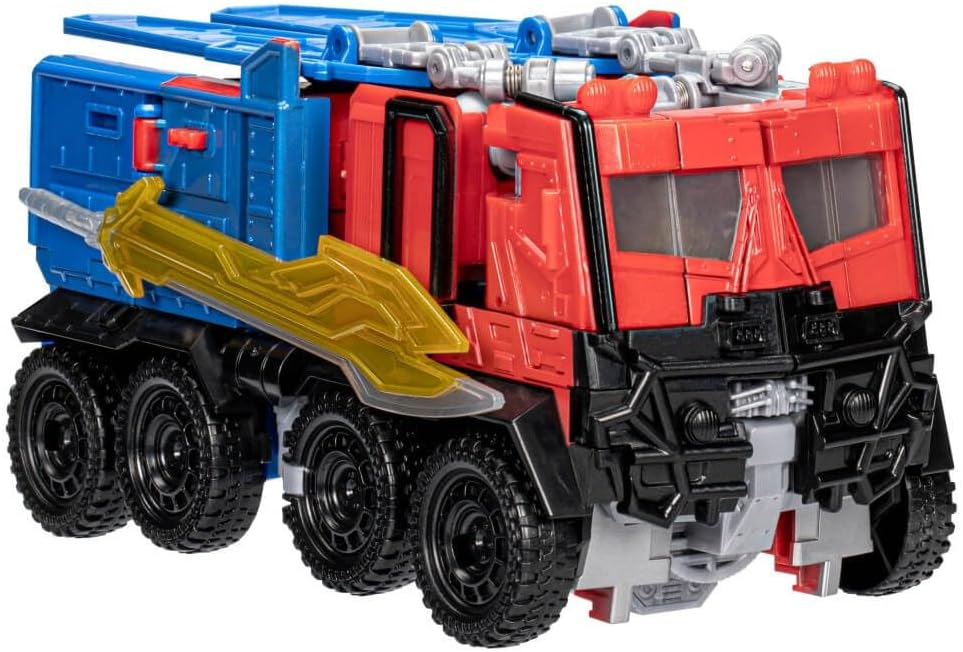
Image: The Optimus Prime figure in its vehicle mode, a robust truck, with the golden sword accessory securely attached to its side.
Maintenance
- Cleaning: Wipe the toy with a clean, damp cloth. Do not use harsh chemicals or abrasive cleaners.
- Storage: Store the toy in a cool, dry place away from direct sunlight and extreme temperatures.
- Battery Removal: If the toy will not be used for an extended period, remove the batteries to prevent leakage.
Troubleshooting
| Problem | Possible Cause | Solution |
|---|---|---|
| Lights and sounds not working | Dead or incorrectly installed batteries | Replace batteries with new LR44 batteries, ensuring correct polarity. |
| Difficulty transforming the figure | Incorrect step sequence or stiff joints | Refer to the transformation instructions on the packaging. Apply gentle, consistent pressure. Do not force parts. |
| Accessory (sword) does not fit | Incorrect orientation or attachment point | Ensure the accessory is oriented correctly and inserted into the designated slot or hand. |
Specifications
- Model Number: F3939
- Product Dimensions: 10 x 4.5 x 12 inches (Robot Mode, approximate)
- Item Weight: 14.7 ounces
- Batteries: 3 x LR44 (included)
- Manufacturer Recommended Age: 6 years and up
- Manufacturer: Hasbro
Warranty Information
This product is covered by a manufacturer's warranty. For details regarding warranty coverage, terms, and conditions, please refer to the information provided on the product packaging or contact the manufacturer directly. Keep your proof of purchase for warranty claims.
Customer Support
For further assistance, questions, or to report any issues with your Transformers Beast-Mode Optimus Prime toy, please contact Hasbro customer support. Contact information can typically be found on the product packaging or on the official Hasbro website.


