Introduction
The TTXSCAM T86 Portable Car Radio Stereo Audio Receiver is designed to enhance your driving experience with advanced connectivity and user-friendly features. This 7-inch Full HD IPS touchscreen device offers wireless Apple CarPlay and Android Auto, along with Apple AirPlay and Android Miracast support. It includes an AHD 1080P backup camera for improved safety and integrates intelligent voice control for hands-free operation. Its portable design and easy installation make it a versatile upgrade for most vehicles.
Package Contents
Before beginning installation, please verify that all items are present in the package:
- 7-inch IPS Touch Screen Monitor
- AHD 1080P Backup Camera
- Two Brackets (Windshield Suction Cup and Dashboard Mount)
- Cigarette Lighter Power Cable
- 8M Video Cable
- AUX Cable
- Pad
- Double-sided Glue
- Removal Tool
- License Plate Bracket
- Installation Bag (containing various necessary parts)
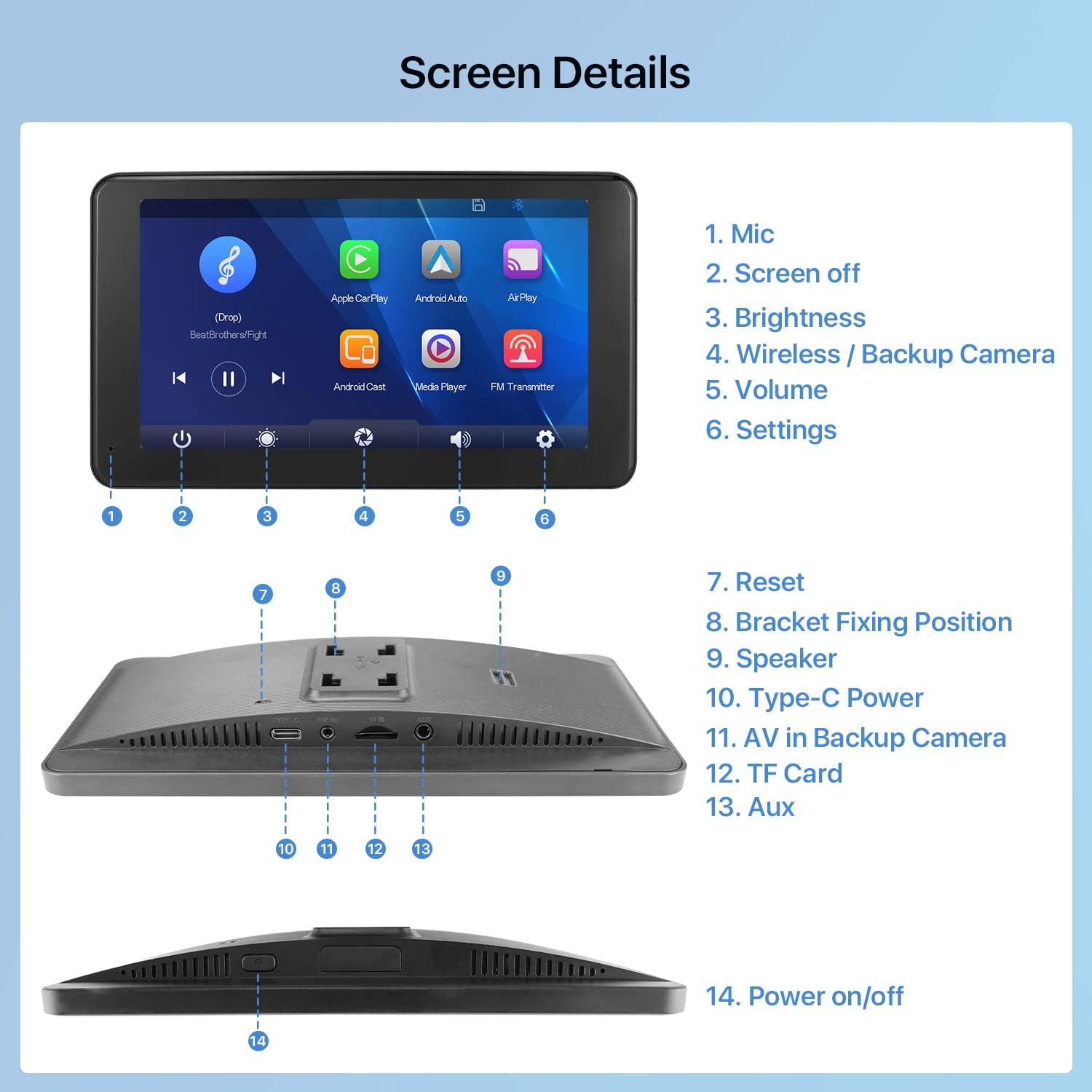
Figure 1: Complete Package Contents
Setup and Installation
The TTXSCAM T86 is designed for non-destructive and easy installation, suitable for most vehicles including cars, vans, sedans, trucks, pickups, RVs, and campers. You can choose between windshield or dashboard mounting using the two included brackets.
Mounting Options
The device comes with two primary mounting options:
- Windshield Mounting: Utilizes the suction cup bracket for flexible positioning on your windshield.
- Dashboard Mounting: Uses the desktop bracket for a stable placement on your dashboard.

Figure 2: Dashboard and Windshield Mounting Options with Hidden Wires
The unique design of the T86 helps hide wires for a cleaner appearance in your vehicle.
Connecting the Device
Refer to the following video for a visual guide on installing the monitor brackets and connecting the device:
Video 1: How to Install Two Monitor Brackets. This video demonstrates the process of attaching the monitor to both the windshield and dashboard brackets.
For a detailed look at the unboxing and initial setup, including connecting the power and camera cables, please watch the following video:
Video 2: Demo of Opening Package for T86 Wireless Carplay Display. This video provides a step-by-step guide on unboxing and connecting the main components of the T86 system.
The screen features various ports for connectivity. Familiarize yourself with these connections for proper setup:

Figure 3: Screen Details and Port Identification
Operating Instructions
Wireless Connectivity (CarPlay & Android Auto)
The T86 supports seamless wireless Apple CarPlay and Android Auto via WiFi and Bluetooth. It also supports Apple AirPlay and Android Miracast for screen mirroring.

Figure 4: Wireless Connectivity Options
Intelligent Voice Control
Utilize Siri or Google Voice for hands-free operation, allowing you to make calls, play music, and get GPS directions without diverting your attention from the road.

Figure 5: Intelligent Voice Control Features
Audio Modes
The T86 offers multiple audio output options:
- Built-in Speaker: For direct audio output from the device.
- Wired AUX Cable Connection: Connect to your vehicle's AUX input for audio playback through your car speakers.
- Wireless FM Transmitter: Adjust your car's FM radio to match the frequency set on the T86 to transmit audio wirelessly to your car speakers.

Figure 6: Available Audio Output Modes
AHD 1080P Backup Camera
The included AHD 1080P backup camera provides a clear view for safer reversing. The IPS screen ensures clear visibility from various angles.
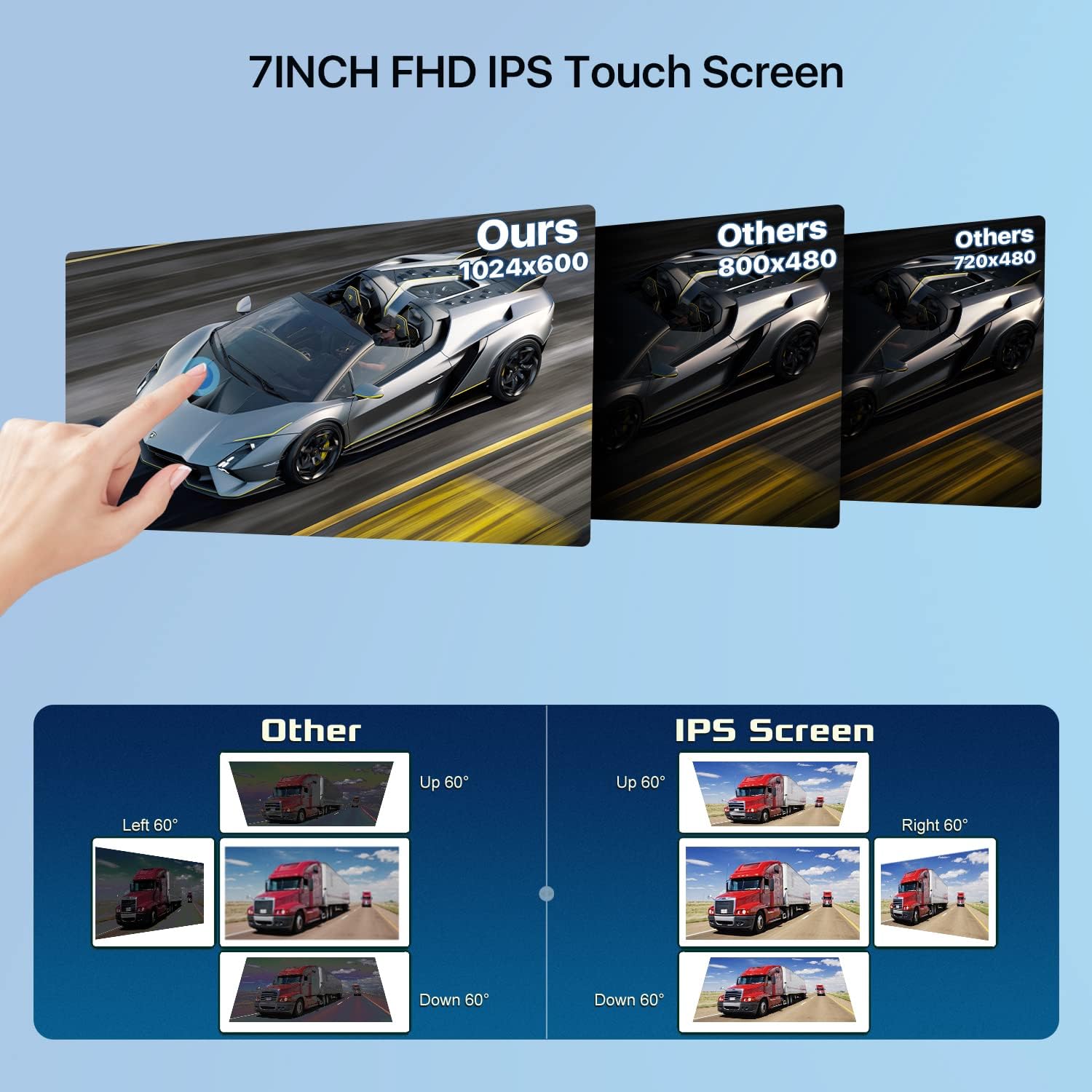
Figure 7: 7-inch FHD IPS Touch Screen Clarity
For a demonstration of the backup camera's functionality, please refer to the video below:
Video 3: Show How AHD 1080P Backup Camera Works. This video illustrates the real-time display and features of the backup camera.
Screen Functions and Brightness Adjustment
The touchable screen provides seamless operation. You can adjust the screen brightness for optimal visibility in various lighting conditions.
Video 4: Show TTXSCAM T86 Touch Screen Functions. This video demonstrates various touch screen functionalities, including brightness adjustment.
Maintenance
To ensure the longevity and optimal performance of your TTXSCAM T86 Portable Car Stereo, follow these maintenance guidelines:
- Cleaning: Use a soft, dry cloth to clean the touchscreen and exterior. Avoid abrasive cleaners or solvents that may damage the surface.
- Temperature: Avoid exposing the device to extreme temperatures, both hot and cold, for extended periods.
- Cable Management: Ensure all cables are securely connected and not pinched or strained, which can lead to damage.
- Storage: If removing the device for storage, keep it in a cool, dry place away from direct sunlight.
Troubleshooting
If you encounter issues with your TTXSCAM T86, please refer to the following common troubleshooting steps:
- No Power:
- Check the cigarette lighter connection to ensure it is firmly seated and receiving power.
- Verify the Type-C power cable is securely connected to the monitor.
- Ensure your vehicle's cigarette lighter socket is functional.
- No Audio Output:
- If using FM Transmitter, ensure the frequency on the T86 matches your car radio and there is no interference.
- If using AUX, ensure the AUX cable is properly connected to both the T86 and your car's AUX input.
- Check the volume levels on both the T86 and your car stereo.
- Wireless CarPlay/Android Auto Disconnection:
- Ensure your phone's Bluetooth and Wi-Fi are enabled and connected to the T86.
- Restart both your phone and the T86 device.
- Check for any software updates for your phone's operating system or the T86 firmware.
- Backup Camera Not Displaying:
- Verify the video cable connection between the camera and the monitor.
- Ensure the camera's power trigger wire (if applicable) is correctly connected to your vehicle's reverse light positive.
- Check camera settings on the T86 for proper input selection.
If these steps do not resolve the issue, please contact TTXSCAM customer support for further assistance.
Specifications
| Feature | Detail |
|---|---|
| Product Dimensions | 7.44 x 4.33 x 0.79 inches |
| Item Weight | 2.4 pounds |
| Model Number | TTXSCAM-T86 |
| Brand | TTXSCAM |
| Connectivity Technology | Auxiliary, Wireless (WiFi, Bluetooth) |
| Controller Type | Google Assistant, Siri |
| Special Features | Cigarette Lighter with USB Port, Two Brackets for Monitor, Support wireless Carplay & Android Auto, Airplay & Miracast, Two Brackets for Camera, 7Inch IPS FHD Touchscreen |
| Compatible Devices | Smartphone, Speaker |
| Connector Type | USB Type A, 3.5mm Jack |
| Audio Output Mode | Stereo |
| Surround Sound Channel Configuration | 2 |
| Video Encoding | PAL |
| Color | Black |
| Manufacturer | TTXSCAM |
| Country of Origin | China |
Warranty and Support
For warranty information or technical support regarding your TTXSCAM T86 Portable Car Stereo, please contact the manufacturer directly. Refer to the product packaging or the official TTXSCAM website for contact details.


