Introduction
Thank you for choosing the PETKIT CYBERTAIL Wireless Cat Water Fountain. This innovative pet fountain is designed to provide fresh, clean, and oxygen-rich water for your beloved cats and dogs, encouraging them to drink more. Featuring a unique wireless pump, an advanced 3.0 filtration system, and intelligent LED indicators, it ensures a safe, quiet, and convenient hydration experience for your pets.

Image: The PETKIT CYBERTAIL Wireless Cat Water Fountain in grey, with a white cat observing it. This image showcases the product's sleek design and its intended user.
Package Contents
Please check the package to ensure all items are present and in good condition:
- 1 x PETKIT Eversweet Solo SE Water Fountain (Main Unit)
- 1 x Wireless Water Pump
- 1 x Filter Unit 3.0
- 1 x User Manual

Image: A clear view of the PETKIT Eversweet Solo SE fountain, user manual, and a sealed filter unit, illustrating the complete package contents.
Safety Precautions
To ensure safe operation and longevity of your PETKIT water fountain, please observe the following:
- The fountain's base requires an external power adapter (not included). Ensure you use a compatible adapter.
- The main unit, which holds the water, is designed without electronic components for enhanced safety. This allows for safe separate cleaning and water refilling.
- Important: The base of the fountain, which contains the electrical components, must never be submerged in water.
- The fountain features an automatic shut-off mechanism if the water level is too low, preventing dry running and ensuring pump safety.
- Use only food-grade materials for all components that come into contact with water.
Setup Guide
Follow these steps to set up your PETKIT water fountain:
- Disassemble and Clean: Before first use, disassemble all removable parts (water tank, top tray, wireless pump, filter unit). Wash them thoroughly with water and mild soap. Rinse completely.
- Install Wireless Pump: Place the wireless water pump into its designated slot in the water tank. The magnetic induction design eliminates exposed wires, making installation simple and safe.

Image: An internal view of the fountain illustrating the wireless water pump and its magnetic induction power supply, emphasizing the absence of exposed wires.
- Insert Filter Unit: Place the Filter Unit 3.0 into the filter tray. Ensure it is seated correctly.
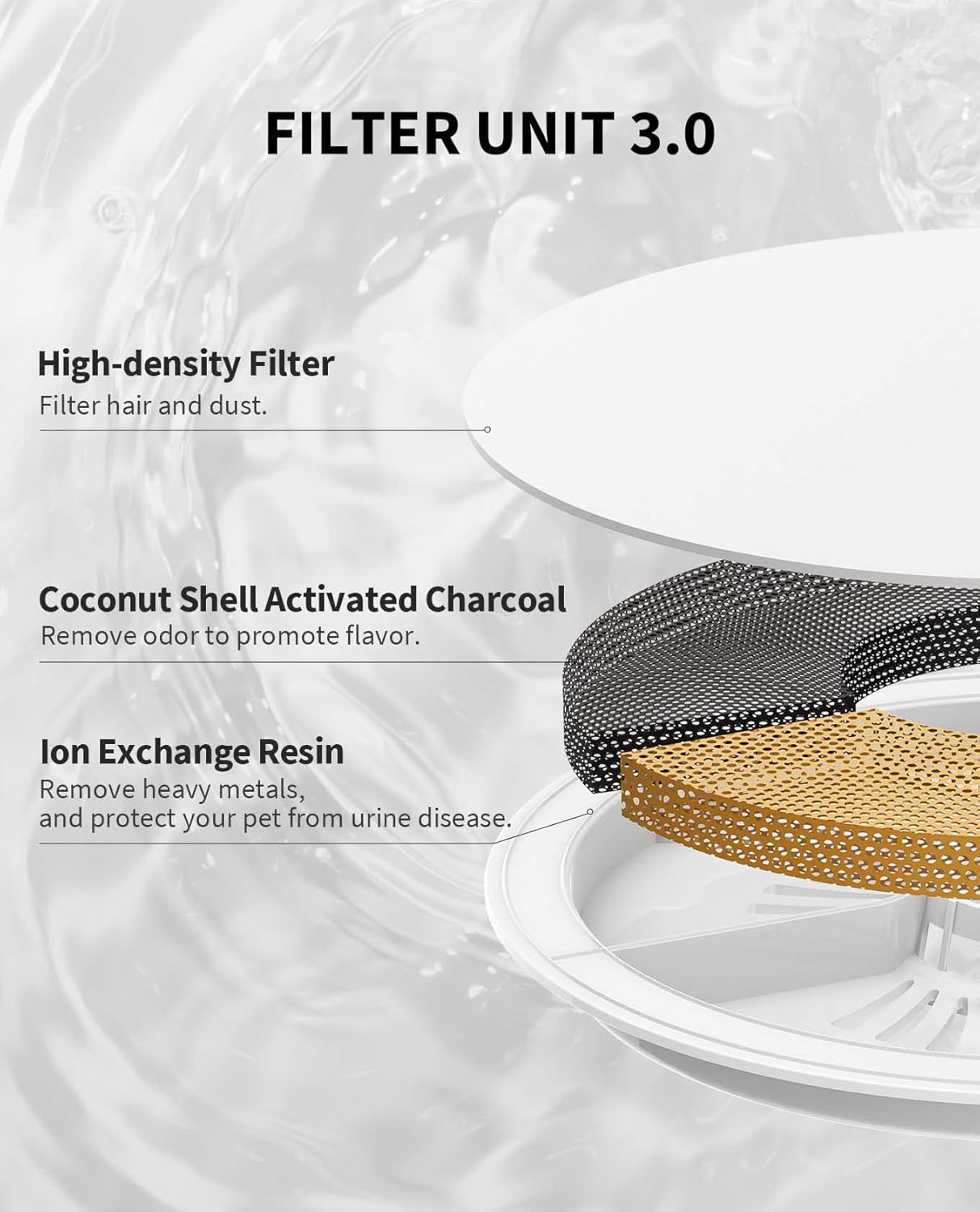
Image: A detailed breakdown of the Filter Unit 3.0, showing its three layers: high-density filter, coconut shell activated charcoal, and ion exchange resin, explaining their functions.
- Assemble Fountain: Place the top tray onto the water tank, ensuring it aligns properly.
- Fill with Water: Fill the water tank with clean water up to the MAX line. The 1.85L capacity is suitable for small to medium-sized pets and can provide fresh water for 8-10 days.

Image: The PETKIT water fountain with a cat, highlighting its 1.8L (60oz) large capacity and dimensions, indicating it can provide fresh water for 8-10 days.
- Connect Power: Place the assembled fountain onto its power base. Connect the power base to a suitable power adapter (not included) and plug it into an electrical outlet.
Operating Instructions
Once set up, the PETKIT water fountain operates automatically. Here's how to understand its functions:
Water Flow and Quiet Operation:
The fountain simulates a natural water flow, encouraging pets to drink more. Its Roman column fountain structure and advanced pump design ensure extremely quiet operation, typically below 25 dB, which is quieter than a whisper. This ensures your pet's and your own peaceful sleep.

Image: A cutaway view of the fountain's internal structure, illustrating the Roman column design that contributes to its quiet operation, with a clear indication of noise levels below 25dB.

Image: A close-up of the fountain's top surface, showing the gentle ripple of water, designed to simulate a natural flow and attract pets to drink.
Intelligent LED Indicators:
The LED indicator on the fountain provides real-time status updates:
- Green Light (Solid): Indicates normal operation.
- Blue Light (Flashing): Indicates a low water level. Please refill the fountain.
- Blue and Traffic Lights (Alternating Flashing): Indicates it's time to replace the filter.

Image: A composite image displaying various states of the PETKIT fountain, including the LED indicator light and the visible MAX/MIN water level markings, aiding in easy monitoring.
Water Level Monitoring:
The fountain is designed with translucent material, allowing you to easily monitor the water consumption of your pet and the remaining water level. This helps you know when to refill without needing to open the unit.
Maintenance
Regular cleaning and maintenance are crucial for the health of your pet and the longevity of the fountain.
Cleaning the Fountain:
The PETKIT CYBERTAIL fountain is designed for easy cleaning with fully detachable parts. It is recommended to clean the fountain at least once a week.
- Disconnect Power: Always unplug the power base before cleaning.
- Disassemble: Carefully remove the top tray, filter unit, and wireless pump from the water tank.
- Wash Components: Wash all detachable parts (water tank, top tray, wireless pump, filter tray) with water and a mild, pet-safe detergent. Use a soft brush to clean any hard-to-reach corners.
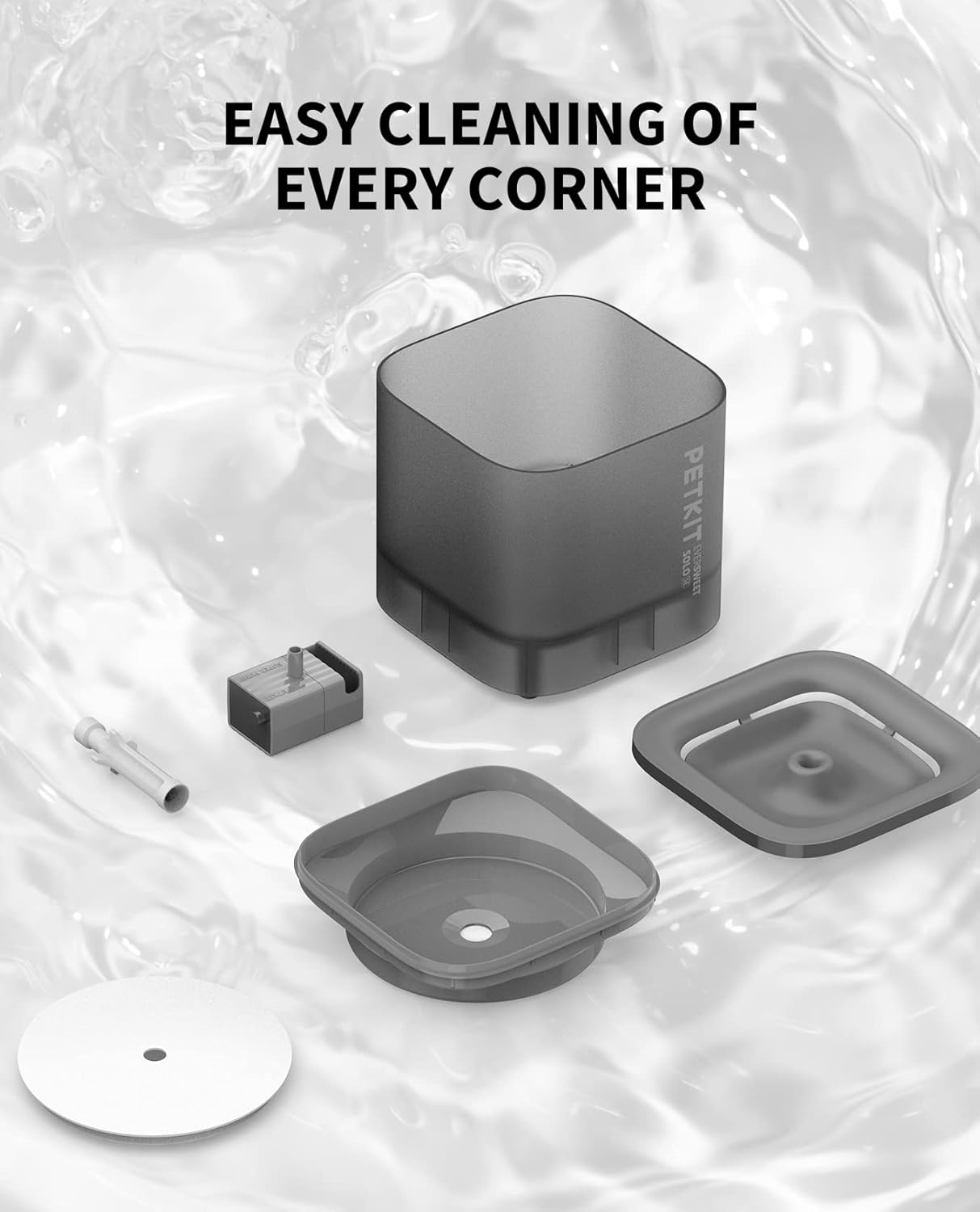
Image: All components of the PETKIT water fountain laid out, demonstrating their detachability for thorough and easy cleaning of every corner.
- Rinse Thoroughly: Rinse all parts thoroughly to remove any soap residue.
- Clean Power Base: Wipe the power base with a damp cloth. Do not submerge the power base in water.
- Dry and Reassemble: Ensure all parts are completely dry before reassembling the fountain.
Filter Replacement:
The Filter Unit 3.0 is a high-performance filter composed of a high-density filter, coconut shell activated charcoal, and ion exchange resin. It provides quadruple filtration for healthy, oxygen-rich water. The filter should be replaced approximately every 30-60 days, or when the alternating blue and traffic lights indicator appears.
- Remove the old filter unit.
- Rinse the new filter unit under running water for a few minutes to remove any loose carbon dust.
- Place the new filter unit into the filter tray.
- Reassemble the fountain and refill with water.
Troubleshooting
If you encounter any issues with your PETKIT water fountain, please refer to the following common solutions:
| Problem | Possible Cause | Solution |
|---|---|---|
| Fountain not working / No water flow |
|
|
| Excessive noise during operation |
|
|
| Water quality appears poor / Odor |
|
|
| LED indicator flashing blue | Low water level. | Refill the water fountain to the MAX line. |
| LED indicator flashing blue and traffic lights alternately | Filter needs replacement. | Replace the filter unit. |
Specifications
| Feature | Detail |
|---|---|
| Model Number | CT-W1S-Grey-EU |
| Dimensions (L x W x H) | 16 x 16 x 15.8 cm |
| Weight | 670 grams |
| Capacity | 1.85 Liters |
| Material | Acrylonitrile Butadiene Styrene (ABS) |
| Voltage | 2.3E+2 Volts (AC) |
| Noise Level | Below 25 dB |
| Filtration System | Filter Unit 3.0 (High-density filter, Coconut Shell Activated Charcoal, Ion Exchange Resin) |
| Power Source | Wired base with wireless pump (adapter not included) |
Warranty and Support
PETKIT is committed to providing high-quality products. While specific warranty details may vary by region and retailer, PETKIT products typically come with a manufacturer's warranty covering defects in materials and workmanship under normal use.
For technical support, warranty claims, or any inquiries regarding your PETKIT CYBERTAIL Wireless Cat Water Fountain, please contact PETKIT customer service:
- Phone: (888) 851-2770
- Operating Hours: Monday - Friday, 9:00 AM - 12:00 PM CST & 1:00 PM - 6:00 PM CST
- You may also visit the official PETKIT website for more information and support resources.
Please retain your proof of purchase for warranty purposes.


