
Introduction
This manual provides detailed instructions for the assembly, operation, and maintenance of your Sytas Ergonomic Desk Chair. Please read this manual thoroughly before assembly and use to ensure proper function and safety. Retain this manual for future reference.

Image: Front view of the Sytas Ergonomic Desk Chair in black, showcasing its mesh backrest and padded flip-up arms.
Safety Information
- Maximum Weight Capacity: Do not exceed the maximum weight recommendation of 250 pounds (113 kg). Exceeding this limit may result in damage to the chair or personal injury.
- Assembly: Assembly may require tools and careful handling. Ensure all parts are securely fastened before use.
- Stability: Do not stand on the chair. Avoid leaning excessively to one side or backward to prevent tipping.
- Children: Keep children away from the chair during assembly. This chair is designed for adult use.
- Moving Parts: Be cautious of moving parts during adjustment to avoid pinching.
Product Components
Before beginning assembly, verify that all components listed below are present and undamaged. If any parts are missing or damaged, please contact customer support.
- Backrest Assembly
- Seat Cushion Assembly
- Armrests (2)
- Gas Lift Cylinder
- Base (Star Base)
- Casters (5)
- Mechanism Plate
- Screws and Allen Wrench
- User Manual (this document)
Assembly Instructions
Assembly typically takes 15-20 minutes. Follow these steps carefully:
- Attach Casters to Base: Insert each of the five casters into the holes at the end of each leg of the star base. Push firmly until they click into place.
- Insert Gas Lift: Place the gas lift cylinder into the center hole of the assembled star base.
- Attach Mechanism Plate to Seat: Align the mechanism plate with the pre-drilled holes on the underside of the seat cushion. Secure it using the provided screws and Allen wrench. Ensure the front of the mechanism faces the front of the seat.
- Attach Armrests to Seat: Attach the armrests to the sides of the seat cushion using the designated screws. Ensure they are oriented correctly for the flip-up function.
- Attach Backrest to Seat: Align the backrest with the mounting points on the seat cushion and armrests. Secure it with the remaining screws.
- Connect Seat Assembly to Gas Lift: Carefully place the assembled seat and backrest onto the gas lift cylinder, ensuring the center hole of the mechanism plate aligns with the top of the gas lift. Press down firmly to secure.

Image: Illustration depicting various product durability tests, including 60,000 armrest adjustments, 120,000 gas lift cycles, 120,000 swivel rotations, 120,000 backrest pressure checks, 1300 KGS base bearing test, and 10,000 caster rolling checks.
Operating Instructions
Your Sytas Ergonomic Desk Chair offers several adjustment features for personalized comfort:
- Seat Height Adjustment: Locate the lever on the right side beneath the seat. To raise the seat, lift the lever while taking your weight off the chair. To lower the seat, lift the lever while seated. Release the lever at the desired height.
- Tilt Tension Adjustment: The knob located under the front-center of the seat controls the tilt tension. Turn clockwise to increase tension (making it harder to recline) or counter-clockwise to decrease tension (making it easier to recline). The chair supports a 90°-120° tilt range.
- Tilt Lock/Unlock: The same lever used for seat height adjustment can also lock or unlock the tilt function. Push the lever inwards to lock the backrest in an upright position (90°). Pull the lever outwards to allow the chair to recline (up to 120°).
- Flip-Up Armrests: The armrests can be flipped up 90 degrees. This feature allows the chair to be pushed further under a desk, saving space. Simply lift the armrests upwards until they lock into the vertical position. To lower, gently pull them down.
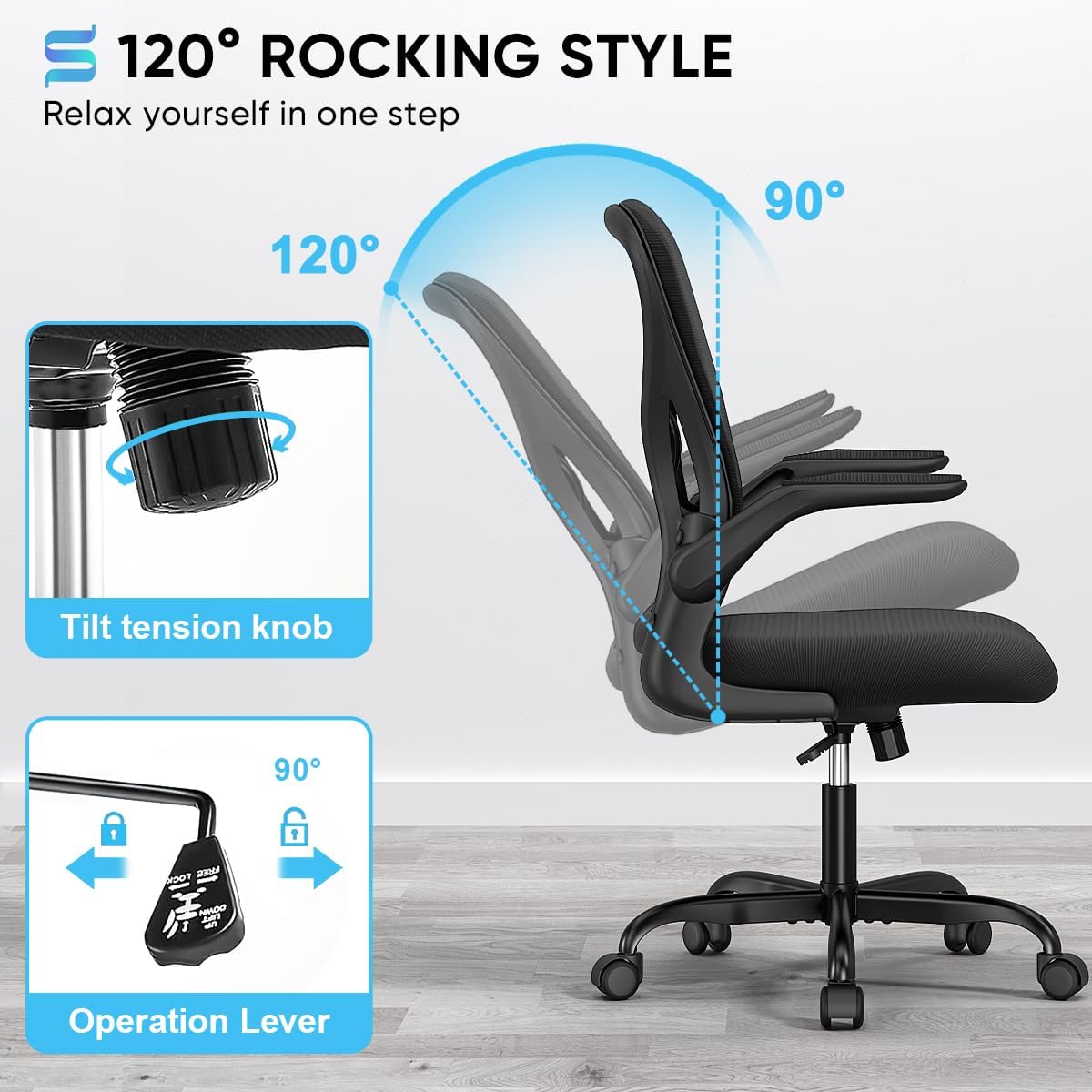
Image: Diagram illustrating the 90-120 degree rocking function of the chair, highlighting the tilt tension knob and the operation lever for tilt lock/unlock.

Image: Visual explanation of the 90-degree flip-up armrests, demonstrating how they can be raised to save space.
Ergonomic Features
The Sytas Ergonomic Desk Chair is designed to support a healthy posture and provide comfort during extended use.
- S-Shaped Backrest: The backrest is contoured to align with the natural curve of your spine, providing support to the lumbar region and reducing muscle fatigue.
- Lumbar Support: Integrated lumbar support helps maintain the natural inward curve of the lower back.
- Breathable Mesh: The high-density double-layer mesh back allows for air circulation, preventing heat buildup and promoting comfort.
- Padded Seat Cushion: The thick, high-resilience foam seat cushion is designed to effectively relieve hip pressure for all-day comfort.
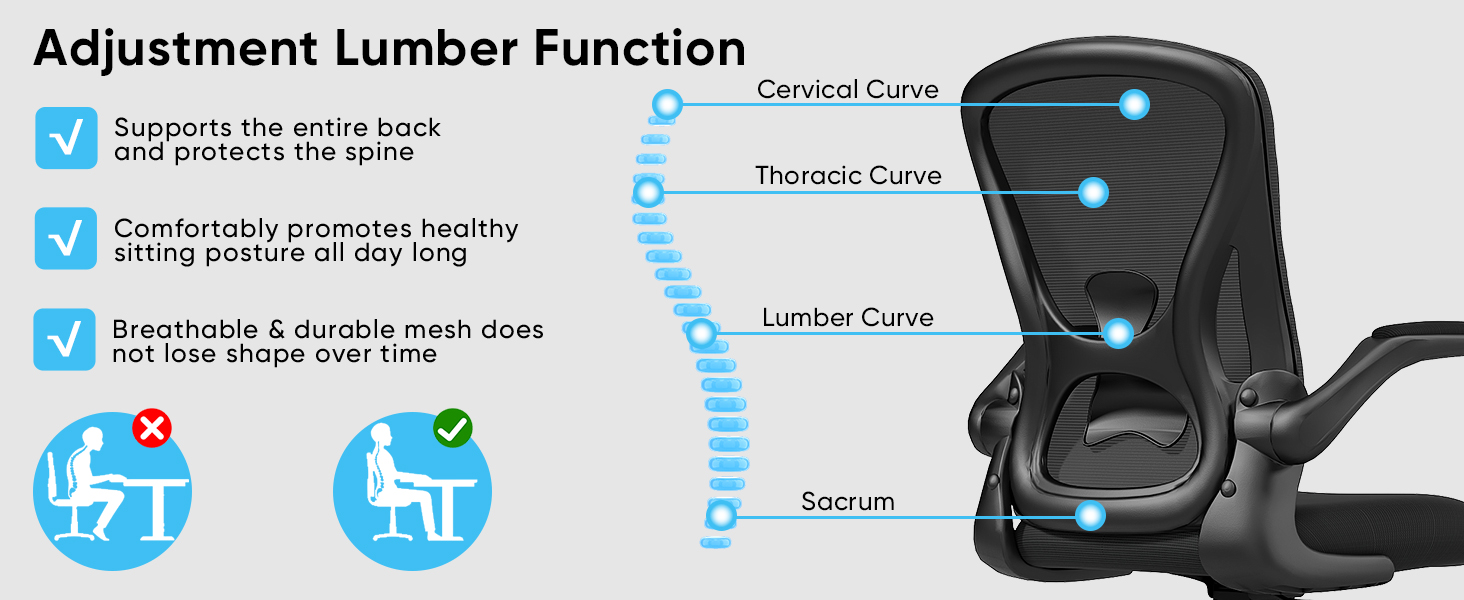
Image: Diagram illustrating the ergonomic lumbar support and S-shaped backrest, showing how it supports the cervical, thoracic, lumbar, and sacrum curves of the spine for healthy sitting posture.

Image: Close-up view of the breathable and strong mesh material used for the chair's backrest, highlighting its properties for effective sweat evaporation and durability.

Image: Cross-section diagram of the high-density foam cushion, showing layers of premium mesh material, high-quality sponge, and a durable sturdy board for optimal comfort and support.
Maintenance
Proper care will extend the life of your Sytas Ergonomic Desk Chair:
- Cleaning: Wipe clean with a damp cloth. Avoid harsh chemicals or abrasive cleaners, which can damage the mesh or fabric.
- Inspection: Periodically check all screws and bolts to ensure they are tight. Re-tighten if necessary.
- Casters: Keep casters free of hair and debris to ensure smooth rolling.
- Avoid Direct Sunlight: Prolonged exposure to direct sunlight can cause fading of materials.
Troubleshooting
| Problem | Possible Cause | Solution |
|---|---|---|
| Chair does not adjust height | Gas lift not engaged or faulty. | Ensure the height adjustment lever is fully pulled. If issue persists, contact customer support. |
| Chair wobbles | Loose screws or uneven floor. | Check and tighten all assembly screws. Ensure the chair is on a flat surface. |
| Casters do not roll smoothly | Debris caught in casters. | Turn the chair over and remove any hair, dust, or debris from the caster wheels. |
| Backrest does not recline | Tilt lock engaged. | Pull the tilt adjustment lever outwards to unlock the recline function. Adjust tilt tension knob if recline is too stiff. |
Specifications
| Brand | Sytas |
| Model Name | TJ-SBGY001BP |
| Color | Black |
| Product Dimensions (D x W x H) | 18.9"D x 19.69"W x 36.22"H |
| Maximum Weight Recommendation | 250 Pounds (113 kg) |
| Item Weight | 27.7 pounds (12.5 kg) |
| Back Style | Solid Back, Ergonomic S-shaped |
| Arm Style | With 90° Flip-up Arms |
| Material | Mesh, Foam |
| Special Feature | Space Saving, Lumbar Support, Breathable Mesh |
| Tilting | Yes (90°-120° rocking) |
| Furniture Base Movement | Swivel, Casters |
| UPC | 717765843819 |
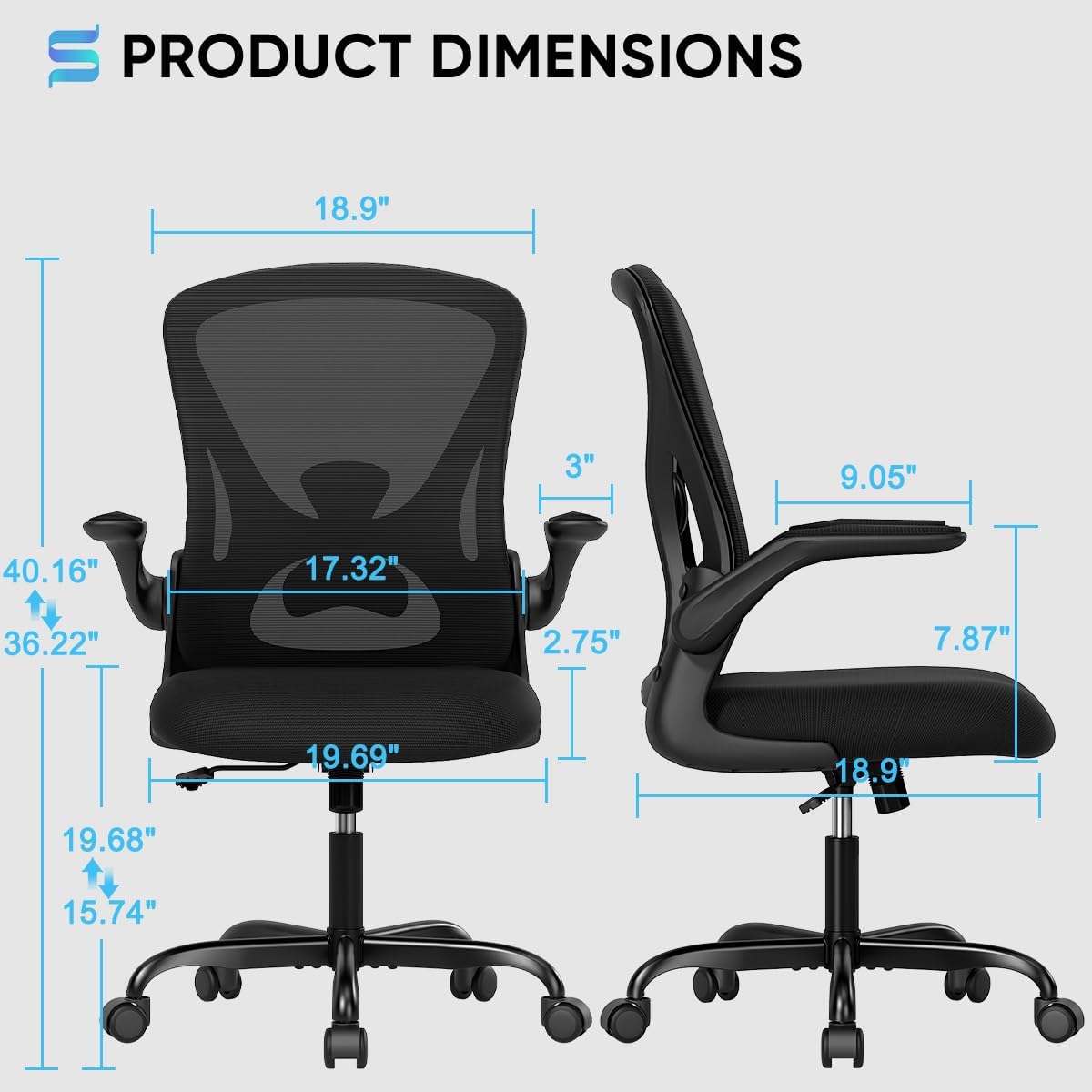
Image: Detailed diagram showing the product dimensions of the Sytas Ergonomic Desk Chair, including height, width, depth, and armrest measurements.

Image: Illustration of the chair's sturdy base, indicating a weight capacity of 300 LBS.

Image: Close-up of the SGS certified gas lift cylinder, indicating its quality and safety certification.

Image: Illustration of the chair's casters, emphasizing their 360-degree smooth and quiet movement.
Warranty and Support
Sytas provides a 1-year warranty for this product, covering manufacturing defects. Additionally, a 30-day money-back guarantee is offered for any reason.
For any questions, issues, or warranty claims, please contact Sytas customer service. We aim to provide effective assistance within 24 hours.
Refer to your purchase documentation for specific contact details or visit the official Sytas store on Amazon: Sytas Amazon Store

