
Introduction
This manual provides detailed instructions for the Binardat PoE Extender Passthrough Switch, Model 100M 30W. This device is designed to extend Power over Ethernet (PoE) connections, allowing for flexible network deployment without the need for additional power outlets. It supports IEEE 802.3af/at standards and offers 10/100Mbps Ethernet connectivity.
Product Overview
The Binardat PoE Extender is a versatile device that simplifies network installations by extending PoE signals. It features a robust metal casing and a plug-and-play design for ease of use.
Key Features:
- PoE Passthrough: 1 PoE In, 2 PoE Out ports with 10/100Mbps auto-adaptation.
- IEEE 802.3af/at Compliance: Supports standard PoE, with input/output up to 30W. PoE voltage 44-57 Vdc.
- Unmanaged Plug & Play: Automatic device detection, no configuration required.
- Three-in-One Functionality: Operates as a PoE Extender (PoE powered), Network Extender (DC 12V 0.5A input), or PoE Switch/Injector (DC 37-57V 0.5A input).
- Durable Design: Metal case, LED indicators, fanless operation, and wall-mountable.
Package Contents:
- 1 x Binardat PoE Extender Passthrough Switch (Model 100M 30W)
- Note: Power adapter for Network Extender or PoE Injector modes is not included.

Image: Overview of the Binardat 3-Port 100M PoE Extender, highlighting its 1 PoE In and 2 PoE Out ports, IEEE802.3af/at support, 3-in-1 functionality, long distance PoE, plug and play, and daisy-chainable features.
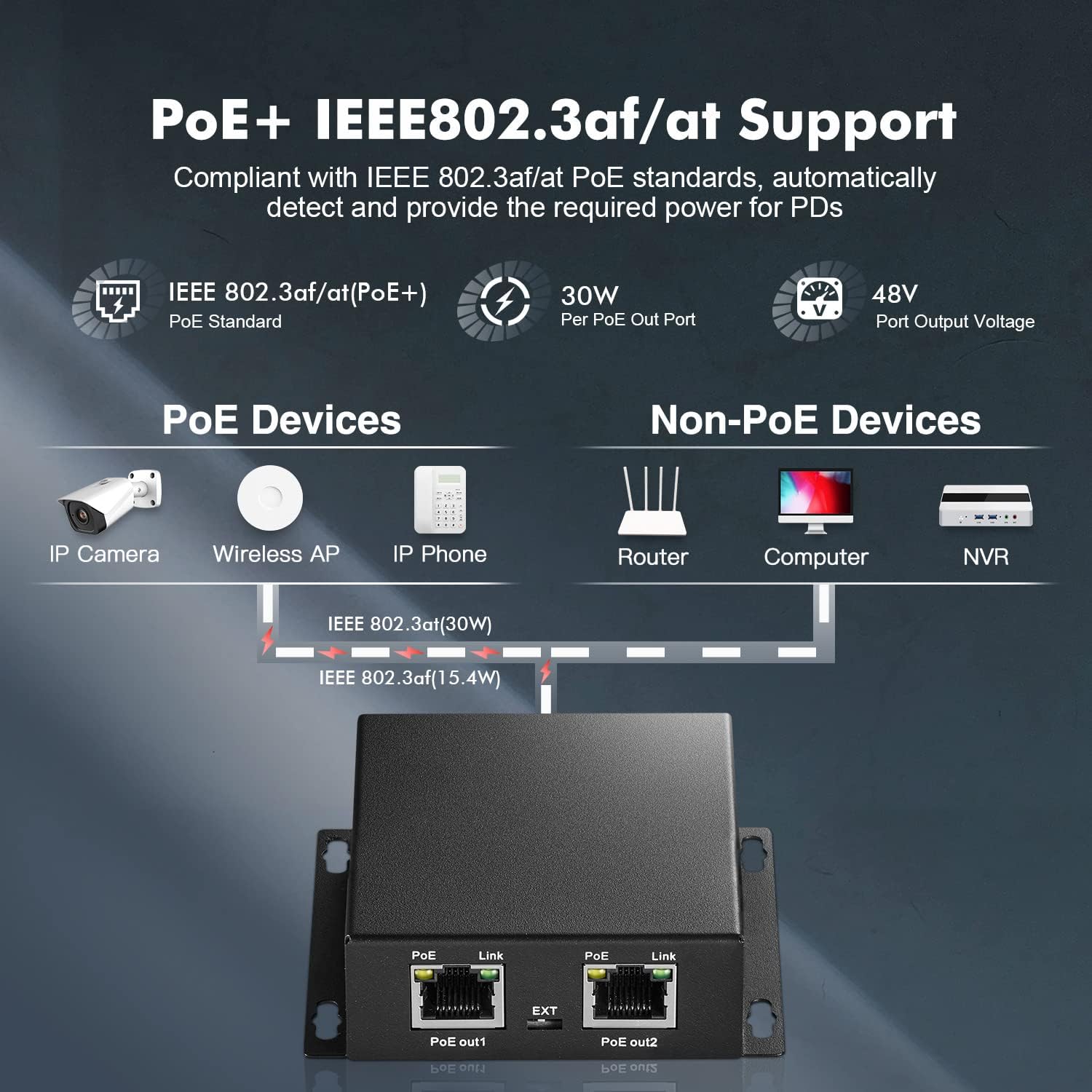
Image: Diagram illustrating PoE+ IEEE802.3af/at support, showing how the extender powers PoE devices (IP Camera, Wireless AP, IP Phone) and connects to non-PoE devices (Router, Computer, NVR). It also shows the 30W per PoE out port and 48V port output voltage.
Setup
The Binardat PoE Extender is designed for simple plug-and-play installation. Follow these steps to set up your device:
Connection Modes:
- PoE Extender Mode (Default):
Connect a PoE switch or PoE injector to the "PoE In" port of the extender using an Ethernet cable. Then, connect your PoE-powered devices (e.g., IP cameras) to the "PoE Out1" and "PoE Out2" ports. No external power adapter is needed in this mode as the extender is powered by the incoming PoE signal.
- Network Extender Mode:
If you need to extend a network connection to a non-PoE device and do not require PoE output, you can use an optional DC 9-57V 0.5A power adapter (not included) connected to the "DC-In" port. Connect a non-PoE switch to the "PoE In" port, and your non-PoE device to an "EXT" port. This mode extends the network signal.
- PoE Injector Mode:
To provide PoE to devices from a non-PoE switch, connect an optional DC 37-57V 0.5A power adapter (not included) to the "DC-In" port. Connect your non-PoE switch to the "PoE In" port, and your PoE-powered devices to the "PoE Out1" and "PoE Out2" ports. The extender will inject power into the Ethernet lines.
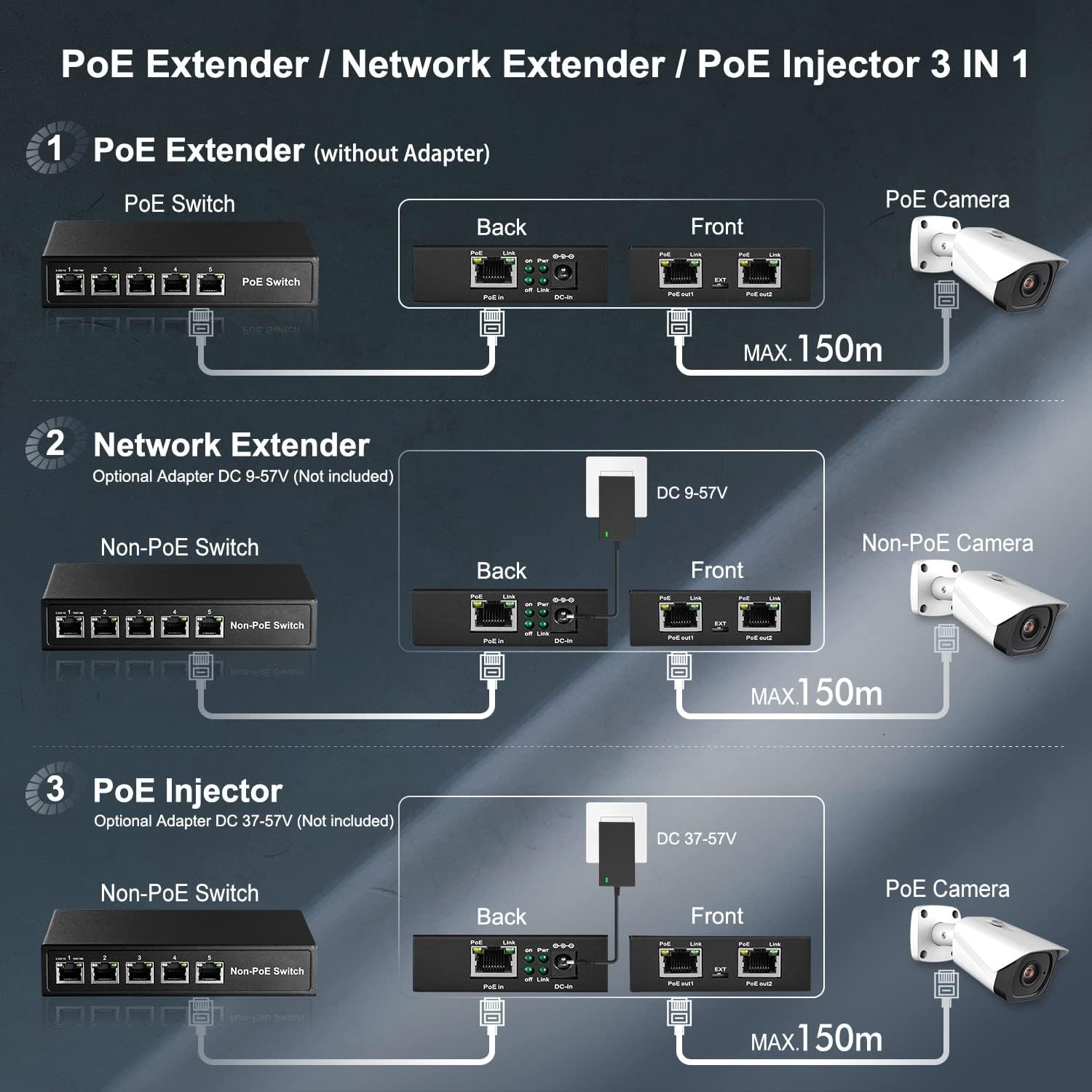
Image: Detailed diagram showing the three operational modes: 1) PoE Extender (without adapter), 2) Network Extender (with optional DC 9-57V adapter), and 3) PoE Injector (with optional DC 37-57V adapter). Each mode illustrates the connections between PoE switches, non-PoE switches, the extender, and cameras, indicating maximum distances.
Wall Mounting: The extender features mount ears for easy wall installation. Secure the device to a suitable surface using appropriate screws (not included).
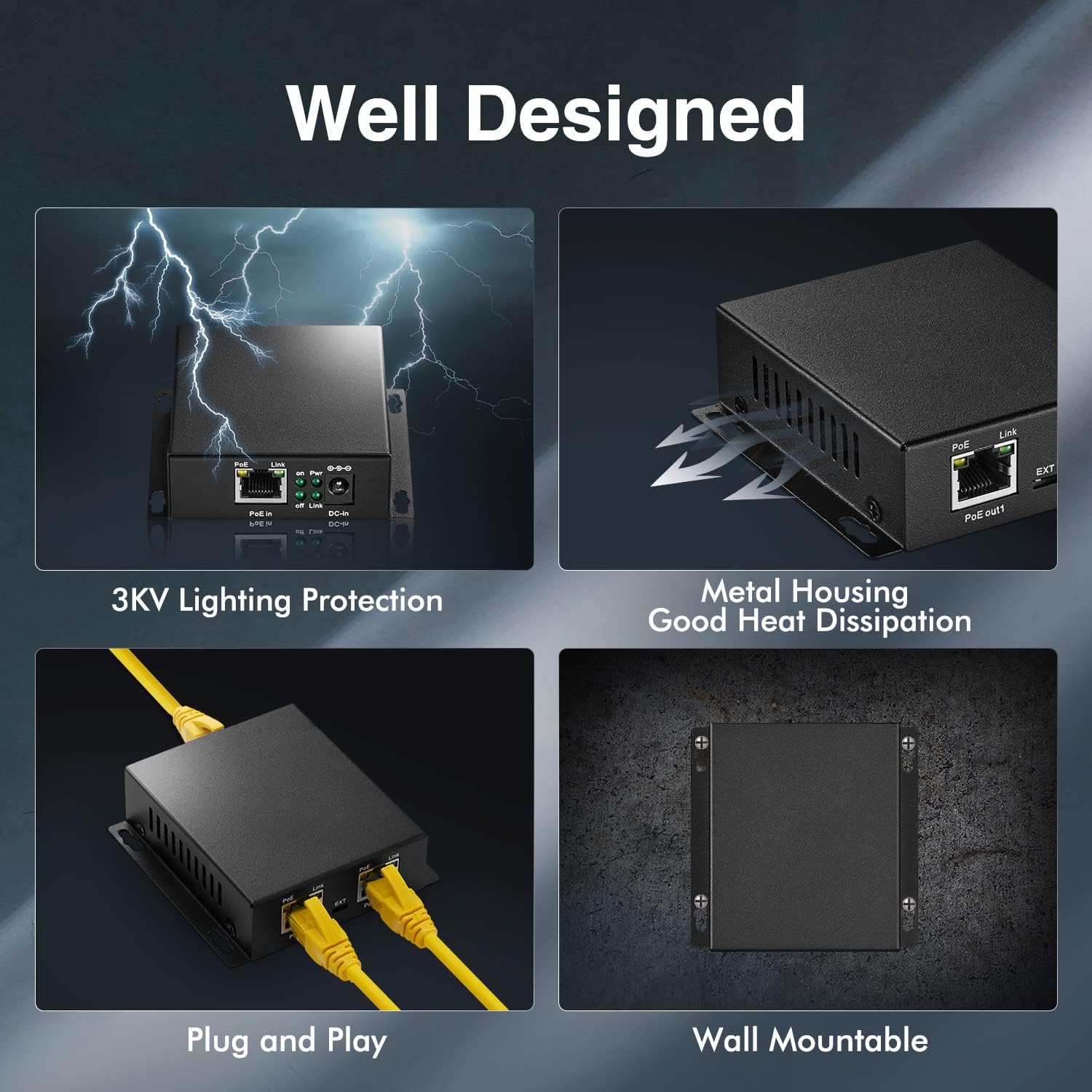
Image: Illustrates the "Well Designed" aspects of the extender, including 3KV lighting protection, metal housing for good heat dissipation, plug-and-play functionality, and wall-mountable design.
Operating Instructions
Once connected, the Binardat PoE Extender operates automatically. Here's how to understand its status:
LED Indicators:
- PoE LED (Left, Orange):
- Orange: Indicates Power over Ethernet (PoE) is supplied to Powered Devices (PDs).
- OFF: No PoE is supplied to PDs.
- Link LED (Right, Green):
- Green: Indicates a normal network signal connection.
- OFF: No network link detected.
The device supports 8-pin simultaneous PoE input, utilizing pins 1/2/4/5 for positive power and 3/6/7/8 for negative power, ensuring stable power delivery.
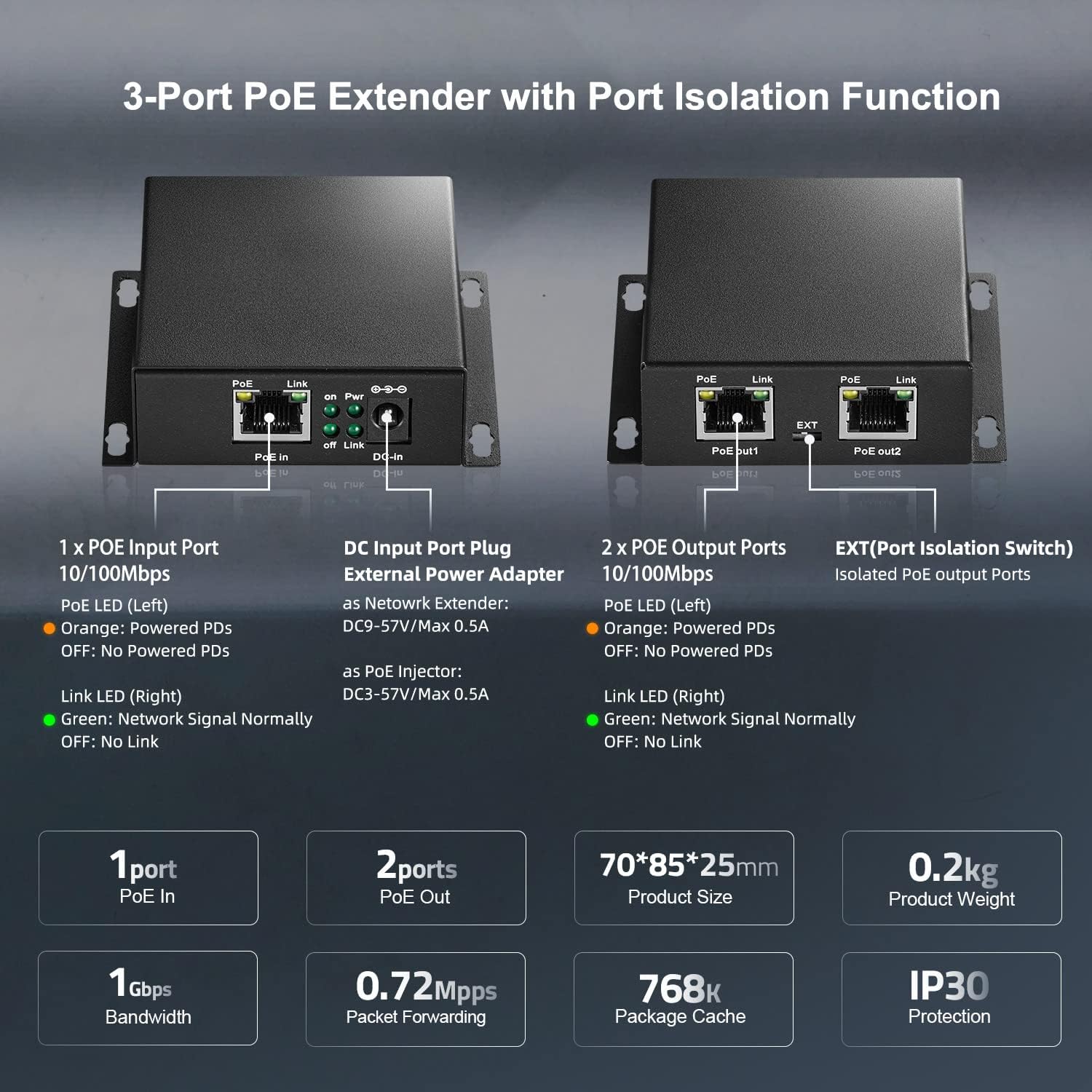
Image: Detailed view of the 3-Port PoE Extender with Port Isolation Function. It labels the 1 x PoE Input Port, DC Input Port, and 2 x PoE Output Ports, along with their respective LED indicators (PoE LED and Link LED). Also displays product size (70*85*25mm), weight (0.2kg), IP30 protection, 1Gbps bandwidth, 0.72Mpps packet forwarding, and 768K package cache.

Image: Diagram illustrating the 8-pin simultaneous PoE input, showing pin assignments for positive (1/2/4/5) and negative (3/6/7/8) power supply, and signal lines on pins 1/2/3/6.
Maintenance
To ensure optimal performance and longevity of your Binardat PoE Extender, follow these maintenance guidelines:
- Cleaning: Use a soft, dry cloth to clean the exterior of the device. Do not use liquid or aerosol cleaners.
- Environment: Operate the device in a well-ventilated area. The metal casing is designed for good heat dissipation, but avoid obstructing ventilation.
- Cable Management: Ensure all Ethernet cables are securely connected and not under excessive strain.
- Power Supply: If using an external power adapter for Network Extender or PoE Injector modes, ensure it meets the specified voltage and current requirements.
- Protection: The device features 3KV lighting protection, but it is still recommended to disconnect the device during electrical storms.
Troubleshooting
If you encounter issues with your Binardat PoE Extender, refer to the following troubleshooting steps:
- No Power/LEDs Off:
- Ensure the incoming PoE source (PoE switch/injector) is active and providing power.
- Check the Ethernet cable connecting the PoE source to the "PoE In" port for damage or improper connection.
- If using an external DC adapter (for Network Extender or PoE Injector modes), verify it is correctly connected and providing the specified voltage.
- No Network Link (Link LED Off):
- Verify that the Ethernet cables connected to the "PoE In" and "PoE Out" ports are functional and properly seated.
- Ensure the connected network devices (e.g., cameras, switches) are powered on and operating correctly.
- Test with different Ethernet cables to rule out cable issues.
- PoE Device Not Receiving Power (PoE LED Off):
- Confirm that the incoming PoE source is providing sufficient power (up to 30W).
- Ensure the connected device is a standard IEEE 802.3af/at PoE-powered device. This extender does not support passive 24V PoE.
- Check the power requirements of your PoE device; if it exceeds 30W, it may not function correctly.
- Slow Network Speed:
- Ensure all connected devices and cables support 10/100Mbps speeds.
- Check for excessive network traffic or other bottlenecks in your network.
Specifications
| Feature | Description |
|---|---|
| Brand | Binardat |
| Model Number | 100M 30W |
| Number of Ports | 1 PoE In, 2 PoE Out |
| Data Transfer Rate | 10/100 Mbps |
| PoE Standard | IEEE 802.3af/at |
| Max PoE Output | 30W per port |
| PoE Voltage | 44-57 Vdc |
| PoE Pin Assignment | Input: 1/2 (+), 3/6 (-), 4/5(+), 7/8(-) |
| DC Input (Optional) | 9-57V (Network Extender), 37-57V (PoE Injector) |
| Switch Type | Unmanaged |
| Case Material | Metal |
| Item Weight | 0.19 Kilograms |
| Dimensions | 70 x 85 x 25 mm (approx.) |
| Protection | IP30, 3KV Lighting Protection |
| Compatible Devices | Camera, Wireless AP, IP Phone, etc. |
Warranty and Support
Warranty: The Binardat PoE Extender Passthrough Switch comes with a 1-Year Warranty from the date of purchase. This warranty covers defects in materials and workmanship under normal use.
Support: For technical assistance, troubleshooting, or warranty claims, please contact Binardat customer support through the retailer's platform or the official Binardat website. Please have your product model number and purchase information ready when contacting support.