
1. Introduction
Thank you for choosing the VIHELM MD3030 Metal Detector. This device is designed for detecting various metals, including gold, silver, coins, and relics, with high accuracy and strong discrimination capabilities. Its adjustable and waterproof features make it versatile for different environments and user preferences. This manual provides detailed instructions for assembly, operation, and maintenance to ensure you get the most out of your metal detector.

The VIHELM MD3030 Metal Detector is designed for ease of use and effective metal detection in various environments.
2. Safety Guidelines
- Always obtain permission before searching on private property.
- Avoid searching in areas where underground cables or pipes may be present.
- Do not use the detector during electrical storms to prevent lightning strikes.
- Exercise caution when digging to avoid injury or damage to property.
- Keep the detector away from extreme temperatures and moisture (beyond the waterproof search coil) to prevent damage.
- Dispose of batteries responsibly according to local regulations.
3. Package Contents
Upon unpacking your VIHELM MD3030 Metal Detector, please ensure all the following components are present:
- 1 x Control Unit (with LCD Display)
- 1 x Adjustable Stem (Stretchable Pole)
- 1 x Armrest
- 1 x Anti-slip Soft Handle
- 1 x 10-inch Waterproof Search Coil
- 2 x Washers (for search coil attachment)
- 1 x User Manual (this document)
Note: 2 x 9V AA batteries are required but not included in the package.
4. Product Components Overview
Familiarize yourself with the main parts of your metal detector before assembly and operation.
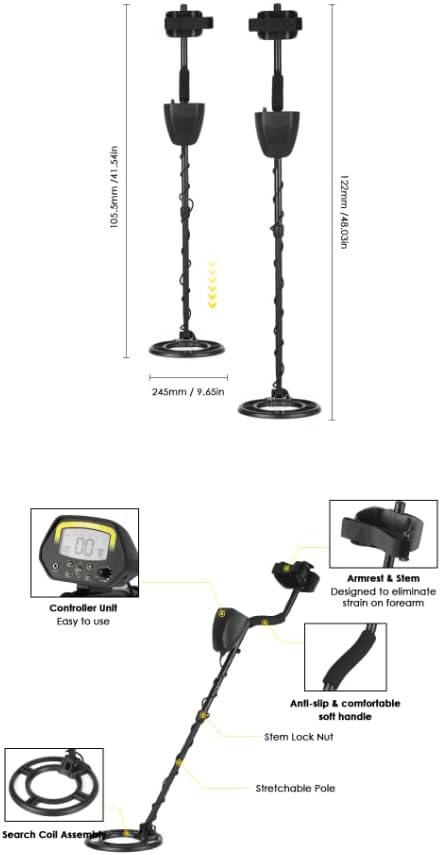
Detailed diagram of the VIHELM MD3030 metal detector's components.
- Controller Unit: Houses the LCD display, control buttons, and battery compartment.
- Armrest & Stem: Provides support and comfort during use, designed to reduce strain.
- Anti-slip Soft Handle: Ensures a secure and comfortable grip.
- Stem Lock Nut: Used to secure the adjustable stem at the desired length.
- Stretchable Pole: Allows for adjustment of the detector's overall length (40-60 inches).
- Search Coil Assembly: The waterproof coil that detects metal objects.
5. Assembly Instructions
Follow these steps to assemble your MD3030 Metal Detector:
- Attach the Search Coil: Connect the search coil to the lower stem using the provided washers and bolt. Ensure it is securely fastened but not overtightened, allowing for slight angle adjustment.
- Connect Lower and Upper Stems: Slide the lower stem into the upper stem.
- Attach Control Unit: Mount the control unit onto the upper stem. Secure it in place.
- Connect Cables: Carefully wrap the search coil cable around the stem and plug it into the corresponding port on the control unit. Ensure the connection is firm.
- Adjust Length: Loosen the stem lock nut, adjust the stretchable pole to a comfortable length (between 40-60 inches) that allows the search coil to be parallel to the ground when standing upright, then tighten the lock nut.
- Install Armrest: Attach the armrest to the upper stem for comfortable operation.
6. Battery Installation
The MD3030 Metal Detector requires two 9V AA batteries (not included). Follow these steps for installation:
- Locate the battery compartment on the back of the control unit.
- Open the battery compartment cover.
- Insert two 9V AA batteries, ensuring the correct polarity (+ and -) as indicated inside the compartment.
- Close the battery compartment cover securely.
Always use fresh batteries for optimal performance. Remove batteries if the detector will not be used for an extended period.
7. Operating Your Metal Detector
7.1 Control Panel Overview
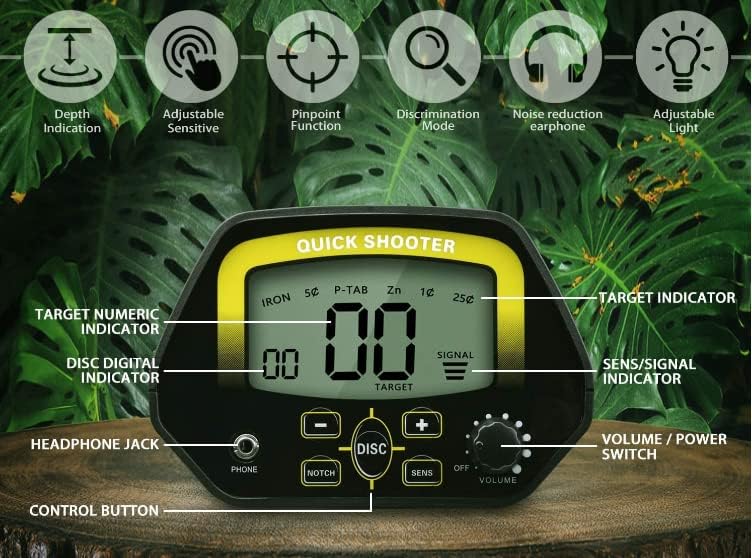
The control panel features an LCD display and various buttons for adjusting settings.
- LCD Display: Shows DISC/NOTCH range, SENS level, Battery Condition, TARGET ID, Target Depth, and Metal Type.
- VOLUME / POWER Switch: Turns the detector on/off and adjusts audio volume.
- SENS Button: Adjusts the detector's sensitivity.
- DISC Button: Activates and adjusts the discrimination function.
- NOTCH Button: Activates and adjusts the notch function.
- Control Buttons (+/-): Used to increase or decrease values for SENS, DISC, and NOTCH settings.
- Headphone Jack: For connecting 3.5mm headphones (not included).
7.2 Power On/Off
To turn on the detector, rotate the VOLUME / POWER switch clockwise. To turn it off, rotate the switch counter-clockwise until it clicks.
7.3 Sensitivity Adjustment (SENS)
Press the SENS button, then use the '+' or '-' buttons to adjust the sensitivity level. Higher sensitivity increases detection depth but may also increase false signals from ground mineralization or electrical interference. Start with a medium setting and adjust as needed.
7.4 Discrimination (DISC) and Notch Modes
The MD3030 offers advanced discrimination features to help you ignore unwanted metals (junk) and focus on valuable targets.
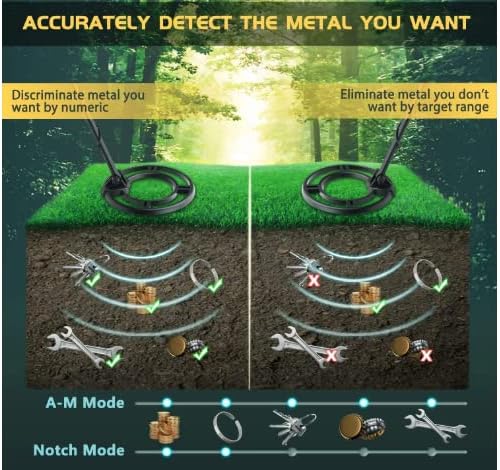
Visual representation of how discrimination and notch modes filter out unwanted metals.
- DISC Mode: Press the DISC button, then use '+' or '-' to set a discrimination range. Metals falling below this range will be ignored. This is useful for eliminating common junk metals like iron. The LCD will show the discriminated target.
- NOTCH Mode: Press the NOTCH button, then use '+' or '-' to select specific metal types or ranges to ignore. This allows for more precise filtering, letting you 'notch out' specific unwanted items while still detecting others.
- Three Tone Audio Discrimination: The detector provides high, medium, and low audio tones to indicate different types of metal, aiding in target identification before digging.
7.5 Volume Control
Adjust the audio volume by rotating the VOLUME / POWER switch. Turn clockwise to increase, counter-clockwise to decrease.
7.6 Headphone Use
For improved audio clarity and to conserve battery life, plug any standard 3.5mm headphones (not included) into the headphone jack on the control unit.
7.7 Search Coil Usage

The 10-inch search coil is IP68 waterproof, suitable for use in shallow water.
- Waterproof Design: The 10-inch search coil is IP68 waterproof, allowing for detection in shallow water, wet sand, and dry ground. Note: The control unit is not waterproof and should not be submerged.
- Sweeping Technique: Hold the search coil parallel to the ground, about 1-2 inches above the surface. Sweep the coil slowly from side to side in overlapping arcs. A super slow sweep can enhance discrimination.
7.8 Adjustable Length
The detector's shaft is adjustable from approximately 40 to 60 inches, allowing users of different heights to find a comfortable operating position. Loosen the stem lock nut, adjust the length, and then re-tighten.
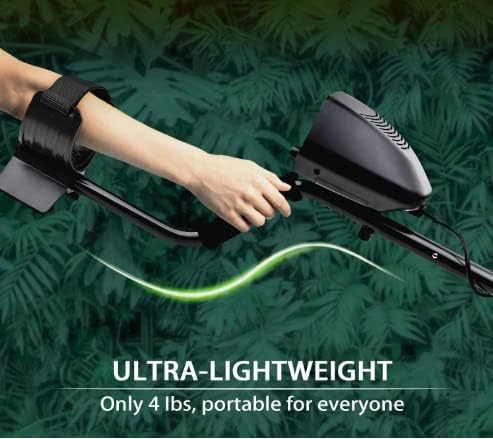
The adjustable shaft and lightweight design ensure comfortable use for extended periods.
7.9 Target Indication

The detector can identify various metal types and indicate approximate depth.
- LCD Display: The display shows a TARGET ID (numeric indicator), Target Depth, and an icon representing the likely metal type (e.g., iron, nickel, zinc, copper, silver).
- Audio Tones: Different audio tones (high, medium, low) correspond to different metal types, providing an audible cue for target identification.
- Detection Depth: The detector can detect objects at depths ranging from approximately 0.2 to 1.5 meters (8 to 59 inches), depending on target size, composition, and ground conditions.
8. Maintenance and Care
- Cleaning: Wipe the detector with a damp cloth after each use. Do not use abrasive cleaners or solvents.
- Search Coil: The search coil can be rinsed with fresh water if used in saltwater or dirty conditions. Ensure it is dry before storage.
- Storage: Store the detector in a cool, dry place. Remove batteries if storing for extended periods to prevent leakage.
- Cable Care: Avoid sharp bends or kinks in the search coil cable.
9. Troubleshooting
- No Power: Check battery installation and ensure batteries are fresh. Rotate the VOLUME / POWER switch fully clockwise.
- Erratic Signals / False Alarms:
- Reduce sensitivity.
- Ensure the search coil cable is securely connected and not damaged.
- Move away from power lines, other electronic devices, or highly mineralized ground.
- Check for nearby metal objects (e.g., fences, large rocks with mineral content).
- No Sound: Check volume setting. Ensure headphones are properly plugged in if used.
- Poor Detection Depth:
- Increase sensitivity (if conditions allow).
- Ensure batteries are fully charged.
- Sweep the coil slowly and consistently.
10. Specifications
| Feature | Detail |
|---|---|
| Model Number | MD3030 |
| Brand | VIHELM |
| Color | Black |
| Power Source | Battery Powered (2 x 9V AA, not included) |
| Operating Frequency | 6.0 KHz |
| Item Weight | Approximately 5 Pounds (2.27 kg) |
| Adjustable Length | Yes, 40-60 inches (101-152 cm) |
| Search Coil | 10-inch, IP68 Waterproof, Interchangeable |
| Detection Depth | 0.2-1.5 meters (approx. 8-59 inches), depending on target and conditions |
| Search Modes | LCD & Sound Mode, DISC, NOTCH |
| Audio Tones | Three-tone audio discrimination (High, Medium, Low) |
11. Customer Support
For any questions, technical assistance, or support regarding your VIHELM MD3030 Metal Detector, please refer to the retailer's customer service channels or visit the official VIHELM website for further information.