
Introduction
This manual provides instructions for the ALLIMITY RC4390A replacement remote control. This remote is designed to function as a direct replacement for various VORTEX television models, offering full functionality without the need for complex programming. Please read this manual carefully before use.

This image displays the front of the ALLIMITY RC4390A remote control, showing all buttons including power, number pad, volume, channel, navigation, and dedicated buttons for streaming services like Netflix and YouTube.
Setup
Battery Installation
- Locate the battery compartment on the back of the remote control.
- Press down on the tab and slide the battery cover downwards to open it.
- Insert two AAA alkaline batteries (not included) into the compartment, ensuring the correct polarity (+ and -) as indicated inside the compartment.
- Slide the battery cover back into place until it clicks securely.
No programming is required. Once batteries are installed, the remote control is ready for immediate use with compatible VORTEX TV models.
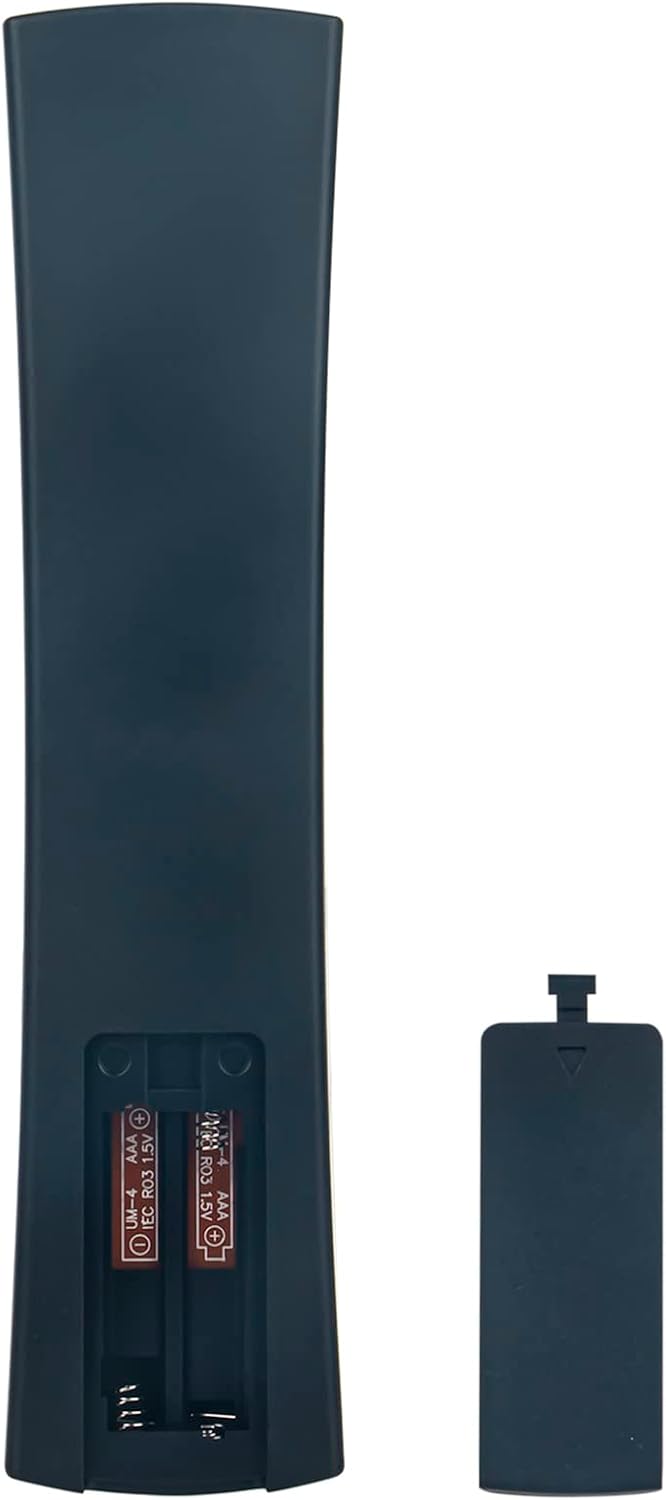
This image shows the back of the remote control with the battery cover removed, revealing the battery slots. It indicates the correct polarity for inserting AAA batteries.
Operating Instructions
Basic Functions
Point the remote control directly at your television's infrared sensor. Ensure there are no obstructions between the remote and the TV.
- Power Button: Turns the TV on or off.
- Number Pad (0-9): Selects channels directly.
- Volume Up/Down: Adjusts the sound level.
- Channel Up/Down: Changes channels sequentially.
- Navigation Buttons (Up, Down, Left, Right, OK): Used for menu navigation and selection.
- Back/Exit: Returns to the previous screen or exits a menu.
- Smart TV Buttons (Netflix, YouTube, Kids, USB): Provides direct access to these applications or functions, if supported by your TV model.
Compatible Models
This remote control is compatible with the following VORTEX TV models:
- V32EP18
- LED-1960
- LED-V24E16DF
- LEDV-24E19D
- LED-24E-112D
- LEDV-28E16D
- LEDV-24E24Z1
- LEDV-24CD06
- LEDV-24EP28S
- LEDV-32ED9D
- LEDV-28E22D
- LEDV-28E33D
- LEDV-24E12D
- LEDV-24E19DS
- LED-V2416DF
- LED-V24E1D
- LEDV-24E24Z
- LED-V32ED2D
- LED-V32E1D
- LEDV-40E48AS
- LEDV-42E15D
- LEDV-42E19D
- LEDV-40E19N
Care and Maintenance
- Cleaning: Wipe the remote control with a soft, dry cloth. Do not use liquid cleaners or abrasive materials.
- Battery Care: If the remote control will not be used for an extended period, remove the batteries to prevent leakage and potential damage.
- Storage: Store the remote in a cool, dry place away from direct sunlight and extreme temperatures.
Troubleshooting
Remote Not Responding
- Check Batteries: Ensure batteries are inserted correctly with the correct polarity and are not depleted. Replace with fresh AAA alkaline batteries if necessary.
- Line of Sight: Make sure there is a clear path between the remote control and the TV's infrared sensor. Remove any obstructions.
- TV Sensor: Confirm that the TV's infrared sensor is not blocked or dirty.
- Compatibility: Verify that your TV model is listed as compatible with the ALLIMITY RC4390A remote control.
Product Specifications
| Feature | Detail |
|---|---|
| Brand | ALLIMITY |
| Model Number | QYSY-RC4390A-V-QYSY |
| Compatible Devices | VORTEX V32EP18, LED-1960, LED-V24E16DF, LEDV-24E19D, LED-24E-112D, LEDV-28E16D, LEDV-24E24Z1, LEDV-24CD06, LEDV-24EP28S, LEDV-32ED9D, LEDV-28E22D, LEDV-28E33D, LEDV-24E12D, LEDV-24E19DS, LED-V2416DF, LED-V24E1D, LEDV-24E24Z, LED-V32ED2D, LED-V32E1D, LEDV-40E48AS, LEDV-42E15D, LEDV-42E19D, LEDV-40E19N |
| Special Features | No programming required |
| Batteries Required | Yes, 2x AAA (not included) |
| Connection Type | Infrared |
| Controller Type | Button Control |
| Maximum Range | 10 Meters |
| Product Dimensions | 4 x 12 x 0.3 cm |
| Product Weight | 60 g |
| First Available Date | 12 April 2023 |
Warranty Information
This product comes with a standard manufacturer's warranty. For specific details regarding warranty coverage and duration, please refer to the purchase documentation or contact the seller directly.
Customer Support
If you encounter any issues or have questions regarding your ALLIMITY RC4390A replacement remote control that are not addressed in this manual, please contact the seller or ALLIMITY customer support for assistance.
