Introduction
This manual provides essential information for the setup, operation, and maintenance of your Lionel Southern Pacific Berkshire Freight Bluetooth Electric HO Gauge Model Train Set. This HO Gauge model train set is designed for enthusiasts aged 14 years and up, offering a detailed and interactive model railroading experience.
Lionel HO Gauge products are 1:87 in scale, operating on a 2-Rail HO FasTrack System. The FasTrack system features a snap-together connection for reliable track assembly.
What's Included
Your Lionel Southern Pacific Berkshire Freight Bluetooth Electric HO Gauge Model Train Set includes the following components:
- (1) 2-8-4 Locomotive
- (1) Tender
- (1) Boxcar
- (1) Flatcar
- (1) Reefer
- (1) Work Caboose
- (12) Twenty Inch Radius HO Curve FasTrack sections
- (3) Nine Inch HO Straight FasTrack sections
- (1) Nine Inch HO Terminal FasTrack section
- (1) Wall-pack Power Supply
- (1) LionChief Remote for Locomotive
Setup Instructions
- Track Assembly: Connect the HO FasTrack sections by snapping them together firmly. Ensure all connections are secure for reliable operation. The set includes (12) 20-inch radius curve sections, (3) 9-inch straight sections, and (1) 9-inch terminal section.
- Power Connection: Connect the Wall-pack Power Supply to the HO Terminal FasTrack section. Plug the power supply into a suitable electrical outlet.
- Locomotive Placement: Carefully place the 2-8-4 Locomotive and other rolling stock onto the assembled track. Ensure all wheels are properly seated on the rails.
- Remote Batteries: The LionChief Remote requires three AAA batteries (not included). Use a Phillips screwdriver (not included) to open the battery compartment and insert the batteries, observing correct polarity.
Operating Instructions
Your train set can be operated using the included LionChief Remote or via the Lionel LionChief App on a compatible smart device.
Using the LionChief Remote
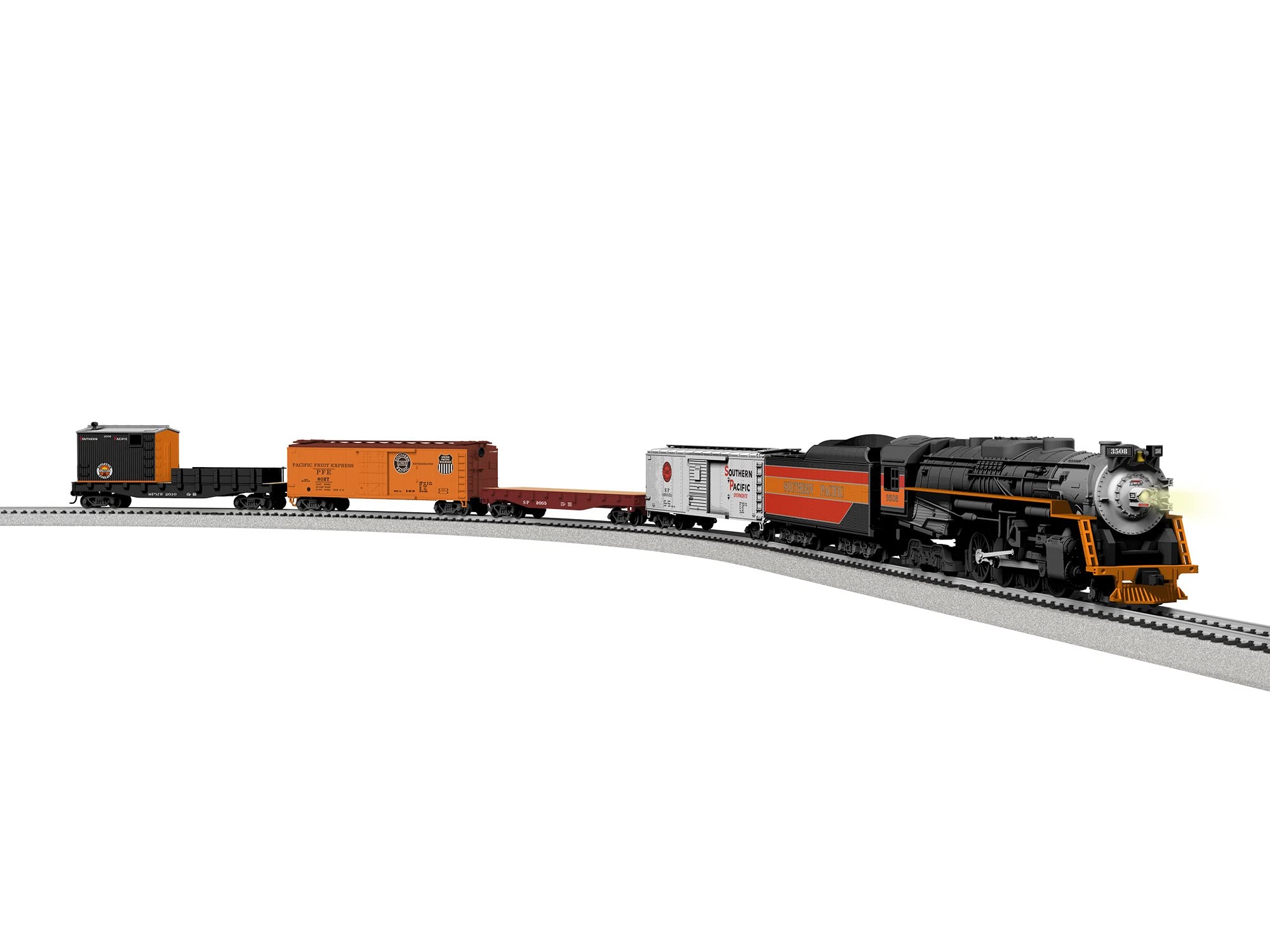
Image: The LionChief Remote Control. This black remote features a central speed dial, buttons for bell, whistle, and announcements, and a forward/reverse switch. The Lionel logo and Southern Pacific Lines emblem are visible on its body.
- Power On: Ensure the remote has fresh AAA batteries installed. Turn the remote's power switch to the "ON" position.
- Connect to Locomotive: The remote should automatically pair with the locomotive. If not, refer to the remote's specific pairing instructions (usually involves pressing a button on the locomotive or remote).
- Control Speed: Use the central dial to control the locomotive's speed. Turn it forward for increasing speed in the forward direction and backward for increasing speed in reverse.
- Direction: Use the "FORWARD" and "REVERSE" switch to change the train's direction.
- Sounds: Press the designated buttons for whistle, bell, and user-activated announcements. The RailSounds RC Sound System provides realistic train background sounds.
- Headlight: The locomotive features an operating headlight.
Using the Lionel LionChief App (Bluetooth)
- Download App: Download the Lionel LionChief App from your compatible smart device's app store.
- Bluetooth Connection: Enable Bluetooth on your smart device. Open the LionChief App and follow the on-screen instructions to connect to your locomotive.
- App Controls: The app provides comprehensive control over speed, direction, and sound features, mirroring the remote control functionality.
- Lionel Voice Control (LVC): Utilize LVC through the app to operate your locomotive by speaking commands. Refer to the app's help section for a list of available voice commands.
Maintenance
- Lubrication: Lubricate the wheels and axles regularly to ensure smooth operation and prevent squeaks and wear. Use model train specific lubricant.
- Cleaning: Wipe the train components with a soft cloth occasionally to keep them clean. Avoid harsh chemicals.
- Battery Storage: Remove all batteries from the LionChief Remote when the train set will not be used for an extended period to prevent corrosion.
Safety Information
CAUTION - ELECTRIC TOY: Not recommended for children under 14 years of age. As with all electric products, precautions should be observed during handling and use to prevent electric shock.
CHOKING HAZARD: Small parts. Not for children under 3 years of age.
WARNING: This product can expose you to chemicals including lead, which is known in the State of California to cause cancer, birth defects, or other reproductive harm. Wash hands after handling.
Specifications
| Model Number | 2361010 |
| Rail Line | Southern Pacific |
| Gauge | HO Gauge (1:87 scale) |
| Minimum Curve | 18 inches |
| Set Length | 39.5 inches |
| Product Dimensions | 18.7 x 14 x 6.4 inches |
| Item Weight | 8 pounds |
| Power Supply | Wall-pack Power Supply |
| Remote Batteries | 3 AAA batteries (not included) |
| Recommended Age | 14 years and up |
| Release Date | September 26, 2024 |
| Manufacturer | Lionel |
Troubleshooting
If your train set is not operating as expected, consider the following common issues and solutions:
- Train Not Moving:
- Ensure the Wall-pack Power Supply is securely plugged into both the track and a working electrical outlet.
- Verify that all track sections are firmly connected, providing continuous electrical contact.
- Check that the locomotive's wheels are properly seated on the rails.
- Confirm the LionChief Remote has fresh batteries and is turned "ON".
- Remote Not Responding:
- Replace the AAA batteries in the remote.
- Ensure the remote is within range of the locomotive.
- If using the LionChief App, verify Bluetooth is enabled on your device and the app is correctly paired with the locomotive.
- Intermittent Operation:
- Inspect track connections for any looseness or debris.
- Clean the track and locomotive wheels to ensure good electrical conductivity.
Warranty and Support
For warranty information, technical support, or replacement parts, please contact Lionel customer service. You can find additional resources and contact details on the official Lionel website or their Amazon Brand Store.
Lionel Brand Store: Visit the Lionel Store on Amazon


