
1. Introduction
The ENONEO CH-911 Wall-Mounted Key Box is designed to provide secure storage for your keys, offering convenient access for authorized users while maintaining high security against unauthorized entry. Its robust construction and illuminated dial make it suitable for various indoor and outdoor applications, including homes, offices, garages, and for sharing keys with family, cleaners, or service personnel.

Image: Front view of the ENONEO CH-911 Key Box, showing the combination dial and the interior with keys.
2. Safety Information
Please read and understand all safety instructions before using this product.
- Warning: Do not allow children under 10 years of age to handle the key box unsupervised.
- Ensure the key box is securely mounted to a solid surface to prevent unauthorized removal.
- Keep the combination code confidential and do not share it with unauthorized individuals.
- Regularly check the key box for any signs of damage or tampering.
3. Package Contents
Verify that all components are present in the package:
- 1 x ENONEO CH-911 Key Lock Box
- 1 x CR2032 Battery (pre-installed)
- 4 x Nylon Expansion Plugs
- 4 x Mounting Screws
- 1 x User Manual
4. Setup and Installation
Follow these steps to securely install your ENONEO CH-911 Key Box:
- Choose a Location: Select a suitable wall or solid surface for mounting. Consider a discreet location that is easily accessible to authorized users.
- Mark Drill Holes: Place the key box against the desired mounting surface. Use a pencil to mark the positions for the four screw holes.
- Drill Holes: Using an appropriate drill bit for your wall type, drill holes at the marked positions.
- Insert Expansion Plugs: Insert the provided nylon expansion plugs into the drilled holes. Tap them gently with a hammer until they are flush with the wall surface.
- Mount the Key Box: Align the key box with the installed expansion plugs. Insert the mounting screws through the key box's screw holes and tighten them firmly with a screwdriver. Ensure the key box is stable and secure.
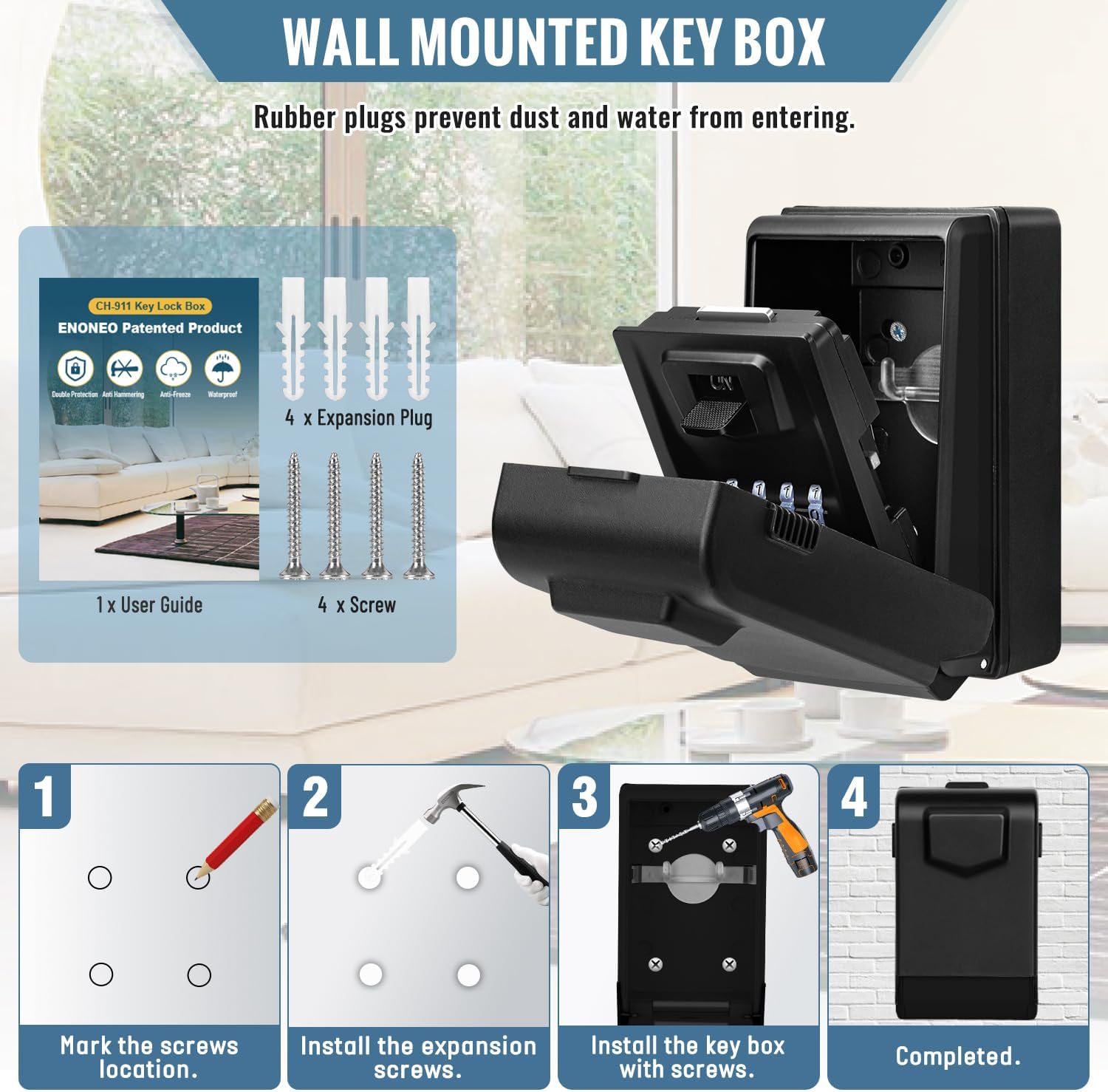
Image: Visual guide for wall-mounting the key box, showing marking, drilling, and securing steps.
5. Operating Instructions
5.1 Setting the Combination
The default combination is 0-0-0-0. To set your personal combination:
- Open the Key Box: Enter the default code (0-0-0-0) and open the key box door.
- Locate Reset Lever: Inside the key box, on the back of the door, locate the reset lever (usually a small metal rod or switch).
- Move Lever to Position B: Push the metal rod from position A to position B.
- Set New Combination: Rotate the dials to your desired 4-digit combination. Ensure the numbers are aligned with the indicator line.
- Move Lever Back to Position A: Push the metal rod back from position B to position A.
- Test New Combination: Close the key box door and scramble the dials. Then, enter your new combination to verify it opens correctly.
Important: Remember your new combination. There is no master key or override if you forget it.

Image: Detailed steps for changing the 4-digit combination code.
5.2 Opening the Key Box
- Slide open the protective cover to reveal the dials.
- Rotate the dials to your set 4-digit combination.
- Pull down the door to open the key box.
5.3 Using the Luminous Dial
The key box features an auto-illuminated dial for visibility in low-light conditions.
- The dial automatically illuminates for 15 seconds when the protective cover is opened.
- To re-activate the light, press the black button located below the dials.

Image: Illustration of the automatic LED light feature and battery compartment.
6. Maintenance
6.1 Battery Replacement
The luminous dial is powered by a CR2032 battery. If the light dims or stops working, replace the battery:
- Open the key box door.
- Locate the battery compartment, typically on the inside of the door or near the dial mechanism.
- Use a small screwdriver to open the compartment and replace the old CR2032 battery with a new one.
- Close the battery compartment securely.
6.2 Cleaning
Wipe the key box with a soft, damp cloth. Avoid using abrasive cleaners or solvents that could damage the finish or internal components.
6.3 Weather Protection
The durable ABS cover protects the dials from dust, rain, snow, and frost. Ensure this cover is always closed when the key box is not in use to maintain its waterproof and dustproof properties.
7. Troubleshooting
- Key box will not open:
- Ensure the correct 4-digit combination is entered.
- Verify that the numbers on the dials are perfectly aligned with the indicator line.
- If the combination is forgotten, the key box cannot be opened without the code.
- Luminous dial not working:
- Check if the CR2032 battery needs replacement (refer to Section 6.1).
- Ensure the battery is inserted with the correct polarity.
- Difficulty rotating dials:
- Ensure the protective cover is fully open.
- Clean any dirt or debris from around the dials.
8. Specifications
| Brand | ENONEO |
| Model Number | CH-911 |
| Color | Black |
| Material | High-strength Aluminum Alloy, Metal |
| Product Dimensions (L x W x H) | 7 x 8 x 13.5 cm |
| Item Weight | 650 grams |
| Combination Type | 4-Digit resettable combination (10,000 possibilities) |
| Key Capacity | 7-15 standard keys, 3-4 car keys |
| Special Features | Illuminated Dial, Waterproof, Rust-resistant, Secure, Lockable |
| Battery | 1 x CR2032 (included) |
| Mounting Type | Surface Mount (Wall-Mounted) |
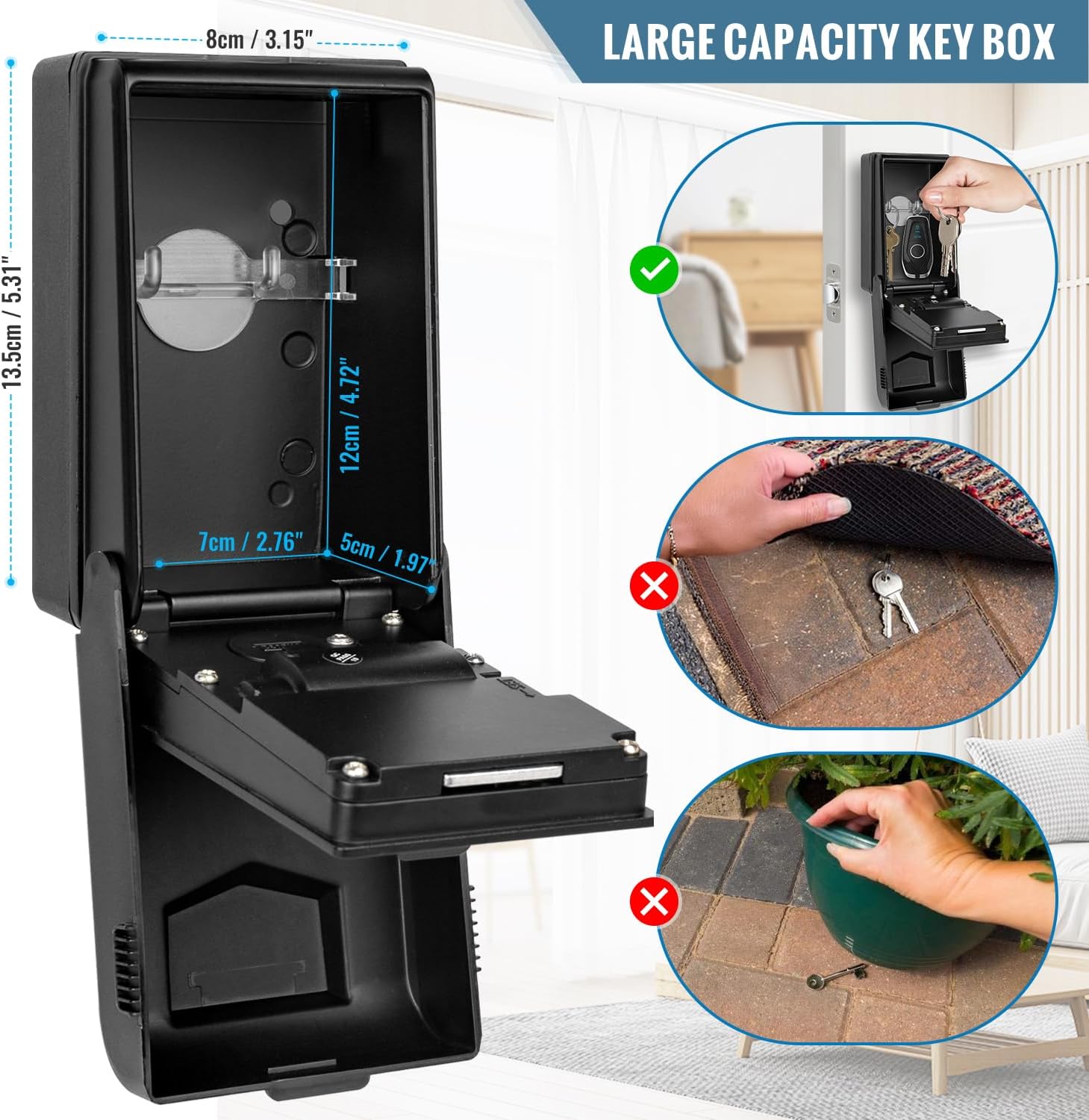
Image: Visual representation of the key box dimensions and storage capacity.
9. Warranty and Support
Specific warranty information is not provided in the product details. For warranty claims, technical support, or any questions regarding your ENONEO CH-911 Key Box, please contact the seller or manufacturer directly through your purchase platform.
