
Introduction
This manual provides comprehensive instructions for the installation, operation, and maintenance of your Ejoyous RFID Electronic Cabinet and Drawer Lock. This hidden lock system offers secure and convenient access control for various wooden furniture items such as cabinets, drawers, and lockers using advanced RFID technology. Please read this manual thoroughly before installation and use to ensure proper functionality and safety.
Product Overview and Components
The Ejoyous RFID Electronic Cabinet Lock system is designed for discreet installation, preserving the aesthetic of your furniture. It consists of several key components:
- Main Lock Unit: The electronic mechanism that controls the locking and unlocking.
- Latch Mechanism: The physical component that secures the cabinet or drawer.
- RFID Cards/Keychains: Used to unlock the system. Typically includes one master card and user cards.
- Installation Hardware: Screws and a baffle plate for mounting.

This image clearly displays all components included with the Ejoyous RFID Electronic Cabinet Lock: the main lock unit, the latch mechanism, RFID cards, and various installation screws.
The lock features a durable construction with a stainless steel latch and an ABS plastic lock body, ensuring longevity and resistance to corrosion.

This image highlights the durable construction of the lock, featuring a stainless steel latch and an ABS plastic lock body, designed for longevity and corrosion resistance.
Setup and Installation
Battery Installation
- Locate the battery compartment on the main lock unit.
- Insert 4 AA alkaline batteries, ensuring correct polarity.
- Close the battery compartment securely.
Mounting the Lock
The Ejoyous RFID lock is designed for easy, hidden installation without the need for drilling external holes, thus preserving the appearance of your furniture.
- Determine the optimal placement for the main lock unit and the latch mechanism inside your wooden cabinet or drawer. Ensure the lock unit is positioned to allow the RFID card to be scanned through the wood.
- Secure the main lock unit to the inside of the cabinet or drawer using the provided installation screws.
- Attach the latch mechanism to the corresponding position on the cabinet frame or drawer body, ensuring proper alignment with the main lock unit.
- Test the lock's functionality before fully closing the cabinet or drawer.

This image shows the main lock unit with an RFID card being presented, indicating the process for setting up the lock with a master card and installing AA batteries.

This image illustrates the hidden installation of the RFID lock inside a cabinet, emphasizing that no external drilling is required, preserving the furniture's appearance.
Operating Instructions
Unlocking the Cabinet/Drawer
To unlock, simply present an authorized RFID card or keychain to the external surface of the cabinet or drawer where the lock unit is installed. The lock will automatically disengage, allowing you to open the door or drawer. The system features an auto-rebounce and auto-lock function for convenience.
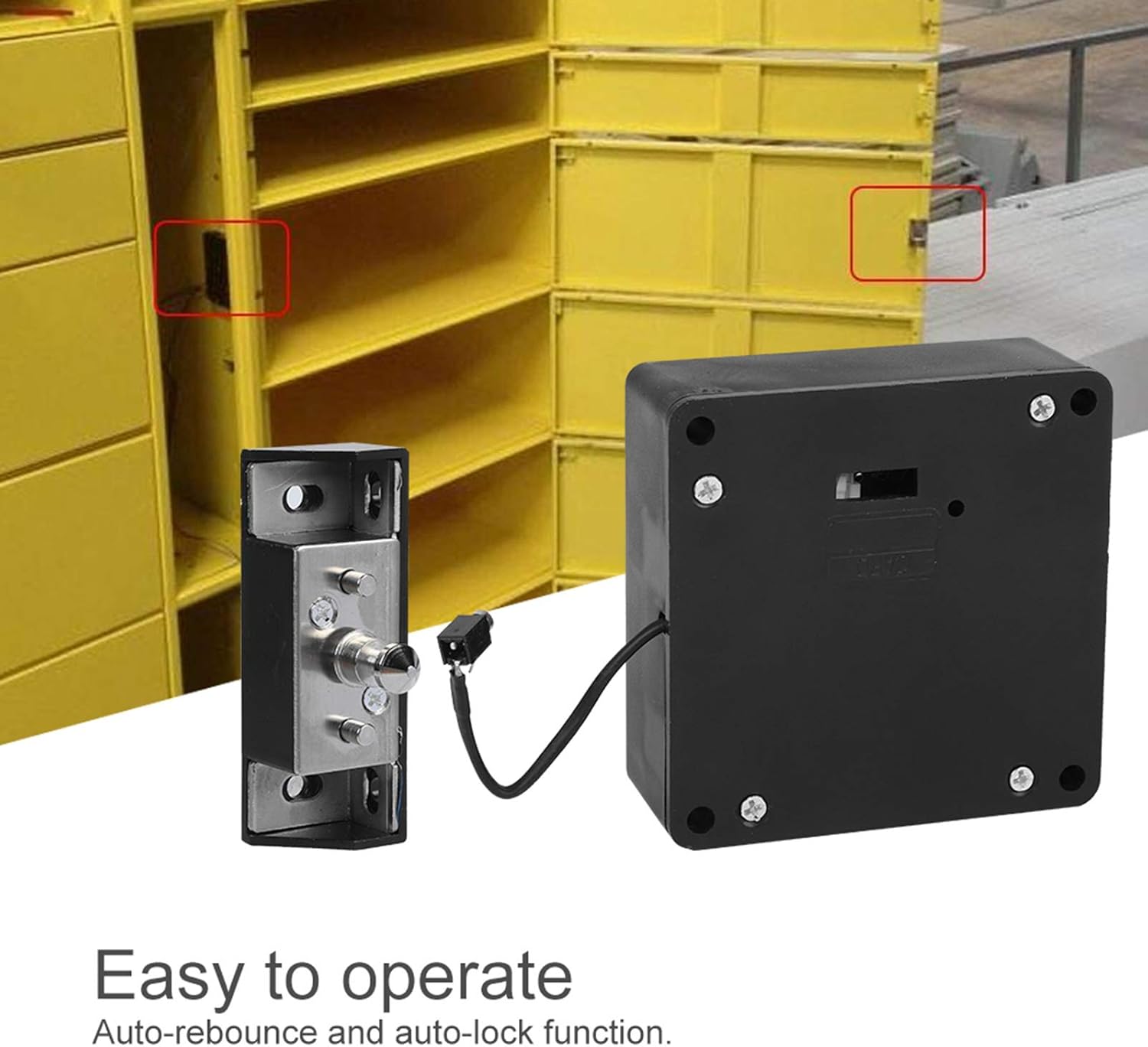
This image demonstrates the lock's automatic rebound and auto-lock functionality, showing the lock mechanism in action.
Card Programming
The master RFID card/keychain is typically pre-set for the lock and does not require additional programming or activation for initial use. For managing multiple locks, a single master card can be configured to control several Ejoyous RFID locks, simplifying access management.

This diagram illustrates how a single master RFID card can be configured to control multiple Ejoyous RFID cabinet locks, simplifying key management.
Maintenance
Battery Replacement
The lock is designed with a low-battery warning feature. If the battery power becomes too low, the lock will automatically disengage (open) to prevent you from being locked out. At this point, the batteries must be replaced with new AA alkaline batteries before the lock can be reused. Prompt battery replacement ensures continuous security and functionality.
Troubleshooting
- Lock does not respond to RFID card: Check if the batteries are correctly installed and have sufficient charge. Replace batteries if necessary. Ensure the RFID card is presented directly to the area where the lock unit is installed.
- Lock opens automatically: This indicates that the battery power is critically low. Replace all 4 AA batteries immediately.
- Difficulty in opening/closing: Check for any obstructions or misalignment between the lock unit and the latch mechanism. Ensure the installation screws are tight.
Specifications
| Feature | Detail |
|---|---|
| Brand | Ejoyous |
| Model Number | B0C23H856H |
| Special Feature | Easy to install, Hidden design |
| Lock Type | RFID Electronic Lock |
| Material | Stainless Steel (latch), ABS Plastic (lock body) |
| Recommended Uses | Cabinets, Mailboxes, Drawers, Lockers, Gyms, Saunas, Document Cabinets, Phone Chargers, Shoe Cabinets, Central Control Boxes |
| Color | Black |
| Included Components | Mortise lock, Door support, RFID ID card, Installation screw bag, White card, Baffle plate |
| Shape | Rectangular |
| Item Weight | 197 Grams |
| Power Source | 4 x AA Alkaline Batteries (not included) |
Dimensions
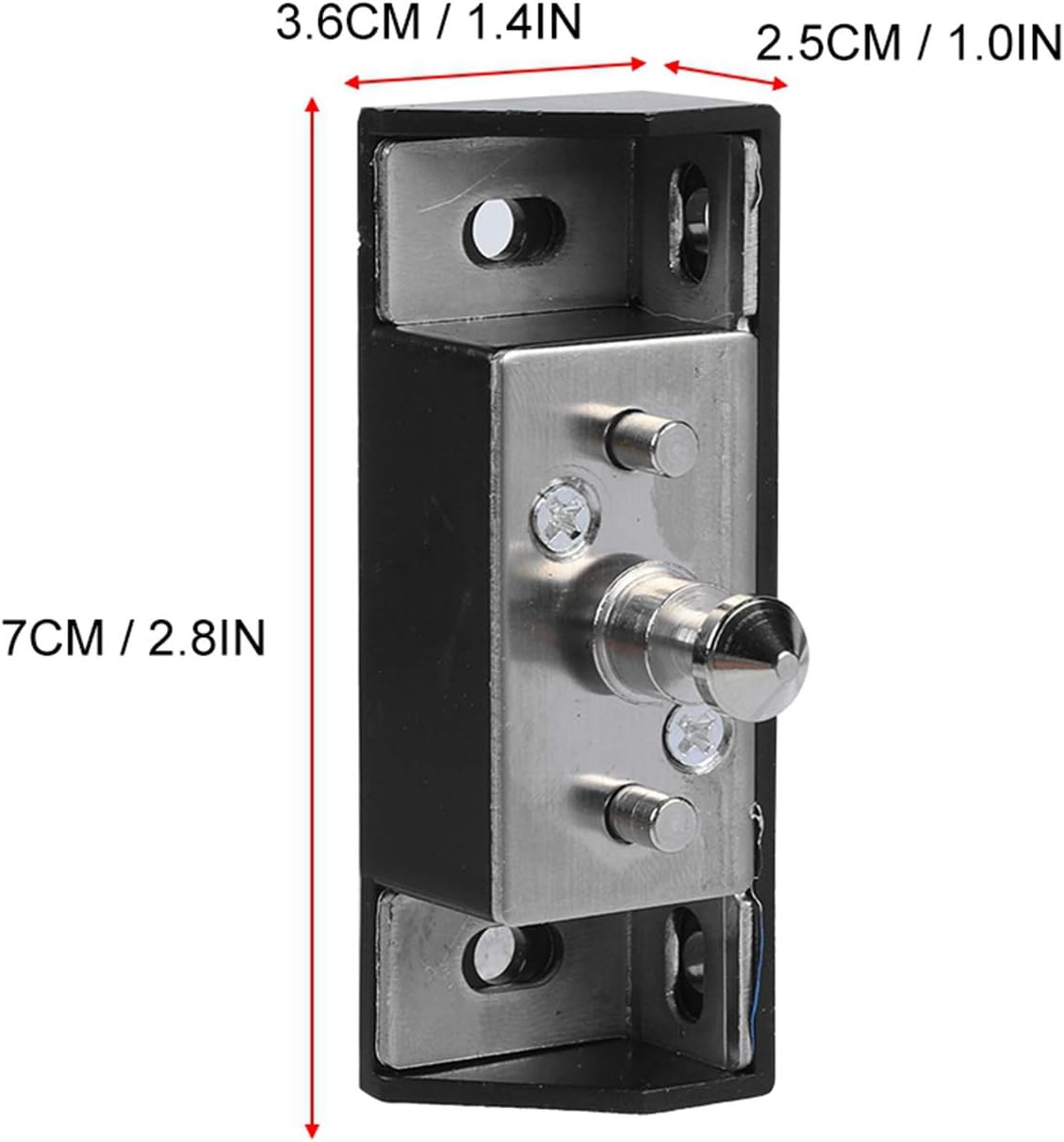
This image provides the dimensions of the lock's latch mechanism, showing its height (7cm / 2.8in), width (3.6cm / 1.4in), and depth (2.5cm / 1.0in).

This image displays the dimensions of the main lock body, detailing its height (7.5cm / 3.0in), width (7.5cm / 3.0in), and depth (3.0cm / 1.2in).
Warranty and Support
For detailed warranty information, technical support, or customer service inquiries, please refer to the product packaging or contact Ejoyous customer service directly through their official channels. Keep your purchase receipt for warranty claims.