
CANDY HOUSE SESAME5 PRO
CANDY HOUSE SESAME 5 Pro Smart Lock User Manual
Model: SESAME5 PRO
Brand: CANDY HOUSE
Introduction
The CANDY HOUSE SESAME 5 Pro is an advanced smart lock designed to enhance the security and convenience of your home, office, or store entrance. Featuring multiple unlocking methods including fingerprint authentication, card reader, and smartphone operation, it offers high performance and ease of use without requiring complex construction for installation.
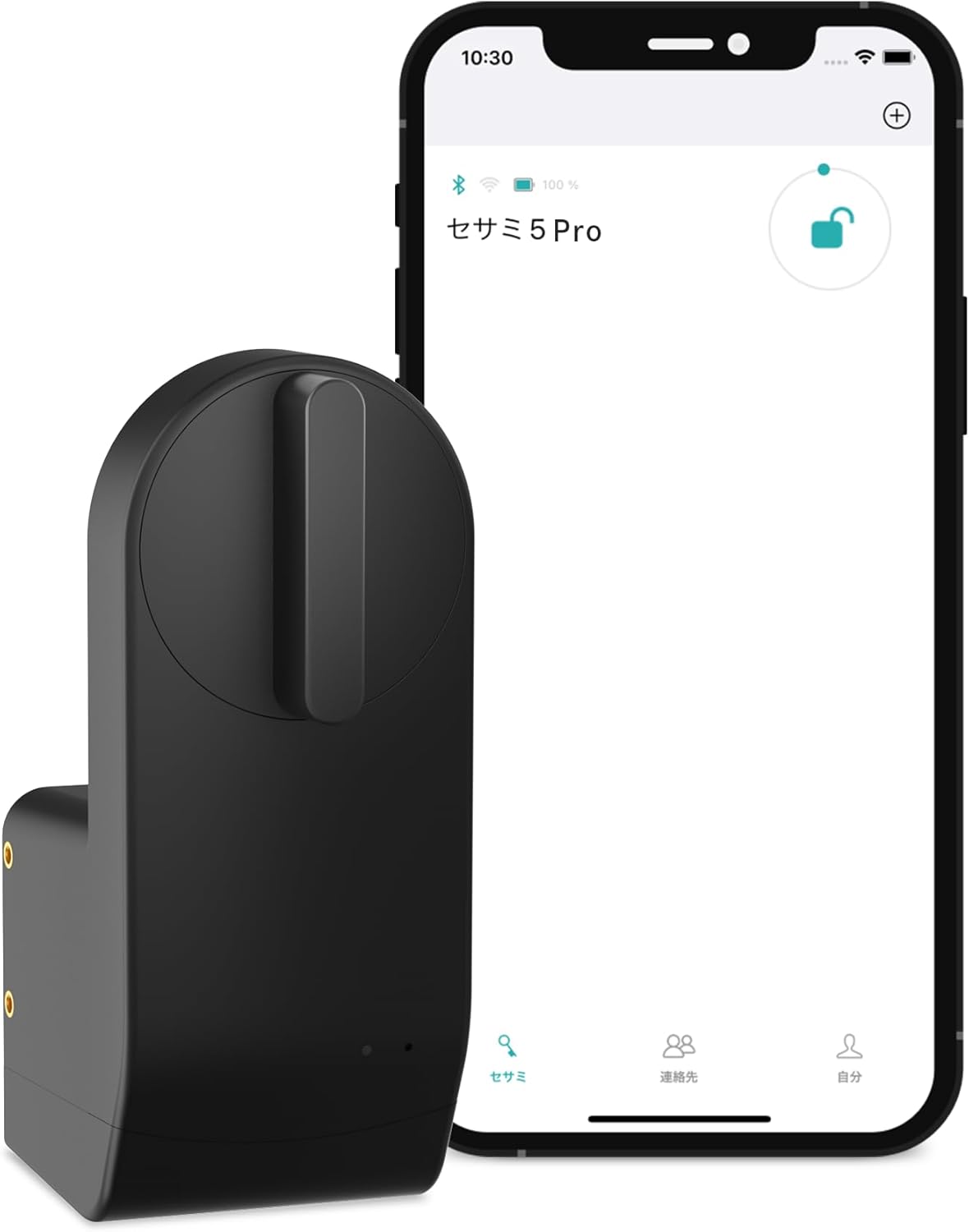
Image: The SESAME 5 Pro smart lock shown alongside a smartphone displaying its control application.
Key Features
- Multiple Unlocking Methods: Supports fingerprint authentication, card reader, and smartphone operation for versatile access.
- High Fingerprint Registration Capacity: Store up to 100 fingerprints, suitable for family, relatives, and friends.
- Easy Installation: Simple installation using 3M tape, requiring no construction. Includes 3 rolls of tape for convenience.
- Wide Key Compatibility: Expanded compatibility with 99% of key types. Custom 3D printed adapters can be requested for unique keys.
- Auto-Lock Functionality: Configure auto-lock settings for added security and peace of mind.
- Remote Support: Operable via smartphone, Alexa, Google Home, and Apple Watch for remote access and control.
Setup and Installation
The SESAME 5 Pro is designed for straightforward installation without the need for professional construction. Follow these steps for a quick setup:
- Prepare the Door: Ensure the door surface where the lock will be mounted is clean and dry.
- Attach 3M Tape: Apply the provided 3M adhesive tape to the back of the SESAME 5 Pro unit. The package includes 3 rolls of tape, allowing for adjustments if needed.
- Position the Lock: Carefully align the SESAME 5 Pro with your existing door lock's thumb turn. The device should be positioned so its mechanism can engage with the thumb turn.
- Secure the Unit: Press firmly to secure the unit to the door, ensuring good adhesion.
- Install Batteries: Insert the two included CR123AH Lithium Metal batteries into the designated battery compartment.
- Initial Setup via App: Download the official CANDY HOUSE app on your smartphone. Follow the in-app instructions to pair the device and complete the initial calibration.

Image: A collage demonstrating various aspects of the SESAME 5 Pro, including its installation on a door, operation via a smartphone app, integration with smart home devices, and unlocking using an IC card or fingerprint keypad.
For keys that may not be directly compatible, CANDY HOUSE offers a service to create custom 3D printed adapters. Please contact customer support with photos of your key for assistance.
Operating the SESAME 5 Pro
The SESAME 5 Pro offers multiple convenient ways to lock and unlock your door:
Unlocking the Door:
- Fingerprint Authentication: Place a registered finger on the fingerprint sensor. The lock will disengage upon successful recognition.
- Card Reader: Tap a registered IC card against the designated card reader area on the device.
- Smartphone Application: Open the CANDY HOUSE app on your smartphone. Tap the unlock icon within the app.
- Voice Commands: If integrated with Alexa or Google Home, use voice commands to unlock the door (e.g., "Alexa, unlock the front door").
- Apple Watch: Control the lock directly from your Apple Watch via the dedicated app.
Locking the Door:
- Auto-Lock: The SESAME 5 Pro can be configured to automatically lock after a set period of time or when the door is closed.
- Unregistered Fingerprint: For quick locking upon exit, you can configure the device to lock when an unregistered fingerprint is presented. This is a convenient feature for ensuring the door is locked as you leave.
- Smartphone Application: Open the CANDY HOUSE app on your smartphone. Tap the lock icon within the app.
- Voice Commands: Use voice commands via Alexa or Google Home to lock the door.

Image: The SESAME 5 Pro smart lock installed on a door in an office setting, highlighting its suitability for commercial use.

Image: The SESAME 5 Pro smart lock (white variant) installed on a door in a cafe setting, demonstrating its aesthetic integration in various environments.
Maintenance
Proper maintenance ensures the longevity and optimal performance of your SESAME 5 Pro smart lock.
- Battery Replacement: The device uses 2 CR123AH Lithium Metal batteries. When the battery level is low, the app will provide a notification. Replace both batteries simultaneously for best performance.
- Cleaning: Wipe the exterior of the lock with a soft, dry cloth. Avoid using abrasive cleaners or solvents, as these can damage the finish.
- Firmware Updates: Regularly check the CANDY HOUSE app for available firmware updates. These updates often include performance improvements and security enhancements.
Troubleshooting
If you encounter issues with your SESAME 5 Pro, consider the following common solutions:
- Device Not Responding: Check battery levels. If low, replace the batteries. Ensure the device is within Bluetooth range of your smartphone for app control.
- Fingerprint Recognition Issues: Ensure your finger is clean and dry. Re-register your fingerprint if issues persist. Try different registered fingers.
- App Connectivity Problems: Ensure Bluetooth is enabled on your smartphone. Restart the app or your phone. If issues continue, try re-pairing the device through the app settings.
- Lock/Unlock Mechanism Not Engaging: Verify that the SESAME 5 Pro is securely mounted and properly aligned with your door's thumb turn. Check for any obstructions.
For more complex issues or technical support, please refer to the official CANDY HOUSE support channels.
Specifications
| Feature | Detail |
|---|---|
| Manufacturer | CANDY HOUSE |
| Model Number | SESAME5 PRO |
| Product Dimensions | 4.65 x 4.5 x 10.59 cm |
| Item Weight | 186 Grams |
| Batteries | 2 Lithium Metal batteries (CR123AH) required (included) |
| Color | Black |
| Material | Plastic |
| Special Features | Waterproof |
| Lock Type | Biometric |
| Usage | Inside |
| Included Components | Screwdriver, 3M tape (3 uses), Thumb turn receiver metal parts (2), High Performance High Capacity 1800mAh CR123AH Battery (2), Thumbturn receiver plastic parts (2) |
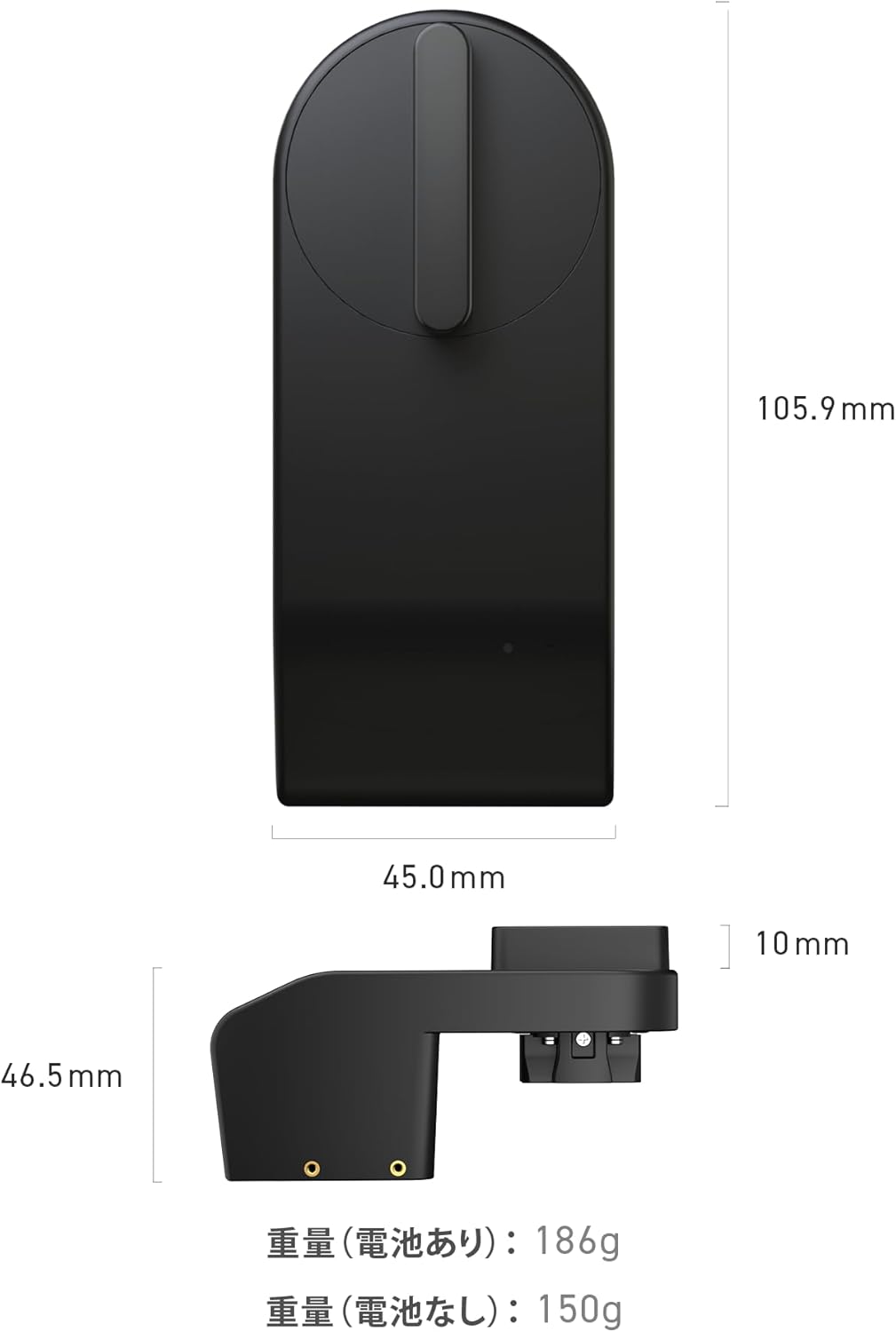
Image: A diagram illustrating the precise dimensions of the SESAME 5 Pro smart lock, including its height, width, and depth, along with its weight with and without batteries.

Image: A visual comparison highlighting the enhanced durability of the SESAME 5 Pro compared to its predecessor, the SESAME 5.
Warranty and Support
For warranty information and detailed support, please refer to the official CANDY HOUSE website or contact their customer service. The product is designed for remote support and operation via various smart home platforms.
Online Resources: Visit the CANDY HOUSE official website for FAQs, troubleshooting guides, and software downloads.
Customer Service: Contact CANDY HOUSE customer support for personalized assistance with installation, operation, or technical issues.
Related documentsSESAME5 PRO


Ask a question about this manual
Ask about setup, troubleshooting, compatibility, parts, safety, or missing instructions. Manuals+ will review the question and use this page’s manual context to help answer it.