
1. Overview
The DS18 RKS-BT is a waterproof Bluetooth marine rocker switch audio streamer designed for seamless integration into marine, UTV, ATV, truck, and other powersports audio systems. This compact unit provides convenient control over your audio streaming directly from a rocker switch panel, eliminating the need for a full head unit. It features a built-in wireless Bluetooth audio receiver and stereo 2.5V pre-out RCA outputs for high-quality audio.

Figure 1.1: Front view of the DS18 RKS-BT Waterproof Bluetooth Marine Rocker Switch Audio Streamer.
2. Key Features
- Integrated Bluetooth Audio Streaming: Built-in wireless Bluetooth audio receiver for streaming music from your compatible devices.
- Universal Rocker Switch Mount: Designed to fit standard rocker switch panels for easy installation.
- Waterproof Design: IPX6 water resistance rating ensures durability in marine and outdoor environments.
- Pre-Out RCA: Stereo 2.5V pre-out RCA outputs for connecting to an amplifier.
- Auxiliary Input: Includes a 3.5mm auxiliary input port for wired audio connections.
- Amplifier Control: Features a remote turn-on wire to activate your amplifier.
- Backlit Buttons: Easy-to-use blue backlit silicone buttons for visibility in low-light conditions.
- Protection Circuitry: Integrated power wiring harness with overload and power protection.
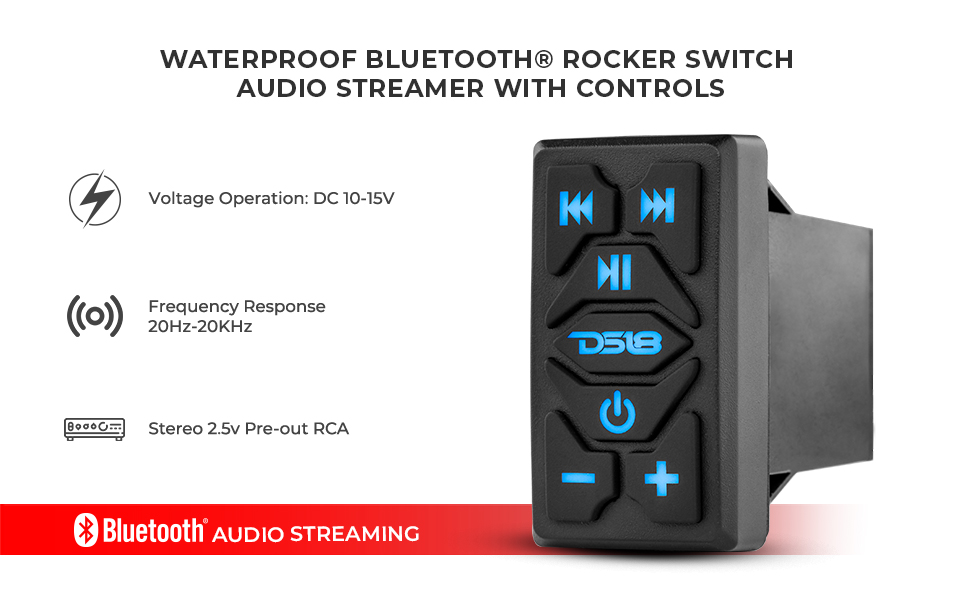
Figure 2.1: Visual representation of key features including voltage operation, frequency response, and stereo pre-out RCA.
3. Setup & Installation
The RKS-BT is designed for straightforward installation into a standard rocker switch panel. Ensure all power is disconnected before beginning installation.
3.1 Wiring Connections
- Power (Yellow Wire): Connect the yellow wire to a constant 12V DC power source. This provides continuous power to the unit.
- Ground (Black Wire): Connect the black wire to a reliable chassis ground point.
- Ignition/Accessory (Red Wire): Connect the red wire to a switched 12V DC source (e.g., ignition or accessory circuit) that turns on and off with your vehicle/vessel.
- Remote Turn-On (Blue Wire): Connect the blue wire to the remote input of your amplifier. This will turn on the amplifier when the RKS-BT is powered on.
- RCA Outputs: Connect the white and red RCA cables to the corresponding left and right audio inputs on your amplifier.
- Auxiliary Input: If using a wired audio source, connect it to the 3.5mm auxiliary input port using the provided cable.

Figure 3.1: The DS18 RKS-BT wiring harness showing power, ground, remote, and RCA connections.

Figure 3.2: Detailed wiring diagram illustrating connections for RCA line out, Aux line input, and integrated power wiring harness.
3.2 Mounting
The RKS-BT is designed to snap into a standard rocker switch opening. Ensure the opening dimensions are compatible with the unit's size (Overall Length: 1.1" / 28mm, Overall Height: 2" / 51mm, Overall Depth: 2.8" / 72mm).

Figure 3.3: The DS18 RKS-BT integrated into a vehicle's dashboard alongside other rocker switches.
3.3 Installation Video
For a visual guide on installation and features, please refer to the official product video below:
Video 3.1: Official DS18 RKS-BT Waterproof Bluetooth Rocker Switch overview and basic wiring demonstration. This video provides a detailed look at the product's features and how to connect it to a power source.
4. Operating Instructions
The RKS-BT features intuitive controls for managing your audio experience.
4.1 Power On/Off
- Power On: Press the power button (⑂) briefly. The blue backlighting will illuminate, and the unit will begin blinking, indicating it is searching for a Bluetooth device.
- Power Off: Press and hold the power button (⑂) for approximately 3 seconds until the backlighting turns off. This will completely shut down the unit.
4.2 Bluetooth Pairing
- When powered on, the RKS-BT will automatically enter pairing mode (blue lights blinking).
- On your mobile device, navigate to Bluetooth settings and select "DS18 RKS-BT" from the list of available devices.
- Once successfully paired, the blue lights on the RKS-BT will stop blinking and remain solid.
- The unit will automatically attempt to reconnect to the last paired device when powered on.
4.3 Audio Control
- Play/Pause: Press the Play/Pause button (⏸) to start or pause audio playback.
- Next Track: Press the Next Track button (⏭) to skip to the next song.
- Previous Track: Press the Previous Track button (⏮) to go back to the beginning of the current song or to the previous song.
- Volume Up: Press the Plus button (+) to increase the volume.
- Volume Down: Press the Minus button (-) to decrease the volume.

Figure 4.1: Close-up view of the RKS-BT control buttons, including power, play/pause, track skip, and volume controls.
5. Maintenance
The DS18 RKS-BT is designed for durability in harsh environments. Regular maintenance will ensure its longevity and optimal performance.
- Cleaning: Wipe the unit with a soft, damp cloth to remove dirt and grime. Avoid using harsh chemicals or abrasive cleaners.
- Inspection: Periodically inspect all wiring connections for corrosion or damage. Ensure all connections are secure.
- Water Exposure: While waterproof (IPX6 rated), avoid prolonged submersion or high-pressure water jets directly on the unit to prevent potential damage over time.
6. Troubleshooting
| Problem | Possible Cause | Solution |
|---|---|---|
| No power/Unit does not turn on. | Incorrect wiring, blown fuse, insufficient power supply. |
|
| Bluetooth will not pair. | Unit not in pairing mode, device too far, interference, previously paired to another device. |
|
| No audio output. | Incorrect RCA connections, amplifier not powered on, volume too low, incorrect source selected on amplifier. |
|
| Audio quality is poor or distorted. | Low quality audio source, interference, damaged cables. |
|
7. Specifications
| Feature | Detail |
|---|---|
| Model Number | RKS-BT |
| Operation Mode | Manual |
| Current Rating | 2 Amps |
| Operating Voltage | 12.5 Volts (DC) |
| Contact Type | Normally Open |
| Connector Type | 3.5mm Jack, RCA |
| Terminal | Blade |
| Circuit Type | Parallel |
| Actuator Type | Rocker |
| Contact Material | Plastic |
| International Protection Rating | IPX6 (Waterproof) |
| Number of Positions | 2 |
| Controller Type | Push Button |
| Control Method | Remote (Bluetooth) |
| Connectivity Protocol | Bluetooth 5.0 |
| Color | Black |
| Unit Count | 1.0 Count |
| Item Weight | 6.3 ounces |
| Package Dimensions | 5.16 x 3.74 x 2.91 inches |
| UPC | 810097261730 |
8. Warranty and Support
For warranty information, technical support, or further assistance with your DS18 RKS-BT, please contact DS18 customer service directly. Refer to the official DS18 website or your product packaging for the most current contact details.
DS18 Website: www.ds18.com


