NANAMI A8S

NANAMI Magnetic Wireless Charger

Model: A8S

User Manual

1. Introduction

Thank you for choosing the NANAMI Magnetic Wireless Charger. This device is designed to provide convenient and efficient wireless charging for your MagSafe-compatible iPhone models and AirPods. Please read this manual carefully before use to ensure proper operation and safety.

2. Package Contents

  • NANAMI Magnetic Wireless Charger Unit x 1
  • USB-C to USB-A Charging Cable (120cm) x 1

3. Specifications

Model NumberA8S
BrandNANAMI
Input Voltage9 Volts
Output WattageMax 10W
Connection TypeUSB
Number of USB Ports1
ColorWhite
Product Weight110 g
Dimensions16.3 x 11.6 x 1.7 cm
Compatible DevicesiPhone 16/15/14/13/12 Series, AirPods 4/3/Pro (2nd Gen) with Wireless Charging Case, Galaxy Buds +/Pro, Soundcore Life P3/P2(Mini)/Liberty Air2(Pro)/Neo2, other Qi-compatible smartphones and wireless earphones.

4. Setup

  1. Connect the Charger: Insert the USB-C end of the provided charging cable into the port on the NANAMI Magnetic Wireless Charger.
  2. Power Source: Connect the USB-A end of the charging cable to a compatible USB power adapter (not included) with a minimum output of 9V/2A or 5V/3A for optimal performance.
  3. Placement: Place the wireless charger on a flat, stable surface.

Ensure the power adapter is properly connected to a wall outlet.

5. Operating Instructions

  1. Initiate Charging: Place your MagSafe-compatible iPhone or AirPods (with wireless charging case) directly onto the center of the NANAMI Magnetic Wireless Charger. The device will magnetically align for optimal charging.
  2. Charging Indicator: A subtle LED indicator on the charger will illuminate to confirm that charging has begun. The light will turn off after a few seconds to avoid disturbance, especially in dark environments.
  3. Charging Speed: The charger delivers up to 10W for compatible devices. Charging speed may vary based on the device, battery level, and environmental factors.
  4. Case Compatibility: The charger supports charging through non-metallic phone cases up to 3-4mm thick. For best results, remove cases thicker than 4mm or those containing metal, magnetic strips, or credit cards.
Comparison of wired vs. wireless charging and unstable vs. stable wireless charging
Figure 1: Advantages of the NANAMI Magnetic Wireless Charger, showing ease of use compared to wired charging and stable magnetic alignment compared to unstable wireless pads.
Image showing iPhone 15, iPhone 14, iPhone 13 series and AirPods Pro (2nd Gen) and AirPods (3rd Gen) compatible with the charger.
Figure 2: Compatibility with various iPhone models (12, 13, 14, 15 series) and AirPods.
Diagram illustrating case compatibility, showing MagSafe compatible cases and silicone cases are supported, while metal rings, metal cases, magnets, and credit cards are not.
Figure 3: Case compatibility guidelines. MagSafe-compatible and silicone cases are supported. Avoid metal objects, magnets, or credit cards.

6. Safety Features

The NANAMI Magnetic Wireless Charger incorporates advanced safety mechanisms to protect your devices and ensure safe operation:

  • Overcurrent Protection: Prevents damage from excessive current.
  • Overvoltage Protection: Safeguards against voltage spikes.
  • Short-Circuit Prevention: Protects against electrical shorts.
  • Overcharge Protection: Stops charging once the device battery is full, extending battery lifespan.
  • Temperature Control: Monitors and regulates the charger's temperature to prevent overheating.
  • Foreign Object Detection (FOD): Automatically detects metal objects on the charging surface and prevents charging to avoid heat generation and potential damage.
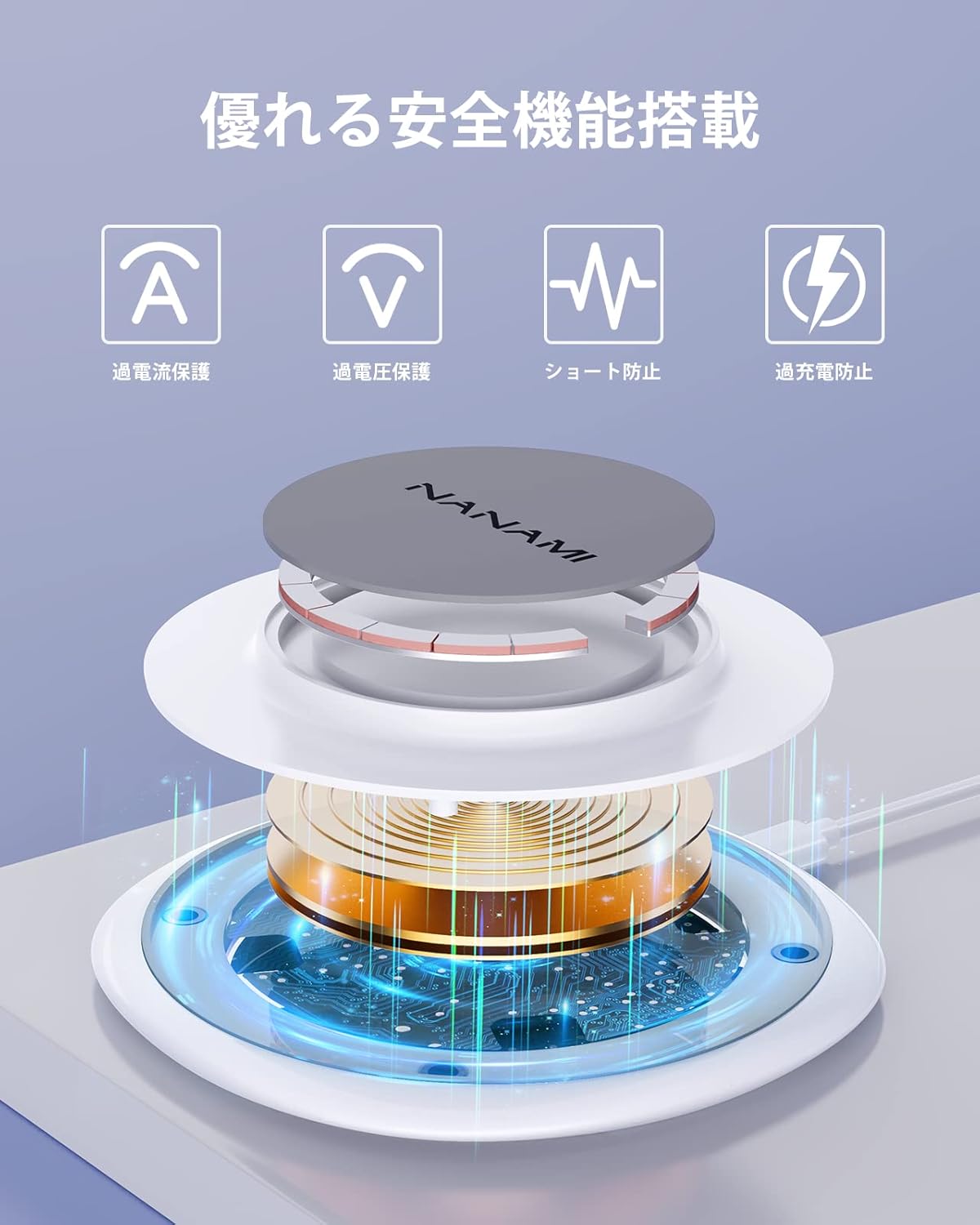
Diagram illustrating the internal components and safety features of the NANAMI wireless charger, including overcurrent, overvoltage, short-circuit, and overcharge protection.
Figure 4: Internal structure highlighting the multiple safety features integrated into the charger.
Image showing the NANAMI wireless charger with an iPhone charging on it, next to a laptop, illustrating a camera-friendly design that does not obstruct the phone's camera.
Figure 5: The charger's design ensures no obstruction to the device's camera lens during charging.

7. Maintenance

  • Cleaning: Disconnect the charger from the power source before cleaning. Use a soft, dry cloth to wipe the surface. Do not use harsh chemicals or abrasive materials.
  • Storage: Store the charger in a cool, dry place away from direct sunlight and extreme temperatures.
  • Handling: Avoid dropping or subjecting the charger to strong impacts.

8. Troubleshooting

ProblemPossible CauseSolution
Device not charging
  • Improper placement of device
  • Foreign object detected
  • Incompatible phone case
  • Power adapter not connected or insufficient output
  • Device not Qi-compatible
  • Ensure device is centered on the charger.
  • Remove any metal objects, magnets, or credit cards.
  • Remove phone case or use a compatible one (max 3-4mm non-metallic).
  • Check power connection and use a 9V/2A or 5V/3A adapter.
  • Verify device supports wireless charging.
Slow charging
  • Power adapter output is too low
  • Device case is too thick
  • Background apps running on device
  • Use a power adapter with sufficient output (9V/2A or 5V/3A).
  • Remove phone case.
  • Close unnecessary apps on your device.
Charger LED not lighting up
  • No power supply
  • Charger malfunction
  • Check power cable connection and power adapter.
  • Contact customer support if the issue persists.

9. Warranty and Support

This NANAMI product comes with an 18-month warranty from the date of purchase. Your order number serves as proof of purchase and warranty. In the unlikely event of a defect or issue within the warranty period, please follow these steps:

  1. Locate your order in your purchase history on Amazon.
  2. Click on the 'Contact Seller' link associated with your order.
  3. Describe the issue clearly.

Our customer support team guarantees a response within 24 hours to assist you with troubleshooting, replacement, or refund as per our warranty policy.

Related Documents - A8S

Preview HM006 3-in-1 Wireless Charger User Manual
User manual for the HM006 3-in-1 Wireless Charger, detailing product appearance, charging specifications, usage steps, and technical data for simultaneous charging of mobile phones, watches, and earphones.
Preview A8S Smart Magnetic Wireless Charger User Manual and Specifications
Comprehensive user manual for the A8S Smart Magnetic Wireless Charger, detailing product specifications, usage precautions, safety notices, warranty information, and FCC compliance statements.
Preview NovaStar MX40 Pro LED Display Controller V1.4.0 Release Notes
Release notes for the NovaStar MX40 Pro LED Display Controller, version 1.4.0. Details include upgrade instructions, new version introduction, optimization details, bug fixes, and known issues.
Preview NovaStar KU20 LED Display Controller Specifications
Detailed specifications for the NovaStar KU20 LED Display Controller, covering features, inputs/outputs, advanced functions, device controls, appearance, dimensions, product specifications, video source capabilities, and important notes.
Preview NovaStar COEX VMP V1.4.0 Release Notes: Features, Updates, and Bug Fixes
NovaStar COEX VMP V1.4.0 Release Notes: Discover new features like Adaptive Thermal Compensation and ST 2110 support, along with optimizations for backup, project management, optical ports, and offline mode. Includes bug fixes and known issues for NovaStar LED display control systems.
Preview NovaStar MX30 LED Display Controller Specifications
Comprehensive technical specifications for the NovaStar MX30 LED Display Controller, detailing its features, input/output capabilities, advanced functionalities, physical dimensions, electrical requirements, and video source compatibility.