
Moondrop Blessing 3
Moondrop Blessing 3 In-Ear Earphones User Manual
Model: Blessing 3
Brand: Moondrop
1. Introduction
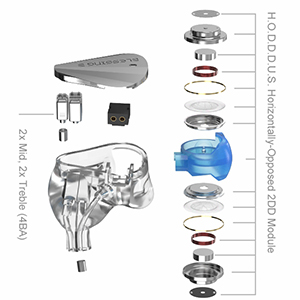
Thank you for choosing the Moondrop Blessing 3 In-Ear Earphones. These high-fidelity in-ear monitors are engineered with advanced hybrid driver technology to deliver an exceptional audio experience. The Blessing 3 features a sophisticated 2DD+4BA hybrid triple-frequency division system, ensuring precise sound reproduction across the entire audio spectrum.
Key features include:
- 2DD + 4BA Advanced Hybrid Triple-Frequency Division: For balanced and detailed sound.
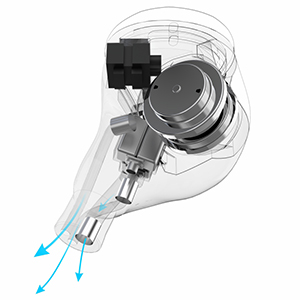
- H.O.D.D.D.U.S. - Horizontally-Opposed 2DD Module: Utilizes 3D printing technology for enhanced bass dynamics.
- 3D-Printed High-Precision Acoustic Filtering Nozzle Structure: Ensures accurate sound delivery.
- Eye-Catching Stainless Steel Faceplate: Durable and aesthetically pleasing design.
- Interchangeable Cable Design: Offers flexibility and rich playability for various audio setups.


2. Setup and Installation
2.1 Package Contents
Your Moondrop Blessing 3 package should contain the following items:
- Moondrop Blessing 3 In-Ear Earphones (Left and Right units)
- Detachable 0.78-2pin Audio Cable
- Assorted Silicone Ear Tips
- Carrying Case
- User Manual (this document)
2.2 Connecting the Cable
- Identify the left (L) and right (R) earphone units and the corresponding connectors on the cable. The cable connectors are typically marked with 'L' and 'R'.
- Align the 0.78-2pin connector on the cable with the receptacle on the earphone unit. Ensure the pins are correctly oriented.
- Gently push the connector straight into the earphone receptacle until it is firmly seated. Do not force the connection.
- Repeat for the other earphone unit.

2.3 Choosing and Installing Ear Tips
Selecting the correct ear tip size is crucial for optimal sound quality and comfort. Experiment with the included ear tips to find the best fit for your ears.
- A good seal ensures proper bass response and passive noise isolation.
- To install, gently push the ear tip onto the nozzle of the earphone until it is securely in place.
- To remove, gently twist and pull the ear tip off the nozzle.
2.4 Inserting the Earphones
Carefully insert the earphones into your ear canals. The cable is designed to loop over your ear for a secure and comfortable fit. Adjust the earphones until they feel snug and comfortable, and the sound is clear and full.
3. Operation
3.1 Connecting to an Audio Source
Once the cable is attached to the earphones, plug the 3.5mm jack of the cable into the headphone output of your audio device (e.g., smartphone, digital audio player, computer, amplifier).
3.2 Listening to Audio
Begin playing audio from your connected device. Adjust the volume on your audio source to a comfortable listening level. Avoid excessively high volumes to prevent hearing damage.
3.3 Making Calls (if applicable)
If your cable includes an in-line microphone and media controls, you can use these for phone calls and audio playback control. Refer to your audio device's manual for specific compatibility and control functions.
4. Maintenance and Care
Proper maintenance will extend the lifespan of your Moondrop Blessing 3 earphones and ensure consistent performance.
4.1 Cleaning the Earphones and Ear Tips
- Regularly clean the ear tips with a soft, damp cloth. For deeper cleaning, remove the ear tips and wash them with mild soap and water, then rinse thoroughly and allow them to dry completely before reattaching.
- Gently wipe the earphone bodies and nozzles with a dry, soft, lint-free cloth.
- Do not use harsh chemicals, solvents, or abrasive materials for cleaning.
- Ensure no moisture enters the earphone drivers or connectors.
4.2 Cable Care
- Avoid sharp bends or kinks in the cable.
- When storing, coil the cable loosely.
- Always pull from the plug, not the cable itself, when disconnecting from an audio source.
4.3 Storage
When not in use, store your earphones in the provided carrying case to protect them from dust, dirt, and physical damage.
5. Troubleshooting
If you encounter any issues with your Moondrop Blessing 3 earphones, please refer to the following common solutions:
| Problem | Possible Cause | Solution |
|---|---|---|
| No sound or sound from only one side | Loose cable connection, incorrect audio source settings, faulty cable, or dirty earphone nozzle. | Ensure cable is firmly connected to both earphones and audio source. Check audio source volume and output settings. Try a different audio source or cable if available. Clean earphone nozzles. |
| Distorted or poor sound quality | Poor ear tip seal, low-quality audio file, or damaged driver. | Ensure ear tips provide a good seal. Try different ear tip sizes. Use high-quality audio files. If distortion persists, contact customer support. |
| Earphones fall out easily or are uncomfortable | Incorrect ear tip size or improper insertion. | Experiment with different ear tip sizes to find the best fit. Ensure earphones are inserted correctly with the cable looping over the ear. |
| Cable issues (e.g., intermittent sound) | Damaged cable or loose connection. | Check all cable connections. If the cable is visibly damaged or issues persist, consider replacing the cable. |
If the problem persists after trying these solutions, please contact Moondrop customer support for further assistance.
6. Specifications
Detailed technical specifications for the Moondrop Blessing 3 In-Ear Earphones:
| Feature | Specification |
|---|---|
| Model Name | Blessing 3 |
| Connectivity Technology | Wired |
| Headphones Jack | 3.5 mm Jack |
| Frequency Range | 10Hz-30kHz |
| Impedance | 14.82 Ohm |
| Audio Driver Type | Hybrid Driver (2DD + 4BA) |
| Material | Plastic, Stainless Steel |
| Item Weight | 0.49 Kilograms (approx. 1.08 pounds) |
| Package Dimensions | 7.13 x 5.83 x 3.23 inches |
| Ear Placement | In Ear |
| Special Feature | Interchangeable wires |
7. Warranty and Support
7.1 Warranty Information
Moondrop products are manufactured to the highest quality standards. For detailed warranty terms and conditions, please refer to the warranty card included with your product or visit the official Moondrop website. The warranty typically covers manufacturing defects for a specified period from the date of purchase.
7.2 Customer Support
If you require technical assistance, have questions about your product, or need to initiate a warranty claim, please contact Moondrop customer support through the following channels:
- Official Moondrop Website: Visit the support section for FAQs, contact forms, and service information.
- Authorized Retailer: Contact the retailer from whom you purchased the product for initial support.
Please have your product model number and proof of purchase ready when contacting support.
Related documentsBlessing 3


Ask a question about this manual
Ask about setup, troubleshooting, compatibility, parts, safety, or missing instructions. Manuals+ will review the question and use this page’s manual context to help answer it.