
Introduction
This manual provides comprehensive instructions for the setup, operation, and maintenance of your LAWOHO Garage Door Opener Remote. This remote is designed as a replacement for specific LiftMaster, Chamberlain, and Craftsman garage door openers featuring a Red or Orange Learn Button and operating at 390MHz frequency. Please read this manual thoroughly before use to ensure proper functionality and safety.
Product Overview

Figure 1: LAWOHO Garage Door Opener Keychain Remotes (2-Pack)
This image displays the two compact keychain remotes included in the pack, featuring a black body with two grey buttons and a metal keyring attachment.
- 2-Channel Mini Remote: Capable of controlling up to two separate garage door openers.
- Compact Design: Slim and mini design for easy portability in pockets, purses, or backpacks.
- Security+ 390MHz: Utilizes Security+ rolling code technology for enhanced security.
- Red LED Flashing Light: Provides visual feedback during operation and programming.
- Durable Construction: Made from metal and leather for longevity.
Compatibility
This remote control is specifically designed for garage door openers with a Red or Orange Learn Button and a 390MHz Security+ frequency, manufactured between 1996 and 2005. It is not compatible with other learn button colors or frequencies.
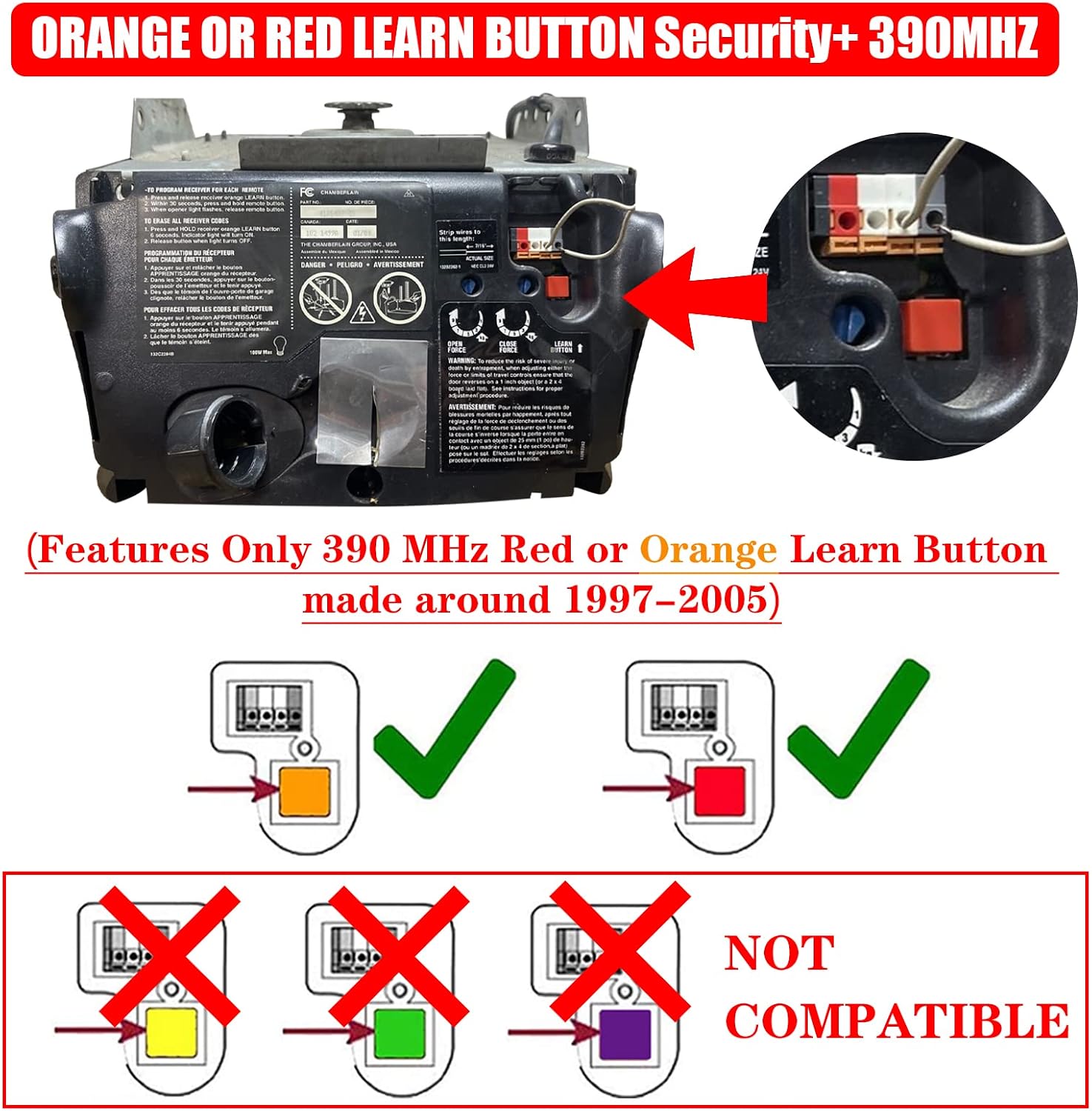
Figure 2: Learn Button Compatibility Guide
This diagram illustrates which learn button colors (Red and Orange) are compatible with the remote, and which colors (Yellow, Green, Purple) are not compatible.
Compatible models include, but are not limited to, the following:
| Garage Door Opener Brand | Color of Learn Button | Model Series |
|---|---|---|
| LiftMaster (Security+, 390MHz 1996-2005) | Red or Orange | 1245R/1255R, 1265R, 2220, 2245/2255, 2265, 2280, 2500, 2575, 2585, 2595, 91LM, 92LM, 94LM, 96LM, 970LM, 971LM, 972LM, 973LM, 973W, 974LM, Keyless Entry 976LM |
| Chamberlain (Security+, 390MHz 1997-2005) | Red or Orange | 940CB, 950CB, 953CB, 956CB, CG40, PD210, PD212, PD420, PD460-2, PD610, PD612K, PD752, PD7855, WD822K, WD822KS, WD912K, WD922K, 1200, 2200, 2265, 4200, 4620, 4640, 6200, 7320, 7420, 7902, 8200, 9200, 9902, 9950, 9960 |
| Sears Craftsman (Security+, 390MHz 1997-2005) | Red or Orange | 139.53661, 139.53661SRT, 139.53661SRT3, 139.53662, 139.53662SRT, 139.53662SRT2, 139.53663, 139.53663SRT, 139.53663SRT2, 139.53664, 139.53664SRT, 139.53664SRT1, 139.53664SRT2, 139.53670, 139.53670SRT1, 139.53671, 139.53671SRT, 139.53671SRT3, 139.53672, 139.53672SRT, 139.53672SRT2, 139.53672SRT3, 139.53673, 139.53673SRT, 139.53673SRT3, 139.53674, 139.53674SRT1, 139.53674SRT2, 139.53675, 139.53675SRT1, 139.53675SRT2, 139.53677, 139.53677SRT, 139.53677SRT3, 139.53680, 139.53681, 139.53682, 139.53683, 139.53684, 139.53910, 139.53914, 139.53923, 139.53927, 139.53954, 139.53961, 139.53961SRT, 139.53962, 139.53962SRT, 139.53962SRT1, 139.53963, 139.53963SRT, 139.53964, 139.53964SRT, 139.53966, 139.53966SRT, 139.53966SRT1, 139.53974, 139.53974SRT, 139.53975, 139.53975SRT, 139.53975SRT1, 139.53976, 139.53976SRT, 139.53977SRT, 139.53978, 139.53978SRT, 139.53978SRT1, 139.53982SRT, 139.53985, 139.53990, 139.53990SRT, 139.53991SRT, 139.53992, 139.53995, 139.53995SRT, 00953680000, 00953681000, HBW1255 |
Setup and Programming
To program your new LAWOHO remote control, you will need to access the "Learn" button on your garage door opener motor unit. Ensure your garage door opener has a Red or Orange Learn Button.
- Locate the Learn Button: Find the "Learn" button on the back or side panel of your garage door opener motor unit. The color of this button must be Red or Orange for compatibility.
- Activate Programming Mode: Press and immediately release the "Learn" button on your garage door opener. The indicator light on the opener will illuminate, signaling that it is in programming mode. You have approximately 30 seconds to complete the next step.
- Program the Remote: While the opener's indicator light is on, press and hold the desired button on your new LAWOHO remote control.
- Confirm Programming: Continue holding the button on the remote until the garage door opener's light flashes or you hear two clicks. This indicates successful programming.
- Test the Remote: Release the button on the remote. Press the programmed button again to test if the garage door responds.

Figure 3: Remote Control Features and Programming Context
This image shows the remote control in front of a garage door, emphasizing its ease of programming, security features, and the red LED indicator light.
If you are programming a second button on the remote for another garage door opener, repeat steps 1-5 for the second opener and the other button on your remote.
Operating Instructions
Once programmed, operating your LAWOHO remote control is straightforward:
- To Open or Close the Garage Door: Simply press the button on the remote that you have programmed for your garage door opener. The door will begin to move.
- To Stop the Garage Door: Press the same button again while the door is in motion.

Figure 4: Operating the Remote Control
This image depicts a hand holding the remote control, demonstrating its use to operate a garage door.
Maintenance
Battery Replacement
The remote control is powered by a CR2032 3V battery. If the remote's range decreases significantly or the LED indicator does not light up when a button is pressed, the battery may need replacement.
- Locate the small screw on the back of the remote.
- Carefully remove the screw and gently pry open the remote casing.
- Remove the old CR2032 battery.
- Insert a new CR2032 3V battery, ensuring the positive (+) side is facing up.
- Close the remote casing and secure it with the screw.
Note: Dispose of old batteries responsibly according to local regulations.
Troubleshooting
| Problem | Possible Cause | Solution |
|---|---|---|
| Remote does not work after programming. | Incorrect learn button color; programming error; dead battery. | Verify your garage door opener has a Red or Orange learn button. Re-attempt programming steps carefully. Replace the battery. |
| Remote has limited range. | Low battery; interference; obstructions. | Replace the battery. Ensure there are no large metal objects or electronic devices causing interference. Test from different locations. |
| Garage door opens/closes unintentionally. | Button pressed accidentally (e.g., in pocket). | Be mindful of where the remote is stored. The sliding cover design helps prevent accidental presses. |
Specifications
- Brand: LAWOHO
- Model Number: 971LM Red or Orange Learn Button 390MHz
- Material: Leather, Metal
- Keys: 2 buttons
- Frequency: 390 MHz
- Compatible Learn Button Colors: Red or Orange
- Type: Sliding cover (protection button)
- Battery: 1 x CR2032 3V (included)
- Item Weight: 2.11 ounces
- Product Dimensions: 0.5 x 1 x 1 inches (approximate, based on product details)

Figure 5: Remote Control Dimensions and Portability
This image provides the dimensions of the remote control and illustrates its compact size, suitable for carrying on a motorcycle keyring, in a pocket, purse, or backpack.
Warranty and Support
LAWOHO is committed to providing quality products and customer satisfaction. While specific warranty details are not provided in this manual, we have dedicated customer service staff available to assist with any pre-sales or after-sales questions you may have.
For support, please refer to the contact information provided with your purchase or visit the official LAWOHO store on Amazon.
