Introduction
Thank you for choosing the Redragon M990 MMO Gaming Mouse. This high-precision wired RGB gaming mouse is designed for optimal performance with 23 programmable buttons, 16 side macro keys, and an aluminum base. This manual provides essential information for setting up, operating, and maintaining your device.
Key Features
- High-End Optical Sensor: Equipped with a professional optical sensor (PAW3389) for precise tracking.
- Adjustable DPI: 5 redefinable DPI levels (default: 1000/2000/4000/8000/16000), software adjustable from 100-32000 DPI.
- 23 Programmable Buttons: Includes 16 side macro keys and a dedicated fire button for extensive customization.
- Dynamic RGB Backlighting: 5 distinct backlit modes with 16.8 million RGB LED color options. LED backlight can be disabled. 5 memory profiles, each with a dedicated light color for quick identification.
- Weight Tuning System: Includes an 8-piece weight tuning set (2.4g x8) for personalized balance and feel.
- Durable Construction: Features an aluminum base for enhanced stability and smooth movement.
- Ergonomic Design: Crafted for comfort during extended gaming sessions.
- Broad Compatibility: Compatible with Windows XP/VISTA/7/8/10/11 for programmable functions and Mac OS for normal use.
Setup Guide
1. Connecting the Mouse
The Redragon M990 is a wired mouse. Simply plug the USB connector into an available USB port on your computer. The mouse will be recognized automatically by most operating systems for basic functionality.
2. Software Installation for Customization
To unlock the full potential of your M990 mouse, including DPI customization, button programming, macro settings, and RGB lighting effects, you need to install the official Redragon software.
- Visit the official Redragon website.
- Navigate to the 'Downloads' or 'Support' section.
- Locate the software for the Redragon M990 model.
- Download and run the installer, following the on-screen instructions.
- Once installed, launch the software to begin customizing your mouse.
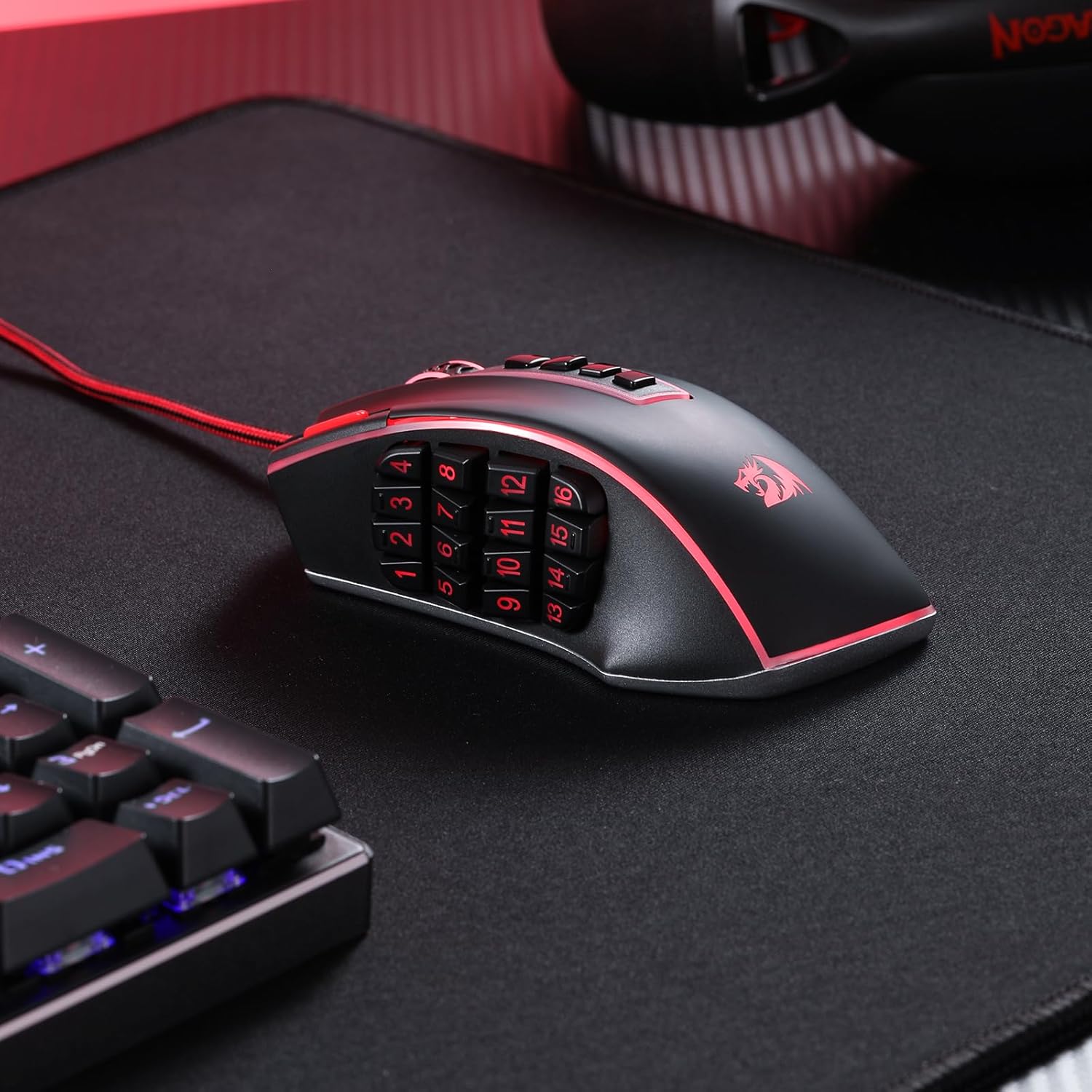
Image: Redragon M990 software interface for customization.
3. Weight Tuning Adjustment
The M990 mouse includes an 8-piece (2.4g each) weight tuning set, allowing you to adjust the mouse's weight and balance to your preference.
- Locate the weight compartment on the underside of the mouse.
- Open the compartment.
- Add or remove weights as desired to achieve your preferred feel.
- Close the compartment securely.

Image: Underside of the Redragon M990 mouse showing the weight tuning compartment and included weights.
Operating Instructions
1. DPI Adjustment
The M990 features dedicated buttons for on-the-fly DPI adjustment. There are 5 redefinable DPI levels, with defaults set at 1000, 2000, 4000, 8000, and 16000 DPI. You can further customize these levels and set a range from 100 to 32000 DPI using the Redragon software.

Image: Graphic illustrating the customizable DPI levels of the Redragon M990 mouse.
2. Programmable Buttons and Macro Keys
The mouse boasts 23 programmable buttons, including 16 side macro keys. These buttons can be assigned various functions, macros, or keybinds through the Redragon software to suit your gaming or work needs.
- Side Macro Keys: The 16 buttons on the side are ideal for complex commands in MMO games or for quick access to software functions.
- Dedicated Fire Button: A specific button designed for rapid firing actions in games.
- Software Customization: Use the Redragon software to record macros, assign single key presses, or complex sequences to any of the programmable buttons.

Image: Close-up view of the Redragon M990 mouse highlighting the 16 side programmable buttons.
3. RGB Backlighting Control
The M990 features dynamic RGB backlighting with 5 distinct modes and 16.8 million color options. You can customize the lighting effects, brightness, and even disable the LEDs via the software. The mouse supports 5 memory profiles, each identifiable by a dedicated light color.

Image: The Redragon M990 mouse displaying its dynamic RGB backlighting.
Maintenance
Proper maintenance ensures the longevity and optimal performance of your Redragon M990 mouse.
- Cleaning: Regularly clean the mouse surface and sensor with a soft, dry cloth. Avoid using harsh chemicals or abrasive materials.
- Cable Care: Avoid sharp bends or excessive pulling on the USB cable to prevent damage.
- Storage: When not in use, store the mouse in a clean, dry environment away from extreme temperatures.
Troubleshooting
If you encounter issues with your Redragon M990 mouse, refer to the following common solutions:
- Mouse Not Responding:
- Ensure the USB cable is securely plugged into a working USB port.
- Try plugging the mouse into a different USB port or another computer to rule out port or system issues.
- Software Issues (Settings Not Saving/Forgetting Bindings):
- Ensure the Redragon software is up-to-date. Check the official website for the latest version.
- Run the software as an administrator.
- Reinstall the software if problems persist.
- Ensure no other mouse customization software is running simultaneously, as this can cause conflicts.
- Squeaking or Mushy Buttons:
- This can sometimes occur with new mice. Continued use may alleviate the issue.
- Ensure no debris is lodged around the buttons. Gently clean around the buttons with compressed air.
- If the issue significantly impacts functionality, contact Redragon support.
- Cursor Movement Issues (Lag/Jitter):
- Clean the optical sensor on the underside of the mouse.
- Ensure you are using the mouse on a suitable surface (e.g., a mouse pad). Avoid highly reflective or uneven surfaces.
- Adjust DPI settings in the software or using the on-mouse buttons.
Specifications
| Model Number | M990 |
| Connectivity Technology | USB Wired |
| Movement Detection Technology | Optical |
| DPI Range | 100-32000 (Software Adjustable) |
| Programmable Buttons | 23 (including 16 side macro keys) |
| RGB Backlighting | 5 Modes, 16.8 Million Colors |
| Weight Tuning System | 8 x 2.4g weights included |
| Product Dimensions | 4.81 x 3.62 x 0.04 inches |
| Item Weight | 7.1 ounces |
| Compatibility | Windows XP/VISTA/7/8/10/11 (programmable), Mac OS (normal use) |
Warranty and Support
For warranty information, technical support, or further assistance with your Redragon M990 MMO Gaming Mouse, please visit the official Redragon website or contact their customer service directly. Keep your purchase receipt for warranty claims.
No official instructional videos from the seller were available in the provided data. Please refer to the written instructions and the Redragon support website for further guidance.


