
VIHELM MD3040
VIHELM MD3040 Metal Detector User Manual
Model: MD3040
1. Introduction
The VIHELM MD3040 is an advanced underground metal detector designed for treasure hunting, lost item recovery, and general metal detection. It features high sensitivity and strong discrimination capabilities, making it suitable for various environments and target types. This manual provides detailed instructions for assembly, operation, maintenance, and troubleshooting to ensure optimal performance and user satisfaction.
Key Features:
- LCD Display: Provides visual information including probable metal type, target depth, DISC&NOTCH range, sensitivity levels (SENS), and battery condition. Includes a numeric display for precise target identification.
- Three-Tone Audio Discrimination: Emits three distinct audio tones (high, medium, and low) to differentiate between various types of metal, aiding in target identification without looking at the display.
- DISC (Discrimination) Function: Allows the user to eliminate unwanted targets by setting a numeric discrimination range. The detector will ignore targets falling outside this specified range.
- Super Slow Sweep Identification: Utilizes a very slow sweep of the search coil for enhanced discrimination of different metal types.
- Waterproof Search Coil: Equipped with a 250mm (9.84 inch) waterproof search coil, enabling detection in shallow water environments.
2. Package Contents
Upon unpacking your VIHELM MD3040 Metal Detector, please verify that all components listed below are present and in good condition:
- 1 × Metal Detector Main Unit (Control Box)
- 1 × Armrest
- 1 × Search Coil (250mm)
- 2 × Adjustable Rod Sections
- 1 × S-Elbow (Lower Stem)
- 1 × User Manual
3. Assembly and Setup
Follow these steps to assemble your MD3040 Metal Detector:
- Attach the Search Coil: Connect the search coil to the S-Elbow (lower stem) using the provided bolt and nut. Ensure it is securely fastened but allows for slight angle adjustment.
- Connect Rod Sections: Insert the S-Elbow into the lower adjustable rod, and then connect the lower adjustable rod to the upper adjustable rod. Secure them with the locking collars.
- Mount the Control Unit: Slide the control unit onto the top of the upper adjustable rod. Ensure it clicks into place or is secured by any locking mechanism.
- Attach the Armrest: Secure the armrest to the upper rod, positioning it comfortably for your arm.
- Wrap the Cable: Carefully wrap the search coil cable around the rod, ensuring it is snug but not overly tight. Plug the cable connector into the corresponding port on the control unit.
- Install Batteries: Open the battery compartment on the control unit. Insert two (2) 9-volt alkaline batteries, observing the correct polarity (+/-). Close the compartment securely.
- Adjust Length: Adjust the length of the detector rod to a comfortable height that allows the search coil to be parallel to the ground when sweeping. The adjustable length ranges from 1060mm to 1290mm (approximately 41.7 to 50.8 inches).

Image: The VIHELM MD3040 metal detector fully assembled, showing the control unit, adjustable stem, armrest, and search coil.

Image: Diagram illustrating the adjustable length of the metal detector (1060-1290mm) and the 250mm diameter of the search coil.
4. Operation
4.1 Powering On/Off
Locate the power button on the control unit. Press and hold to turn the detector on or off. The LCD display will illuminate upon power-on.
4.2 Controls and Display

Image: A close-up view of the MD3040's control panel, showing the LCD screen, buttons, and headphone jack.
- LCD Display: Shows various parameters including target type, depth, discrimination settings, sensitivity, and battery status.
- SENS (Sensitivity): Adjusts the detector's sensitivity to targets. Higher sensitivity increases detection depth but may also increase false signals in mineralized ground.
- DISC/NOTCH: Used to discriminate or notch out unwanted metals. Adjust the numeric range to ignore specific types of trash or undesirable targets.
- Headphone Jack: A 3.5mm jack for connecting headphones (not included) for clearer audio signals and privacy.
4.3 Audio Tones
The MD3040 provides three distinct audio tones to help identify targets:
- Low Tone: Typically indicates ferrous metals (iron) or small, low-conductivity targets.
- Medium Tone: Often indicates medium-conductivity targets like pull tabs, nickel, or some gold alloys.
- High Tone: Usually indicates high-conductivity targets such as silver coins, copper, or large brass objects.
4.4 Sweeping Technique
Proper sweeping technique is crucial for effective detection and accurate target identification.
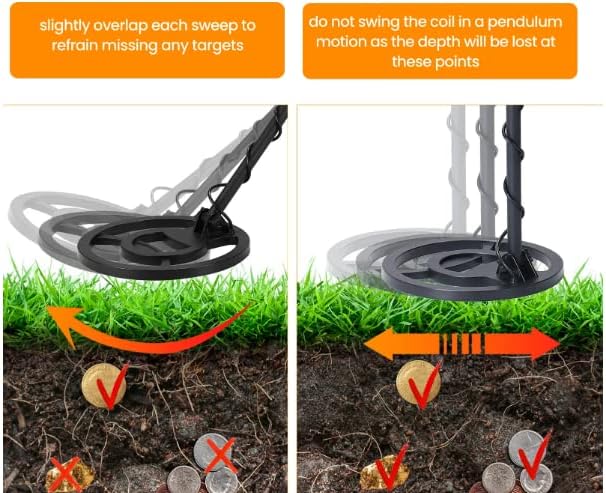
Image: A visual guide demonstrating the correct sweeping motion for the metal detector, emphasizing overlapping sweeps and avoiding pendulum swings.
- Maintain Coil Parallelism: Keep the search coil parallel to the ground and as close as possible without touching it.
- Overlap Sweeps: Slightly overlap each sweep to ensure complete ground coverage and avoid missing targets.
- Slow and Steady: Sweep the coil slowly and steadily. Rapid or erratic movements can lead to missed targets or false signals.
- Avoid Pendulum Motion: Do not swing the coil in a pendulum motion (like a clock pendulum) as this can cause loss of depth and inaccurate readings.
4.5 Target Identification and Applications

Image: The metal detector's search coil positioned over ground, with visual cues indicating the detection of buried objects.

Image: The metal detector in use, with illustrations of various metal types it can detect, including iron/gold, copper, silver, and jewelry.

Image: A collage of scenarios where the metal detector can be used, such as family activities, finding lost items, assisting in house building, and treasure hunting.
The MD3040 is versatile and can be used for a variety of purposes:
- Treasure Hunting: Discovering historical artifacts, coins, and other valuable items.
- Lost Item Recovery: Locating lost jewelry, keys, or other metallic objects.
- Family Activities: An engaging hobby for outdoor enthusiasts and families.
- House Building/Renovation: Identifying pipes, wires, or rebar before digging or drilling.
5. Maintenance
Proper care and maintenance will extend the life of your metal detector:
- Cleaning: After each use, wipe down the detector with a damp cloth to remove dirt, dust, or moisture. Do not use abrasive cleaners or solvents.
- Search Coil: The search coil is waterproof, but the control unit is not. Do not submerge the control unit. Clean the coil with water if necessary, but ensure it is dry before storage.
- Battery Care: Always remove batteries if the detector will not be used for an extended period to prevent leakage and damage. Store batteries in a cool, dry place.
- Storage: Store the detector in a dry, cool environment, away from direct sunlight and extreme temperatures.
- Cable Inspection: Periodically check the search coil cable for any signs of wear, cuts, or damage.
6. Troubleshooting
If you encounter issues with your MD3040, refer to the following common problems and solutions:
| Problem | Possible Cause | Solution |
|---|---|---|
| Detector does not power on. | Dead or incorrectly installed batteries. | Replace with fresh 9-volt alkaline batteries, ensuring correct polarity. |
| Constant false signals or chattering. | High sensitivity setting; electromagnetic interference; highly mineralized ground. | Reduce SENS setting. Move away from power lines, cell phones, or other electronic devices. Try ground balancing if available (MD3040 has automatic ground balance). |
| No detection or very shallow detection. | Low sensitivity; incorrect DISC setting; damaged coil cable. | Increase SENS. Check DISC setting to ensure desired targets are not discriminated out. Inspect coil cable for damage and ensure it's securely connected. |
| Inaccurate target ID. | Fast sweeping; multiple targets; highly mineralized ground. | Sweep slower. Try pinpointing the target. Adjust SENS or DISC. |
7. Specifications
| Feature | Detail |
|---|---|
| Model | MD3040 |
| Brand | VIHELM |
| Material | ABS |
| Color | BLACK |
| Power Supply | 2 × 9-volt Alkaline Batteries (not included) |
| Headphone Jack | 3.5mm |
| Adjustable Length | 1060mm ~ 1290mm (approx. 41.7 ~ 50.8 inches) |
| Search Coil Diameter | 250mm (approx. 9.84 inches) |
| Search Coil Type | Waterproof |
| Product Dimensions (assembled) | 5 x 1 x 2 inches (Control Unit) |
| Item Weight | 4 pounds (approx. 1.81 kg) |
| Package Size | 445 × 280 × 155mm (approx. 17.5 × 11.0 × 6.1 inches) |
| Package Weight (Type 1: without bag) | 1729g / 3.8lb |
| Package Weight (Type 2: with bag) | 2112g / 4.7lb |
8. Safety Information
- Always obtain permission before metal detecting on private property.
- Be aware of local laws and regulations regarding metal detecting in public areas, parks, and historical sites.
- Exercise caution when digging. Be mindful of underground utilities (pipes, cables) and historical artifacts.
- Do not use the detector during lightning storms.
- Keep the control unit dry. It is not waterproof.
- Dispose of batteries responsibly according to local regulations.
9. Warranty and Support
The VIHELM MD3040 Metal Detector is designed for durability and performance. For specific warranty details, please refer to the warranty card included with your product or contact your retailer. For technical support or inquiries, please reach out to the customer service provided by your point of purchase.
Ask a question about this manual
Ask about setup, troubleshooting, compatibility, parts, safety, or missing instructions. Manuals+ will review the question and use this page’s manual context to help answer it.