
XTRONS Universal Double Din Rotatable Android 12 Car Stereo
XTRONS 12.8 Inch Universal Double Din Rotatable Android 12 Car Stereo User Manual
Model: Universal Double Din Rotatable Android 12 Car Stereo
Brand: XTRONS
Product Overview
The XTRONS 12.8 Inch Universal Double Din Rotatable Android 12 Car Stereo is an advanced in-car entertainment and navigation system. It features an Octa-Core CPU with 8GB RAM and 128GB ROM, providing a fast and responsive user experience. Key functionalities include a rotatable QLED IPS touch screen, global 4G LTE modem, built-in wireless CarPlay and Android Auto, DSP audio processing, and comprehensive connectivity options.

Figure 1: Front view of the XTRONS 12.8 Inch Universal Double Din Rotatable Android 12 Car Stereo, highlighting its Android 12 OS, Octa-core processor, 8GB RAM, 128GB ROM, QLED display, CarAutoPlay, Android Auto, DSP, RDS Radio, Global 4G LTE, and Laminated Screen features.
Key Features
- Fast & Responsive Android Car Stereo: Latest Android 12 OS, Octa-Core CPU with 8GB RAM & 128GB ROM for a smooth experience.
- Global 4G LTE Modem: Access ultra-fast data speeds anywhere by inserting a Micro-SIM network card (not included). Supports 99% of carriers worldwide.
- Built-in Wireless CarPlay & Full Featured Android Auto: Safe phone usage on the large screen with smart voice commands (Siri/Google Assistant).
- 12.8-inch Rotatable Multi-Touch QLED Car Screen: 1920x1080 high resolution display with stunning colorful images, easy visibility, and accessible options.
- ROHM DSP: Enhanced audio quality for an improved music listening experience.
- Dual Band WiFi: Supports both 2.4GHz and 5GHz bands for faster speed and flexibility.
- USB Tethering: Connect a smartphone via USB for online access.
- PIP (Picture-in-Picture) Mode: Floating video player for multitasking.
- Multi-window View: Run two applications side-by-side.
- Radio with RDS: Built-in ST TDA7708 radio chip covers AM/FM bands with multipath noise mitigation and RDS decoding.
- Bluetooth 5.0: For hands-free calls, phone book access, call logs, and Bluetooth music streaming.
- GPS Navigation: Supports various Android navigation software like Sygic, IGO, Waze, and Google Maps.
- Optional Support: DAB+ Tuner Ready, OBD2 Support, DVR, Camera, Keyboard, TPMS, Video Output.
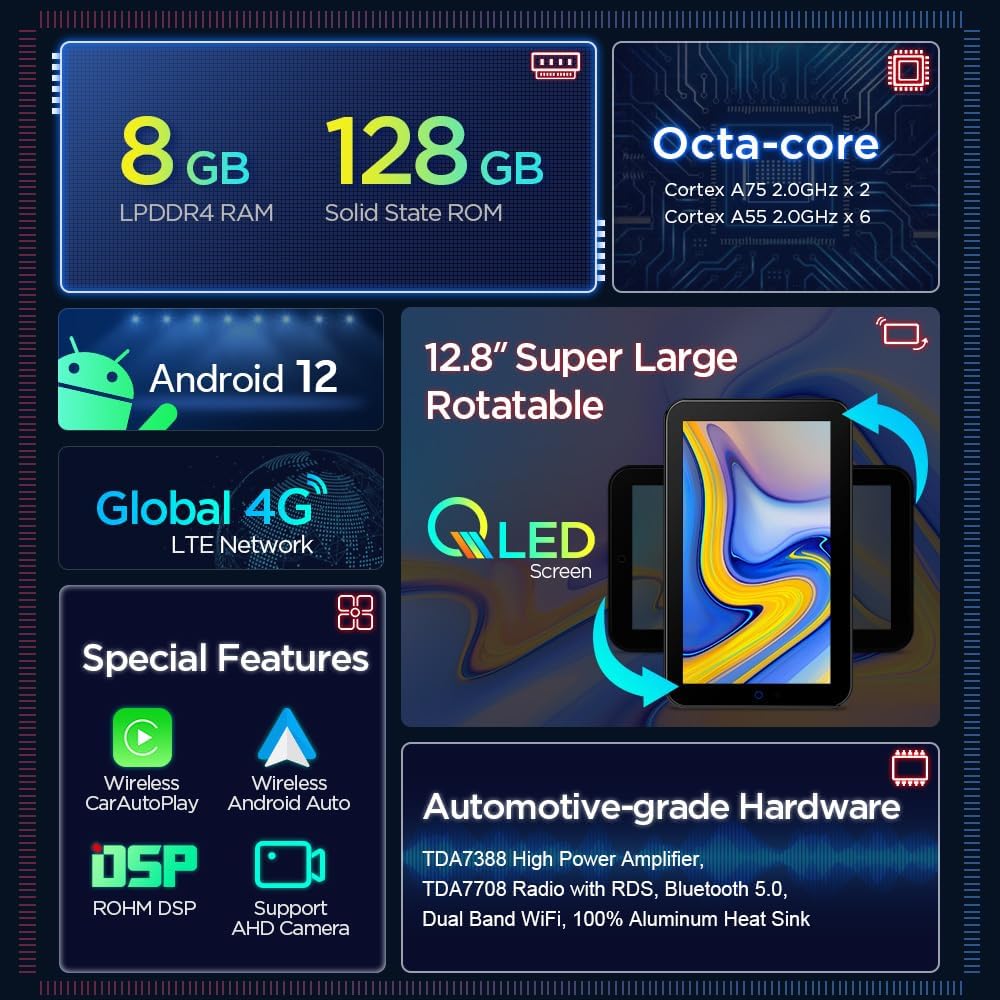
Figure 2: Overview of the XTRONS car stereo's core features including Android 12, Octa-core processor, 8GB RAM, 128GB ROM, 12.8" Rotatable QLED screen, Global 4G LTE, Wireless CarPlay/Android Auto, DSP, and AHD Camera support.
Setup and Installation
Proper installation is crucial for optimal performance. It is recommended to have this unit installed by a qualified professional. The following steps provide a general guide for installation.
Installation Video Guide
Video 1: This video demonstrates the installation process for the XTRONS TIX221L car stereo, including removal of the original unit, wiring connections, and reassembly. It provides a visual guide for users.
General Installation Steps
- Prepare the Dashboard: Carefully uninstall the car frame and remove the original radio. This typically involves using pry tools and screwdrivers to remove screws and clips.
- Connect Wiring Harness: Use the customized cable provided to connect to the original car socket. Ensure all connections are secure.
- Install Metal Side Frame: Attach the metal side frames to the main unit.
- Connect Antennas and Cables: Connect the ISO Wiring Harness, Wi-Fi antenna, 4G antenna, RCA cables, GPS antenna, and any other necessary cables to the main unit. Refer to the wiring diagram for correct connections.
- Secure Main Unit: Fix the XTRONS main unit into the dashboard using the provided screws.
- Assemble Installation Frame: Assemble the installation frame onto the original car frame and re-install them.
- Install Screen: Carefully install the XTRONS screen onto the socket, ensuring it clicks securely into place.
- Initial Power On: Switch on the car ignition and then power on the head unit to check if everything is functioning correctly. Verify display, audio, and basic functions.
- Reassemble Dashboard: Install the dashboard frame back into place, ensuring all components are securely fitted.
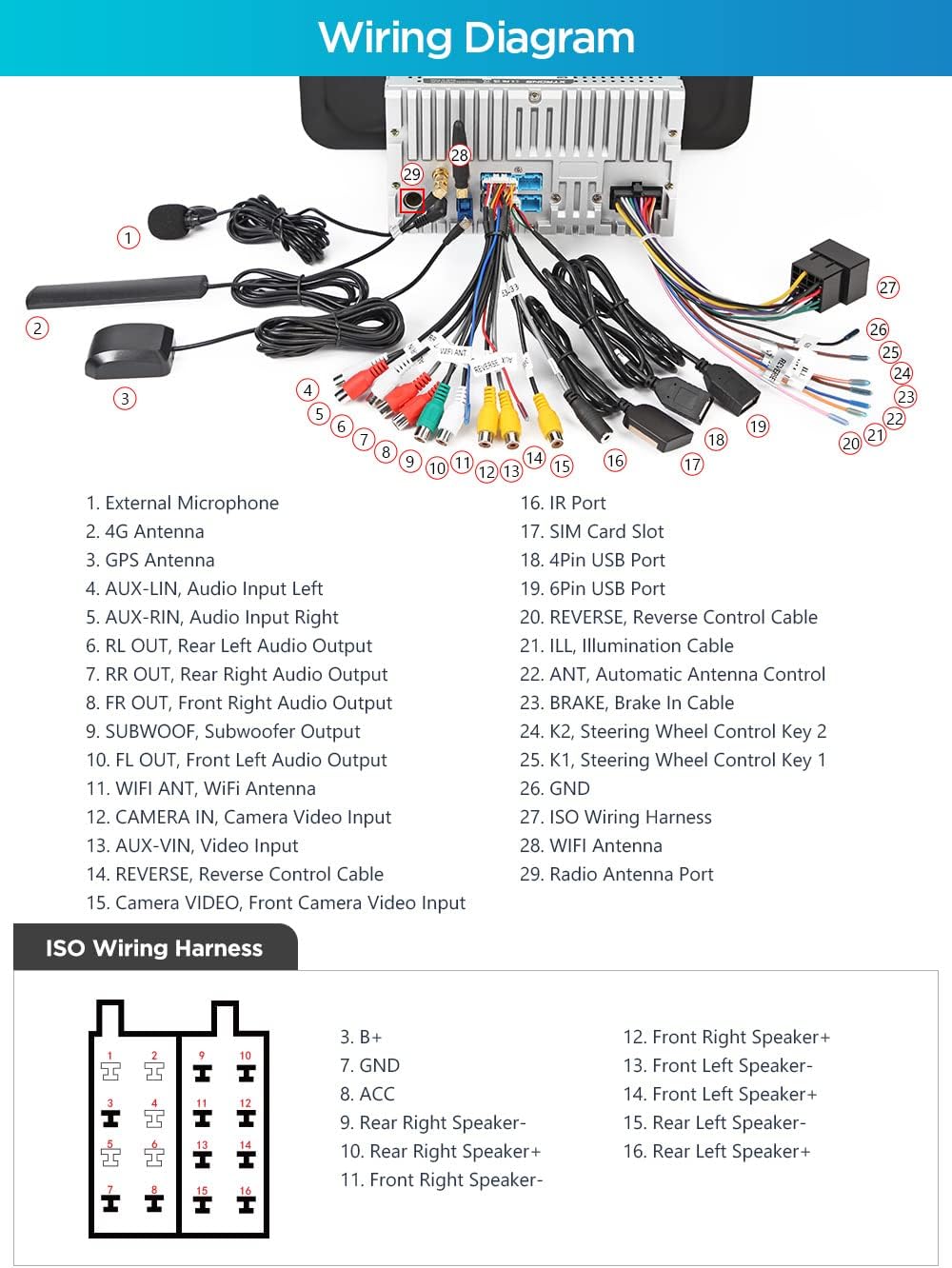
Figure 3: Detailed wiring diagram for the XTRONS car stereo, showing connections for external microphone, 4G antenna, GPS antenna, RCA cables, ISO wiring harness, and WiFi antenna.

Figure 4: Included accessories with the XTRONS car stereo, such as ISO wiring harness, RCA cables, 4G antenna, GPS antenna, USB cables, SIM card slot cable, fitting kits, screws, microphone, WiFi antenna, and user manual.
Operating Instructions
This section covers the basic operation of your XTRONS car stereo, highlighting its key functionalities.
Product Features Overview Video
Video 2: This video provides a comprehensive overview of the XTRONS 12.8 Inch Double Din Rotatable Car Stereo's features, including its Android 12 OS, QLED display, and various smart functions.
Rotatable Screen
The 12.8-inch QLED screen can be rotated to optimize your viewing experience. It features a gravity sensor that automatically adjusts the display orientation. This allows for both landscape and portrait modes, making content viewing and navigation more adaptable.

Figure 5: The rotatable screen of the XTRONS car stereo shown in a car interior, demonstrating its ability to switch between landscape and portrait orientations for optimal viewing of navigation or media.
4G LTE Connectivity
The integrated 4G LTE solution allows for high-speed internet access directly from the unit. Simply insert a Micro-SIM network card (not included) into the dedicated slot. This feature supports 99% of carriers worldwide, eliminating the need for an external dongle.
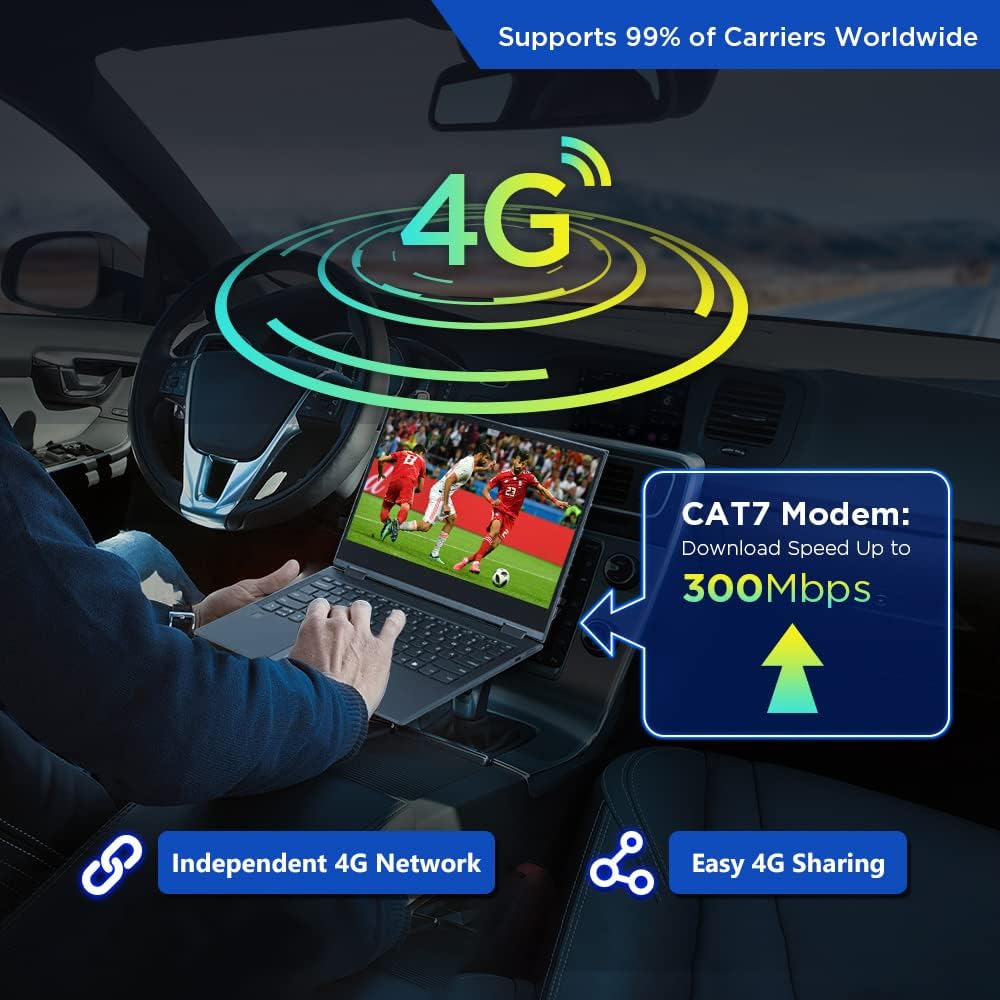
Figure 6: Illustration of the XTRONS car stereo's 4G LTE capability, showing a laptop connected to the unit for internet access, emphasizing independent 4G network and easy sharing.
Wireless CarPlay & Android Auto
Connect your iPhone or Android phone wirelessly via Bluetooth for a safer and more convenient in-car experience. Access apps, navigation, music, and make calls directly from the large screen. Utilize smart voice commands like "Hey Siri" or "Hey Google" to control functions while keeping your focus on the road.

Figure 7: Demonstrates the wireless CarPlay and Android Auto features of the XTRONS car stereo, showing the interface for both Apple and Android devices on the large screen, along with voice command capabilities.
Digital Sound Processor (DSP)
The built-in ROHM DSP is designed to enhance audio quality, providing a superior music listening experience. Adjust sound fields, bass filters, and utilize the 16-band graphic equalizer to customize your audio output.

Figure 8: User interface for the built-in ROHM DSP, showing options for sound field adjustment, 16-band graphic equalizer, and bass filter settings to optimize audio quality.
GPS Navigation
The unit supports various Android navigation software, including Sygic, IGO, Waze, and Google Maps. Ensure you have the necessary map data installed for offline navigation. The large QLED screen provides clear and detailed map views.

Figure 9: Depiction of the XTRONS car stereo displaying GPS navigation, showing various map applications and satellite signal strength indicators.
Dual Band WiFi & USB Tethering
The unit supports both 2.4GHz and 5GHz WiFi bands for faster and more stable internet connectivity. For online access on the go, you can connect your smartphone via the USB port and enable "USB Tethering" (for Android) or "Allow Others to Join" (for iPhones).

Figure 10: Screenshot of the WiFi settings on the XTRONS unit, showing available networks and indicating support for both 2.4GHz and 5GHz bands.

Figure 11: Illustration of USB tethering, showing a smartphone connected to the XTRONS unit via USB, enabling internet access for the head unit.
Picture-in-Picture (PIP) & Multi-window View
The PIP feature allows a floating video player to remain visible while you navigate other applications. The multi-window view enables running two applications side-by-side, such as a navigation map on one side and a music player on the other.

Figure 12: Screenshot demonstrating the Picture-in-Picture (PIP) mode, where a video plays in a small floating window over another application.

Figure 13: Screenshot illustrating the multi-window view, showing two applications running simultaneously side-by-side on the screen.
Maintenance
To ensure the longevity and optimal performance of your XTRONS car stereo, follow these general maintenance guidelines:
- Screen Cleaning: Use a soft, lint-free cloth to gently wipe the QLED touch screen. For stubborn smudges, slightly dampen the cloth with water or a screen-safe cleaner. Avoid abrasive materials or harsh chemicals.
- Software Updates: Periodically check for and install software updates provided by XTRONS. These updates can improve performance, add new features, and fix bugs.
- Cable Connections: Ensure all cables connected to the unit are secure and free from damage. Loose connections can lead to intermittent issues.
- Avoid Extreme Temperatures: While designed for automotive environments, prolonged exposure to extreme heat or cold can affect the unit's lifespan.
- Ventilation: Ensure the unit's ventilation areas are not blocked to prevent overheating.
Troubleshooting
This section addresses common issues you might encounter with your XTRONS car stereo.
| Problem | Possible Cause | Solution |
|---|---|---|
| Unit does not power on. | Loose power connection, blown fuse, vehicle battery issue. | Check power wiring and fuse. Ensure vehicle battery is charged. Consult a professional if issues persist. |
| Poor or no Wi-Fi connection. | Weak signal, incorrect password, unit not connected to network, software glitch. | Ensure strong Wi-Fi signal. Re-enter password. Restart the unit. Check for software updates. If using tethering, verify phone settings. |
| Touch screen unresponsive or inaccurate. | Software glitch, screen protector interference, physical damage. | Restart the unit. Remove any screen protectors to test. If damage is suspected, contact support. |
| Audio distortion or no sound. | Incorrect audio settings (DSP), loose speaker wires, damaged speakers. | Check DSP settings and reset if necessary. Verify speaker connections. Test with different audio sources. |
| GPS signal lost or inaccurate. | GPS antenna not properly installed or obstructed, software issue. | Ensure GPS antenna is securely connected and has a clear view of the sky. Restart navigation app or unit. |
Specifications
- Product Dimensions: 12.8 x 12.8 x 12.8 inches
- Item Weight: 10.63 pounds
- Manufacturer: XTRONS
- Country of Origin: China
- Model Name: Universal Double Din Rotatable Android 12 Car Stereo
- Vehicle Service Type: Car
- Screen Size: 12.8 Inches
- Special Feature: Touchscreen, Bluetooth
- Connectivity Technology: Bluetooth, Cellular, Wi-Fi, USB
- Map Type: No Pre-installed Map
- Audio Output Mode: Stereo
- Mounting Type: Dashboard Mount
- Operating System: Android 12
- Processor: Octa-Core CPU (Cortex-A75 x2 + Cortex-A55 x6)
- RAM: 8GB LPDDR4
- ROM: 128GB Solid State
- Display Resolution: 1920x1080 FHD
- Display Type: QLED IPS Touch Screen
What's in the Box
The package includes the following components:
- 1 × ISO Wiring Harness
- 1 × RCA Cable
- 1 × 4G Antenna
- 1 × GPS Antenna
- 2 × USB Cable
- 1 × SIM Card Slot Cable
- 2 × Fitting Kits & 8 x Screws
- 1 × Microphone
- 1 × WiFi Antenna
- User Manual
Warranty and Support
XTRONS provides a 1-year warranty for this double din radio. For any technical assistance or support, please do not hesitate to contact XTRONS via Amazon email. They aim to reply promptly to ensure your rights and interests are protected.
Additionally, protection plans are available for purchase:
- 2-Year Protection Plan
- 3-Year Protection Plan
- Complete Protect: One plan covers all eligible past and future purchases (monthly billing option available)
Related Documents - Universal Double Din Rotatable Android 12 Car Stereo
 |
XTRONS TIMH128L User Manual This user manual provides essential information on the installation, usage, and maintenance of the XTRONS TIMH128L universal double din car multimedia player. Learn to operate its extensive functionalities safely and efficiently. |
 |
XTRONS TAD128 10.1" QLED Car Multimedia Player User Manual Comprehensive user manual for the XTRONS TAD128, a 10.1" QLED 4K Android 14 car multimedia player. Learn about installation, operation, safety, radio, navigation, Bluetooth, multimedia, Carplay, Android Auto, and troubleshooting. |
 |
XTRONS Car Double Din DVD Navigation Entertainment System User Manual User manual for the XTRONS Car Double Din DVD Navigation Entertainment System, covering features, operation, settings, troubleshooting, and system parameters. |
 |
XTRONS Car Double Din DVD Navigation Entertainment System User Manual Comprehensive user manual for the XTRONS Car Double Din DVD Navigation Entertainment System, covering features, operation, settings, troubleshooting, and system parameters. |
 |
XTRONS Autoradio Bedienungsanleitung: Installation und Nutzung Umfassende Bedienungsanleitung für XTRONS Autoradiosysteme mit Android-Betriebssystem. Erfahren Sie mehr über Installation, Funktionen wie Navigation, Bluetooth, Medienwiedergabe und Fehlerbehebung. |
 |
Xtrons PE Series Android Car Stereo User Manual Comprehensive user manual for the Xtrons PE Series Android Car Stereo, covering installation, basic operations, functions like radio, navigation, Bluetooth, multimedia, and troubleshooting. |
Ask a question about this manual
Ask about setup, troubleshooting, compatibility, parts, safety, or missing instructions. Manuals+ will review the question and use this page’s manual context to help answer it.