1. Introduction
Thank you for choosing the NiPoGi E1 Mini PC. This compact and powerful mini PC is designed for a variety of tasks, from home server applications and educational use to web browsing, business office tasks, and digital signage. Equipped with an AMD Ryzen 3250U processor and pre-installed with Windows 11 Pro, it offers fast responsiveness and smooth operation. This manual provides essential information for setting up, operating, maintaining, and troubleshooting your device.

Figure 1: NiPoGi E1 Mini PC Overview
2. Package Contents
Please check the box for the following items:
- NiPoGi E1 Mini PC
- Power Adapter
- HDMI Cable
- VESA Mount Bracket
- Mounting Screws (4 pcs)
- User Manual (this document)

Figure 2: Included accessories with the NiPoGi Mini PC E1.
3. Product Overview
3.1. Processor and Performance
The NiPoGi E1 Mini PC is powered by an AMD Ryzen 3250U processor with a pulse frequency of up to 3.50GHz and 4MB L3 cache. This processor delivers robust performance for everyday computing tasks, outperforming many entry-level mini PCs. It ensures faster responsiveness and smoother operation for various applications.
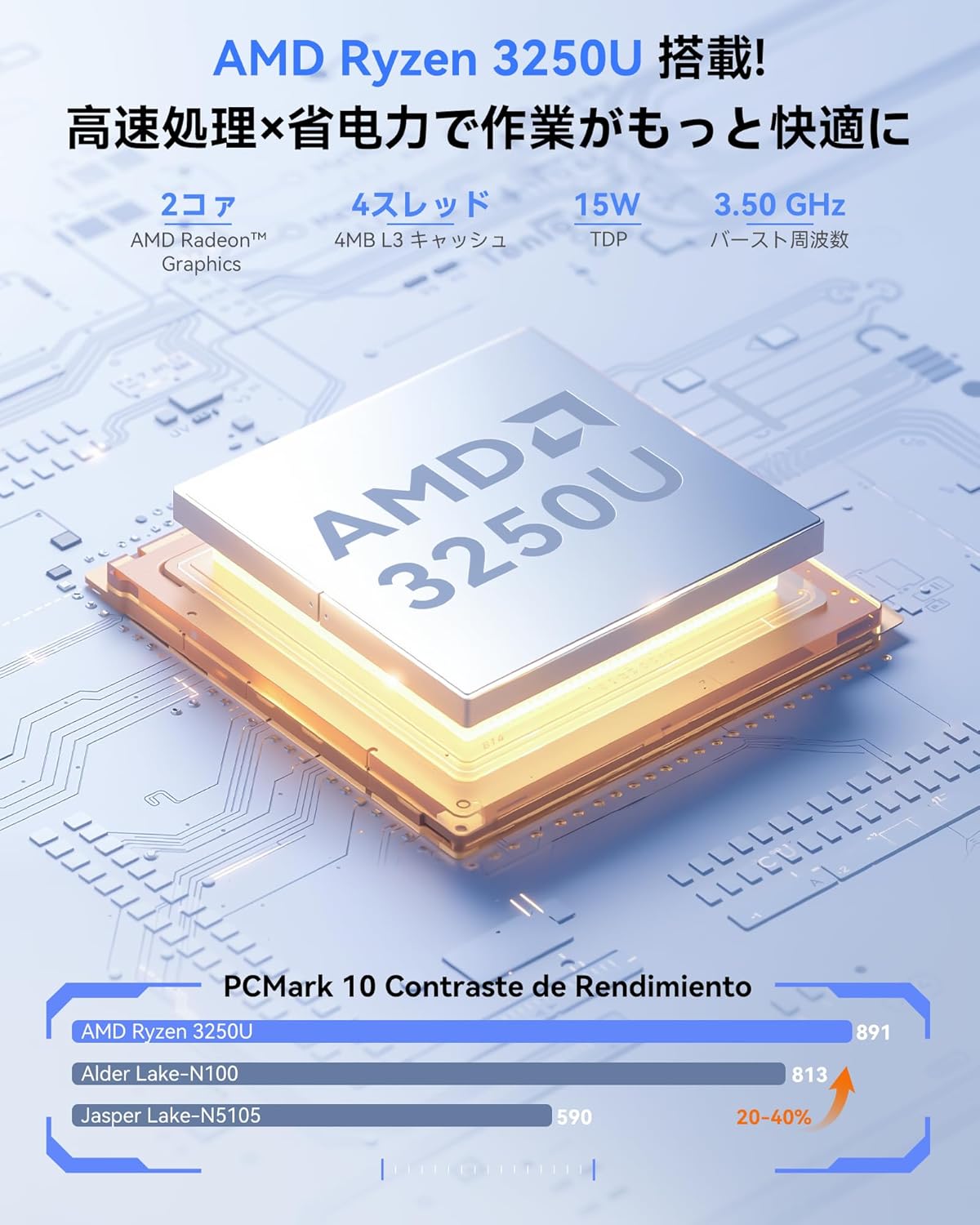
Figure 3: AMD Ryzen 3250U Processor

Figure 4: Performance comparison of AMD Ryzen 3250U against other processors.
3.2. Ports and Interfaces
The mini PC offers a comprehensive set of ports for connecting various peripherals:
- 1x HDMI 2.0 Port
- 1x DisplayPort 1.4
- 2x USB 3.2 Ports
- 2x USB 2.0 Ports
- 1x RJ45 Gigabit Ethernet Port
- 1x 5.5/2.1mm DC Power Input Jack
- 1x 3.5mm Headphone Jack
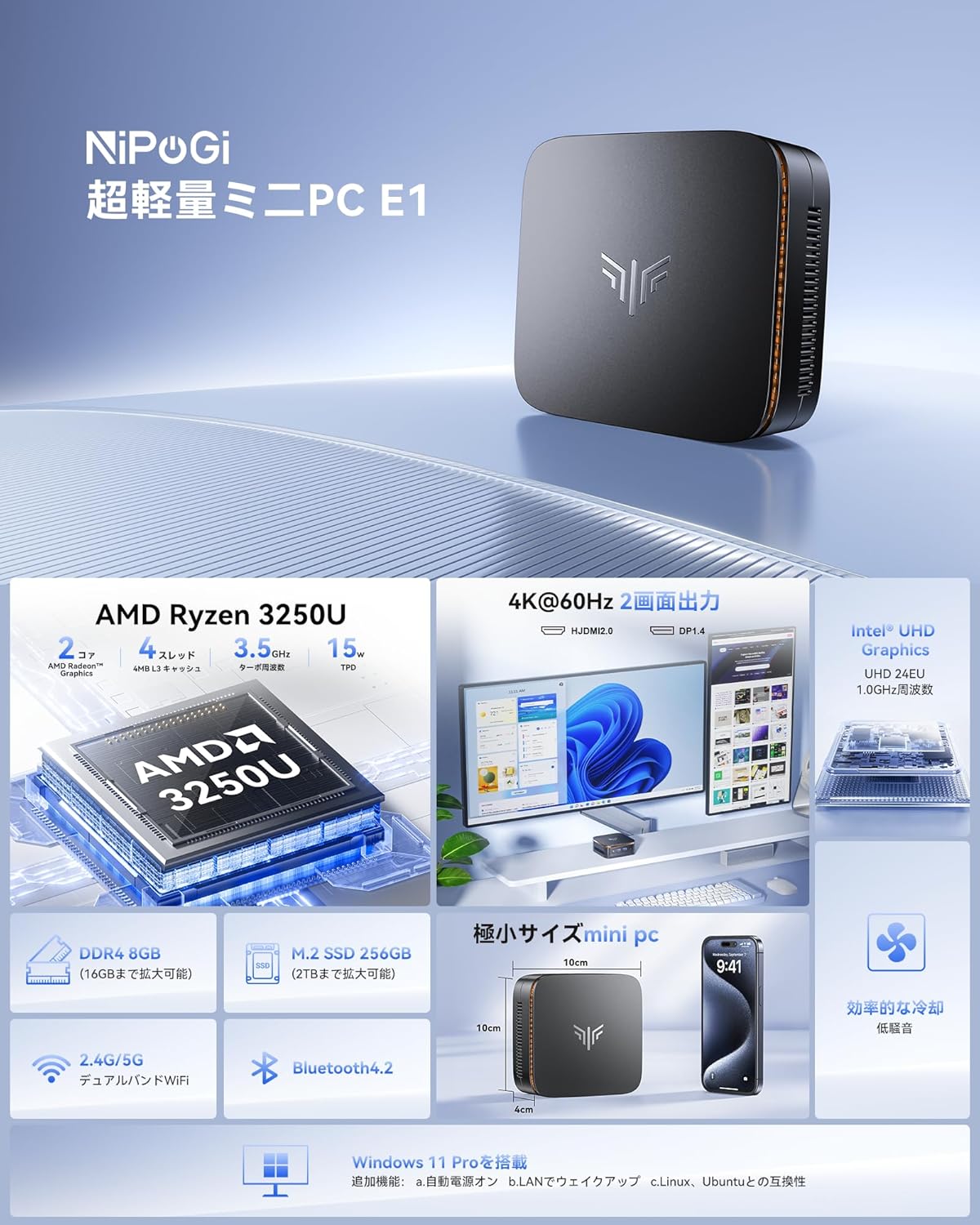
Figure 5: Front and rear view of the NiPoGi Mini PC showing all available ports.

Figure 6: The NiPoGi Mini PC can connect to a wide range of office and home entertainment devices.
3.3. Compact Design and Dimensions
The NiPoGi E1 Mini PC features a space-saving design, measuring approximately 10 x 10 x 4 cm and weighing only 0.38 kg. Its ultra-compact size allows for flexible placement on your desk or mounted behind a monitor, reducing clutter and optimizing your workspace.

Figure 7: The compact dimensions of the NiPoGi Mini PC, highlighting its small footprint compared to traditional desktops.
3.4. Cooling System
The mini PC incorporates an ultra-quiet cooling fan for efficient heat dissipation. High-speed fan blades quickly disperse heat, ensuring stable long-term operation and preventing performance throttling.
4. Setup
4.1. Connecting Peripherals
- Connect Monitor: Use an HDMI cable to connect your monitor to the HDMI 2.0 port on the mini PC. Alternatively, use a DisplayPort cable for the DP 1.4 port.
- Connect Keyboard and Mouse: Plug your USB keyboard and mouse into the available USB ports (USB 3.2 or USB 2.0). For wireless peripherals, ensure Bluetooth is enabled and pair them.
- Connect Power: Plug the power adapter into the DC input jack on the mini PC, then connect it to a power outlet.
4.2. Initial Power On
Press the power button located on the front of the mini PC. The system will boot up, and you will see the Windows 11 Pro setup screen or desktop if already configured. Follow the on-screen instructions for initial Windows setup if prompted.
4.3. VESA Mounting
The included VESA mount bracket allows you to attach the mini PC to the back of a compatible monitor or to a wall, further saving desk space. Secure the bracket to the monitor/wall using the provided screws, then slide the mini PC onto the bracket.

Figure 8: Various placement options for the NiPoGi Mini PC, including VESA mounting behind a monitor.
5. Operating Instructions
5.1. Power On/Off and Restart
- Power On: Press the power button.
- Shut Down: Click the Start button in Windows, then select Power > Shut down.
- Restart: Click the Start button in Windows, then select Power > Restart.
5.2. Network Connectivity
The NiPoGi E1 Mini PC supports both wired and wireless network connections:
- Wired LAN: Connect an Ethernet cable to the RJ45 port on the back of the mini PC. The system will automatically detect and connect to the network.
- Wi-Fi: The device supports 2.4G/5G dual-band Wi-Fi. In Windows, click the Wi-Fi icon in the taskbar, select your desired network, enter the password, and connect.
- Bluetooth: The mini PC features Bluetooth 4.2. To connect Bluetooth devices, go to Windows Settings > Devices > Bluetooth & other devices, turn on Bluetooth, and pair your device.
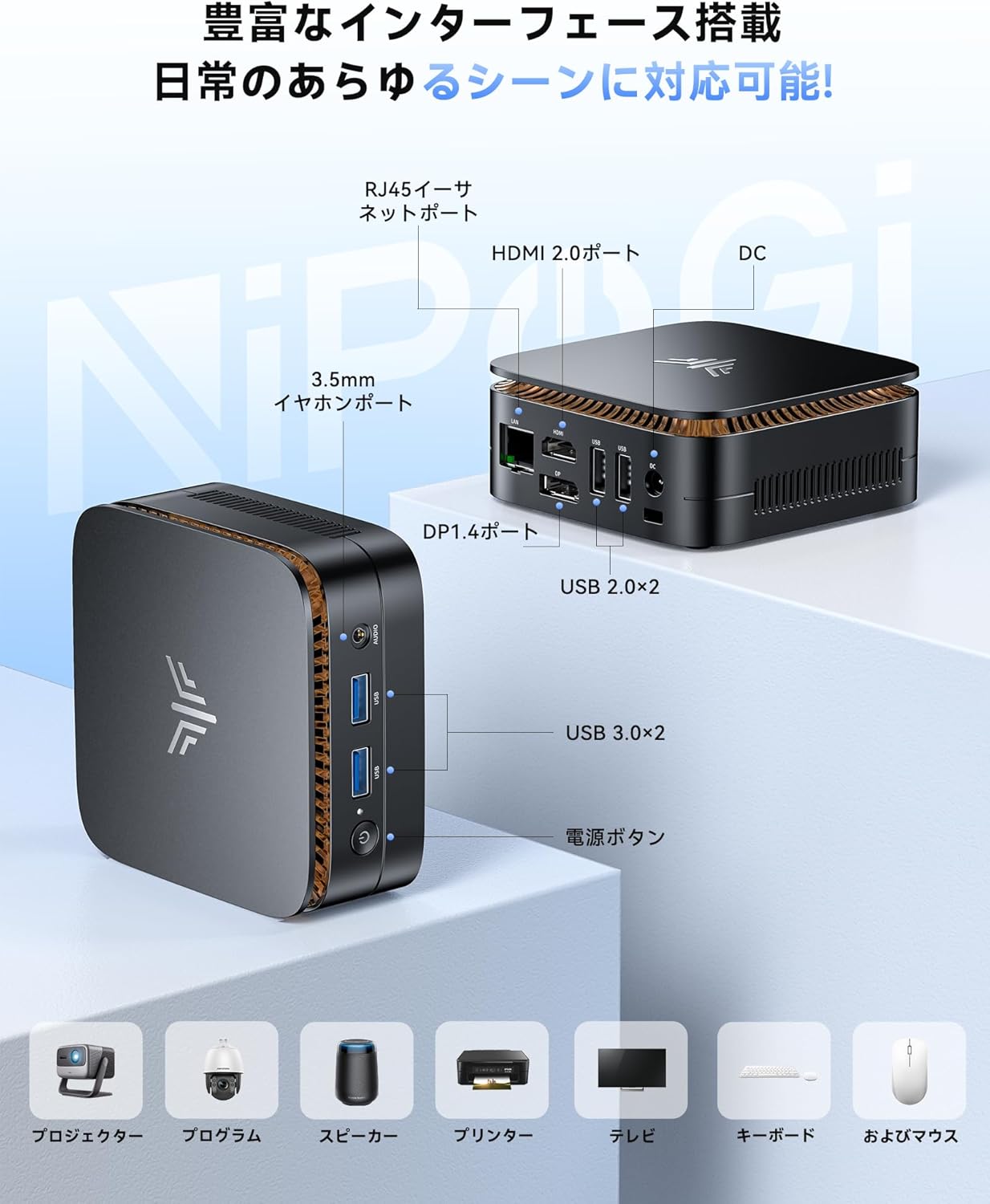
Figure 9: The NiPoGi Mini PC offers stable 2.4G/5G Wi-Fi and Bluetooth 4.2 connectivity for various devices.
5.3. Dual Display Setup
The mini PC supports dual display output via its HDMI 2.0 and DisplayPort 1.4 interfaces, allowing for an immersive 4K Ultra HD experience. This is ideal for multitasking, business presentations, or extended workspaces.
- Connect your primary monitor to the HDMI 2.0 port.
- Connect your secondary monitor to the DisplayPort 1.4.
- In Windows, right-click on the desktop and select "Display settings."
- Configure your displays (e.g., extend, duplicate) as needed. The AMD Radeon Graphics GPU ensures stable image and sound processing for high-resolution output.

Figure 10: The NiPoGi Mini PC supports dual 4K displays for enhanced productivity.
6. Storage and Memory Expansion
The NiPoGi E1 Mini PC comes with 8GB DDR4 RAM and a 256GB M.2 2280 SSD. Both can be upgraded to enhance performance and storage capacity:
- RAM Upgrade: The 8GB DDR4 RAM can be upgraded to a maximum of 16GB.
- SSD Expansion: The 256GB M.2 2280 SSD can be upgraded to a maximum of 2TB. Additionally, you can install a 2.5-inch SATA SSD/HDD for further storage expansion. The PCIe SSD offers significantly faster read/write speeds compared to traditional SATA SSDs.
Note: Upgrading components may require technical knowledge. If unsure, consult a professional.

Figure 11: Internal components showing 8GB DDR4 RAM and 256GB SSD, with options for expansion.
7. Maintenance
To ensure the longevity and optimal performance of your NiPoGi E1 Mini PC, follow these maintenance guidelines:
- Keep Clean: Regularly clean the exterior of the mini PC with a soft, dry cloth. Use compressed air to gently clear dust from the ventilation openings to maintain efficient cooling.
- Software Updates: Keep your Windows 11 Pro operating system and drivers updated to the latest versions. This ensures security, stability, and performance improvements.
- Avoid Obstructions: Ensure that the ventilation openings are not blocked to allow proper airflow and prevent overheating.
- Safe Shutdown: Always shut down the system properly through the Windows menu to prevent data corruption.
8. Troubleshooting
If you encounter issues with your NiPoGi E1 Mini PC, refer to the following common problems and solutions:
| Problem | Possible Cause | Solution |
|---|---|---|
| No display on monitor | Loose cable connection, incorrect input source, monitor off. | Check HDMI/DP cable connections. Ensure monitor is powered on and set to the correct input source. Try a different cable or monitor. |
| Mini PC does not power on | Power adapter not connected, faulty power outlet. | Verify power adapter is securely connected to both the PC and a working power outlet. Try a different outlet. |
| Wi-Fi connection issues | Incorrect password, router issues, Wi-Fi disabled. | Check Wi-Fi password. Restart your router. Ensure Wi-Fi is enabled in Windows settings. |
| Slow performance | Too many applications running, insufficient RAM, overheating. | Close unnecessary applications. Consider upgrading RAM. Ensure proper ventilation and clean dust from vents. |
| Bluetooth device not connecting | Bluetooth disabled, device out of range, pairing issue. | Ensure Bluetooth is enabled in Windows settings. Move device closer to the PC. Re-pair the Bluetooth device. |
If the issue persists after trying these solutions, please contact customer support.
9. Specifications
| Feature | Detail |
|---|---|
| Brand | NiPoGi |
| Model | E1-Ryzen 3250U |
| CPU Brand | AMD |
| CPU Type | Ryzen 3 3250U |
| CPU Speed | 3.5 GHz (Max Burst) |
| Processor Count | 4 |
| Cache Size | 6 MB |
| RAM Capacity | 8 GB DDR4 (Max 16GB) |
| Memory Clock Speed | 2666 MHz |
| Hard Disk Type | SSD |
| Memory Storage Capacity | 256 GB (M.2 2280 SSD, Max 2TB) |
| HDD Interface | PCIe x 4 |
| Graphics Accelerator | Intel UHD Graphics (Integrated) |
| Resolution | 4096 x 2304, 3840x2160 Pixels |
| HDMI Ports | 1 (HDMI 2.0) |
| Operating System | Windows 11 Pro (Supports Ubuntu, Linux, Win11 Home, Win11 IOT) |
| Product Weight | 380 g |
| Product Dimensions | 13.2 x 13.2 x 10.3 cm |
| Form Factor | Small Form Factor |
| Connectivity | 2.4G/5G Wi-Fi, Bluetooth 4.2, Gigabit Ethernet |
| Security | TPM 2.0 Chip |
10. Warranty and Support
Your NiPoGi Mini PC comes with an 18-month warranty from the date of purchase. We strive for complete quality assurance. However, if you encounter any defects, damage, or receive an incorrect product, please contact our customer support team immediately.
How to Contact Support:
- Go to "Account Service" on the platform where you purchased the product.
- Navigate to "Order History."
- Find your order and click on the "Seller" link.
- Select "Ask a question" to send a message to our support team.
Our customer service team is available 24/7 and aims to resolve any issues within 24 hours.


