
WinDrogon WinDrogon VR Headset
WinDrogon VR Headset Instruction Manual
Model: WinDrogon VR Headset | Brand: WinDrogon
1. Introduction
Thank you for choosing the WinDrogon VR Headset for your Nintendo Switch and Switch OLED console. This headset is designed to provide an immersive virtual reality experience for compatible games and media. Please read this manual thoroughly before using the product to ensure proper setup, operation, and maintenance.
2. Safety Information
To ensure safe and enjoyable use of your VR headset, please observe the following precautions:
- Adult Supervision: Children should use the VR headset under adult supervision.
- Clear Surroundings: Ensure you have ample clear space around you to avoid collisions with objects or people while using the headset.
- Take Breaks: Prolonged use may cause eye strain or discomfort. Take regular breaks, especially if you experience dizziness, nausea, or fatigue.
- Not for Medical Use: This device is not intended for medical purposes. Consult a healthcare professional if you have pre-existing medical conditions that might be affected by VR use.
- Avoid Direct Sunlight: Do not expose the lenses to direct sunlight, as this can damage the screen of your Nintendo Switch.
- Cleaning: Use a soft, dry cloth for cleaning. Do not use liquid cleaners or abrasive materials.
3. Package Contents
Verify that all items are present in your package:
- WinDrogon VR Headset
- Adjustable Headstrap
4. Product Overview
Familiarize yourself with the components of your WinDrogon VR Headset:

The WinDrogon VR Headset with a Nintendo Switch console attached, showcasing its design and how the console integrates.

A detailed view of the high-definition optical lenses within the VR headset, designed for clear visuals.
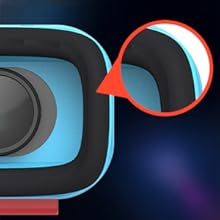
The soft, comfortable face cushion of the VR headset, highlighting the material designed for extended wear.
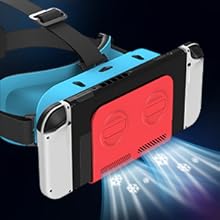
Illustration of the heat dissipation vents on the VR headset, ensuring optimal temperature during use.
5. Setup Guide
Follow these steps to set up your WinDrogon VR Headset:
- Set VR Mode on Switch Console:
Before inserting your Switch, navigate to the VR mode settings on your Nintendo Switch console. This prepares the display for virtual reality viewing.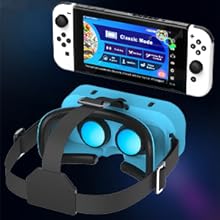
Ensure your Nintendo Switch is set to VR mode for optimal performance.
- Secure the Switch into the VR Headset:
Carefully slide your Nintendo Switch or Switch OLED console into the designated slot on the front of the VR headset. Ensure it is securely seated and aligned with the viewing area.
Properly insert your Nintendo Switch into the headset's front slot.
- Adjust the Headstrap and Lenses:
Place the headset on your head. Adjust the elastic headstrap for a snug yet comfortable fit. Use the adjustment knobs on the top and sides of the headset to fine-tune the focal length and pupillary distance until the image is clear and comfortable for your eyes.
Adjust the focal length and pupillary distance for the best visual clarity.
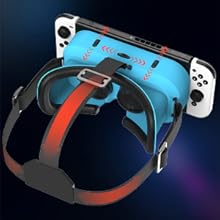
Adjust the headstrap for a secure and comfortable fit.
- Immerse Yourself:
Once adjusted, you are ready to enjoy an immersive VR experience with your Nintendo Switch.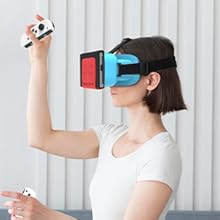
Enjoy your VR experience!
6. Operating Instructions
6.1 Compatible Games
The WinDrogon VR Headset is compatible with various Nintendo Switch games that support VR mode. Some popular titles include:
- Super Mario Odyssey
- The Legend of Zelda: Breath of the Wild
- Super Smash Bros. Ultimate
- Spice and Wolf VR
- Captain Toad: Treasure Tracker
- LABO VR
- It Takes Two

A selection of games that support VR mode with the headset.
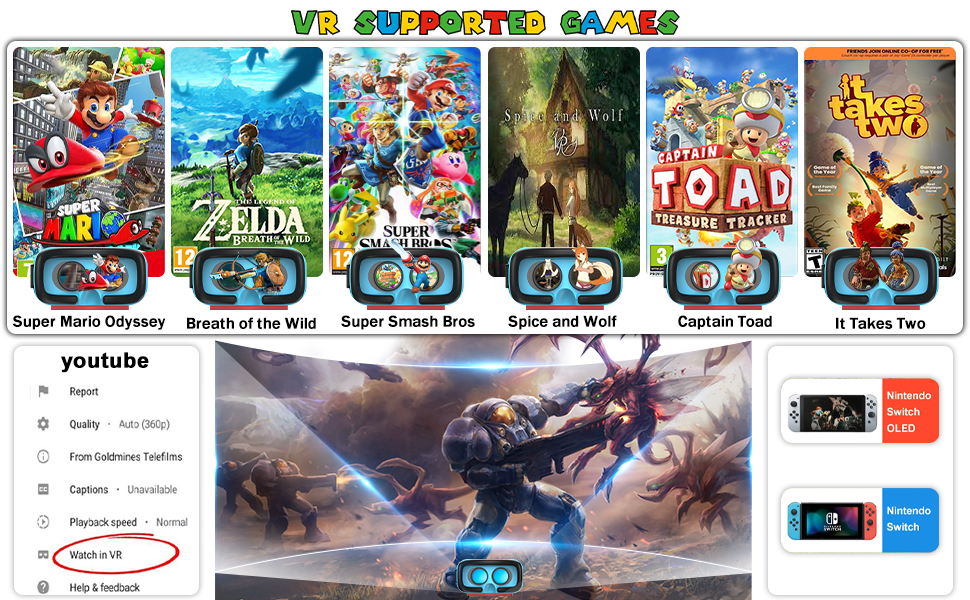
Further examples of VR compatible games and the YouTube VR interface.
6.2 YouTube VR
You can also use the WinDrogon VR Headset to experience YouTube videos in VR. Convert YouTube videos to play in VR mode, then wear the VR goggles to enjoy a 3D VR video experience at home.

Experience YouTube content on a giant virtual screen.
6.3 General Usage Tips
- Ensure your Nintendo Switch is fully charged before extended VR sessions.
- For the best experience, play in a well-lit room to prevent motion sickness.
- Clean the lenses regularly with a microfiber cloth to maintain visual clarity.

The VR headset is designed for fun for everyone, with a retractable head strap to fit most head shapes.
7. Maintenance
Proper maintenance will extend the life of your VR headset:
- Cleaning Lenses: Use a dry, soft microfiber cloth specifically designed for optical lenses. Do not use water, cleaning solutions, or abrasive cloths, as this can scratch or damage the lenses.
- Cleaning Headset Body: Wipe the exterior of the headset with a slightly damp, soft cloth. Ensure no moisture enters the internal components.
- Storage: Store the headset in a cool, dry place away from direct sunlight and extreme temperatures. Keep it in its original packaging or a protective case when not in use to prevent dust accumulation and accidental damage.
- Avoid Moisture: The headset is not waterproof. Avoid exposure to rain, humidity, or any liquids.
8. Troubleshooting
If you encounter issues with your WinDrogon VR Headset, refer to the following common problems and solutions:
| Problem | Possible Cause | Solution |
|---|---|---|
| Blurred or Unclear Image | Incorrect focal length/pupillary distance, dirty lenses, Switch not fully inserted. | Adjust focal length and pupillary distance knobs. Clean lenses with a microfiber cloth. Ensure Switch is fully and correctly inserted. |
| Discomfort during use | Headstrap too tight/loose, improper fit. | Adjust the headstrap for a comfortable, snug fit. Ensure the headset is centered on your face. Take regular breaks. |
| No VR effect / Standard 2D image | VR mode not activated on Switch, game does not support VR. | Ensure VR mode is enabled in your Nintendo Switch settings. Verify that the game you are playing supports VR functionality. |
| Headset feels hot | Prolonged use, lack of ventilation. | Take a break to allow the headset and Switch to cool down. Ensure ventilation holes are not blocked. |
9. Specifications
- Product Dimensions: 7.4 x 5.98 x 4.41 inches
- Item Weight: 8.1 ounces
- Model Name: WinDrogon VR Headset
- Color: Red
- Special Feature: Adjustable Angle, 3D VR Technology
- Connectivity Technology: USB
- Compatible Devices: Nintendo Switch
- Specific Uses For Product: Gaming
- Field Of View: 105 Degrees
10. Warranty and Support
WinDrogon is committed to providing high-quality products. For any questions, technical support, or warranty inquiries, please contact our customer service team through the retailer's platform where you purchased the product. Please retain your proof of purchase for warranty claims.
Ask a question about this manual
Ask about setup, troubleshooting, compatibility, parts, safety, or missing instructions. Manuals+ will review the question and use this page’s manual context to help answer it.