
1. Introduction
The EBYTE E870-E1 is an Ethernet Edge Acquisition Gateway IO Controller designed for industrial applications. It facilitates data acquisition and control functions through various communication protocols, enabling seamless integration with cloud platforms and other devices. This manual provides detailed instructions for the setup, operation, and maintenance of the E870-E1 device.
2. Product Overview
The E870-E1 is a robust industrial-grade device supporting a wide range of functionalities for data acquisition and control. It operates on DC8~28V and features an RS485 communication interface alongside Ethernet connectivity. Key capabilities include 4-way switch value collection, 2-way analog (0-20/4-20mA) acquisition, and 2-way A-type relay output.
The device supports multiple protocols such as TCP, UDP, and MQTT for server access, and includes heartbeat and registration package settings. Configuration can be performed via a web platform, host computer, or network. It can function as an RTU device to analyze Modbus commands for IO control and supports edge acquisition and control of 20 Modbus RTU data points.
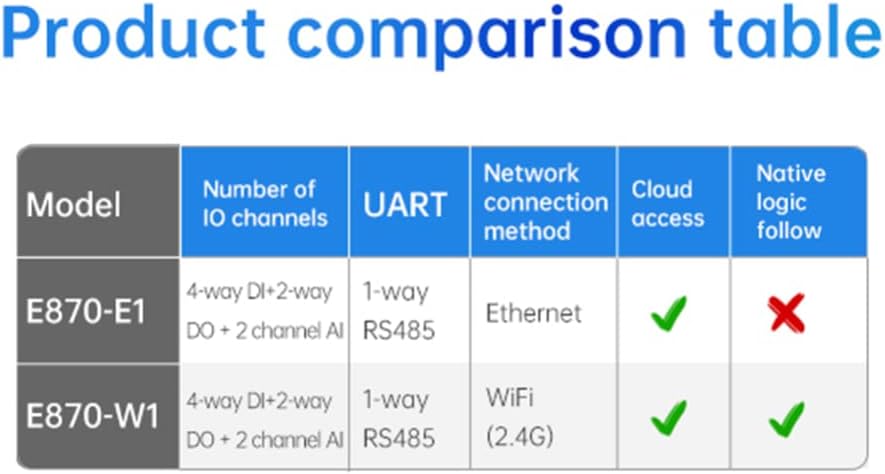
Figure 1: EBYTE E870-E1 Device
2.1. Key Features
- I/O Capabilities: 4 Digital Inputs (DI), 2 Digital Outputs (DO), 2 Analog Inputs (AI).
- Communication: Ethernet, RS485.
- Protocols: Modbus TCP, Modbus RTU, MQTT, TCP, UDP.
- Cloud Integration: Supports Ebyte Cloud Device Communication Protocol and Alibaba Cloud IoT model JSON protocol.
- Edge Computing: Supports edge acquisition and control of 20 Modbus RTU data points, with formulas for upstream and downstream data.
- Reporting: Supports change reporting and periodic reporting.
- Configuration: Web platform, host computer, network.
- Industrial Design: Operates in -40~85℃ environment.
2.2. Product Comparison
The E870-E1 model is distinguished by its Ethernet connection method and lack of native logic follow, as detailed in the comparison table below.
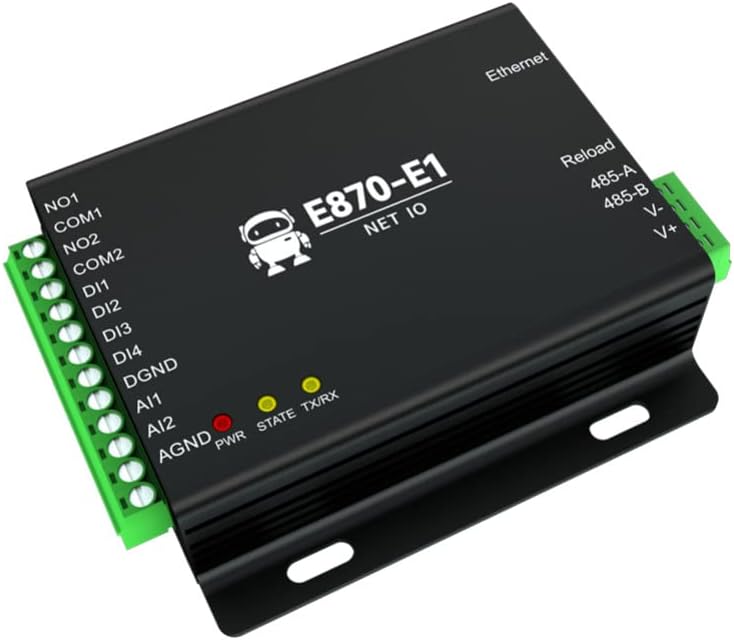
Figure 2: Product Comparison Table. This table compares the E870-E1 with the E870-W1, highlighting differences in network connection method (Ethernet vs. WiFi) and native logic follow capabilities.
2.3. Functional Structure
The E870-E1 supports multiprotocol transparent transport, adapting to various standard IoT transport protocols. It meets the requirements for wireless upload of serial port data to a server.

Figure 3: Multiprotocol Transparent Transport. This image illustrates the E870-E1's support for TCP, UDP, and MQTT protocols for data transport.
The functional structure diagram illustrates how the E870-E1 interacts with a server, handling JSON agreements, data points, Modbus polling, and various sensors and equipment.

Figure 4: Functional Structure Diagram. This diagram shows the data flow and interaction between the server, E870-E1 gateway, and connected sensors/equipment, including JSON agreement and Modbus polling.
2.4. Core Functions
The E870-E1 integrates twelve core functions to provide comprehensive edge acquisition and control capabilities.

Figure 5: Twelve Core Functions. This image lists and visually represents the twelve primary functions of the E870-E1, including Edge acquisition, ModBus command control, Edge computing, Transparent transmission, MQTT, JSON command acquisition, Configuration mode, Proactive escalation, Multilink, Heartbeat pack, Domain name resolution (DNS), and Support for upper computer upgrade.
3. Specifications
| Attribute | Value |
|---|---|
| Brand | EBYTE |
| Model Number | E870-E1 |
| Transmission Method | Ethernet |
| Working Voltage | DC8~28V |
| Communication Interface | RS485 |
| Digital Inputs (DI) | 4-way switch value collection |
| Analog Inputs (AI) | 2-way (0-20/4-20mA) acquisition |
| Digital Outputs (DO) | 2-way A-type relay output |
| Supported Protocols | TCP, UDP, MQTT, Modbus TCP, Modbus RTU |
| Operating Temperature | -40~85℃ |
| Product Size | 80*85mm |
4. Setup
4.1. Wiring Diagrams
Proper wiring is crucial for the correct operation of the E870-E1. Follow the diagrams below for Analog Input (AI), Digital Input (DI), and Output wiring.
4.1.1. Analog Input (AI) Wiring
The E870-E1 supports various analog input configurations, including four-wire, three-wire, and two-wire systems. Ensure correct connection of VCC, GND, OUT, and AGND terminals as per your sensor type.
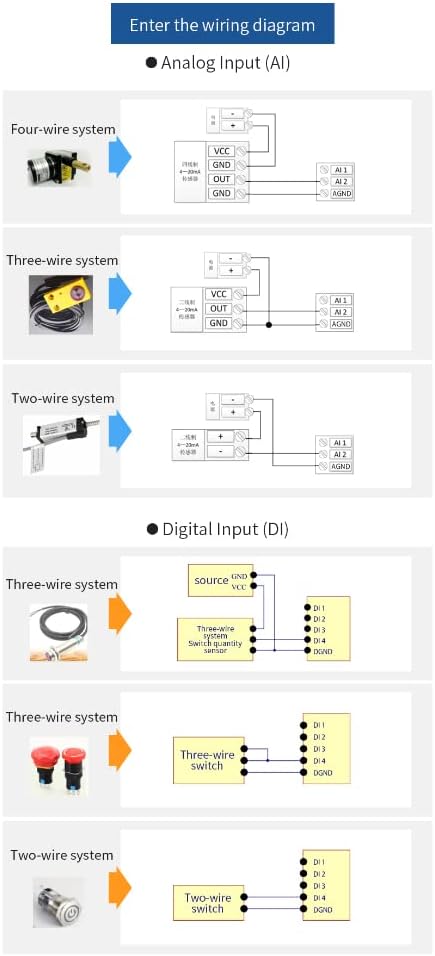
Figure 6: Analog Input Wiring Diagram. This image displays wiring configurations for 4-wire, 3-wire, and 2-wire analog input sensors to the AI1 and AI2 terminals of the E870-E1.
4.1.2. Digital Input (DI) Wiring
For digital inputs, connect your three-wire or two-wire switches and sensors to the DI1-DI4 terminals, ensuring proper connection to GND and VCC where applicable.
Figure 7: Digital Input Wiring Diagram. This image shows wiring configurations for 3-wire and 2-wire digital input switches and sensors to the DI1-DI4 terminals of the E870-E1.
4.1.3. Output Wiring Diagram
The E870-E1 provides passive outputs (NO1, COM1, NO2, COM2) for controlling external loads. Connect your loads (e.g., lighting, access control) to these terminals as shown in the diagram.

Figure 8: Output Wiring Diagram. This diagram illustrates how to connect external loads, such as lighting and access control, to the passive output terminals (NO1, COM1, NO2, COM2) of the E870-E1.
4.2. Initial Configuration
After physical installation and wiring, the E870-E1 requires initial configuration. This can be done through several methods:
- Web Platform: Access the device's web interface via its IP address for comprehensive settings.
- Host Computer Software: Utilize dedicated software provided by EBYTE for configuration.
- Network Configuration: Configure network parameters directly.
Refer to the EBYTE official documentation or software guides for detailed steps on accessing and utilizing these configuration methods.
5. Operating Instructions
5.1. Data Acquisition and Control
The E870-E1 can acquire data from its digital and analog inputs and control its digital outputs. Data acquisition can be configured for change reporting or periodic reporting to a server.
- Digital Input (DI): Monitor the status of connected switches or sensors.
- Analog Input (AI): Read analog values (0-20mA or 4-20mA) from sensors.
- Digital Output (DO): Control external devices by switching the relay outputs.
5.2. Communication Protocols
The device supports various communication protocols for flexible integration:
- Modbus TCP/RTU: The E870-E1 can act as an RTU device, parsing Modbus RTU commands from a host to collect and control IO. It also supports Modbus TCP for network communication.
- MQTT: For IoT applications, the device can publish data and subscribe to commands using the MQTT 3.1.1 protocol, including support for Alibaba Cloud IoT model JSON protocol reporting.
- TCP/UDP: Supports 4-way Socket independent connections to user-defined servers using TCPC and UDPC protocols.
5.3. Cloud Platform Integration
The E870-E1 is designed to integrate with cloud platforms, particularly the Ebyte cloud platform, using the "Ebyte Cloud Device Communication Protocol." This enables remote management, data visualization, and control from anywhere.
6. Maintenance
To ensure the longevity and reliable operation of your E870-E1 controller, consider the following maintenance guidelines:
- Environmental Conditions: Ensure the device operates within its specified temperature range (-40~85℃) and avoid excessive humidity or dust.
- Firmware Updates: Periodically check for and apply firmware updates from EBYTE to benefit from new features, improvements, and security patches.
- Connection Integrity: Regularly inspect all wiring connections for looseness or corrosion. Ensure power supply is stable and within the specified voltage range.
- Cleaning: Keep the device clean and free from dust accumulation. Use a soft, dry cloth for cleaning. Do not use liquid cleaners.
7. Troubleshooting
If you encounter issues with your E870-E1, consider the following basic troubleshooting steps:
- No Power: Check the power supply connection and ensure the voltage is within DC8~28V. Verify the power indicator LED on the device.
- No Network Connection: Verify the Ethernet cable connection. Check network settings (IP address, subnet mask, gateway) in the device's configuration. Ensure the network switch or router is functioning correctly.
- Communication Failure (RS485/Modbus): Check RS485 wiring (A/B lines). Verify Modbus addresses and function codes in your master device or software. Ensure baud rates and parity settings match.
- IO Not Responding: Check wiring for digital/analog inputs and outputs. Verify sensor functionality and relay connections. Review configuration settings for IO channels.
- Cloud Connection Issues: Confirm internet connectivity. Verify MQTT broker settings, user credentials, and topic subscriptions. Check firewall rules if applicable.
- Device Unresponsive: Try power cycling the device. If issues persist, a factory reset might be necessary (refer to EBYTE documentation for reset procedures, as this will erase all configurations).
For persistent issues or advanced troubleshooting, contact EBYTE technical support.
8. Warranty and Support
EBYTE products typically come with a standard manufacturer's warranty. For specific warranty terms, duration, and conditions, please refer to the warranty card included with your product or visit the official EBYTE website. Keep your purchase receipt as proof of purchase.
For technical support, product inquiries, or service requests, please contact EBYTE customer service through their official website or the contact information provided in the product packaging. When contacting support, please have your product model (E870-E1) and any relevant error messages or observations ready.