
VIHELM MD-5030
VIHELM MD-5030 Metal Detector User Manual
Model: MD-5030
1. Introduction
Thank you for choosing the VIHELM MD-5030 Metal Detector. This device is designed for detecting various types of metal objects underground, making it suitable for treasure hunting, archaeological exploration, and finding lost items. This manual provides comprehensive instructions for the proper assembly, operation, and maintenance of your metal detector to ensure optimal performance and longevity.
2. Product Overview
2.1 Components
Familiarize yourself with the main components of your MD-5030 metal detector:
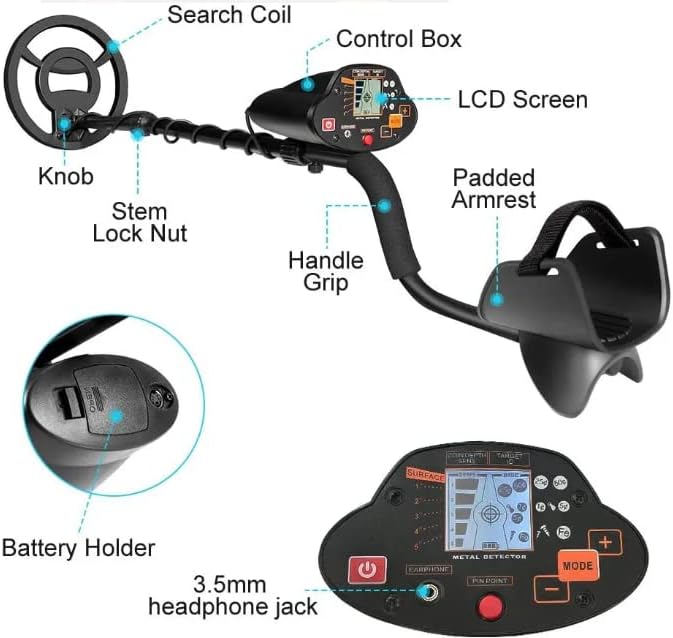
Figure 2.1: Main Components of the MD-5030 Metal Detector
This diagram illustrates the key parts: Search Coil, Control Box, LCD Screen, Knob, Stem Lock Nut, Handle Grip, and Padded Armrest. The battery holder and 3.5mm headphone jack are also shown in detail.
- Search Coil: The primary sensor that detects metal objects. It is 8 inches and waterproof.
- Control Box: Houses the electronics, LCD screen, and control buttons. Note: The control box is NOT waterproof.
- LCD Screen: Displays target information, depth, sensitivity, and battery status.
- Knob: Used for adjusting the stem length.
- Stem Lock Nut: Secures the adjustable stem in place.
- Handle Grip: Provides a comfortable hold during operation.
- Padded Armrest: Supports the forearm for extended use.
- Battery Holder: Located at the bottom of the control box, for battery installation.
- 3.5mm Headphone Jack: For connecting headphones (not supplied) to hear detection signals, especially useful in noisy environments.
2.2 Control Panel
The control panel provides access to all operational settings and displays detection feedback.

Figure 2.2: Control Panel Layout
This image details the control panel, showing the Power On/Off button, Earphone jack, Pinpoint button, Mode button, and Sensitivity adjustment buttons (+/-).
- POWER ON/OFF Button: Press to turn the detector on or off.
- EARPHONE Jack: Connect 3.5mm headphones here.
- PIN POINT Button: Narrows the target location range for precise pinpointing.
- MODE Button: Selects between ALL METAL and DISC (Discrimination) modes, or adjusts sensitivity.
- +/- Buttons: Adjust metal detection type or sensitivity depending on the selected mode.
The LCD screen displays: Target Depth (5 levels), Target ID (shows the target when detected), Coin Depth, SENS (Sensitivity), DISC (Discrimination), and icons for various metal types (e.g., 25¢, 50¢, 1¢, 5¢, Fe for Iron).
3. Setup
3.1 Assembly
Assemble the metal detector by connecting the search coil to the lower stem, then attaching the lower stem to the middle stem, and finally connecting the middle stem to the control box assembly. Ensure all connections are secure.
3.2 Battery Installation
The MD-5030 requires two 9V DC batteries (not supplied).
- Locate the battery holder compartment on the underside of the control box.
- Open the battery compartment cover.
- Insert two 9V batteries, ensuring correct polarity (+ and -).
- Close the battery compartment cover securely.
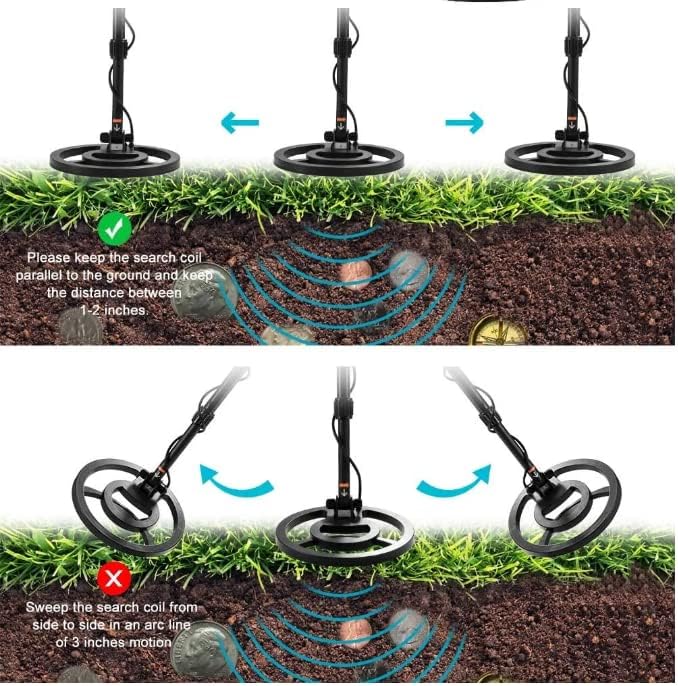
Figure 3.1: Battery Holder
This image shows the location of the battery holder on the underside of the control box.
3.3 Adjusting Length and Armrest
Adjust the detector's length for comfortable use, suitable for users between 107cm and 132cm (approximately 42 to 52 inches).
- Loosen the Stem Lock Nut.
- Extend or retract the stem to your desired length.
- Tighten the Stem Lock Nut to secure the stem.
- Ensure the padded armrest comfortably supports your forearm.
4. Operating Instructions
4.1 Powering On/Off
Press the POWER ON/OFF button on the control panel to turn the detector on or off.
4.2 Operating Modes
The MD-5030 offers three operation modes: ALL METAL, DISC (Discrimination), and Pinpoint.
- ALL METAL Mode: Detects all types of metal objects. This mode offers the greatest depth sensitivity.
- DISC (Discrimination) Mode: Allows you to discriminate against certain types of metals, such as iron, to avoid unwanted targets. Use the +/- buttons to adjust the discrimination level.
- PIN POINT Mode: Used to narrow down the exact location of a detected target. Press the PIN POINT button to activate.
Press the MODE button to cycle through the available detection modes or to adjust sensitivity.
4.3 Sensitivity Adjustment
Adjust the detector's sensitivity using the +/- buttons. Higher sensitivity settings increase detection depth but may also increase false signals from ground mineralization or electrical interference. Start with a moderate sensitivity and adjust as needed.
4.4 Sweeping Technique
Proper sweeping technique is crucial for effective detection.
Figure 4.1: Sweeping Technique
The top illustration shows the correct method: keep the search coil parallel to the ground at a distance of 1-2 inches. The bottom illustration shows an incorrect method: sweeping in an arc or lifting the coil too high.
- Keep the search coil parallel to the ground at all times.
- Maintain a consistent distance of 1-2 inches (2.5-5 cm) from the ground.
- Sweep the search coil from side to side in a slow, overlapping motion.
- Avoid sweeping in an arc or lifting the coil at the ends of your sweep, as this can lead to missed targets or inaccurate readings.
4.5 Interpreting Signals
The MD-5030 provides visual and auditory feedback:
- LCD Screen: Displays Target ID (indicating probable metal type), Target Depth (5 levels), and Coin Depth.
- Audio Tones: The detector produces three distinct tones to indicate different types of metals. Higher tones generally indicate more valuable metals, while lower tones often indicate iron or less valuable targets.
- Headphone Use: Connect 3.5mm headphones to the EARPHONE jack to hear signals more clearly, especially in noisy environments.
5. Maintenance
5.1 General Care
- Keep the detector clean. Wipe down the search coil and stem with a damp cloth after each use.
- Avoid exposing the control box to moisture, rain, or direct sunlight for extended periods. The control box is NOT waterproof.
- Store the detector in a dry, cool place when not in use.
- Do not use abrasive cleaners or solvents on any part of the detector.
5.2 Battery Care
- Remove batteries from the detector if it will not be used for an extended period to prevent leakage and damage.
- Replace batteries when the low battery indicator appears on the LCD screen.
- Always use fresh, high-quality 9V batteries.
5.3 Waterproof Search Coil
The 8-inch search coil is waterproof and can be used in shallow water. However, ensure the control box remains dry and away from water, as it is not waterproof.
6. Troubleshooting
| Problem | Possible Cause | Solution |
|---|---|---|
| Detector does not power on. |
|
|
| Erratic signals or false alarms. |
|
|
| Poor detection depth. |
|
|
7. Specifications
| Feature | Detail |
|---|---|
| Model | MD-5030 |
| Brand | VIHELM |
| Power Source | 2 x 9V DC batteries (not supplied) |
| Operating Frequency | 6.6KHz ± 0.2KHz |
| Search Coil | 8-inch, waterproof |
| Control Box | Not waterproof |
| Adjustable Length | 107-132 cm (approx. 42-52 inches) |
| Headphone Jack | 3.5mm |
| Operating Modes | All Metal, Discrimination, Pinpoint |
| Audio Tones | Three tones for different metal types |
| Sensitivity | ≥ 18cm for a US Quarter |
| Item Weight | 4 Pounds (approx. 1.8 kg) |
8. Warranty and Support
Specific warranty information for the VIHELM MD-5030 Metal Detector is not provided in this manual. Please refer to the product packaging, your purchase receipt, or contact the retailer or manufacturer directly for details regarding warranty coverage and customer support.
Ask a question about this manual
Ask about setup, troubleshooting, compatibility, parts, safety, or missing instructions. Manuals+ will review the question and use this page’s manual context to help answer it.