
DUMBORC X4FMG
DUMBORC X4FMG Mini Receiver User Manual
Model: X4FMG | Brand: DUMBORC
1. Introduction
This manual provides detailed instructions for the DUMBORC X4FMG Mini Receiver. The X4FMG is a compact 2.4GHz 4-channel PWM receiver designed for small-scale RC cars, including Mosquito cars, track cars, and racing cars. It features an integrated gyroscope for enhanced vehicle stability and control.
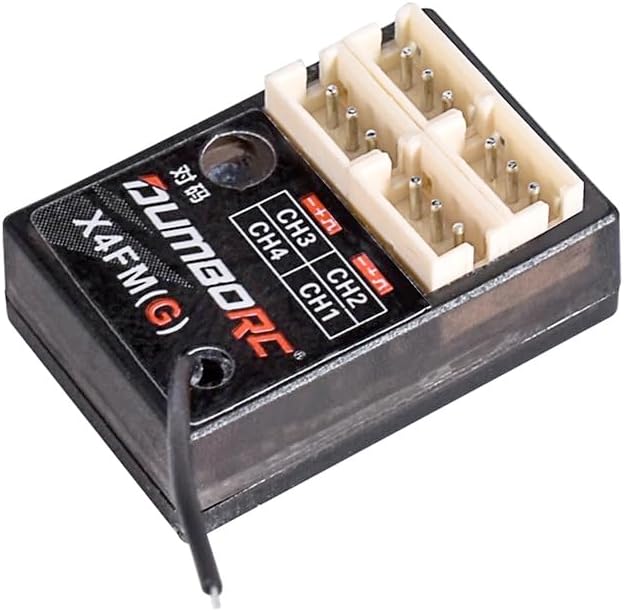
Figure 1: DUMBORC X4FMG Mini Receiver. This image shows the compact design of the receiver with its four channel ports and antenna.
2. Key Features
- Compact Size: Dimensions of 25mm x 13mm x 8mm, ideal for micro and small-scale RC vehicles.
- Integrated Gyroscope: Provides stability assistance, particularly beneficial for RC drift and racing cars.
- 4-Channel PWM Output: Supports up to four independent control channels.
- 2.4GHz FHSS Technology: Utilizes Frequency Hopping Spread Spectrum for robust anti-interference performance and stable signal transmission.
- Lightweight Design: Weighs approximately 2.3g, minimizing impact on vehicle performance.
- Wide Voltage Range: Operates within 3V-10V DC.
- Compatibility: Designed to work seamlessly with DUMBORC X4, X5P, X6, and X6PM series transmitters.

Figure 2: Comparison of DUMBORC X4FM and X4FMG receivers, highlighting their 4-channel PWM capability and compatibility with various DUMBORC transmitters (X4, X5P, X6, X6PM).
3. Specifications
| Brand | DUMBORC |
| Model | X4FMG |
| Item Type | PWM Mini Receiver |
| Voltage Range | 3V-10V DC |
| Number of Channels | 4CH |
| Dimensions (L*W*H) | 25mm * 16mm * 8mm |
| Weight | 2.3g |
| Signal Type | PWM |
| Model Application | RC Car / RC Boat |
| Operating Current | 30 mA@5V |
| Spreading Mode | FHSS (67 channel pseudo-random frequency hopping) |
| Compatible Remote Control | DUMBORC X4, X6 series, X5P series, X6PM series |

Figure 3: Detailed specifications and dimensions of the DUMBORC X4FMG receiver, including its physical size and electrical parameters.
4. Setup and Binding
Before operating your DUMBORC X4FMG receiver, it must be correctly connected to your RC vehicle's components and bound to a compatible DUMBORC transmitter.
4.1 Receiver Layout

Figure 4: Diagram illustrating the port layout of the DUMBORC X4FMG receiver. Each channel (CH1-CH4) has signal, positive (+), and negative (-) pins. The diagram also shows the code key button and antenna connection.
- CH1: Channel 1 port (e.g., Steering Servo)
- CH2: Channel 2 port (e.g., ESC/Throttle)
- CH3: Channel 3 port
- CH4: Channel 4 port
- Code Key: Binding button
- Antenna: Signal reception
- Signal Pin: (Top pin for each channel)
- Positive (+) Pin: (Middle pin for each channel)
- Negative (-) Pin: (Bottom pin for each channel)
4.2 Connection
- Connect your steering servo to CH1.
- Connect your Electronic Speed Controller (ESC) to CH2. The ESC typically provides power to the receiver.
- Connect any additional accessories (e.g., lights, auxiliary servos) to CH3 and CH4 as needed.
- Ensure the antenna is positioned correctly for optimal signal reception, avoiding contact with metal parts of the chassis.

Figure 5: The DUMBORC X4FMG Mini Receiver shown alongside a DUMBORC X6PM transmitter, illustrating the intended pairing for remote control operation.
4.3 Binding Procedure
To establish communication between the receiver and your DUMBORC transmitter, follow these steps:
- Ensure your transmitter is turned OFF.
- Connect power to the receiver (e.g., via the ESC connected to CH2). The receiver's LED should start flashing rapidly, indicating it is in binding mode.
- Press and hold the Code Key button on the receiver.
- While holding the Code Key, turn ON your DUMBORC transmitter.
- Release the Code Key button on the receiver after a few seconds.
- The receiver's LED should now be solid, indicating a successful bind.
- Turn off both the transmitter and receiver, then power them on again in the correct sequence (transmitter first, then receiver) to confirm the bind.
If the LED continues to flash, repeat the binding procedure.
5. Operating Instructions
The DUMBORC X4FMG receiver features a built-in gyroscope to assist with vehicle stability, especially useful for drift and high-speed racing applications.
5.1 Gyroscope Function
The integrated gyroscope helps to automatically correct the steering angle of your RC car, providing better control and stability during turns and drifts. This function is particularly beneficial for maintaining a straight line and recovering from slides.

Figure 6: Illustration demonstrating the effect of the built-in gyroscope in the DUMBORC X4FMG receiver, showing how it assists in correcting the vehicle's angle for improved control during drifts compared to a receiver without gyro.
- Gyro Sensitivity Adjustment: The sensitivity of the gyroscope can typically be adjusted via a dedicated channel on your DUMBORC transmitter (e.g., CH3 or CH4, if configured). Refer to your transmitter's manual for specific instructions on gyro sensitivity adjustment.
- Initial Setup: For initial use, it is recommended to start with a lower gyro sensitivity setting and gradually increase it to find the optimal balance for your driving style and vehicle.
- Direction: Ensure the gyro correction direction is correct. If the car steers into the slide, reverse the gyro direction setting on your transmitter (if available).
6. Maintenance
Proper maintenance ensures the longevity and reliable performance of your DUMBORC X4FMG receiver.
- Keep Clean: Regularly clean the receiver with a soft, dry brush or cloth to remove dust and debris. Avoid using liquids or solvents.
- Protect from Moisture: The receiver is not waterproof. Keep it away from water, humidity, and extreme temperatures. If operating in damp conditions, ensure adequate waterproofing for the receiver.
- Secure Mounting: Ensure the receiver is securely mounted in your RC vehicle to prevent vibrations and physical damage.
- Antenna Care: Do not cut or damage the antenna wire. Ensure it is routed away from electrical interference sources and metal parts.
- Storage: When not in use, store the receiver in a dry, cool place, away from direct sunlight.
7. Troubleshooting
If you encounter issues with your DUMBORC X4FMG receiver, refer to the following common problems and solutions:
- No Power to Receiver:
- Check all power connections, especially from the ESC or external battery.
- Ensure the battery is charged.
- Verify the polarity of the power connection.
- Receiver LED Flashing Rapidly (Not Bound):
- Repeat the binding procedure carefully (Section 4.3).
- Ensure your transmitter is compatible with the X4FMG receiver.
- Make sure the transmitter is turned on during the binding process.
- No Control/Intermittent Control:
- Check if the receiver is properly bound (solid LED).
- Ensure the antenna is not damaged and is positioned correctly.
- Check for sources of interference (e.g., strong electrical fields, other 2.4GHz devices).
- Verify all servo and ESC connections are secure and in the correct channels.
- Ensure the transmitter batteries are fully charged.
- Gyroscope Not Functioning Correctly:
- Check the gyro sensitivity setting on your transmitter.
- Ensure the receiver is mounted securely and not experiencing excessive vibration.
- Verify the gyro direction setting on your transmitter.
8. Warranty and Support
DUMBORC products are manufactured to high-quality standards. For specific warranty information, please refer to the documentation provided with your purchase or contact your retailer. For technical support or further assistance, please visit the official DUMBORC website or contact their customer service department.
Note: Unauthorized modifications or improper use of the product may void the warranty.
Related documentsX4FMG


Ask a question about this manual
Ask about setup, troubleshooting, compatibility, parts, safety, or missing instructions. Manuals+ will review the question and use this page’s manual context to help answer it.