
N-one Npad Plus
N-ONE Npad Plus Android 12 Tablet User Manual
Model: Npad Plus
1. Introduction
This manual provides essential information for the safe and efficient use of your N-ONE Npad Plus Android 12 Tablet. Please read this manual thoroughly before using the device and keep it for future reference.
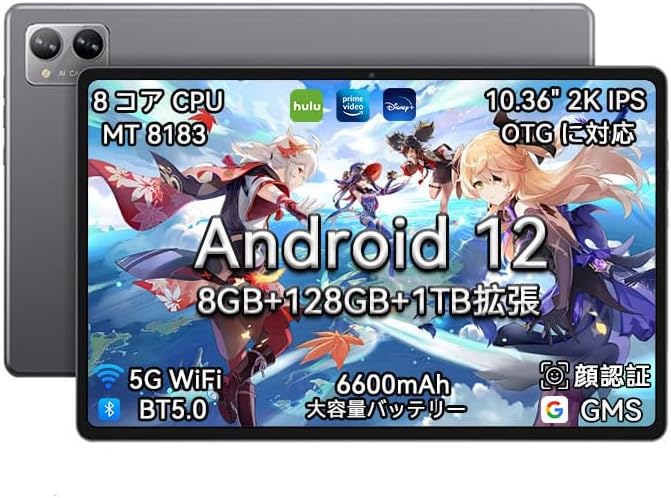
Figure 1: N-ONE Npad Plus Android 12 Tablet
2. Product Overview
2.1 Package Contents
- N-ONE Npad Plus Tablet
- USB Type-C Cable
- Power Adapter (may vary by region)
- User Manual (this document)
2.2 Device Layout
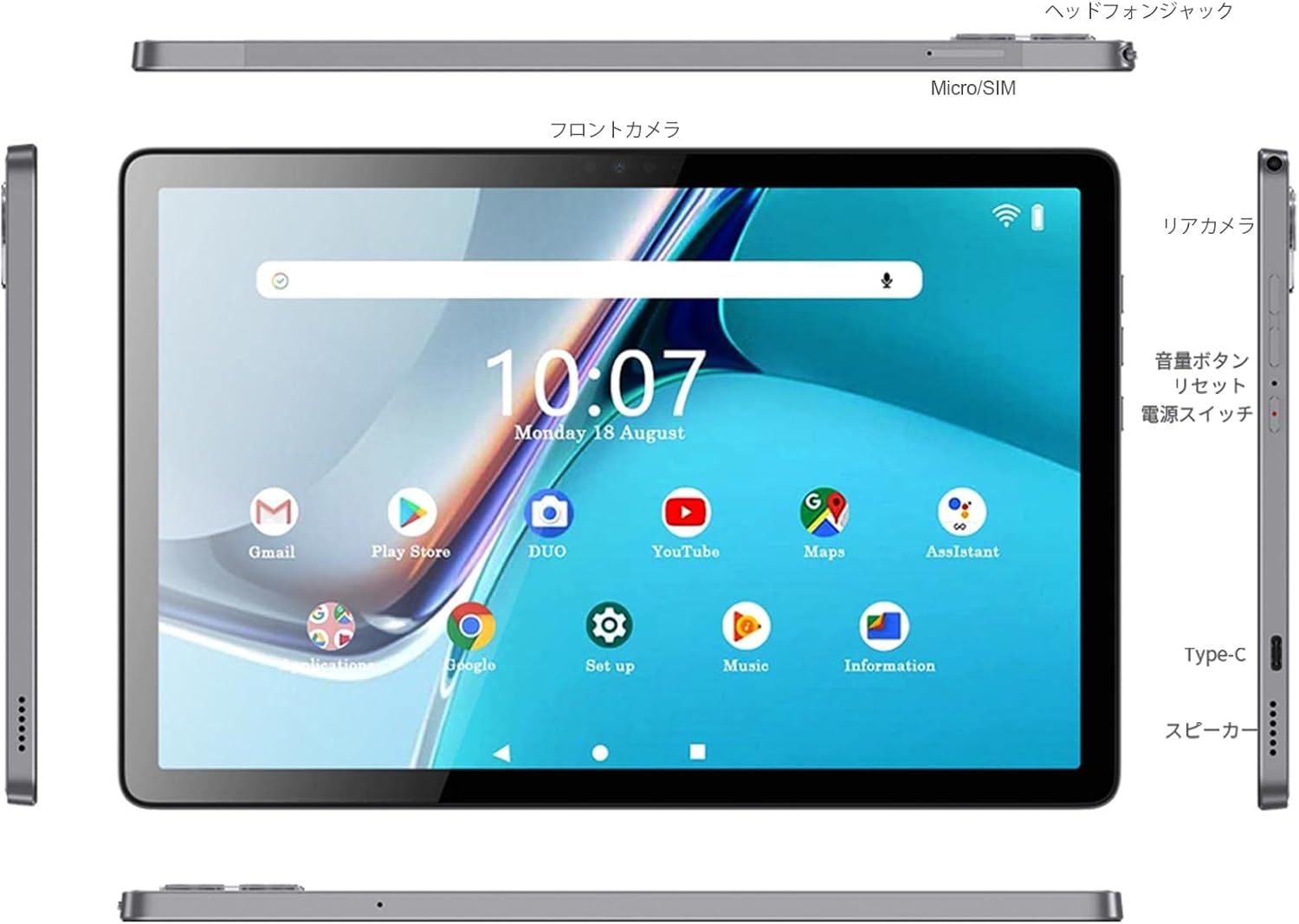
Figure 2: Npad Plus Device Layout
The Npad Plus features a headphone jack, Micro/SIM card slot, front camera, rear camera, volume buttons, reset button, power switch, Type-C port, and speakers. Familiarize yourself with these components for optimal use.
3. Setup
3.1 Charging the Battery
Before first use, fully charge the tablet. Connect the provided USB Type-C cable to the tablet's Type-C port and the other end to the power adapter. Plug the adapter into a power outlet. The battery indicator on the screen will show charging status.

Figure 3: High Capacity 6600mAh Battery
3.2 Power On/Off
- To Power On: Press and hold the Power button until the N-ONE logo appears.
- To Power Off: Press and hold the Power button until a power-off menu appears. Select "Power off" and confirm.
- To Restart: From the power-off menu, select "Restart".
3.3 Initial Setup Wizard
Upon first power-on, the tablet will guide you through an initial setup process. This includes selecting your language, connecting to a Wi-Fi network, setting up your Google account, and configuring basic security settings.
4. Operating Instructions
4.1 Android 12 Features
The Npad Plus runs on Android 12, offering a personalized, safe, and effortless experience. Key features include a redesigned user interface, enhanced privacy controls, multi-window operation, eye protection mode, parental controls, and dark mode.

Figure 4: Android 12 Interface and Connectivity
4.2 Display and Visuals
The tablet features a 10.36-inch IPS display with a 2000x1200 2K resolution, providing clear and vibrant visuals. The eye protection mode can be enabled for comfortable viewing during extended use.

Figure 5: High-Resolution Display
4.3 Performance and Storage
Equipped with a MediaTek MT8183 8-core high-speed processor and 8GB of RAM, the Npad Plus ensures smooth operation even with multiple applications running. It comes with 128GB of internal storage, expandable up to 1TB via a TF card, providing ample space for your files, apps, and media.

Figure 6: MediaTek 8-Core CPU

Figure 7: Memory and Storage Configuration
4.4 Camera Usage
The Npad Plus features a 5MP front camera and a 13MP rear camera. These cameras are suitable for capturing photos, video calls, and online learning. The high-resolution rear camera ensures clear and vivid recordings in various lighting conditions.

Figure 8: Front and Rear Cameras
4.5 Connectivity
The tablet supports 2.4G/5G dual-band Wi-Fi for stable and high-speed internet access. Bluetooth 5.0 allows connection to various Bluetooth devices. Integrated GPS functionality enables navigation with offline maps.
- Wi-Fi: Supports 802.11 a/b/g/n/ac for fast and reliable wireless connections.
- Bluetooth: Version 5.0 for connecting headphones, speakers, and other peripherals.
- GPS: Built-in GPS for location services and navigation.
5. Maintenance
5.1 Cleaning the Tablet
Use a soft, lint-free cloth to clean the screen and body of the tablet. Do not use abrasive cleaners, alcohol, or chemical solvents, as these may damage the surface. Avoid getting moisture into any openings.
5.2 Battery Care
To prolong battery life, avoid exposing the tablet to extreme temperatures. Do not fully discharge the battery frequently. If storing the tablet for an extended period, charge it to about 50% before storage.
5.3 Storage
Store the tablet in a cool, dry place away from direct sunlight and excessive humidity. Keep it away from strong magnetic fields.
6. Troubleshooting
| Problem | Possible Cause | Solution |
|---|---|---|
| Tablet does not turn on. | Battery is depleted. | Charge the tablet for at least 30 minutes before attempting to power on. |
| Cannot connect to Wi-Fi. | Incorrect password; router issue; out of range. | Verify password, restart router, move closer to router. |
| Tablet is slow or unresponsive. | Too many apps running; low storage; software glitch. | Close background apps, clear cache, free up storage, restart tablet. |
| Screen flickering. | Software issue; hardware defect. | Restart the tablet. If the issue persists, contact customer support. |
7. Specifications
| Feature | Detail |
|---|---|
| Brand | N-one |
| Model Name | Npad Plus |
| Operating System | Android 12 |
| CPU | MediaTek MT8183 8-Core |
| RAM | 8 GB |
| Storage | 128 GB ROM (Expandable up to 1TB via TF card) |
| Display Size | 10.36 inches |
| Display Resolution | 2000x1200 IPS |
| Front Camera | 5 MP |
| Rear Camera | 13 MP |
| Battery Capacity | 6600 mAh |
| Connectivity | Wi-Fi (2.4G/5G), Bluetooth 5.0, GPS |
| Ports | Type-C, 3.5mm Headphone Jack, Micro/SIM slot |
| Dimensions | 34 x 20.1 x 3.7 cm |
| Weight | 830 g |
8. Warranty and Support
N-ONE provides a 12-month warranty for the Npad Plus tablet, along with a 30-day return and refund policy. If you encounter any quality issues with the product after purchase, please contact customer support via your Amazon purchase history. We are committed to providing a satisfactory resolution.
For further assistance or inquiries, please refer to the contact information provided with your purchase or visit the official N-ONE support website.
Ask a question about this manual
Ask about setup, troubleshooting, compatibility, parts, safety, or missing instructions. Manuals+ will review the question and use this page’s manual context to help answer it.