
1. Important Safety Instructions
Please read all instructions carefully before using this fan and retain this manual for future reference. Failure to follow these instructions may result in electric shock, fire, or serious personal injury.
- Always unplug the fan from the power outlet before cleaning or performing any maintenance.
- Do not use the fan near water or in excessively humid environments (e.g., bathrooms, laundry areas).
- Ensure the power cord is not damaged. If the cord is damaged, it must be replaced by the manufacturer or a qualified service agent to avoid hazards.
- Keep fingers and other objects away from the fan blades and moving parts during operation.
- Do not operate the fan if it has been dropped or damaged.
- Place the fan on a stable, level surface or mount it securely to a wall as instructed.
- This appliance is not intended for use by persons (including children) with reduced physical, sensory or mental capabilities, or lack of experience and knowledge, unless they have been given supervision or instruction concerning use of the appliance by a person responsible for their safety.
2. Product Overview
The LEMOISTAR FW2 is a 10-inch wall-mounted oscillating fan designed for efficient air circulation in various indoor spaces. It features 4 speed settings, a timer function, and remote control for convenient operation.
Package Contents
- 1x Fan Unit
- 1x Holder
- 1x Base
- 1x Wall Bracket
- 2x Auxiliary Stickers
- 1x Adapter (5.9ft cord)
- 1x Remote Control
- 2x Screws
- 1x Color Box
- 1x Instructions Manual

Image: All components included in the LEMOISTAR 10-inch wall mounted fan package.
3. Setup and Installation
The fan can be used as a desktop fan with its base or mounted on a wall using the provided bracket. Follow these steps for installation:
Desktop Setup
- Insert the holder into the screw opening on the back of the fan unit.
- Pass the Type-C plug of the power cord through the fan base.
- Connect the Type-C plug to the fan's Type-C port. Ensure the cylindrical ball on the cord is positioned to allow for auto-oscillation.
- Embed the fan unit (with holder) into the base. Push down the fixing buckle on the back of the base to lock it securely.
- Manually adjust the fan to the desired angle.
Wall Mounting
- Choose a suitable location on the wall for mounting.
- Apply superglue (if provided) to the back of the wall bracket or use the provided screws to secure the wall bracket to the desired location.
- If using adhesive, attach the fixing strips on the wall bracket and allow 48 hours for the adhesive to cure before hanging the fan.
- Once the wall bracket is securely installed, slide the fan unit onto the bracket.
Video: Step-by-step guide on how to install the LEMOISTAR 10-inch wall mounted fan.

Image: Detail of the power cord connection to the fan unit.
4. Operating Instructions
The LEMOISTAR FW2 fan can be operated using the control buttons on the unit or the included remote control.
Control Buttons on Fan Unit
- Power Button: Press to turn the fan On/Off.
- Speed Button: Press repeatedly to cycle through 4 speed settings (Low, Medium, High, Super).
- Oscillation Button: Press to activate or deactivate the 90° horizontal oscillation.
- Timer Button: Press to set the timer for 0.5, 1.5, 4, or 8 hours.
Remote Control Operation
The remote control provides convenient access to all fan functions from a distance. The remote can be magnetically attached to the center of the fan head for storage.
- Power Button: Turns the fan On/Off.
- Speed Button: Adjusts fan speed (4 levels).
- Oscillation Button: Controls 90° horizontal oscillation.
- Timer Button: Sets the auto-off timer (0.5h, 1.5h, 4h, 8h).

Image: The remote control for the LEMOISTAR wall mounted fan.
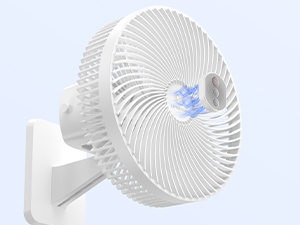
Image: User operating the fan with the remote control.
Video: Demonstration of the LEMOISTAR 10-inch wall mounted fan with remote control and timer functions.
Adjustable Tilt and Oscillation
The fan head can be manually tilted 60° vertically to direct airflow as needed. The 90° horizontal oscillation feature distributes air across a wider area.

Image: Diagram illustrating the 90° horizontal oscillation and 60° vertical tilt capabilities of the fan.
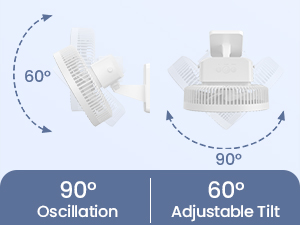
Image: Visual representation of the fan's oscillation and adjustable tilt.
5. Maintenance
Regular cleaning ensures optimal performance and extends the lifespan of your fan.
- Cleaning the Fan Blades: To clean the fan blades, turn off and unplug the fan. Use a screwdriver to remove the 4 screws securing the front grille. Carefully remove the front grille and wipe the blades with a soft, dry cloth. Do not use abrasive cleaners or solvents.
- Cleaning the Exterior: Wipe the exterior surfaces of the fan with a soft, damp cloth. Do not immerse the fan in water or allow water to drip into the motor housing.
- Ensure all parts are completely dry before reassembling and operating the fan.

Image: A hand cleaning the fan blades with a soft cloth.
6. Troubleshooting
If you encounter any issues with your LEMOISTAR fan, please refer to the following common troubleshooting steps:
| Problem | Possible Cause | Solution |
|---|---|---|
| Fan does not turn on. | No power supply; Power cord not properly connected; Remote control battery low. | Check if the fan is plugged into a working outlet. Ensure the power cord is securely connected to the fan. Replace remote control batteries if necessary. |
| Weak airflow. | Fan speed set too low; Fan blades are dirty. | Increase the fan speed setting. Clean the fan blades as described in the Maintenance section. |
| Fan is noisy. | Loose parts; Obstruction in fan blades. | Ensure all parts are securely fastened. Check for any foreign objects obstructing the fan blades and remove them after unplugging the fan. |
| Oscillation not working. | Oscillation function is off; Obstruction. | Press the oscillation button on the fan or remote to activate. Check for any physical obstructions preventing movement. |
If the problem persists after trying these solutions, please contact customer support.
7. Specifications
| Feature | Detail |
|---|---|
| Brand | LEMOISTAR |
| Model Name | FW2 |
| Size | 10 inch |
| Color | White |
| Power Source | AC/DC |
| Wattage | 12 watts |
| Voltage | 12 Volts |
| Number of Power Levels | 4 |
| Oscillation | 90° Horizontal |
| Adjustable Tilt | 60° Vertical |
| Timer Settings | 0.5h, 1.5h, 4h, 8h |
| Control Method | Remote, On-unit buttons |
| Motor Type | Brushless |
| Product Dimensions | 8.58"D x 9.84"W x 11"H |
| Item Weight | 2.25 Pounds |
| Cord Length | 70 Inch (approx. 5.9 ft) |
| Indoor/Outdoor Usage | Indoor |
8. Warranty and Support
LEMOISTAR products are manufactured to high-quality standards. For warranty information, technical support, or customer service inquiries, please refer to the contact details provided on the product packaging or the official LEMOISTAR website.