
HOWORK SM-1510
HOWORK Electric Stand Mixer User Manual
Model: SM-1510
1. Important Safety Information
Please read all instructions carefully before using your HOWORK Electric Stand Mixer. Retain this manual for future reference.
- Always unplug the mixer from the power outlet before cleaning, assembling, or disassembling parts.
- Do not immerse the motor unit in water or other liquids.
- Keep hands, hair, clothing, as well as spatulas and other utensils away from moving beaters during operation to prevent injury and/or damage to the mixer.
- Supervise children closely when the appliance is in use.
- Do not operate any appliance with a damaged cord or plug, or after the appliance malfunctions or has been dropped or damaged in any manner.
- Use only attachments recommended or sold by the manufacturer.
- Ensure the tilt-head is securely locked down before operation.
- This appliance is for household use only.
2. Product Overview and Components
The HOWORK Electric Stand Mixer is designed for efficient and versatile mixing tasks in your kitchen. It features a powerful motor and various attachments to handle different recipes.
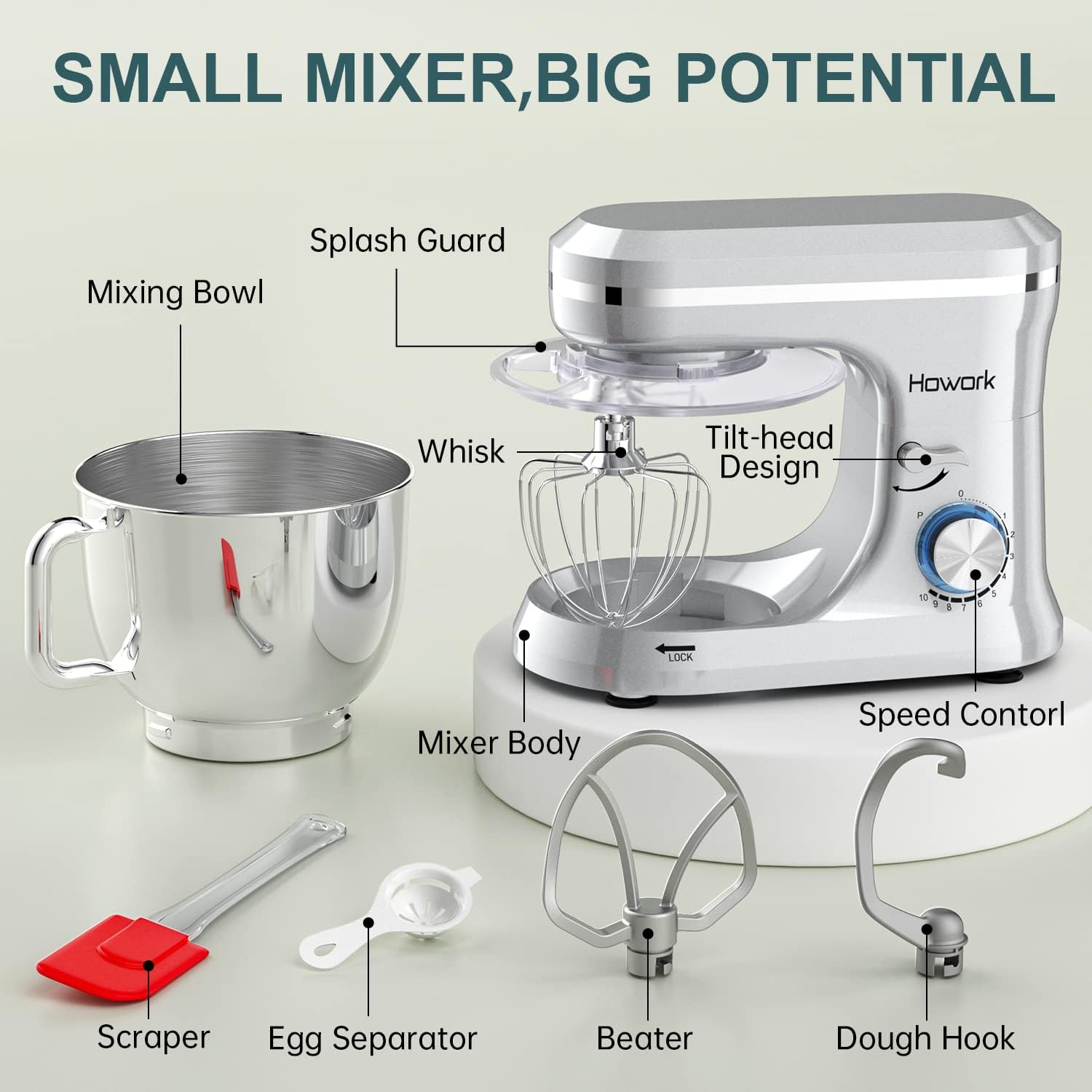
This diagram illustrates the main components of the HOWORK Electric Stand Mixer, including the mixer body, mixing bowl, splash guard, whisk, beater, dough hook, scraper, and egg separator. The tilt-head design and speed control knob are also highlighted.
Key Components:
- Mixer Body: Houses the motor and control panel.
- 6.5QT Stainless Steel Mixing Bowl: Large capacity bowl with a handle for easy handling. Made of food-grade 304 stainless steel.
- Tilt-Head Design: Allows easy access to install or uninstall the bowl and accessories.
- Speed Control Knob: Offers 10 speeds plus a pulse function.
- Splash Guard: Prevents ingredients from splashing out during mixing and features an access hatch for adding ingredients.
- Dough Hook: Teflon-coated aluminum hook for kneading dough (e.g., bread, pizza).
- Flat Beater: Teflon-coated aluminum beater for mixing cakes, cookies, and batters.
- Wire Whisk: Stainless steel whisk for whipping cream, egg whites, and light sauces.
3. Setup and Assembly
Follow these steps to set up your HOWORK Electric Stand Mixer for first use.
- Unpack: Carefully remove all components from the packaging.
- Clean: Before first use, wash the mixing bowl, splash guard, dough hook, flat beater, and wire whisk in warm, soapy water. Rinse thoroughly and dry. Wipe the mixer body with a damp cloth.
- Position the Mixer: Place the mixer on a clean, dry, and stable surface. Ensure the four stronger suction cups on the base are securely attached to prevent movement during operation.
- Attach the Mixing Bowl:
- Lift the tilt-head by pushing the release lever (located on the side of the mixer body) and raising the head until it locks into place.
- Place the mixing bowl onto the base, aligning the bowl's tabs with the slots on the base. Rotate the bowl clockwise until it locks securely into position (indicated by the "LOCK" arrow on the base).
- Install an Attachment:
- Select the desired attachment (dough hook, flat beater, or wire whisk) for your recipe.
- Insert the attachment shaft into the attachment port on the underside of the tilt-head. Rotate the attachment slightly until it slides into place and then push upwards, twisting to secure it.
- Lower the Tilt-Head: Push the release lever again and gently lower the tilt-head until it clicks and locks into the operating position.
- Attach the Splash Guard: If desired, place the splash guard over the attachment and bowl, ensuring it fits snugly.
This video demonstrates the setup process, including attaching different mixing accessories and the bowl, and adding ingredients. It also shows the mixer in operation.
4. Operating Instructions
The HOWORK Electric Stand Mixer offers 10 speeds and a pulse function for precise control over your mixing tasks.
Speed Settings Guide:

This image provides a visual guide for recommended speed settings for different attachments and tasks.
| Speed Range | Attachment | Application |
|---|---|---|
| 1-6 | Dough Hook | Heavy mixtures, kneading dough (e.g., bread, pizza). |
| 1-7 | Flat Beater | Medium-heavy mixtures, creaming butter and sugar, mixing cakes, cookies, and batters. |
| 8-10 | Wire Whisk | Light mixtures, whipping cream, egg whites, and light sauces. |
| P (Pulse) | All | Quick bursts of power for post-processing, such as achieving a delicate texture for whipped cream. |
General Operation:
- Ensure the mixer is properly assembled and the tilt-head is locked down.
- Add ingredients to the mixing bowl.
- Plug the mixer into a suitable power outlet. The blue LED power indicator will illuminate.
- Turn the speed control knob to the desired setting. Start at a lower speed and gradually increase to prevent splashing.
- For adding ingredients during mixing, use the access hatch on the splash guard.
- When finished, turn the speed control knob to "0" (off) and unplug the mixer.
- Lift the tilt-head to remove the attachment and mixing bowl.

The mixer is equipped with a 660W high-performance pure copper motor, designed for durability and efficient mixing with low noise levels. It includes overload and overheat protection functions.
5. Care and Maintenance
Proper care ensures the longevity and optimal performance of your HOWORK Electric Stand Mixer.
Cleaning:
- Always unplug the mixer before cleaning.
- Mixer Body: Wipe the exterior of the mixer body with a soft, damp cloth. Do not use abrasive cleaners or immerse the motor unit in water.
- Mixing Bowl, Attachments, and Splash Guard: These parts are dishwasher safe for convenient cleaning. Alternatively, wash them by hand in warm, soapy water, rinse thoroughly, and dry immediately.
- Ensure all parts are completely dry before reassembling or storing.
Storage:
- Store the mixer in a dry place, away from direct sunlight and heat sources.
- Ensure the power cord is neatly wrapped and not kinked.
6. Troubleshooting
If you encounter any issues with your mixer, refer to the following common problems and solutions:
| Problem | Possible Cause | Solution |
|---|---|---|
| Mixer does not turn on. | Not plugged in; power outlet not working; tilt-head not locked down; motor overheated. | Ensure plug is securely in outlet; check power outlet with another appliance; ensure tilt-head is fully lowered and locked; unplug and let cool for 30 minutes before restarting. |
| Attachment not reaching ingredients at bottom of bowl. | Attachment not properly installed. | Ensure attachment is fully pushed up and twisted into the shaft. |
| Mixer is unusually noisy or vibrating excessively. | Unstable surface; bowl or attachment not properly secured; too much load. | Place mixer on a flat, stable surface; ensure bowl and attachment are locked; reduce the amount of ingredients. |
| Motor stops during operation. | Overload protection activated. | Turn off the mixer, unplug it, reduce the load in the bowl, and let the motor cool down for approximately 30 minutes before resuming. |
If the problem persists after trying these solutions, please contact HOWORK Customer Service.
7. Specifications
| Feature | Detail |
|---|---|
| Brand | HOWORK |
| Model Name | SM-1510 |
| Color | Silver3 |
| Product Dimensions | 15"D x 9.4"W x 11.6"H |
| Item Weight | 9.48 pounds |
| Capacity | 6.5 Quarts |
| Blade Material | Aluminum (for dough hook and beater) |
| Container Material | Stainless Steel |
| Controls Type | Knob |
| Special Features | Adjustable Speed Control, LED Power Indicator, Low Noise, Overheat Protection, Overload Protection |
| Dishwasher Safe Parts | Yes (Bowl, attachments, splash guard) |
8. Warranty and Support
HOWORK is committed to providing quality products and excellent customer service.
- Warranty: The product comes with a 1-year support warranty.
- Customer Service: Our 24/7 Customer Service Team is available to assist you with any questions, including missing parts or damage. We aim for 48-hour service completion and 100% customer satisfaction.
- For support, please refer to the contact information provided with your purchase or visit the official HOWORK website.

HOWORK offers 24/7 online support, 48-hour service completion, 1-year support, and 100% customer service satisfaction.
Related documentsSM-1510

Ask a question about this manual
Ask about setup, troubleshooting, compatibility, parts, safety, or missing instructions. Manuals+ will review the question and use this page’s manual context to help answer it.