
RALAN B0C1S46PHF
RALAN Wireless Controller Instruction Manual
Model: B0C1S46PHF
1. Introduction
Thank you for purchasing the RALAN Wireless Controller. This controller is designed to enhance your gaming experience across multiple platforms, including PS4, PS3, PC, iOS, and Nintendo Switch. It features advanced technology for precise control, customizable LED lighting, and ergonomic design for extended comfort. Please read this manual thoroughly to ensure proper setup and operation.

Image 1.1: Front view of the RALAN Wireless Controller, showcasing its crackle-pattern design and illuminated buttons.
2. Package Contents
Please verify that all items are present in your package:
- 1 x RALAN Wireless Controller
- 2 x Thumb Caps
- 1 x Data Cable (USB charging cable)
- 1 x User Manual
3. Product Overview
The RALAN Wireless Controller features a comprehensive button layout and advanced components for optimal performance.
3.1 Key Features
- K-Silver Joysticks & Hall Sensor Buttons: Designed for zero dead zones, drift, and a lifespan exceeding 50 million cycles.
- Dual-Motor Vibration: Provides immersive haptic feedback.
- 6-Axis Gyro Sensor: Enhances motion control and precision in compatible games.
- Macro Programming: Allows for custom button sequences.
- TURBO Function: Enables rapid firing for selected buttons.
- 8-Color Adjustable LED Lighting: Customizable visual effects.
- 3.5mm Headphone Jack: For audio output and communication.
- Ergonomic Design: Comfortable, sweat-proof grips for extended gaming.

Image 3.1: Diagram highlighting key features such as imported rocker, touch control board, LED dazzling light, Bluetooth+wired connection, transparent body, and custom body feel.
4. Setup
4.1 Charging the Controller
Before first use, fully charge the controller. Connect the provided USB data cable to the controller's charging port and the other end to a USB power source (e.g., console, PC, or USB wall adapter). The LED indicator will show charging status and turn off or change color when fully charged.
4.2 Pairing with Devices
The controller supports Bluetooth connectivity for various platforms.
- For PS4/PS3:
- Ensure the console is powered on.
- Connect the controller to the console using the USB data cable.
- Press the PS button on the controller. The controller will pair and the LED light bar will illuminate.
- Once paired, you can disconnect the USB cable for wireless play.
- For PC (Windows):
- Connect the controller to your PC using the USB data cable. The PC should automatically detect and install the necessary drivers.
- For wireless connection, ensure your PC has Bluetooth enabled. Put the controller into pairing mode (specific button combination may vary, typically holding PS + Share buttons). Select the controller from your PC's Bluetooth device list.
- For iOS/Nintendo Switch:
- Refer to the specific device's Bluetooth pairing instructions. Put the controller into pairing mode (e.g., holding PS + Share buttons until the LED flashes rapidly) and select it from the device's Bluetooth menu.
5. Operating Instructions
5.1 LED Lighting Adjustment
The controller features 8-color adjustable LED lights. Use the dedicated light adjustment button (often labeled "MOT" or a light icon) to cycle through different lighting effects:
- Colorful Lighting Effect: Cycles through various colors.
- Stop Dazzling: Pauses on a specific color or effect.
- Turn Off Light Effect: Disables the LED lighting.

Image 5.1: Illustration showing the light adjustment button and the three main LED lighting modes: colorful, stop dazzling, and off.
5.2 Touchpad Functionality
The integrated touchpad supports various interactive inputs, including drag and drop, sliding contact, and multiple simultaneous touch points, enhancing gameplay for compatible titles.
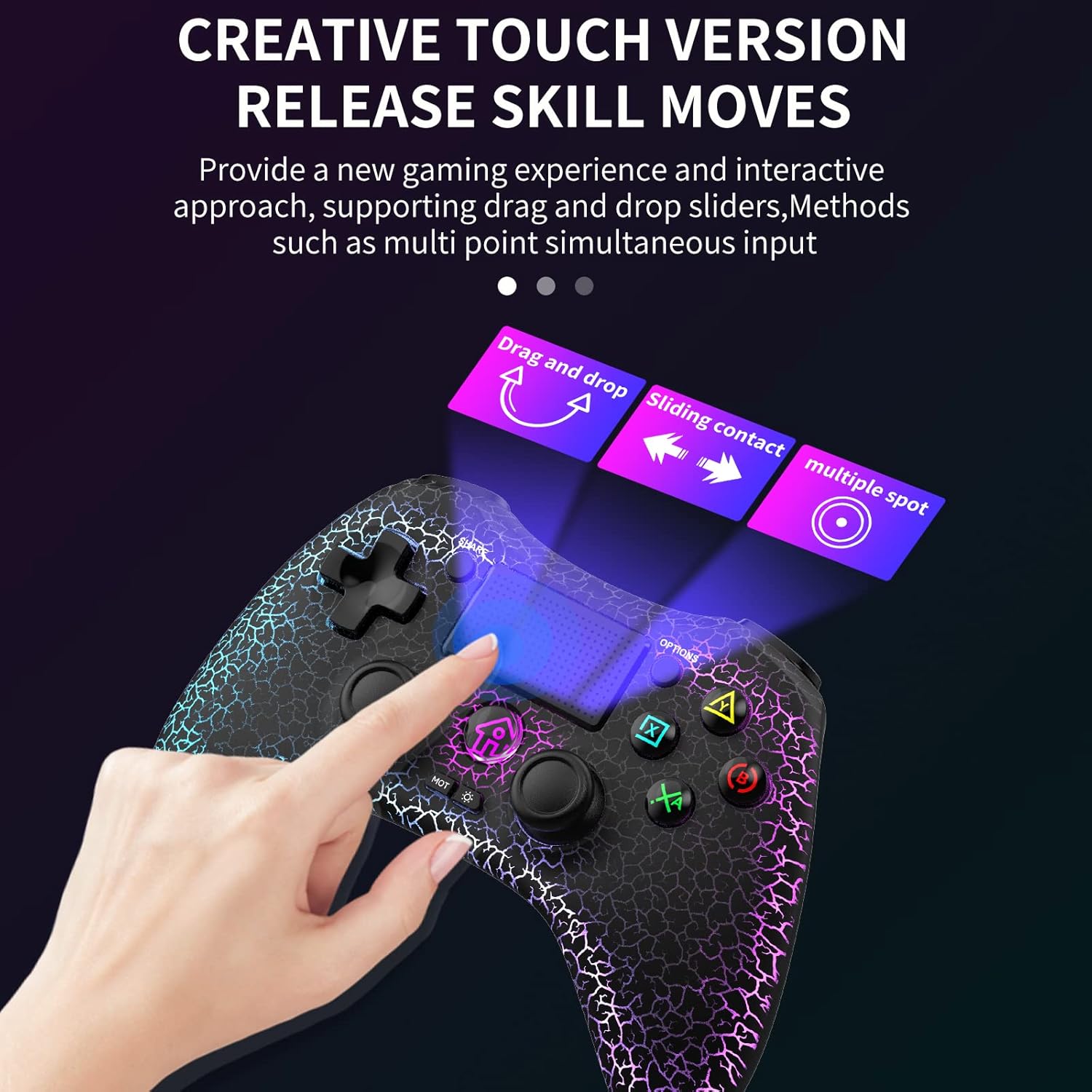
Image 5.2: Visual representation of the touchpad supporting drag and drop, sliding contact, and multiple spot inputs.
5.3 Macro Programming
The controller features a macro programming function. Consult the specific instructions provided with your controller for detailed steps on how to record and activate custom button sequences. This allows for quick execution of complex commands in games.
5.4 TURBO Function
The TURBO button enables rapid firing for selected action buttons. To activate TURBO, press and hold the TURBO button, then press the desired action button (e.g., X, O, Square, Triangle). To deactivate, repeat the process.
5.5 Headphone Jack
A 3.5mm headphone jack is located at the bottom of the controller. Plug in your headphones to enjoy game audio and communicate with teammates (if supported by the game and platform).

Image 5.3: Close-up view of the 3.5mm headphone jack located at the bottom of the controller.
6. Maintenance
- Cleaning: Use a soft, dry cloth to clean the controller. Avoid using harsh chemicals or abrasive materials.
- Storage: Store the controller in a cool, dry place away from direct sunlight and extreme temperatures.
- Battery Care: To prolong battery life, avoid fully discharging the controller frequently. Charge it regularly, even if not in use for extended periods.
- Firmware Updates: Periodically check the manufacturer's website for any available firmware updates to ensure optimal performance and compatibility.

Image 6.1: Display illustrating the low average error rate (0.6%) of the K-Silver joysticks, emphasizing precision and the importance of firmware updates.
7. Troubleshooting
| Problem | Possible Solution |
|---|---|
| Controller does not turn on. | Ensure the controller is charged. Connect it to a power source using the USB cable. |
| Controller does not pair with the device. |
|
| Input lag or disconnection during wireless play. |
|
| Buttons or joysticks are unresponsive. |
|
| LED lights are not working or stuck. | Try cycling through the LED modes using the light adjustment button. If the issue persists, perform a controller reset. |
8. Specifications
| Feature | Detail |
|---|---|
| Model Number | B0C1S46PHF |
| Connectivity | Wireless (Bluetooth), Wired (USB) |
| Compatibility | PS4, PS3, PC, iOS, Nintendo Switch |
| Joysticks | K-Silver Joysticks, Hall Sensor Buttons |
| Sensors | 6-Axis Gyro Sensor, Dual-Motor Vibration |
| Lighting | 8-Color Adjustable LED Lighting |
| Audio Port | 3.5mm Headphone Jack |
| Weight | 10.2 ounces (approx. 289 grams) |
| Dimensions | 6.14 x 4.84 x 2.6 inches (approx. 15.6 x 12.3 x 6.6 cm) |

Image 8.1: Detailed diagram of the 3D high-precision joystick and linear Hall sensing buttons, highlighting long service life, precise positioning, and no accidental contact.
9. Return Policy
RALAN offers a 30-day return or replacement policy. If you encounter any issues or are not completely satisfied with your purchase, please contact the seller through the "Contact Seller" option on Amazon within 30 days of receipt for assistance.
Related documentsB0C1S46PHF

Ask a question about this manual
Ask about setup, troubleshooting, compatibility, parts, safety, or missing instructions. Manuals+ will review the question and use this page’s manual context to help answer it.